1. Bubuka
The ACiQ 9,000 BTU 19 SEER Single Zone Wall Mounted Mini Split System is designed to provide efficient and intelligent climate control for single spaces. This system offers both cooling and heating capabilities, making it suitable for year-round comfort. Its inverter technology ensures adaptive performance and energy efficiency.
This manual will guide you through the proper installation, operation, maintenance, and troubleshooting of your ACiQ mini split system to ensure its optimal performance and longevity.
2. Produk Langkungview
The ACiQ mini split system consists of an indoor wall-mounted air handler and an outdoor condenser unit. These components work together to provide precise temperature control.

Figure 2.1: ACiQ Indoor Wall-Mounted Air Handler and Outdoor Condenser Unit.
The indoor unit, model ACiQ-09W-HP115B, features a soft LED display for quick information such as room temperature and system alerts. The outdoor unit, model ACiQ-09Z-HP115B, utilizes inverter technology for superior, adaptive performance.
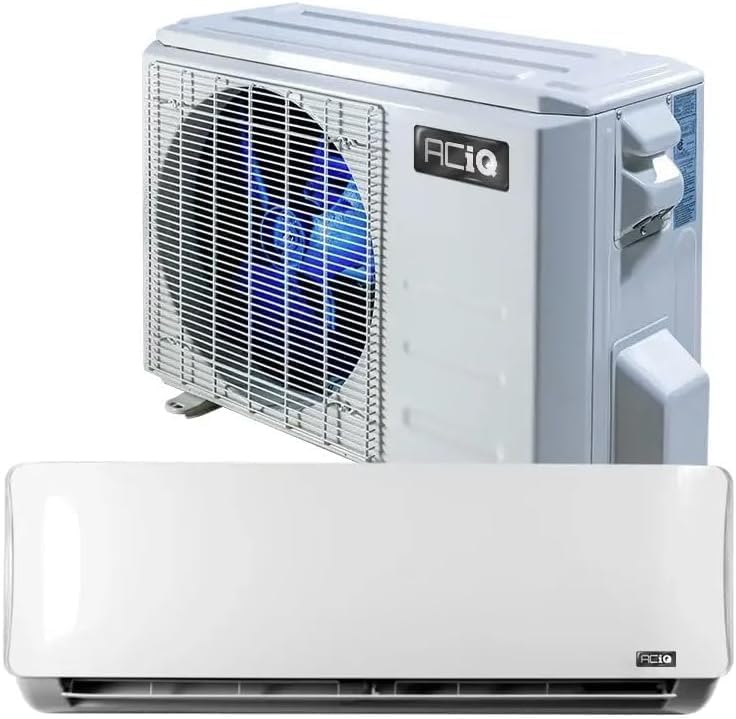
Figure 2.2: The ACiQ outdoor condenser unit (top) and indoor air handler (bottom).
The system is designed for quiet operation and includes a Gold Fin full-protection coating for durability. It is also WiFi enabled, allowing control via a smart device.

Gambar 2.3: Kelample installation of the ACiQ indoor unit within a room and the outdoor unit outside a building.
3. Setup jeung Instalasi
The ACiQ mini split system is a split-system air conditioner, meaning it requires both an indoor and an outdoor unit connected by refrigerant lines and electrical wiring. Due to the complexity involving refrigerant handling and electrical connections, instalasi profésional kacida dianjurkeun to ensure proper function, safety, and warranty validity.
3.1 Cék Pra-Pamasangan
- Verify that the installation location for both indoor and outdoor units meets clearance requirements and structural integrity.
- Ensure the electrical supply matches the unit's voltagsarat e (120 Volt AC).
- Confirm all necessary installation equipment and accessories are available.
3.2 Key Installation Steps (Overview for Professionals)
- Mount the indoor unit securely on the wall, ensuring proper drainage.
- Install the outdoor condenser unit on a stable, level surface, ensuring adequate airflow.
- Connect the refrigerant lines between the indoor and outdoor units, ensuring proper vacuum and charge.
- Complete electrical wiring connections according to local codes and the wiring diagram provided with the unit.
- Install the condensate drain line to ensure proper water removal.
- Perform a system leak check and test run to verify proper operation.
4. Parentah Operasi
Your ACiQ mini split system can be controlled via the included smart remote, the soft LED display on the indoor unit, or through a smart device using the WiFi connectivity.
4.1 Operasi kadali jauh
The smart remote features an LCD screen for notifications and allows you to adjust temperature, mode (Cool, Heat, Fan, Dry), fan speed, and set timers. Refer to the remote control's specific manual for detailed button functions.
4.2 Indoor Unit Display
The indoor unit's LED display shows the current room temperature, setpoint changes, and system alerts, including error codes. This display can be turned off if desired.
4.3 WiFi and Smart Device Control
The ACiQ system is WiFi ready. You can control your unit from anywhere in the world using a compatible smart device (iOS or Android) application. The system is also compatible with Amazon Alexa and Google Assistant for voice control.
- Download the official ACiQ smart control application from your device's app store.
- Follow the in-app instructions to connect your mini split system to your home WiFi network.
- Once connected, you can remotely adjust settings, monitor status, and receive notifications.
4.4 Modeu operasi
- Mode tiis: Provides cooling. Efficient cooling from -4°F to 122°F outdoor temperatures.
- Modeu Panas: Provides heating. Efficient heating from -4°F to 57°F outdoor temperatures.
- Modeu kipas: Sirkulasi hawa tanpa pemanasan atawa cooling.
- Mode Kering (Dehumidification): Ngurangan kalembaban dina hawa.
- Modeu Otomatis: Automatically selects cooling or heating based on the set temperature and room temperature.
- Modeu Bobo: Nyaluyukeun suhu laun-laun pikeun bobo anu nyaman sareng ngahémat énergi.
5. Pangropéa
Regular maintenance is crucial for the efficient and long-lasting operation of your ACiQ mini split system. Always turn off the power to the unit before performing any maintenance.
5.1 Ngabersihan Saringan Udara (Bulanan)
- Buka panel hareup unit indoor.
- Leupaskeun saringan hawa.
- Clean the filters using a vacuum cleaner or wash them with lukewarm water and mild detergent.
- Ngidinan saringan nepi ka garing lengkep saméméh reinserting aranjeunna.
5.2 Outdoor Unit Coil Cleaning (Annually)
- Ensure the outdoor unit is free from debris, leaves, and dirt.
- Carefully clean the outdoor coil fins with a soft brush or a low-pressure water hose. Avoid bending the fins.
- Ensure proper drainage around the outdoor unit.
5.3 Drain Line Check (Seasonally)
- Check the condensate drain line for any blockages or kinks that could prevent proper water drainage.
- Clear any obstructions to prevent water leaks from the indoor unit.
6. Cara ngungkulan
If you encounter issues with your ACiQ mini split system, refer to the following common troubleshooting steps. For complex issues, contact a qualified technician.
| Masalah | Mungkin Cukang lantaranana | Solusi |
|---|---|---|
| Unit teu hurung | No power supply; Circuit breaker tripped; Remote control batteries dead | Check power connection; Reset circuit breaker; Replace remote batteries |
| Kinerja pendinginan/pemanasan anu goréng | Dirty air filters; Blocked outdoor unit; Incorrect mode setting; Low refrigerant | Clean air filters; Clear outdoor unit; Select correct mode; Contact technician for refrigerant check |
| Sora anu teu biasa | Loose parts; Fan obstruction; Refrigerant flow noise (normal) | Check for loose components; Remove obstructions; If persistent or loud, contact technician |
| Cai bocor tina unit jero ruangan | Clogged drain line; Incorrect installation angle | Clear drain line; Contact technician for installation check |
| WiFi connectivity issues | Incorrect network settings; Router issues; App malfunction | Reconfigure WiFi settings in app; Restart router; Reinstall app |
The indoor unit's LED display may show error codes. Refer to the specific error code list in the comprehensive installation manual or contact ACiQ support for interpretation and resolution.
7. Spésifikasi
Detailed technical specifications for the ACiQ 9,000 BTU 19 SEER Single Zone Wall Mounted Mini Split System:
| Spésifikasi | Nilai |
|---|---|
| merek | ACiQ |
| Ngaran modél | ACiQ-09W-HP115B / ACiQ-09Z-HP115B |
| Kapasitas | 9,000 BTU |
| Rasio Éfisiensi Énergi Musiman (SEER) | 19 |
| Tipe Pamasangan | Sistem Pamisah |
| Faktor Bentuk | Mini-Split |
| Voltage | 120 Volt (AC) |
| Sumber Daya | Kabel Listrik |
| Fitur husus | WiFi Diaktipkeun |
| Métode kontrol | Aplikasi, Jauh |
| Efficient Cooling Outdoor Temp. Range | -4°F nepi ka 122°F |
| Efficient Heating Outdoor Temp. Range | -4°F nepi ka 57°F |
| Gold Fin Coating | Sumuhun |
8. Émbaran jaminan
ACiQ offers robust warranty protection for its products. The standard warranty includes 12 years for the compressor. To extend warranty protection to 7 years for parts and 12 years for the compressor, it is essential to register your equipment.
Please register your ACiQ mini split system at the official ACiQ websitus: ACiQ.com. Retain your proof of purchase and installation records for warranty claims.
9. Rojongan jeung Kontak
For technical assistance, troubleshooting beyond this manual, or warranty inquiries, please contact ACiQ customer support or the authorized seller.
- ACiQ Official Websitus: ACiQ.com
- ACiQ Store on Amazon: Visit the ACiQ Store
- Penjual: HVACDirect Online (via Amazon)
When contacting support, please have your model number (ACiQ-09W-HP115B / ACiQ-09Z-HP115B) and purchase date readily available.


