Bubuka
The ASRock B650E PG-ITX WiFi motherboard is designed for AMD Ryzen 7000 Series processors, offering advanced features in a compact Mini-ITX form factor. This manual provides essential information for the proper installation, operation, and maintenance of your motherboard.
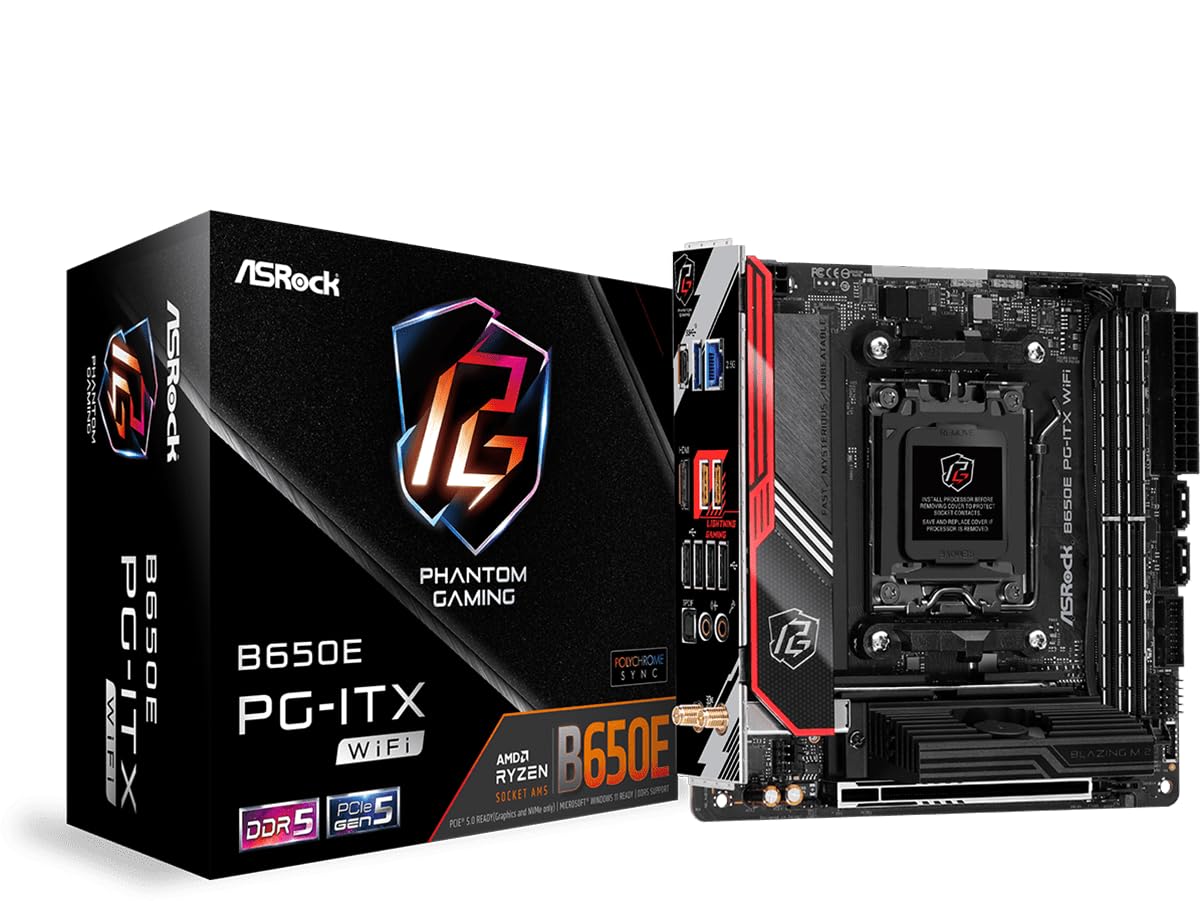
Gambar 1: Top-handap view of the ASRock B650E PG-ITX WiFi Motherboard.
Fitur konci:
- Supports AMD Ryzen 7000 Series Processors (Socket AM5)
- 10+2+1 Phase Power Design with SPS
- 2 x DDR5 DIMM slots, supporting up to 6400+(OC) MHz
- 1 slot PCIe 5.0 x16
- Graphics Output Options: 1 HDMI, eDP
- 7.1 CH HD Audio (Realtek ALC1220 Audio Codec), Nahimic Audio
- 1 Blazing M.2 (PCIe Gen5x4), 1 Hyper M.2 (PCIe Gen4x4), 2 SATA3
- USB Connectivity: 1 USB 3.2 Gen2x2 Type-C (Front), 1 USB 3.2 Gen2 Type-C (Rear), 3 USB 3.2 Gen2 Type-A (Rear), 2 USB 3.2 Gen1 (Front), 6 USB 2.0 (4 Rear, 2 Front)
- Killer 2.5G LAN
- Killer 802.11ax Wi-Fi 6E + Bluetooth 5.3

Figure 2: Diagram highlighting key features and components of the motherboard.
Setup sareng Instalasi
This section guides you through the physical installation of the motherboard and its primary components.
1. Unpacking jeung Inspection
Carefully remove the motherboard from its packaging. Inspect for any visible damage. Ensure all accessories are present.
Video 1: Produk Leuwihview and Unboxing. This video provides a visual overview of the ASRock B650E PG-ITX motherboard and its components, including the unboxing process.
2. Pamasangan CPU
- Tangtukeun lokasi stop kontak CPU AM5 on motherboard nu.
- Gently angkat tuas beban tur buka panutup stop kontak CPU.
- Align tanda triangular on CPU jeung tanda pakait dina stop kontak di.
- Sacara saksama nempatkeun CPU kana stop kontak tanpa maksakeunana.
- Tutupkeun panutup stop kontak teras pencét tuas beban ka handap dugi ka konci dina tempatna.

Figure 3: CPU socket with protective cover. Ensure to remove the cover before installing the processor.

Figure 4: CPU socket ready for processor installation.
3. RAM (memori) Instalasi
- Buka klip dina duanana tungtung liang DDR5 DIMM.
- Sejajarkeun takik dina modul RAM sareng konci dina slot DIMM.
- Insert the RAM module firmly into the slot until the clips snap into place.
4. M.2 Instalasi SSD
- Locate the M.2 slots (Blazing M.2 and Hyper M.2).
- Remove the M.2 heatsink/cover if present.
- Selapkeun M.2 SSD kana slot dina hiji sudut.
- Gently push down the SSD and secure it with the provided screw or standoff.
- Reattach the M.2 heatsink/cover.
5. Pemasangan sareng Sambungan Motherboard
- Install the motherboard into your PC case, aligning it with the standoffs.
- Ngamankeun motherboard kalawan screws.
- Connect the 24-pin ATX power connector and the 8-pin 12V CPU power connector from your power supply.
- Sambungkeun lulugu panel hareup (tombol daya, tombol reset, USB, audio).
- Connect SATA devices to the SATA3 ports if applicable.
- Install your graphics card into the PCIe 5.0 x16 slot.
- Attach the Wi-Fi antennas to the rear I/O panel connectors.
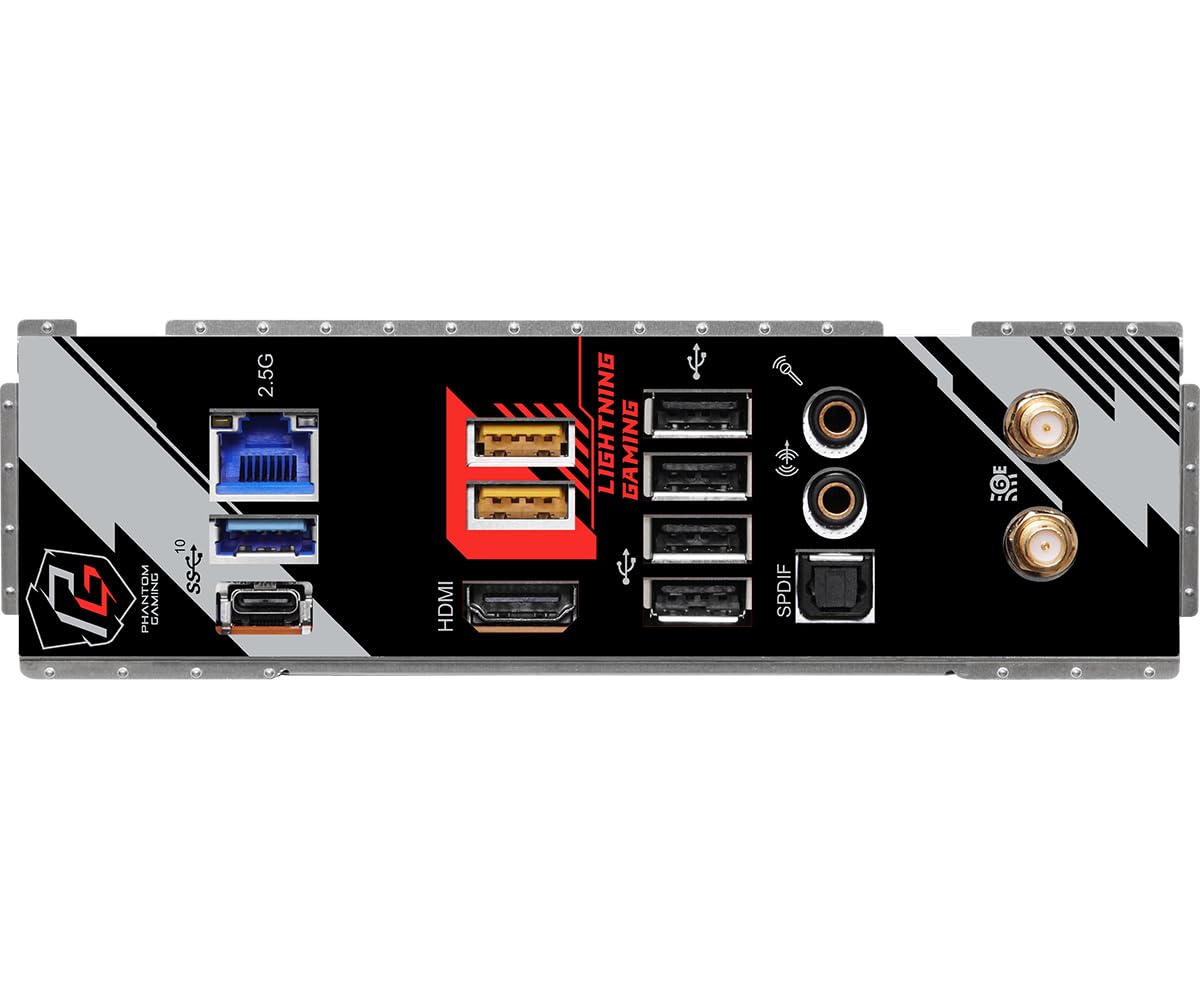
Figure 5: Rear I/O panel showing various ports including USB, HDMI, LAN, and Wi-Fi antenna connectors.
Parentah Operasi
After successful hardware installation, follow these steps to operate your system.
1. Boot awal sareng Setup BIOS
- Sambungkeun monitor anjeun, keyboard, sareng beurit.
- Power on your system. Press Del or F2 during startup to enter the BIOS/UEFI setup utility.
- In the BIOS, verify that all installed components (CPU, RAM, SSDs) are detected correctly.
- Configure boot order to install your operating system from a USB drive or other media.
- Simpen parobahan sareng kaluar BIOS.
2. Pamasangan Sistem Operasi
Turutan parentah dina layar tina sistem operasi anu anjeun pilih (contona, Windows, Linux) pikeun ngalengkepan prosés pamasangan.
3. Pamasangan supir
After OS installation, install the necessary drivers for your motherboard components (chipset, LAN, Wi-Fi, audio, etc.). These can typically be found on the ASRock support websitus pikeun model husus Anjeun.
4. BIOS Apdet
Regularly check the ASRock website for BIOS updates. BIOS updates can improve compatibility, stability, and performance. Refer to the ASRock website for detailed instructions on how to update the BIOS safely.
Pangropéa
Pangropéa anu leres mastikeun umur panjang sareng kinerja optimal motherboard anjeun.
- Ngaleungitkeun lebu: Periodically clean dust from the motherboard and case using compressed air. Ensure the system is powered off and unplugged before cleaning.
- Manajemén Kabel: Ensure all cables are neatly routed to promote good airflow and prevent interference.
- Apdet parangkat lunak: Keep your operating system, drivers, and BIOS updated to the latest versions.
- Kaayaan Lingkungan: Operasikan motherboard di tempat anu ventilasina saé, jauh tina sinar panonpoé langsung, panas anu kaleuleuwihi, sareng kalembaban.
Pamérésan masalah
Bagian ieu ngabahas masalah umum anu anjeun tingali.
1. Sistem Teu Bisa Dihurungkeun
- Check all power connections: 24-pin ATX, 8-pin CPU, and power supply cable to the wall outlet.
- Pastikeun saklar catu daya aya dina posisi ON.
- Pariksa sambungan tombol daya panel hareup kana motherboard.
- Uji nganggo catu daya anu béda upami tiasa.
2. No Display Output (No POST)
- Ensure the monitor is connected to the correct graphics output (either integrated graphics or discrete GPU).
- Pasang deui modul RAM. Coba boot ku ngan hiji iteuk RAM.
- Pasang deui kartu grafik.
- Clear CMOS: Locate the CLRCMOS jumper on the motherboard (refer to the full manual for exact location) and short it for a few seconds with the system powered off and unplugged.
- BIOS Compatibility: If using a newer AMD Ryzen 7000 series CPU, ensure your BIOS version supports it. An older BIOS might require an older compatible CPU for an initial update.
3. Instabilitas Sistim atanapi kacilakaan
- Check CPU and GPU temperatures. Ensure cooling solutions are properly installed.
- Verify RAM stability. Run memory diagnostic tools.
- Pastikeun sadaya drivers up-to-date.
- Pariksa sambungan anu leupas atanapi komponén anu dipasangna teu leres.
spésifikasi
| Fitur | Rincian |
|---|---|
| merek | ASRock |
| Ngaran modél | B650E PG-ITX WIFI |
| CPU Socket | Socket AM5 |
| Prosesor cocog | Prosesor runtuyan AMD Ryzen 7000 |
| Tipe Chipset | AMD B650 |
| Téhnologi Mémori RAM | DDR5 |
| Laju mémori | Up to 6400+(OC) MHz |
| Tipe Wireless | 802.11ax (Wi-Fi 6E) + Bluetooth 5.3 |
| LAN | Killer 2.5G LAN |
| PCIe liang | 1 x PCIe 5.0 x16 |
| M.2 liang | 1 x Blazing M.2 (PCIe Gen5x4), 1 x Hyper M.2 (PCIe Gen4x4) |
| palabuhan SATA | 2 x SATA3 |
| Port USB (Patukangan) | 1 x USB 3.2 Gen2 Type-C, 3 x USB 3.2 Gen2 Type-A, 4 x USB 2.0 |
| Port USB (Pahareup) | 1 x USB 3.2 Gen2x2 Type-C, 2 x USB 3.2 Gen1, 2 x USB 2.0 |
| Kaluaran Grafika | 1 x HDMI, eDP |
| Audio | 7.1 CH HD Audio (Realtek ALC1220), Nahimic Audio |
| Faktor Bentuk | Mini-ITX |
| Dimensi produk | 19.69 x 19.69 x 11.02 inci |
| Item Beurat | 2.2 pon |
Garansi sareng Rojongan
The ASRock B650E PG-ITX WiFi Motherboard comes with a garansi 3 taun from ASRock, covering defects in materials and workmanship under normal use.
For technical support, driver downloads, BIOS updates, and further information, please visit the official ASRock support website. You can also refer to the full product manual available on their website for more detailed instructions and diagrams.
For warranty claims or service, please contact ASRock customer support directly or the retailer from whom you purchased the product.


