
1. Bubuka
Hatur nuhun pikeun meuliasing the Lomeho AM-AKS1 6-Channel Audio Mixer. This professional mixer is designed to provide high-quality audio mixing for a variety of applications, including live performances, studio recording, karaoke, DJ events, and public address systems. With its versatile input options, integrated Bluetooth, and USB playback/recording capabilities, the AM-AKS1 offers comprehensive control over your sound.
Mangga baca manual ieu kalawan saksama sateuacan ngoperasikeun alat ieu pikeun mastikeun panggunaan anu leres sareng pikeun ngamaksimalkeun kinerja sareng umur panjangna.
2. Parentah Kasalametan penting
- Sumber Daya: Only use the provided power adapter or a compatible USB power source (DC 5V) to power the mixer. Ensure the voltage cocog sarat.
- Cai sareng Uap: Ulah ngalaan alat ieu ka hujan atawa beueus. Ulah nempatkeun objék dieusian ku cairan, kayaning vases, dina alat.
- Ventilasi: Ensure proper ventilation. Do not block any ventilation openings. Install in accordance with the manufacturer's instructions.
- Panas: Entong dipasang di deukeut sumber panas sapertos radiator, register panas, kompor, atanapi aparat sanésna (kalebet ampLiifiers) anu ngahasilkeun panas.
- beberesih: Clean only with a dry cloth. Unplug the mixer from the power source before cleaning.
- Palayanan: Entong nyobian ngalayanan produk ieu nyalira. Rujuk sadayana jasa ka tanaga jasa anu mumpuni. Diperlukeun ngalayanan nalika aparatur ruksak ku cara naon waé, sapertos kabel catu daya atanapi colokan rusak, cairan tumpah atanapi barang murag kana aparatur, aparatur parantos kakeunaan hujan atanapi lembab, henteu beroperasi sacara normal, atanapi parantos turun.
- Kabel: Nangtayungan kabel listrik tina leumpang atawa diciwit, utamana dina colokan, wadah merenah, jeung titik dimana aranjeunna kaluar tina aparat.
3. Eusi Paket
Mangga parios heula sadaya barang anu didaptarkeun di handap ieu kalebet kana pakét anjeun:
- Lomeho AM-AKS1 Audio Mixer
- Kabel Daya USB
- Power Adapter (USB wall charger)
- Manual pangguna (dokumén ieu)

Image: The Lomeho AM-AKS1 audio mixer shown alongside its included power adapter.
4. Fitur Produk
- 6-Channel Mixer: Features 4 mono input channels (XLR/1/4" combo) and 1 stereo input channel (1/4" L/R).
- Konektipitas Bluetooth: Seamlessly stream audio from your smartphone, tablet, or other Bluetooth-enabled devices.
- USB Playback/Recording: Puterkeun audio files directly from a USB drive or connect to a computer for recording.
- 3-Band EQ: Each mono channel features HIGH, MID, and LOW equalization controls for precise tone shaping.
- Daya Phantom (+ 48V): Switchable phantom power on select channels for condenser microphones.
- AUX/EFF Send: Dedicated send control for external effects processors or monitor mixes.
- Kaluaran Utama: Stereo L/R main outputs for connecting to power amplifiers atanapi spéker Powered.
- Kaluaran headphone: Dedicated headphone output with level control for monitoring.
- Desain kompak sareng portabel: Ideal for home studios, small venues, and mobile setups.
5. Kontrol jeung Fungsi
Familiarize yourself with the various controls and connections on your AM-AKS1 mixer.
5.1 Kadali Panel hareup

Gambar: Detil view of the Lomeho AM-AKS1 mixer's front panel, showing all knobs, faders, and buttons.
- GAIN (Channels 1-4): Adjusts the input sensitivity for each mono channel. Use to set the optimal signal level without clipping.
- HIGH (Channels 1-4): Controls the treble frequencies (high-end EQ) for each mono channel.
- MID (Channels 1-4): Controls the mid-range frequencies (mid-range EQ) for each mono channel.
- LOW (Channels 1-4): Controls the bass frequencies (low-end EQ) for each mono channel.
- AUX EFF (Channels 1-4): Adjusts the amount of signal sent from each channel to the auxiliary/effects send.
- PAN (Channels 1-4): Pans the signal left or right in the stereo field for each mono channel.
- LEVEL (Channels 1-4): Adjusts the output level of each mono channel to the main mix.
- Fader UTAMA: Ngontrol volume kaluaran sakabéhna tina campuran stereo utama.
- REC Output (RCA): Stereo RCA outputs for connecting to a recording device.
- TAPE Input (RCA): Stereo RCA inputs for connecting external playback devices (e.g., tape deck, CD player).
- Port USB: For connecting a USB flash drive for MP3 playback or connecting to a computer for audio interface functions.
- USB Control Buttons (MODE, PREV, PLAY/PAUSE, NEXT): Controls for USB/Bluetooth playback.
- MODÉ: Switches between USB playback and Bluetooth modes.
- PREV (|<): Skips ka lagu saméméhna.
- PLAY/PAUSE (>||): Muterkeun atanapi ngareureuhkeun lagu ayeuna.
- NEXT (>|): Loncat kana lagu salajengna.
- TELEPON: Headphone output level control.
- MAIN L/R Meters: LED indicators showing the output level of the main stereo mix.
5.2 Sambungan Panel Rear
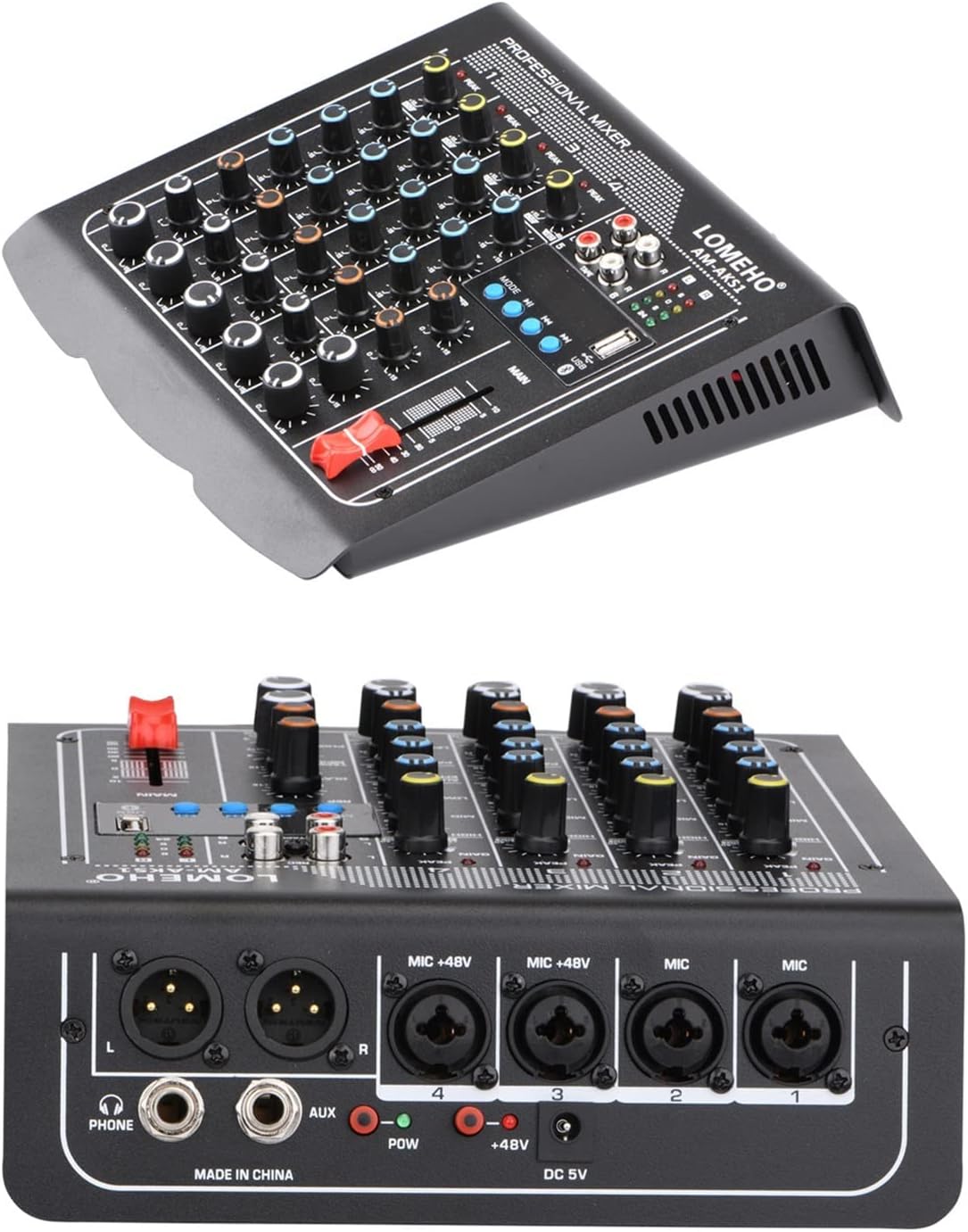
Image: The rear panel of the Lomeho AM-AKS1 mixer, highlighting the XLR and 1/4" inputs, AUX output, and power input.
- MIC +48V (Channels 1-4): Combo XLR/1/4" TRS inputs for microphones or line-level instruments. Channels 1-4 support +48V phantom power.
- AUX Output (1/4" L/R): Stereo 1/4" outputs for sending the auxiliary mix to external effects or monitor speakers.
- POW Indicator: Lampu hurung nalika mixer dihurungkeun.
- Input DC 5V: Power input port for connecting the USB power cable and adapter.
- L/R Main Outputs (1/4" TRS): Main stereo outputs for connecting to a power amplifier, powered speakers, or other audio equipment.
- PHONE Output (1/4" TRS): Jack kaluaran headphone.
6. Setup Guide
Follow these steps to set up your Lomeho AM-AKS1 mixer for operation.
6.1 Sambungan Daya
- Connect the USB power cable to the DC 5V input on the rear panel of the mixer.
- Colokkeun tungtung kabel USB anu sanésna kana adaptor daya anu disayogikeun.
- Plug the power adapter into a suitable wall outlet. The POW indicator on the mixer will light up.
6.2 Ngahubungkeun Input

Image: A visual guide demonstrating how to connect microphones (condenser, dynamic, wireless), headphones, power amplifiers, and passive speakers to the AM-AKS1 mixer.
- Mikropon: Connect XLR or 1/4" cables from your microphones (dynamic, condenser, wireless receiver) to the MIC inputs (Channels 1-4). If using condenser microphones, ensure the +48V phantom power switch (if available on your model, typically a global switch or per-channel button) is engaged.
- Instruments/Line Devices: Connect instruments (e.g., keyboards, guitars with preamps) or other line-level devices to the 1/4" inputs of Channels 1-4 or the TAPE input (RCA) for stereo sources.
- USB drive: Selapkeun USB flash drive nu ngandung audio MP3 files kana port USB.
6.3 Kaluaran Nyambungkeun
- Pamicara Utama: Connect the L/R Main Outputs (1/4" TRS) to your power amplifier atanapi speaker Powered.
- Headphone: Plug your headphones into the PHONE output (1/4" TRS).
- Recording Device: Connect the REC Output (RCA) to the input of your recording device (e.g., audio interface, portable recorder, or dedicated recording unit). Ensure the recording device's input levels are properly set to avoid distortion.
7. Parentah Operasi
7.1 Campuran Dasar
- Daya Hurung: Ensure all connections are secure, then power on the mixer.
- Set Initial Levels: Turn down the MAIN fader and all channel LEVEL knobs to their minimum.
- Saluyukeun Keuntungan: For each active input channel, speak or play into the microphone/instrument. Slowly increase the GAIN knob until the PEAK LED flashes only occasionally. This sets the optimal input level.
- Adjust Channel Levels: Slowly raise the LEVEL knob for each active channel to bring its signal into the mix.
- Adjust Main Output: Gradually raise the MAIN fader to achieve the desired overall volume from your speakers. Monitor the MAIN L/R meters to avoid clipping (red LEDs).
- Kasaruaan (EQ): Use the HIGH, MID, and LOW knobs on each channel to shape the tone of the input signal. Turn clockwise to boost frequencies, counter-clockwise to cut.
- Panning: Use the PAN knob to position the sound of each mono channel in the stereo field (left or right).
- Pangimeutan Headphone: Adjust the PHONE knob to control the volume of your headphones.
7.2 Operasi Bluetooth

Image: An illustration depicting a smartphone wirelessly connecting to the Lomeho AM-AKS1 mixer via Bluetooth technology.
- Pencét éta MODÉ button on the USB control section until "BLUE" or "BT" appears on the display (if available) or you hear an audible prompt indicating Bluetooth mode.
- Dina alat nu diaktipkeun Bluetooth Anjeun (smartphone, tablet), aktipkeun Bluetooth jeung neangan alat nu sadia.
- Select "LOMEHO MIXER" or a similar name from the list of devices.
- Once paired, you can play audio from your device, and it will be routed through the mixer. Control playback (play/pause, skip) using the mixer's USB control buttons or directly from your device.
7.3 Playback USB
- Selapkeun USB flash drive nu ngandung audio MP3 files kana port USB.
- Pencét éta MODÉ button until the mixer enters USB playback mode. The display (if available) will show track information.
- Ngagunakeun éta MUTER / Reureuh, PREV, jeung TERAS tombol pikeun ngadalikeun playback.
- Adjust the USB channel's level (often controlled by the TAPE/MP3/USB level knob) to blend it into your mix.
7.4 Recording (via REC Output)
To record your mix, connect the REC Output (RCA) of the mixer to the audio input of your recording device (e.g., computer audio interface, portable recorder, or dedicated recording unit). Ensure the recording device's input levels are properly set to avoid distortion.
8. Pangropéa
- beberesih: Disconnect the power before cleaning. Use a soft, dry cloth to wipe the surface of the mixer. Do not use liquid cleaners or aerosols.
- Panyimpenan: Lamun teu dipaké pikeun période nambahan, nyimpen mixer dina tiis, tempat garing, jauh ti sinar panonpoé langsung jeung hawa ekstrim.
- Nanganan kalayan ati-ati: Avoid dropping or subjecting the mixer to strong impacts, as this can damage internal components.
9. Cara ngungkulan
| Masalah | Mungkin Cukang lantaranana | Solusi |
|---|---|---|
| Taya sora tina speaker. |
|
|
| Sora nyimpang. |
|
|
| Bluetooth teu nyambung. |
|
|
| playback USB teu jalan. |
|
|
10. Spésifikasi
| Modél | AM-AKS1 |
| merek | ZHELLY |
| Jumlah Saluran | 6 (4 Mono, 1 Stereo) |
| Téhnologi konektipitas | Bluetooth, USB |
| Interface Input Audio | XLR, 1/4" TRS, RCA |
| Sumber Daya | USB (DC 5V) |
| Kakuatan Phantom | +48V (on select channels) |
11. Garansi jeung Rojongan
This product comes with a standard manufacturer's warranty. Please refer to the warranty card included in your package for specific terms and conditions, including warranty period and coverage details. Keep your purchase receipt as proof of purchase.
For technical support, troubleshooting assistance beyond this manual, or warranty claims, please contact the retailer or the manufacturer's customer service. Contact information can typically be found on the product packaging or the manufacturer's official websitus.
Pabrikan: ZHELLY