
LENRUE A39PRO
LENRUE A39PRO USB-C Computer Speaker User Manual
Model: A39PRO | Brand: LENRUE
1. Bubuka
Thank you for choosing the LENRUE A39PRO USB-C Computer Speaker. This speaker is designed to provide clear and powerful audio for your laptop or desktop computer with a simple plug-and-play Type-C connection. This manual provides detailed instructions for setup, operation, and maintenance to ensure optimal performance and longevity of your device.
2. Eusi Paket
Punten parios yén sadaya barang aya dina pakét:
- 1 x LENRUE A39PRO Computer Speaker
- 1 x Manual Pamaké (dokumén ieu)
3. Produk Langkungview
The LENRUE A39PRO speaker features a sleek design with intuitive controls and vibrant lighting. Familiarize yourself with the components below.
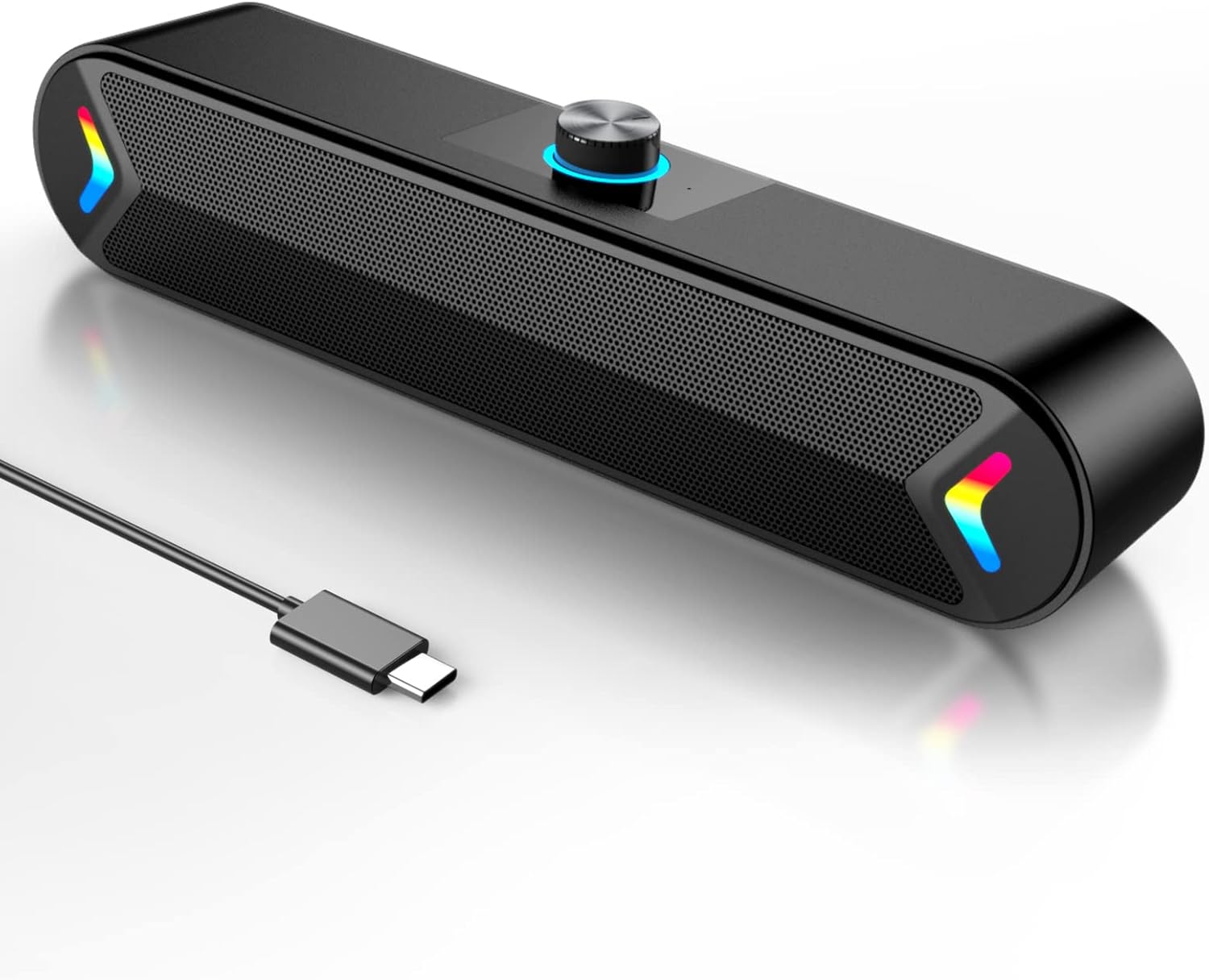
Gambar 3.1: Hareupeun view of the LENRUE A39PRO speaker, showing the main grille and integrated USB-C cable.

Gambar 3.2: Top jeung pungkur view of the speaker, highlighting the volume knob and the power/light control button.
Komponén konci:
- Jilid Kenop: Located on the top, used for adjusting audio volume.
- Tombol Daya/Lampu: Located on the back, controls power and the colorful light feature.
- Kabel USB-C: Integrated cable for both power and audio input.
- Dual 5W Drivers: Internal components providing clear stereo sound.
- Independent Bass Diaphragm: Ningkatkeun kinerja bass.
4. Parentah Setup
The LENRUE A39PRO speaker is designed for simple plug-and-play operation. No additional drivers or software are required for most operating systems.
Nyambungkeun Speaker:
- Locate an available USB-C port on your laptop or desktop computer.
- Insert the integrated USB-C cable from the LENRUE A39PRO speaker firmly into the USB-C port on your computer.

Gambar 4.1: Illustrates connecting the speaker's USB-C cable to a laptop's Type-C port.
- The speaker will automatically power on and be recognized by your operating system. You may need to select the "LENRUE A39PRO" as the default audio output device in your computer's sound settings.

Gambar 4.2: The speaker in operation, connected to a laptop, demonstrating its plug-and-play functionality.
Catetan penting: Ensure your device has a Type-C interface for compatibility. The single USB-C cable transmits both audio and electrical power to the speaker.
5. Parentah Operasi
Kontrol volume:
- Puterkeun Jilid Kenop on the top of the speaker clockwise to increase the volume.
- Puterkeun Jilid Kenop counter-jarum jam pikeun ngurangan polumeu.
Controlling the Colorful Light:
The speaker features a colorful light design that can be controlled via the button on the back.
- Pencét éta Tombol Daya / Lampu once to turn on the speaker and activate the colorful lights.
- Pencét éta Tombol Daya / Lampu a second time to turn off the colorful lights while keeping the speaker powered on.
- Pencét éta Tombol Daya / Lampu a third time to power off both the speaker and the lights.
6. Kasaluyuan
The LENRUE A39PRO speaker offers wide compatibility with various operating systems and devices that feature a USB-C port for audio and power.

Gambar 6.1: Visual representation of the speaker's compatibility with Windows, macOS, Chrome OS, Linux, and Unix systems.
Sistem Operasi anu Dirojong:
- Windows PCs (Vista/7/8/10)
- macOS (MacBook Air, Mac mini)
- Google Chromebooks
- Linux
- Unix
Alat anu cocog:
- Laptops with Type-C port
- Desktop Computers with Type-C port
7. Cara ngungkulan
If you encounter issues with your LENRUE A39PRO speaker, please refer to the following common problems and solutions:
| Masalah | Mungkin Cukang lantaranana | Solusi |
|---|---|---|
| Taya sora tina speaker. |
|
|
| Lights are off, but speaker is on. | Lights have been toggled off. | Press the Power/Light Button once to cycle through light modes and turn them back on. |
| Sorana distort atawa teu jelas. |
|
|
| Speaker not recognized by computer. |
|
|
8. Spésifikasi
| Fitur | Rincian |
|---|---|
| Ngaran modél | A39PRO |
| Tipe Speaker | Speaker komputer |
| Téhnologi konektipitas | USB (Tipe-C) |
| Sumber Daya | Corded Electric (via USB-C) |
| Mode Kaluaran Audio | Stereo |
| Speaker Maksimum Kaluaran Power | 10 Watts (2x5W) |
| Tipe Controller | Kontrol kenop |
| Ukuran produk (D x W x H) | 2.17 "D x 12.6" W x 2.56" H |
| Item Beurat | 1.3 pon |
| Warna | Black-USBC |
| Fitur husus | One Cable with Type-C plug for charging and audio, Colorful light Design |
9. Pangropéa
Proper care and maintenance will ensure the longevity and optimal performance of your speaker.
- beberesih: Use a soft, dry cloth to wipe the surface of the speaker. Do not use liquid cleaners or abrasive materials, as they may damage the finish or internal components.
- Panyimpenan: Lamun teu dipaké pikeun période nambahan, nyimpen speaker dina tiis, tempat garing jauh ti sinar panonpoé langsung jeung hawa ekstrim.
- Penanganan: Avoid dropping the speaker or subjecting it to strong impacts, which can damage internal circuitry.
- Paparan cai: The speaker is not waterproof. Avoid exposing it to water or other liquids.
10. Garansi jeung Rojongan
The LENRUE A39PRO speaker comes with a Garansi kawates. For specific warranty terms, conditions, and support inquiries, please refer to the warranty information provided at the time of purchase or contact LENRUE customer support directly through their official channels.
For further assistance or technical support, please visit the official LENRUE websitus atanapi ngahubungan departemén layanan palanggan maranéhna.
Ask a question about this manual
Ask about setup, troubleshooting, compatibility, parts, safety, or missing instructions. Manuals+ will review the question and use this page’s manual context to help answer it.