Bubuka
This manual provides instructions for the ALLIMITY SE-R0346 replacement remote control. This remote is designed to be compatible with various Toshiba DVD VCR Combo Player models, offering direct functionality without programming.
Compatible models include: SDV398KC, SDV398, SD-V398, SD-V398KC, RT79104138, SD-V392, and SDV392.

Gambar: Leuwihview of the ALLIMITY SE-R0346 remote control, highlighting its compatibility with Toshiba DVD VCR Combo Players and no programming requirement.
Disetél
The ALLIMITY SE-R0346 remote control requires no programming. Simply install batteries to begin operation.
Pamasangan batré
- Panggihan kompartemen batré dina tonggong kadali jauh.
- Press down on the tab and slide the battery cover downwards to open.
- Selapkeun dua (2) batré alkalin AAA, mastikeun terminal positif (+) jeung négatip (-) cocog jeung diagram di jero kompartemen.
- Geser panutup batré deui kana tempatna nepi ka ngaklik aman.
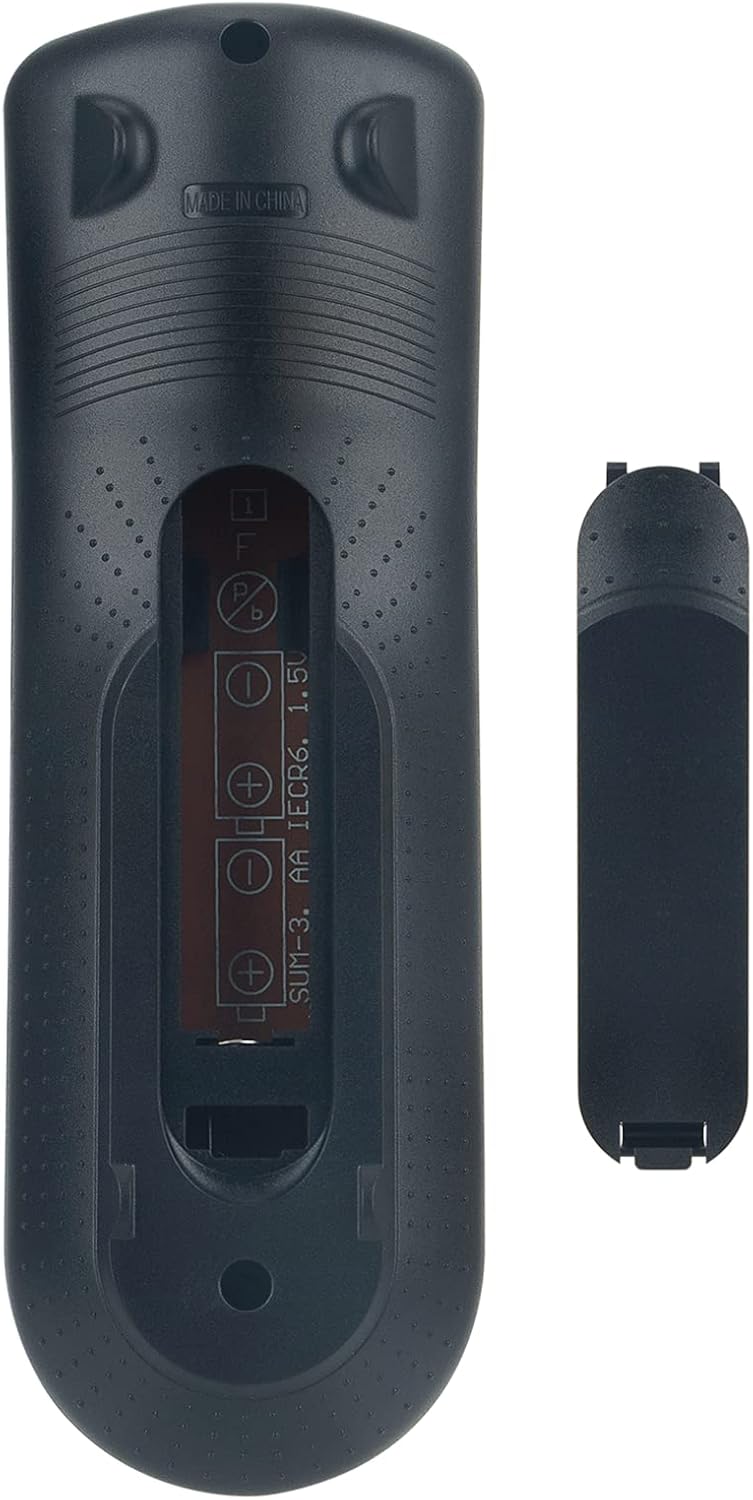
Gambar: Tukangeun view of the remote control showing the open battery compartment and the battery cover.
Parentah Operasi
This remote control provides full functionality for your compatible Toshiba DVD VCR Combo Player. Below is a general guide to the buttons and their functions.

Gambar: Hareupeun view of the ALLIMITY SE-R0346 remote control, displaying all control buttons.
Fungsi konci:
- Power (Red I/O button): Turns the DVD VCR Combo Player on or off.
- Buka/Tutup: Muka atawa nutup baki disc.
- Tombol Jumlah (0-9, +10): Direct input for channel selection, track numbers, or time.
- CH. (Channel Up/Down): Navigasi ngaliwatan saluran TV.
- VCR / DVD Mode: Switches between VCR and DVD playback modes.
- Play, Stop, Pause, Fast Forward, Rewind, Skip: Kontrol playback média standar.
- REC/OTR (Record/One-Touch Record): Initiates recording on the VCR.
- Top Menu / Menu: Accesses the main menu or disc menu.
- Disetél: Enters the system setup menu.
- Directional Arrows (Up, Down, Left, Right) & Enter: Navigates ménu jeung confirms selections.
- Balik deui: Balik deui ka ménu atawa layar saméméhna.
- Audio: Changes audio tracks or language.
- Judul: Ngaganti atawa milih pilihan subjudul.
- Zum: Adjusts the screen zoom level.
- sudut: Ngaganti sudut kaméra dina DVD anu cocog.
- Ulang deui: Repeats playback of a track, chapter, or entire disc.
Pangropéa
- beberesih: Anggo lawon anu lemes sareng garing pikeun ngabersihkeun remot kontrol. Entong nganggo pembersih cair atanapi bahan anu kasar.
- Perawatan batré: Upami remot moal dianggo dina waktos anu lami, cabut batréna pikeun nyegah bocor sareng karusakan.
- Panyimpenan: Nyimpen remote di tempat anu tiis sareng garing jauh tina sinar panonpoé langsung sareng suhu anu ekstrim.
Pamérésan masalah
| Masalah | Mungkin Cukang lantaranana | Solusi |
|---|---|---|
| Remote is unresponsive. | Dead or incorrectly inserted batteries. Obstruction between remote and player. Remote is out of range. | Replace batteries with new AAA alkaline batteries, ensuring correct polarity. Remove any obstructions. Ensure you are within a reasonable range and pointing the remote directly at the player's IR sensor. |
| Sababaraha tombol teu jalan. | Player is in the wrong mode (DVD/VCR). Button malfunction. | Pencét éta VCR or DVD button to switch modes. If the issue persists, the remote may be faulty. |
| Remote does not control the player at all. | Incompatibility with the specific player model. | Verify your Toshiba DVD VCR Combo Player model number against the list of compatible models provided in the Introduction section. This remote is a replacement and may not be universally compatible with all Toshiba models. |
spésifikasi
- model: ALLIMITY SE-R0346
- Alat anu cocog: Toshiba DVD VCR Combo Players (Specific models listed in Introduction)
- Sumber Daya: 2 x Batré AAA (teu kalebet)
- ukuran: 6.5 x 1.38 x 0.72 inci
- Beurat barang: 2 ons
- warna: Hideung
- Fitur husus: Taya Programming Diperlukeun
Garansi sareng Rojongan
Specific warranty information for this ALLIMITY product is not provided in the product details. Please refer to your purchase documentation or contact the seller directly for warranty details and support inquiries.
For further assistance, please contact the retailer from whom you purchased this remote control.


