1. Bubuka
Thank you for choosing the Elna eXperience 530 Computerized Sewing Machine. This machine is designed to offer a wide range of features for various sewing projects, from basic repairs to intricate designs. Its durable construction and user-friendly interface make it suitable for both beginners and experienced sewers. This manual provides detailed instructions for the proper setup, operation, maintenance, and troubleshooting of your machine to ensure optimal performance and longevity.
2. Parentah Kasalametan penting
Nalika nganggo alat listrik, pancegahan kaamanan dasar kedah diturutan, kalebet ieu:
- Maca sadaya pitunjuk sateuacan nganggo mesin jahit ieu.
- Tetep parentah ieu dina tempat merenah deukeut mesin.
- Always unplug the sewing machine from the electrical outlet immediately after using and before cleaning, removing covers, lubricating, or making any other user servicing adjustments mentioned in the instruction manual.
- Entong dioperasikeun mesin jahit ieu upami éta ngagaduhan kabel anu rusak atanapi colokan, upami éta henteu tiasa dianggo leres, upami éta murag atanapi rusak, atanapi murag kana cai.
- Jauhkeun ramo tina sadaya bagian anu obah. Perhatosan khusus diperyogikeun di jarum mesin jahit.
- Salawasna nganggo piring jarum ditangtoskeun. Piring anu salah tiasa nyababkeun jarum rusak.
- Ulah narik atawa nyorong lawon bari stitching. Ieu bisa deflect jarum ngabalukarkeun éta megatkeun.
- Pareuman mesin jahit nalika ngalakukeun panyesuaian di daérah jarum, sapertos ngaitkeun jarum, ngarobih jarum, ngaitkeun bobbin, atanapi ngarobih suku presser.
3. Bagian Idéntifikasi
Familiarize yourself with the various components of your Elna eXperience 530 sewing machine.

Gambar 3.1: Hareupeun view of the Elna eXperience 530 sewing machine, showcasing desain kompak na panel kontrol.

Gambar 3.2: Angled view of the Elna eXperience 530, highlighting the LCD screen and stitch selection buttons.
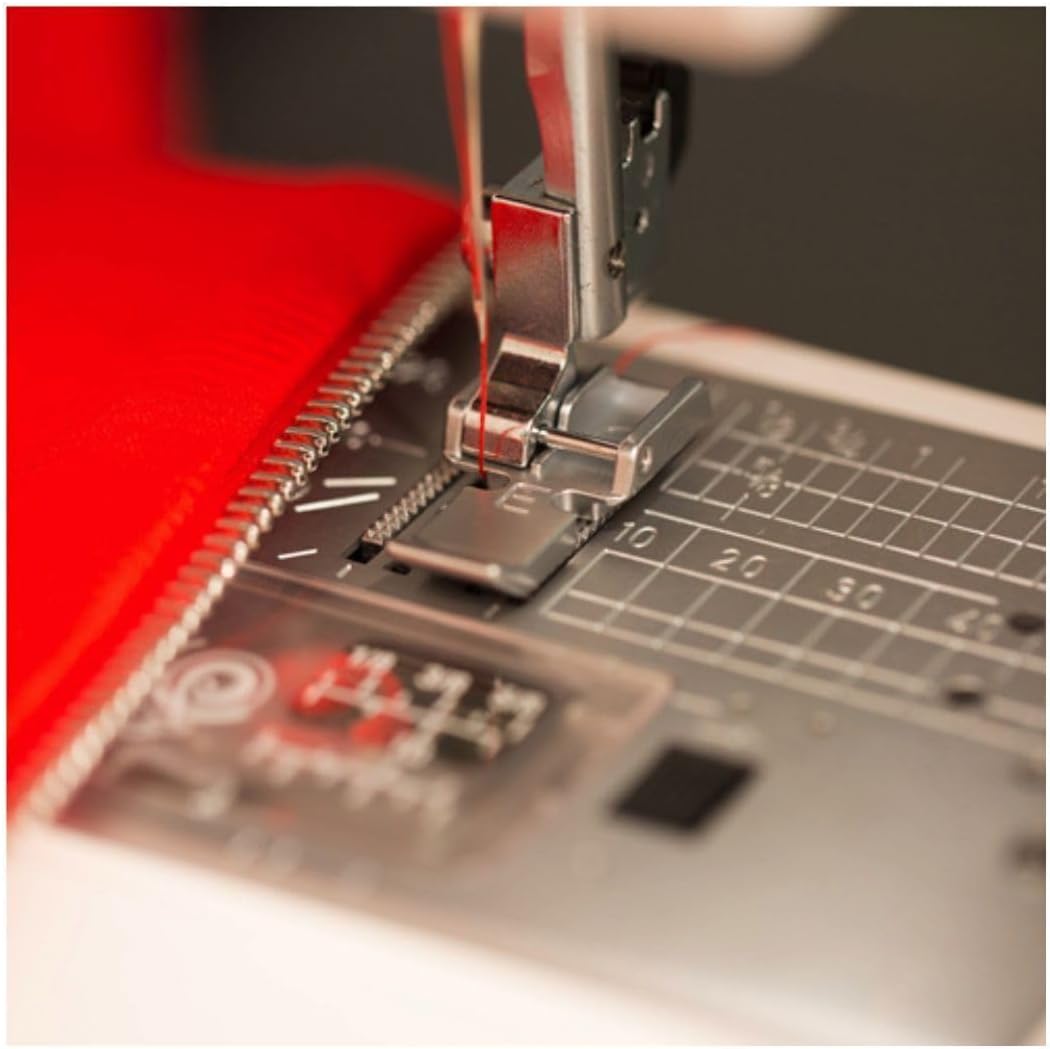
Gambar 3.3: Detil view of the needle, presser foot, and feed dogs, essential for precise stitching.

Figure 3.4: The Elna eXperience 530 positioned for use, demonstrating its practical size and setup.

Gambar 3.5: Kelamples of diverse stitch patterns achievable with the Elna eXperience 530, including decorative and utility stitches.
4. Setélan
4.1 Sambungan Daya
- Teundeun mesin dina stabil, permukaan datar.
- Pastikeun saklar kakuatan dina posisi OFF.
- Insert the power cord into the machine's power socket and then into a suitable electrical outlet.
- Connect the foot controller plug to the machine's foot controller socket.
4.2 Bobbin pungkal
- Pasang spool benang dina pin spool.
- Pituduh thread ngaliwatan pituduh thread tur sabudeureun disc tegangan pungkal bobbin.
- Teundeun bobbin kosong kana spindle winder bobbin.
- Bungkus benang sabudeureun bobbin sababaraha kali, teras dorong spindle winder bobbin ka katuhu.
- Press the foot controller or the Start/Stop button to begin winding. Stop when the bobbin is full.
- Motong benang jeung balikkeun spindle winder bobbin ka kénca.
4.3 Threading Mesin
- Angkat tuas suku presser.
- Teundeun spool thread dina pin spool.
- Follow the numbered threading path indicated on the machine, ensuring the thread is securely seated in all guides.
- Turunkeun suku presser.
- Ngagunakeun éta built-in needle threader to easily thread the needle. If threading manually, pass the thread through the eye of the needle from front to back.
- Tarik kira-kira 6 inci benang ngaliwatan panon jarum.
5. Parentah Operasi
5.1 Operasi Dasar
- Hurungkeun/Pareuman: Use the main power switch located on the side of the machine.
- Layar LCD: The layar LCD displays the selected stitch number, recommended presser foot, and adjustable stitch length/width settings.
- Pilihan Jahitan: Use the stitch selection buttons to cycle through the 30 available stitches. The selected stitch will be shown on the LCD screen.
- Stitch Length and Width: Adjust these settings using the dedicated +/- buttons next to the LCD screen.
- Tombol Start / Stop: Pencét pikeun ngamimitian atanapi ngeureunkeun ngaput tanpa pangatur suku.
- Tombol Balikkeun: Press to sew in reverse, typically used for securing stitches at the beginning and end of a seam.
- Tombol ka luhur/handap jarum: Press to move the needle to its highest or lowest position.
- Automatic Lock Stitch: This feature automatically ties off the end of a seam for added security. Activate it using the designated button.
5.2 Ngaput Jahitan
- Select your desired stitch using the stitch selection buttons.
- Place the fabric under the presser foot, aligning the edge with the desired seam allowance guide on the needle plate.
- Turunkeun suku presser.
- Begin sewing by gently pressing the foot controller or the Start/Stop button.
- Guide the fabric gently, ensuring it feeds smoothly under the presser foot. Do not pull or push the fabric.
- At the end of the seam, press the reverse button to secure the stitches, then press the Otomatis konci Stitch tombol upami hoyong.
- Raise the presser foot and remove the fabric. Cut the threads using the thread cutter.
6. Pangropéa
Pangropéa rutin ngajamin umur panjang sareng kinerja optimal mesin jahit anjeun.
- beberesih: Regularly clean lint and dust from the bobbin case area and feed dogs using the brush provided or a small, soft brush.
- Ngaganti jarum: Replace the needle frequently, especially after every 8-10 hours of sewing or if it becomes bent or dull. Use only appropriate needles for your machine and fabric type.
- Lubrication: Refer to your machine's specific lubrication points in the full manual. Generally, computerized machines require less frequent oiling than mechanical ones.
- Panyimpenan: When not in use, cover the machine with its dust cover or place it in its carrying case to protect it from dust and damage.
7. Cara ngungkulan
Bagian ieu ngabahas masalah umum anu anjeun tingali. Pikeun masalah anu langkung kompleks, konsultasi ka teknisi jasa anu mumpuni.
| Masalah | Mungkin Cukang lantaranana | Solusi |
|---|---|---|
| Jahitan dilewatan | Jarum lepat, jarum bengkok, benang teu leres, ukuran jarum lepat pikeun lawon. | Ganti jarum, mesin ulang benang, mastikeun jinis / ukuran jarum anu leres. |
| Thread megatkeun | Threading teu bener, tegangan teuing ketang, kualitas goréng thread, burr dina piring jarum. | Re-thread machine, adjust tension, use good quality thread, check for burrs. |
| Ngaganggu Benang Bobbin | Incorrect bobbin winding, lint in bobbin case, improper bobbin insertion. | Re-wind bobbin, clean bobbin case, re-insert bobbin correctly. |
| Mesin Teu Dimimitian | Kabel listrik teu nyambung, kontroler suku teu nyambung, saklar daya pareum. | Pariksa sadaya sambungan, pastikeun switch kakuatan on. |
8. Spésifikasi
- model: Elna eXperience 530
- Tipe: Mesin Jahit Komputer
- Jahitan: 30 diwangun-di jahitan
- tampilan: layar LCD
- Fitur: Built-in needle threader, Automatic lock stitch
- ukuran: 19 x 14 x 16 inci (Diménsi Produk)
- beurat: 16.61 pon
- Pabrikan: Elna
- UPC: 732212411946
9. Garansi jeung Rojongan
For warranty information and customer support, please refer to the documentation included with your purchase or visit the official Elna website. If you purchased from a third-party seller like Sewable, you may also contact them directly for assistance regarding your purchase.
Simpen bukti pameseran anjeun pikeun klaim garansi.


