Bubuka
The Maxpower MPD1223 is a versatile 12-inch Bluetooth-compatible speaker system designed for various audio applications, including parties, karaoke, and general music playback. It features a built-in microphone, remote control, and a speaker stand for enhanced usability. This manual provides detailed instructions for setup, operation, maintenance, and troubleshooting to ensure optimal performance and longevity of your device.
Naon dina Box
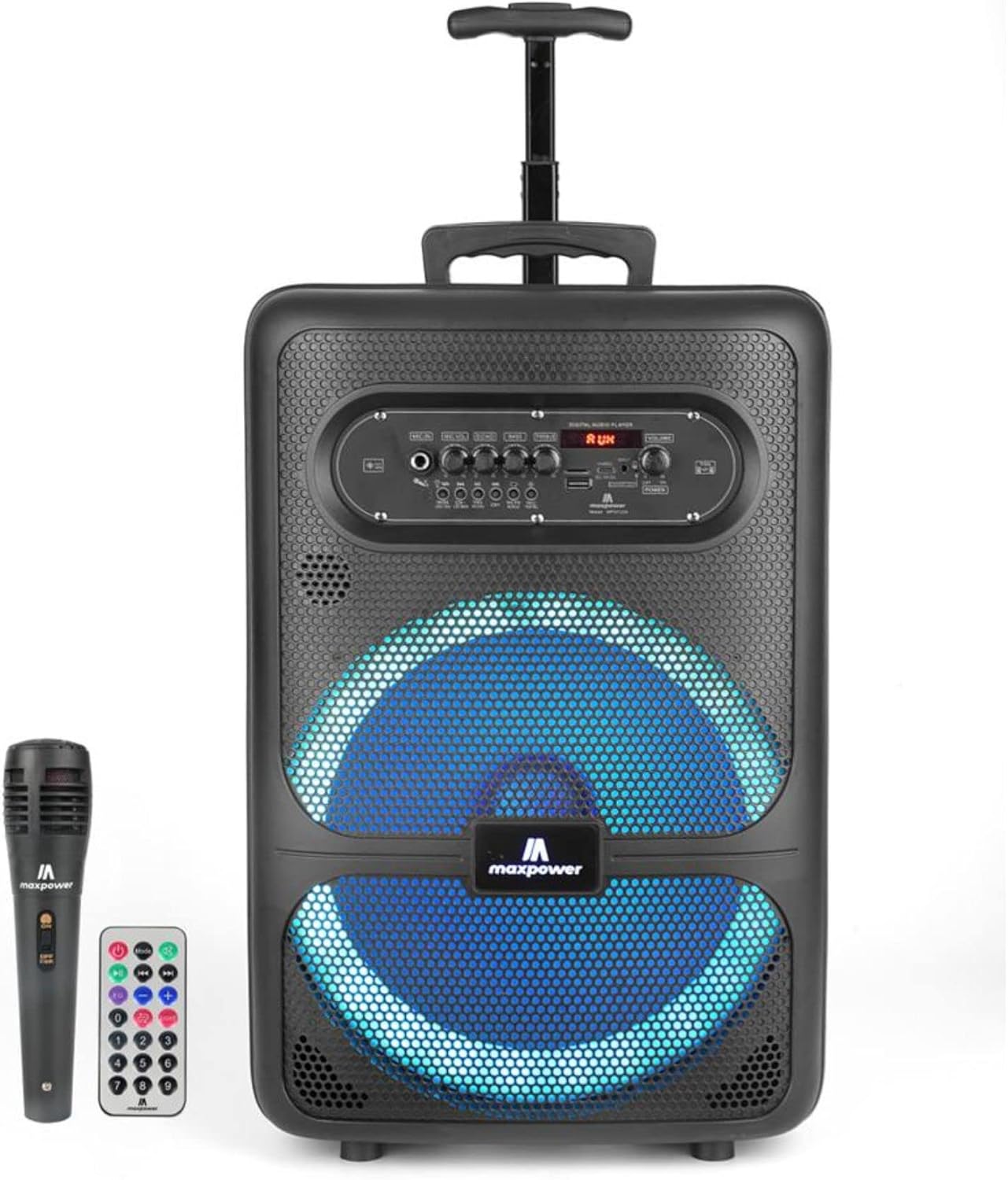
Image: The Maxpower MPD1223 speaker, accompanied by its wireless microphone and remote control.
Upon unboxing your Maxpower MPD1223 speaker system, please verify that all the following components are present:
- Maxpower MPD1223 12" Speaker Unit
- Mikropon nirkabel
- Kadali jauh
- Speaker Stand (DJ Stand)
- AC 100-240V Main Power Cable
- Manual pangguna (dokumén ieu)
Fitur konci

Image: A visual summary of the Maxpower MPD1223's key features, including its portability, battery life, and connectivity options.
- 12-inch Speaker with DJ Stand: Provides full-range stereo sound reproduction and impressive bass response, elevated by the included stand.
- Konektipitas Bluetooth: Seamlessly stream music wirelessly from any Bluetooth-enabled device.
- Batré anu tiasa dicas deui: Built-in battery offers up to 6 hours of playback, ideal for portable use.
- Multi LED Lights Mode: Integrated flashing lights enhance the visual experience, synchronizing with the music.
- Built-in Smartphone Charger: Convenient charging port for mobile devices.
- Sababaraha Input Audio: Supports USB, Aux, and Microphone inputs for versatile connectivity.
- Desain portabel: Compact with a convenient carry handle, making it easy to transport.
- Papasangan Nirkabel Sejati (TWS): Allows connection of two MPD1223 speakers for a stereo sound experience.
Guide Setup
1. Ngecas Speaker
Before initial use, fully charge the speaker. Connect the provided AC power cable to the speaker's power input and plug the other end into a standard electrical outlet. The charging indicator light will illuminate. Once fully charged, the light may change color or turn off, depending on the model.
2. Ngarakit Stand Speaker
- Buka suku tripod tina dudukan speaker dugi ka manjang sapinuhna sareng stabil.
- Adjust the height of the stand using the locking pin and knob. Ensure the pin is securely inserted into one of the height adjustment holes.
- Carefully place the Maxpower MPD1223 speaker onto the top pole of the stand, ensuring it is seated firmly and securely.
3. Ngahurungkeun
Locate the power switch on the speaker's control panel. Toggle it to the "ON" position. The digital display will light up, indicating the speaker is ready for operation.
Parentah Operasi

Gambar: Detil view of the Maxpower MPD1223 control panel, highlighting various inputs and adjustment knobs.
1. Papasangan Bluetooth

Image: Illustration of the speaker's wireless Bluetooth streaming capability.
- Pastikeun spiker diaktipkeun.
- Press the "MODE" button on the control panel until "BLUE" or "Bluetooth" appears on the digital display. The speaker will enter pairing mode, indicated by a flashing Bluetooth icon or sound prompt.
- Dina alat sélulér anjeun (smartphone, tablet, jsb.), aktipkeun Bluetooth sareng milarian alat anu sayogi.
- Select "Maxpower MPD1223" from the list of found devices.
- Sakali dipasangkeun, spiker bakal ngaluarkeun sora konfirmasi, sareng indikator Bluetooth bakal eureun kedip-kedip. Anjeun ayeuna tiasa ngalirkeun audio sacara nirkabel.
2. Ngagunakeun Mikropon
Plug the microphone into the "MIC IN" jack on the control panel. Adjust the "MIC VOL" knob to control the microphone's volume. The "ECHO" knob can be used to add an echo effect to your voice for karaoke or vocal performances.
3. USB jeung AUX Playback
- Puterkeun USB: Selapkeun USB flash drive nu ngandung audio MP3 files into the "USB" port. The speaker will automatically switch to USB mode and begin playing the first compatible track. Use the playback controls (Play/Pause, Next/Previous) on the speaker or remote.
- Puterkeun AUX: Connect an external audio device (e.g., MP3 player, laptop) to the "AUX IN" port using a 3.5mm audio cable. Press the "MODE" button until "AUX" appears on the display. Control playback from your connected device.
4. Adjusting Sound and LED Lights
- Volume: Use the large "VOLUME" knob to adjust the overall output volume.
- Bass & Treble: Use the "BASS" and "TREBLE" knobs to fine-tune the audio's low and high frequencies.
- Lampu LED: Press the "LED" button on the control panel to cycle through different light modes or turn the lights off.
Pangropéa
- beberesih: Anggo kaén anu garing sareng lemes pikeun ngabersihan bagian luar spéker. Ulah make cleaners abrasive atawa pangleyur.
- Panyimpenan: Lamun teu dipaké pikeun période nambahan, nyimpen speaker dina tiis, tempat garing, jauh ti sinar panonpoé langsung jeung hawa ekstrim.
- Perawatan batré: Pikeun manjangkeun umur batré, ulah sering ngosongkeun batréna. Cas spiker sacara rutin, sanaos teu dianggo, pikeun ngajaga kaséhatan batréna.
- Ventilasi: Pastikeun liang ventilasi speaker henteu katutup nalika dioperasikeun pikeun nyegah panas teuing.
Pamérésan masalah
| Masalah | Mungkin Cukang lantaranana | Solusi |
|---|---|---|
| Taya kakuatan | Batréna béak; Kabel daya teu nyambung; Saklar daya pareum. | Charge the speaker; Ensure power cable is securely connected; Turn the power switch to "ON". |
| Taya sora | Volume too low; Incorrect input mode; Device not paired (Bluetooth); Microphone not connected. | Increase volume; Press "MODE" to select correct input; Re-pair Bluetooth device; Ensure microphone is plugged in and MIC VOL is up. |
| Bluetooth teu nyambung | Speaker not in pairing mode; Device too far; Interference; Speaker already connected to another device. | Ensure speaker is in Bluetooth pairing mode; Move device closer; Avoid obstacles; Disconnect from other devices. |
| Mikropon teu jalan | Microphone not plugged in; MIC VOL too low; Microphone battery low (if applicable). | Plug in microphone securely; Increase MIC VOL; Replace microphone batteries. |
spésifikasi

Image: Dimensions of the Maxpower MPD1223 speaker.
| Fitur | Rincian |
|---|---|
| Nomer modél | MPD1223-ROAR |
| Ukuran Speaker | 12 inci |
| Sumber Daya | Ditenagakeun Batré (Bisa dieusi deui) |
| Kahirupan batré | Up to 6 hours (Bluetooth on) |
| Téhnologi konektipitas | Bluetooth, USB, Aux |
| Input Audio | Mikropon |
| Tipe Pamasangan | Pole Mount (with included stand) |
| Ukuran produk (L x W x H) | 12 x 8.4 x 18.2 inci |
| Item Beurat | 14.97 pon |
| Warna | Hideung |
| UPC | 785571464900 |
Support and Legal Information
Rojongan Palanggan
For any questions, technical assistance, or support regarding your Maxpower MPD1223 speaker, please contact Max Power customer service. Refer to the product packaging or the official Max Power websitus pikeun inpo kontak panganyarna.
Bantahan Hukum
This product contains chemicals known to the State of California to cause cancer and birth defects or other reproductive harm. Please handle with care and refer to all safety guidelines provided with the product.


