1. Bubuka
The IXTECH Outdoor Bluetooth Speaker (Model IX-E01) is a versatile and portable audio device designed to enhance your outdoor and indoor environments with high-quality sound and ambient lighting. This speaker features a unique design resembling a tiki torch, providing 360° sound and three distinct lighting modes. Its robust construction ensures durability with an IPX5 water resistance rating, making it suitable for various settings from patios to camping trips. The multi-sync capability allows for connecting up to 100 speakers for an immersive surround sound experience.
2. Naon dina Box
Upon unpacking your IXTECH Outdoor Bluetooth Speaker, please ensure all components listed below are present and in good condition:
- 2 x IXTECH Bluetooth Speakers
- 2 x Kabel Ngecas Tipe-C
- 2 x Adjustable Stakes
- 2 x S-Hooks
- 2 x Panyangga Dinding
- 1 x Manual Pamaké

Image: All components included in the IXTECH Outdoor Bluetooth Speaker package.
3. Produk Langkungview
3.1 Speaker Design and Dimensions
The IXTECH E01 speaker features a compact and portable design, resembling a modern lantern or tiki torch. Its dimensions are approximately 3.5 inches (D) x 3.5 inches (W) x 6.7 inches (H), and it weighs about 4.1 pounds. The speaker is constructed from durable plastic and includes a convenient handle for easy portability.
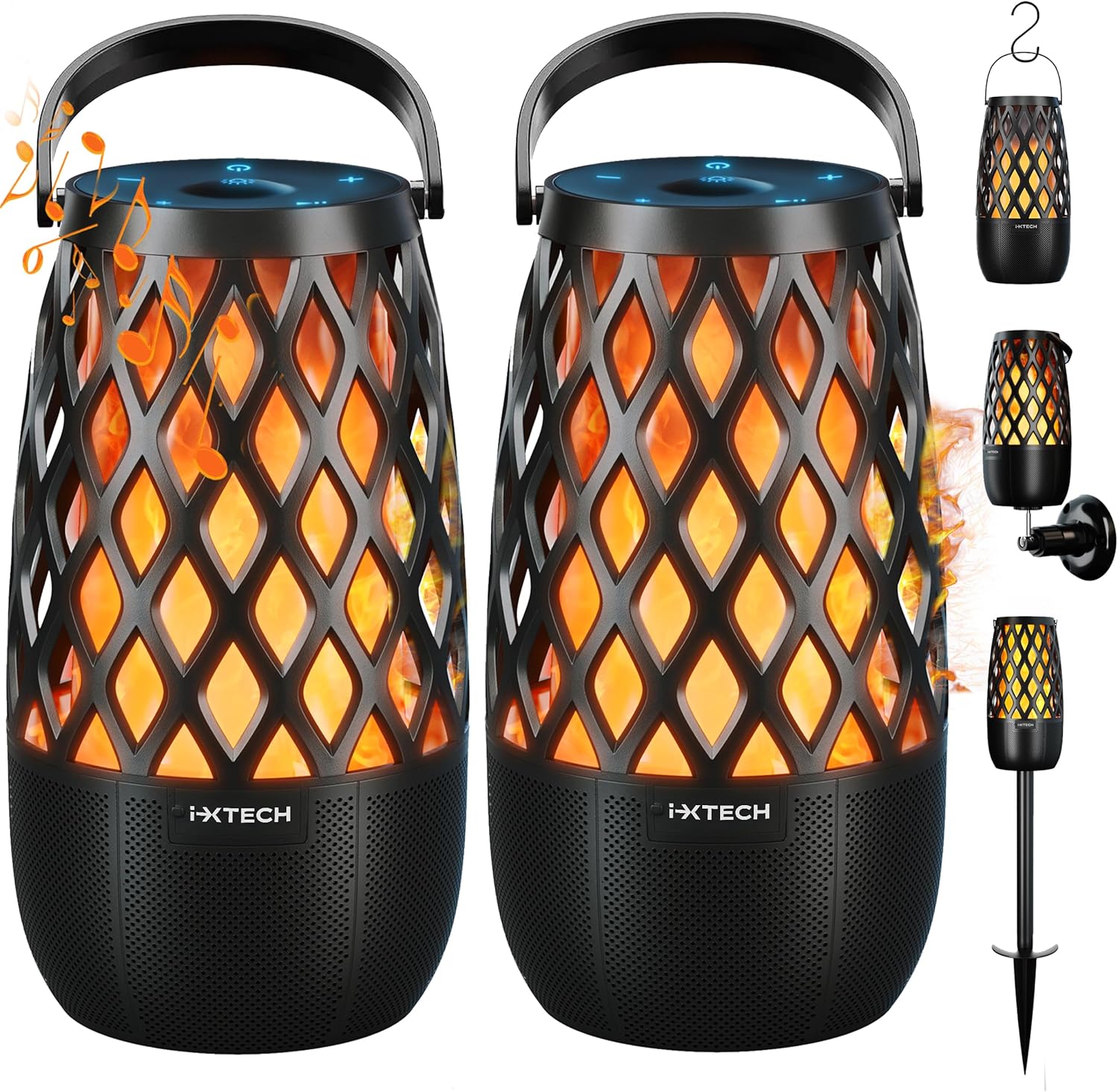
Gambar: Hareupeun view of two IXTECH Outdoor Bluetooth Speakers and their accessories.
3.2 Tombol Kontrol
The speaker's controls are located on the top panel, featuring soft-touch buttons for easy operation:
- Tombol Hurung/Pareum: Ngahurungkeun atanapi mareuman spéker.
- Tombol Sambungan Bluetooth: Mimitian mode papasangan Bluetooth.
- Tombol Mimitian/Reureuh: Muterkeun atanapi ngareureuhkeun playback audio.
- Sound (+) Button: Ngaronjatkeun volume.
- Sound (-) Button: Ngurangan volume.
- Light Mode Change Button: Cycles through the different lighting modes.

Gambar: Detil view of the speaker's soft-touch control buttons.
4. Setélan
4.1 Ngecas Awal
Before first use, fully charge your IXTECH speaker. Connect the provided Type-C cable to the speaker's charging port and the other end to a compatible USB power adapter (not included). A full charge takes approximately 2.5 hours. The speaker's 2000mAh battery provides up to 12 hours of music playback or 24 hours of lighting on a single charge.

Image: Speaker connected to a smartphone, illustrating battery life.
4.2 Powering on / Pareum
Pikeun ngahurungkeun spéker, pencét jeung tahan tombol Tombol Hurung/Pareum until you hear an audible prompt or see the indicator lights activate. To power off, press and hold the same button again.
5. Parentah Operasi
5.1 Nyapasangkeun Bluetooth
- Pastikeun spiker diaktipkeun.
- Pencét éta Bluetooth Connection button. The speaker will enter pairing mode, indicated by a flashing blue light.
- Dina smartphone anjeun, tablet, atawa alat Bluetooth-diaktipkeun sejen, arahkeun ka setelan Bluetooth.
- Select "IXTECH E01" from the list of available devices.
- Once connected, the speaker will provide an audible confirmation, and the blue light will become solid.
5.2 Multi-Sync Wireless Connection
The IXTECH E01 speakers support multi-sync technology, allowing you to connect up to 100 speakers for a synchronized audio experience. This creates an immersive soundscape for larger areas.
- Ensure all speakers you wish to connect are powered on and within range.
- Pair your primary speaker to your device via Bluetooth as described in Section 5.1.
- Dina spiker primér, pencét jeung tahan Bluetooth Connection button for approximately 3 seconds until you hear a specific tone, indicating it's searching for other speakers.
- On each secondary speaker, quickly double-press the Bluetooth Connection button. They will automatically search for and connect to the primary speaker.
- Once connected, all speakers will play audio synchronously.

Image: Illustration of multiple speakers connected via multi-sync technology.
5.3 Modeu Cahya
The speaker features three distinct lighting modes to create different atmospheres. Press the Light Mode Change button to cycle through them:
- Torch Light Mode: Simulates a flickering flame, ideal for a warm, ambient glow.
- Mode cahaya lilin: A softer, more subtle flickering effect, at approximately 80% brightness.
- Modeu Caang pinuh: A steady, bright light at 100% brightness.

Gambar: Répréséntasi visual tina tilu modeu cahaya anu sayogi.
6. Pilihan Instalasi
The IXTECH speaker offers multiple installation methods to suit your environment:
6.1 Adjustable Stake Mounting
For garden, patio, or lawn placement, attach the speaker to the adjustable stake. The stake provides secure placement in soft ground, allowing the speaker to stand upright like a torch.

Image: Speakers installed using adjustable stakes in an outdoor setting.
6.2 S-Hook Mounting
Utilize the included S-hooks to hang the speaker from pergolas, branches, or string lights. This method allows for versatile sound placement and adds to the decorative ambiance.

Image: Speaker hung using an S-hook.
6.3 Pamasangan témbok
For a more permanent installation, use the provided wall mounts. This saves floor space and allows for strategic placement on walls to optimize sound distribution.
Image: Speakers mounted on a wall.
7. Pangropéa
7.1 beberesih
Pikeun ngabersihkeun speaker, usap ku kaén nu lemes,amp cloth. Do not use abrasive cleaners, solvents, or strong chemicals, as these may damage the surface. Ensure the charging port cover is securely closed before cleaning or exposing to water.
7.2 Tahan Cai (IPX5)
The IXTECH E01 speaker is rated IPX5 waterproof, meaning it is protected against low-pressure water jets from any direction. It is suitable for outdoor use and can withstand splashes and light rain. Ulah beuleum speaker dina cai.

Image: Speaker demonstrating its IPX5 water resistance.
7.3 Panyimpenan
When not in use for extended periods, store the speaker in a cool, dry place away from direct sunlight and extreme temperatures. It is recommended to fully charge the battery before storing to prolong its lifespan.
8. Cara ngungkulan
| Masalah | Mungkin Cukang lantaranana | Solusi |
|---|---|---|
| Speaker teu hurung. | Batré béak. | Ngecas spéker sapinuhna nganggo kabel Type-C anu disayogikeun. |
| Teu tiasa dipasangkeun sareng alat Bluetooth. | Spiker teu dina modeu pairing; Bluetooth alat pareum; spiker jauh teuing ti alat; gangguan. | Ensure speaker is in pairing mode (flashing blue light). Turn Bluetooth on your device. Move speaker closer to device. Turn off other Bluetooth devices nearby. |
| Taya sora atawa volume low. | Volume is too low on speaker or device; speaker not connected. | Naékkeun volume dina spiker sareng alat anu nyambung. Pasang deui sambungan Bluetooth. |
| Multi-sync connection fails or speakers desynchronize. | Incorrect pairing procedure; speakers are too far apart; interference. | Follow the multi-sync pairing steps carefully (Section 5.2). Ensure speakers are within the maximum range (82 feet). Reduce interference from other wireless devices. |
| Light function not working. | Speaker is off; light mode not selected. | Ensure speaker is powered on. Press the Light Mode Change button to activate and cycle through modes. |
9. Spésifikasi
| Fitur | Rincian |
|---|---|
| Ngaran modél | IX-E01 |
| merek | IXTECH |
| Tipe Speaker | Sakuliling Sora, Luar |
| Téhnologi konektipitas | Bluetooth, USB (pikeun ngecas) |
| Téknologi Komunikasi Nirkabel | Bluetooth |
| Daya Kaluaran Maksimum | 10 Watt |
| Tingkat Résistansi Cai | IPX5 (Tahan cai) |
| Jenis Batré | Litium Polimér (5 kaasup) |
| Kapasitas batré | 2000 mah |
| Waktu Ngecas | 2.5 Jam |
| Playtime (Music) | Nepi ka 12 Jam |
| Playtime (Lighting) | Nepi ka 24 Jam |
| Rentang maksimum | 82 suku |
| Dimensi produk | 3.5 "D x 3.5" W x 6.7" H |
| Item Beurat | 4.1 pon |
| Bahan | palastik |
| Métode kontrol | Toél |
| Jumlah Item | 2 (dina pakét ieu) |
| Komponén Kaasup | Speakers, Type-C cables, Adjustable stakes, Hooks, Wall mounts, User Manual |
10. Garansi jeung Rojongan
10.1 Émbaran jaminan
The IXTECH Outdoor Bluetooth Speaker comes with a 12-garansi sasih ti tanggal beuli. Garansi ieu nyertakeun cacad manufaktur sareng pagawean dina panggunaan normal. Éta henteu nutupan karusakan anu disababkeun ku nyalahgunakeun, kacilakaan, modifikasi anu teu sah, atanapi bencana alam. Punten tahan bukti pameseran anjeun pikeun klaim garansi.
10.2 Rojongan Palanggan
For technical assistance, troubleshooting, or warranty inquiries, please contact IXTECH customer support. Refer to the contact information provided on the product packaging or the official IXTECH website. You can also find additional information and a downloadable PDF user manual at link ieu.


