
Andoer eefa0e1e-2439-4e97-b124-c6f457feef94
Andoer 4K Digital Camera User Manual
Model: eefa0e1e-2439-4e97-b124-c6f457feef94
Bubuka
This manual provides detailed instructions for the safe and effective use of your Andoer 4K Digital Camera. Please read this manual thoroughly before operating the device and keep it for future reference. This camera is designed to capture high-quality photos and videos, featuring a 48MP image sensor, 4K video recording, 16X digital zoom, and a 2.4-inch IPS screen.
Émbaran Kasalametan
Pikeun mastikeun operasi anu aman sareng nyegah karusakan kana alat, mangga perhatoskeun tindakan pencegahan ieu:
- Ulah ngalaan kaméra ka cai atawa beueus. Produk ieu henteu tahan cai.
- Hindarkeun ngaragragkeun kaméra atanapi kéngingkeun dampak anu kuat.
- Keep the camera away from extreme temperatures, direct sunlight, and dusty environments.
- Do not attempt to disassemble or modify the camera. Repairs should only be performed by qualified personnel.
- Use only the specified charging cable and accessories.
- Dispose of packaging materials properly to avoid choking hazards, especially for children.

Gambar: A warning graphic indicating the importance of proper disposal of packaging materials to prevent choking hazards. Text is provided in multiple languages.
Eusi pakét
Punten parios eusi bungkusan nalika dibuka pikeun mastikeun yén sadaya barang aya:
- 1 x Andoer 4K Digital Camera (Pink)
- 1 x Kabel Ngecas USB
- 1 x Tali pigeulang
- 1 x Mawa Kantong
- 1 x 32GB Card Memori
- 1 x Buku Panduan Pangguna (Basa Inggris)
Produk Leuwihview
Familiarize yourself with the main components and controls of your digital camera.

Gambar: Hareup jeung tukang view of the pink Andoer 4K Digital Camera, highlighting the lens, flash, screen, and control buttons. A 32GB memory card is also shown.

Gambar: Hiji leuwihview of the digital camera's key features, including its professional sensor, 2.4-inch large screen, 48-megapixel resolution, and 4K HD video capability.

Gambar: Technical diagram illustrating the dimensions of the camera: 95mm length, 58mm height, and 25mm thickness.
Komponén konci:
- Lensa: Komponen optik utama pikeun ngarekam gambar.
- Flash: Nyadiakeun katerangan dina kaayaan cahaya remen.
- Layar IPS 2.4 inci: Pikeun viewnge-stream langsung, puter balik, sareng navigasi menu.
- Tombol kontrol: Including Power, Shutter, Zoom (W/T), OK, Menu, Mode, and Playback.
- Slot Kartu Mémori: For inserting the TF memory card.
- Port USB: Pikeun ngecas sareng mindahkeun data.
Disetél
1. Ngecas Batré
The camera has a built-in lithium battery. Before first use, ensure the battery is fully charged.
- Connect the camera to a USB power adapter (not included) or a computer's USB port using the provided USB charging cable.
- Lampu indikator ngecas bakal hurung. Bakal pareum atanapi robih warna saatos ngecas parantos réngsé.
2. Nyelapkeun Kartu Mémori
A 32GB memory card is included. The camera supports Class-10 external TF memory cards up to 128GB.
- Teang slot kartu memori di sisi kaméra.
- Insert the TF memory card into the slot with the metal contacts facing the correct direction (refer to the diagram near the slot if available) until it clicks into place.
- Pikeun nyabut, dorong kartu ka jero dugi ka kaluar.
3. Daya Awal Hurung
Press and hold the Power button to turn the camera on. The IPS screen will light up.
Parentah Operasi
1. Nyandak Poto sareng Ngarékam Pidéo

Gambar: A user holding the camera, demonstrating its use for capturing memories. The screen displays a family on a beach.
- Pikeun nyandak poto: In photo mode, press the Shutter button halfway to focus, then press fully to capture the image.
- Pikeun ngarékam pidéo: Switch to video mode (if applicable, via Mode button), then press the Shutter button to start recording. Press again to stop.
2. Fungsi zum

Gambar: A visual comparison demonstrating the effect of 16X digital zoom. The top image shows a wide view (1x), and the bottom image shows a magnified view (16x) of the same scene.
Use the W (Wide) and T (Telephoto) buttons to adjust the 16X digital zoom. Press W to zoom out and T to zoom in.
3. Pilihan Modeu
The camera offers various shooting modes to optimize your photos and videos for different scenarios:
- Otomatis: shooting Tujuan umum.
- Olahraga: For capturing fast-moving subjects.
- Peuting: Optimized for low-light conditions.
- Potrét: Ideal for capturing people.
- bentang: Best for wide scenic shots.
- Lampu tukang: For subjects with strong light behind them.
- Pihak: For indoor events with mixed lighting.
- Pantai: For bright, outdoor scenes.
- Sensitipitas luhur: For very low light, increasing ISO.
Navigate through modes using the Mode button and select with the OK button.
4. Fungsi séjén
- Anti ngocok: Helps reduce blur from camera movement.
- Face Detect & Smile Capture: Automatically detects faces and can trigger a shot when a smile is detected.
- Continuous Photography: Takes multiple shots in quick succession.
- Timer otomatis: Set a delay (2s, 5s, 10s) before the photo is taken.
- Kasaimbangan bodas: Adjusts color temperature (Auto, Daylight, Cloudy, Fluorescent, Tungsten).
- Kakeunaan: Adjust brightness (EV-3 to EV+3).
- Otomatis Pareum: Configurable idle time before camera powers off (1, 3, 5, 10 minutes).
5. Puterkeun deui
Press the Playback button to review your captured photos and videos on the 2.4-inch IPS screen.
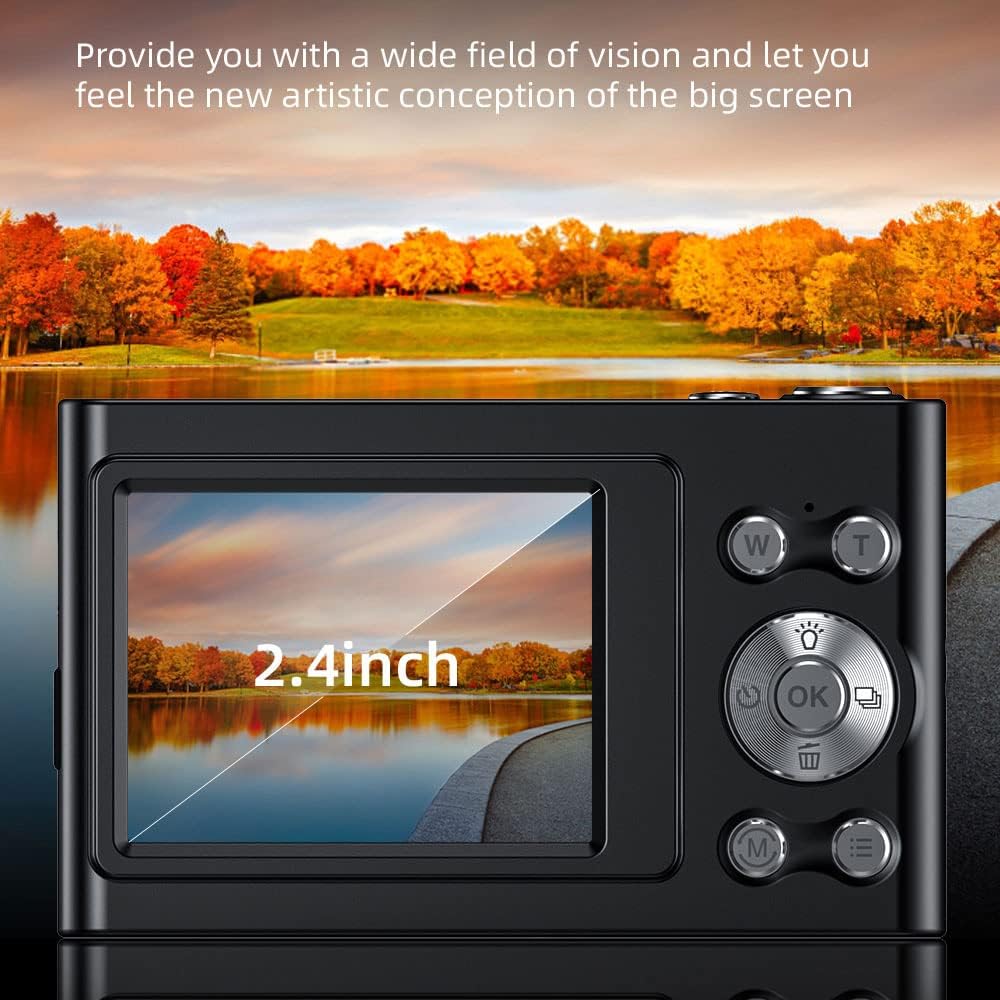
Gambar: A nutup-up view of the camera's 2.4-inch IPS screen, showcasing its display quality with a vibrant landscape image.
6. Nyambungkeun ka Komputer
You can transfer photos and videos to your computer using the provided USB cable.
- Sambungkeun kaméra kana komputer nganggo kabel USB.
- The camera will appear as a removable disk drive.
- Open the drive to access your files and copy them to your computer.
Pangropéa
- beberesih: Anggo lawon anu lemes sareng garing pikeun ngabersihkeun awak kaméra. Pikeun lénsa sareng layar, anggo lawon khusus sareng larutan pembersih lénsa. Entong nganggo pembersih anu kasar.
- Panyimpenan: When not in use for extended periods, store the camera in a cool, dry place, away from direct sunlight and moisture. Remove the memory card if storing for very long durations.
- Perawatan batré: Recharge the battery regularly, even if not using the camera, to maintain its lifespan. Avoid fully discharging the battery frequently.
Pamérésan masalah
| Masalah | Mungkin Cukang lantaranana / Solusi |
|---|---|
| Kaméra teu hurung. | Battery is depleted. Charge the battery fully. |
| Teu tiasa nyandak poto/video. | Memory card is full or not inserted correctly. Check card, delete files, or replace. |
| Gambar blur. | Lens is dirty. Clean the lens. Anti-shake function might be off or insufficient for conditions. Ensure good lighting. |
| Kaméra ngadégdég. | Cabut sareng pasang deui batréna pikeun ngareset kaméra. |
| Teu bisa nyambung ka komputer. | Ensure USB cable is properly connected. Try a different USB port or cable. |
spésifikasi
Detailed technical specifications for the Andoer 4K Digital Camera:
- Sénsor Gambar: Sénsor CMOS
- tampilan: 2.4 inci IPS layar
- Resolusi Gambar: 48M, 36M, 30M, 24M, 20M, 18M, 16M, etc. (Max 48MP)
- Resolusi Video: 4K (3840x2160), 2.7K (2688x1520), 1080P (1920x1080), 720P (1280x720)
- Zum: 16X Digital Zoom
- Panyimpenan: Supports Class-10 external TF memory card up to 128GB (32GB included)
- Sasayogian tanaga: Diwangun-di batré Litium
- Ukuran Item: 9.5 * 5.8 * 2.5cm (3.7 * 2.3 * 1 inch)
- Beurat barang: 115g (4.1 oz)
- Konektipitas: USB
- Fitur husus: Anti-shake, Face Detect, Smile Capture, Continuous Photography, Self-timer, Built-in Flash

Gambar: A lengkep view of the camera's lens and sensor area, emphasizing its 48-megapixel capability for high-resolution imaging.

Gambar: An illustration highlighting the professional CMOS photosensitive chip, explaining its role in analyzing and enhancing picture quality, color restoration, and creating clear, three-dimensional images.

Gambar: A graphic illustrating the camera's intelligent image processing capabilities, including intelligent analysis, enhanced clarity, color restoration, and fine picture quality.
Garansi sareng Rojongan
For warranty information and technical support, please refer to the official Andoer websitus atanapi ngahubungan layanan palanggan maranéhna. Simpen resi pameseran anjeun salaku bukti pameseran.
Andoer Store Link: Visit the Andoer Store on Amazon
Ask a question about this manual
Ask about setup, troubleshooting, compatibility, parts, safety, or missing instructions. Manuals+ will review the question and use this page’s manual context to help answer it.