1. Bubuka
The DIERYA M1SE Wired Gaming Mouse is designed for precision and comfort, featuring a lightweight honeycomb shell, a high-precision optical sensor, and customizable RGB lighting. This manual provides detailed instructions for setup, operation, customization, and maintenance to ensure optimal performance.

Gambar 1: Luhur-handap view of the DIERYA M1SE Wired Gaming Mouse, showcasing cangkang honeycomb na jeung cahaya RGB.
2. Eusi Paket
- DIERYA M1SE Honeycomb Gaming Mouse x 1
- Buku Panduan x 1
3. Setélan
- Sambungkeun Mouse: Plug the USB cable of the DIERYA M1SE mouse into an available USB port on your computer. The mouse will typically be recognized automatically by your operating system.
- Pamasangan Supir (Opsional tapi Disarankeun): For full customization of DPI, macros, and RGB settings, download and install the DIERYA X TMKB driver software from the official DIERYA websitus. Rujuk kana website for the latest software version and installation instructions.
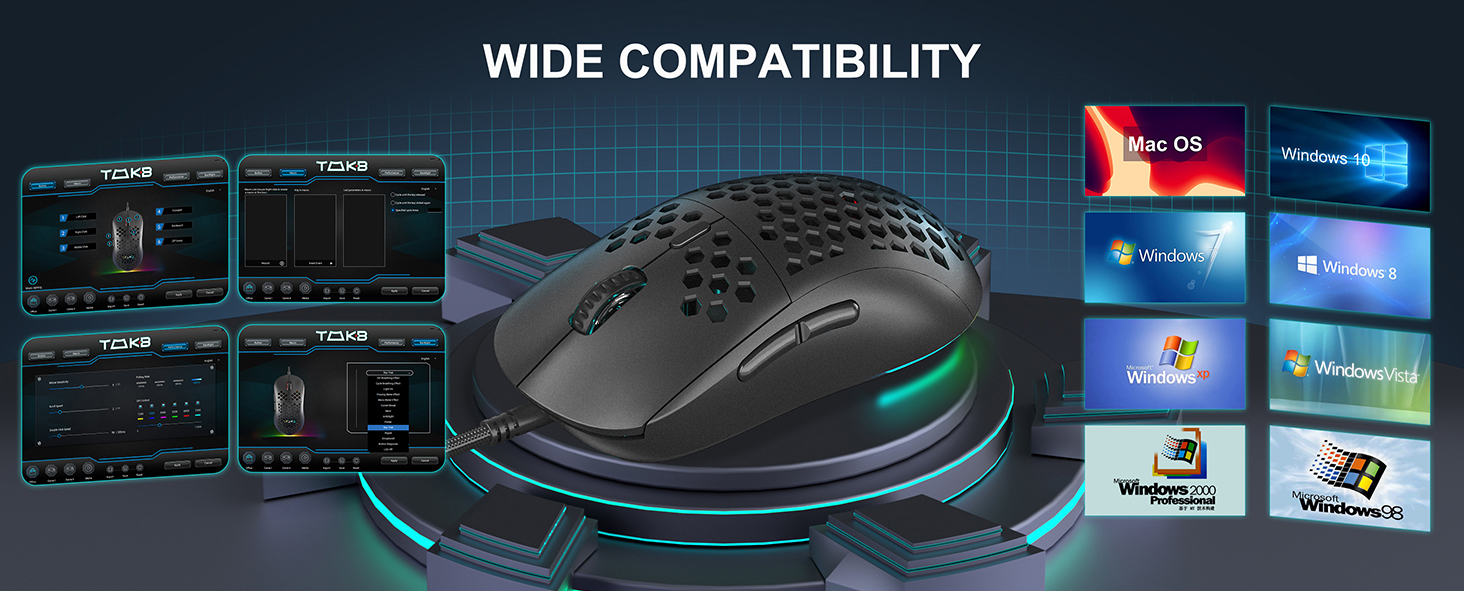
Image 2: Diagram illustrating the wide compatibility of the DIERYA M1SE mouse with various operating systems, including Windows 7/8/10/XP, Vista, and Linux.
4. Parentah Operasi
4.1 DPI adjustment
The DIERYA M1SE features a high-precision optical sensor with adjustable DPI settings from 200 to 12800 DPI. The polling rate can also be adjusted between 125Hz, 250Hz, 500Hz, and 1000Hz.
- Default DPI Levels: The mouse comes with preset DPI levels that can be cycled through using the DPI adjustment button located behind the scroll wheel.
- Custom DPI Settings: Use the DIERYA X TMKB driver software to customize specific DPI values and assign them to different profiles.

Image 3: Visual representation of the 23 adjustable DPI levels and polling rates available on the DIERYA M1SE mouse, ranging up to 12800 DPI.
4.2 Kontrol cahaya RGB
The mouse features 13 vibrant RGB lighting effects with 16.8 million customizable colors. The lighting can dynamically sync with in-game sounds and music rhythms.
- Éfék Siklus: Use the dedicated RGB button (if available, or a programmable button) or the software to cycle through different lighting modes.
- Kustomisasi parangkat lunak: The DIERYA X TMKB software allows for in-depth customization of RGB colors, effects, and synchronization options.

Image 4: Multiple DIERYA M1SE mice displaying various RGB lighting effects, highlighting the 14 bright RGB color modes and 16.8 million color palette.
4.3 Tombol anu tiasa diprogram
The DIERYA M1SE is equipped with 6 programmable buttons, ergonomically designed for both left and right-handed users.
- Default Functions: Left Click, Right Click, Mouse Wheel (Scroll Up/Down, Middle Click), DPI Adjustment Key, Forward, Backward.
- Kustomisasi: All 6 buttons can be remapped using the DIERYA X TMKB driver software to perform various functions, including rapid firing, macro recording, and shortcut key operations.

Image 5: Diagram illustrating the location and default functions of the 6 programmable buttons on the DIERYA M1SE mouse: Left Key, Right Key, Mouse Wheel, DPI Adjustment Key, Forward, and Backward.
5. Customization (Software Support)
The DIERYA X TMKB powerful driver software allows for extensive customization of your M1SE gaming mouse.
- Unduh parangkat lunak: Visit the official DIERYA website to download the latest version of the DIERYA X TMKB driver software.
- Pasang sareng peluncuran: Follow the on-screen instructions to install the software. Once installed, launch the application.
- Tombol Remapping: Within the software, you can remap the functions of each mouse button to suit your preferences for different games or applications.
- Rékam makro: Create and record complex macros to execute multiple commands with a single button press.
- Setélan DPI: Fine-tune DPI levels, adjust polling rates, and create multiple DPI profiles.
- Kustomisasi RGB: Personalize the RGB lighting effects, colors, brightness, and speed.
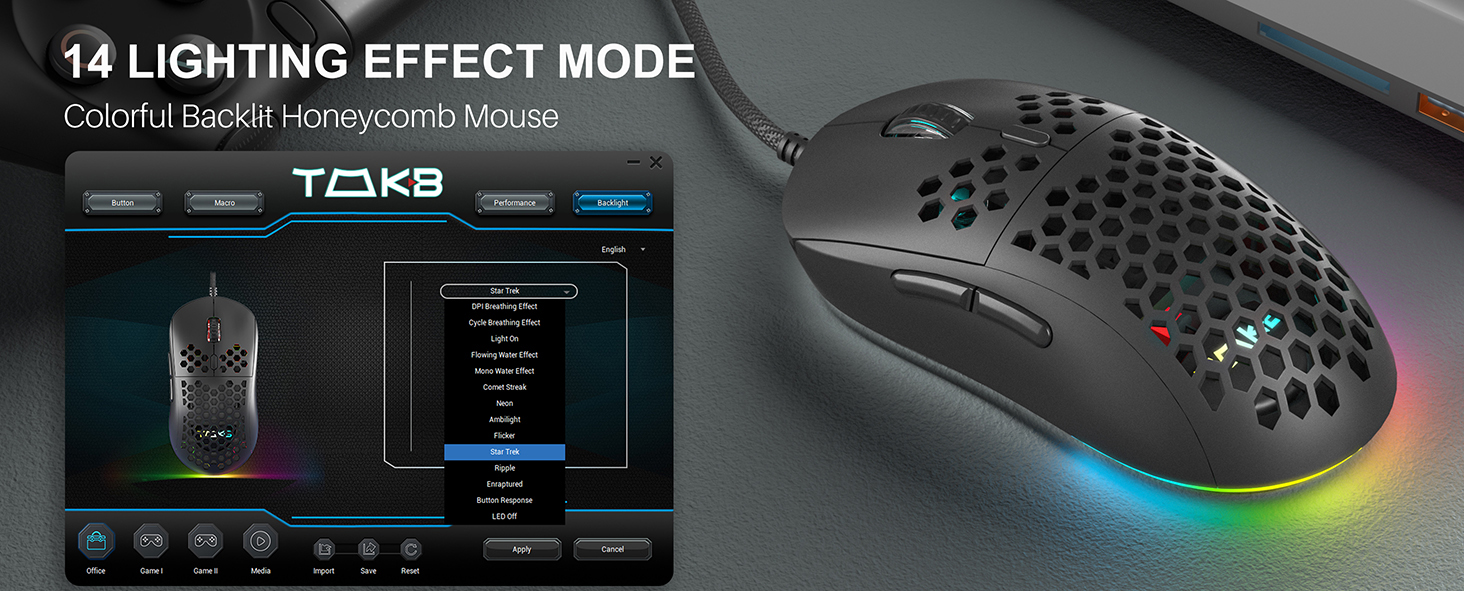
Image 6: Screenshot of the DIERYA X TMKB driver software interface, showing options for button configuration, macro recording, performance settings, and backlight customization.
6. Pangropéa
- beberesih: Use a soft, dry cloth to clean the exterior of the mouse. For the honeycomb shell, a can of compressed air can help remove dust and debris. Avoid using harsh chemicals or abrasive materials.
- Perawatan kabel: Avoid sharp bends or excessive pulling on the USB cable to prevent damage. The ultra-flexible braided cable is designed for durability but proper care extends its lifespan.
- Panyimpenan: Nalika henteu dianggo, simpen beurit di tempat anu bersih sareng garing, jauh tina suhu anu ekstrim.

Gambar 7: Di handap view of the DIERYA M1SE mouse, highlighting the TPU material anti-slip foot pads for smoother glide and the honeycomb structure for reduced weight.
7. Cara ngungkulan
- Beurit Teu Ngabales:
- Pastikeun kabel USB tos aman dicolokkeun kana port USB anu tiasa dianggo.
- Cobi colokkeun beurit kana port USB anu béda atanapi komputer anu sanés pikeun nyingkirkeun masalah port.
- Balikan deui komputer anjeun.
- Setélan DPI Henteu Robah:
- Ensure the DPI adjustment button is functioning correctly.
- Check the DIERYA X TMKB software to verify DPI profiles sareng setélan.
- RGB Lighting Not Working/Flickering:
- Verify RGB settings in the DIERYA X TMKB software.
- Ensure the mouse firmware is up to date (check software for updates).
- If flickering persists, try a different USB port or contact support.
- Parangkat Lunak Henteu Ngadeteksi Mouse:
- Reinstall the DIERYA X TMKB driver software.
- Pastikeun sistem operasi anjeun cocog sareng parangkat lunakna.
- Temporarily disable any antivirus or firewall software that might be interfering with the installation or operation.
8. Spésifikasi
| Fitur | Rincian |
|---|---|
| Modél | M1SE |
| Téhnologi konektipitas | Kabel USB |
| Téhnologi Deteksi Gerakan | Optik |
| Rentang DPI | 200-12800 DPI |
| Laju Polling | 125-1000Hz |
| Tombol Programmable | 6 |
| Lampu RGB | 13 Effects, 16.8 Million Colors |
| Desain | Ultralight Honeycomb Shell |
| Beurat | 75g (kira-kira 3.7 ons) |
| Dimensi produk | 4.91 x 2.48 x 1.6 inci |

Image 8: Detailed graphic showing the dimensions (4.91 x 2.48 x 1.6 inches) and key features of the DIERYA M1SE mouse, including its 75g weight, ergonomic design, and honeycomb structure.
9. Garansi jeung Rojongan
DIERYA products are manufactured to high-quality standards. For warranty information, technical support, or any product-related inquiries, please visit the official DIERYA websitus atanapi ngahubungan layanan palanggan maranéhanana langsung. Simpen resi pameseran anjeun pikeun klaim jaminan.
Resmi Websitus: DIERYA Store on Amazon


