1. Bubuka
This manual provides detailed instructions for the safe and effective use of your InfiRay P2 Pro Android Type-C Thermal Imaging Camera. The InfiRay P2 Pro is a compact, high-performance infrared thermal camera designed for various applications, including industrial inspections, home diagnostics, and PCB detection. Please read this manual thoroughly before operating the device.

Figure 1: InfiRay P2 Pro Thermal Imaging Camera with Android Phone Interface
2. Produk Langkungview jeung Fitur
The InfiRay P2 Pro is engineered for precision and versatility, offering advanced thermal imaging capabilities in a portable form factor.
2.1 Fitur konci
- Quick Identification with Magnetic Macro Lens: The P2 Pro includes a magnetic macro lens, enabling close-up observation for detailed analysis of PCBs and microcircuits. This allows for sharp imaging and identification of resistance in the millimeter range.
- Prestasi Pinunjul: Features an IR resolution of 256 x 192 pixels and a fast frame rate of 25 Hz, providing high-resolution thermal imagery. It supports full-frame temperature measurement (Max, Min, Center Spots) across an extensive temperature range from -4 °F to 1022 °F (-20 °C to 550 °C).
- Akurasi luhur: Offers a measurement accuracy of ±2 °C or ±2% of the measurement range (whichever is greater), suitable for identifying hidden heat-related issues in various settings, including home inspections, HVAC troubleshooting, and professional electrical system checks.
- Batteryless and Secondary Analysis: Operates without an internal battery, drawing power directly from the connected smartphone. Captured infrared images can be used for secondary analysis directly within the software, allowing for point-line-surface analyses.
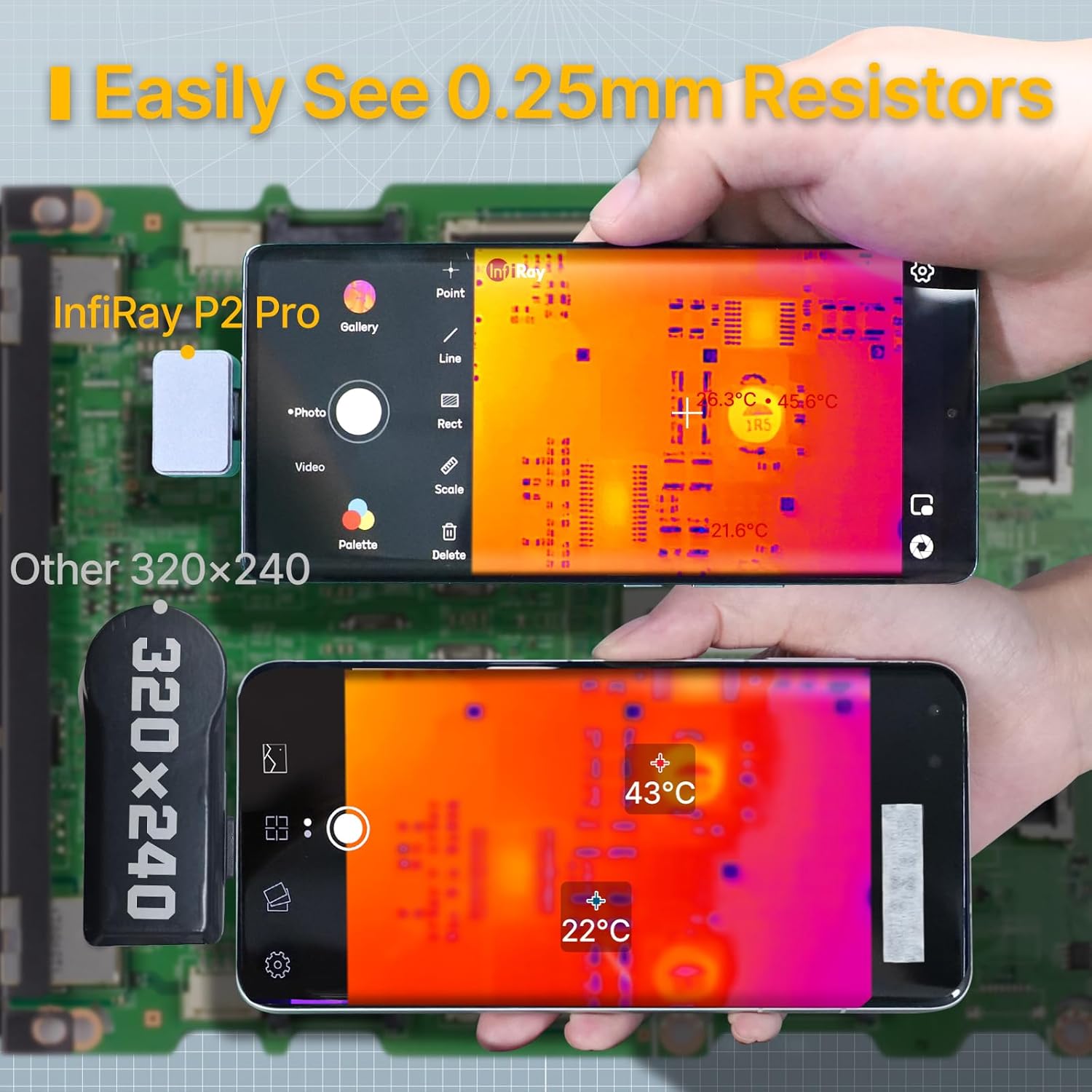
Figure 2: Macro Lens Capability for Detailed PCB Inspection

Figure 3: Comparison of Thermal Image Refresh Rates

Figure 4: Diverse Applications of the P2 Pro Thermal Camera

Figure 5: Low Power Consumption for Extended Use
3. Eusi Paket
Upon opening your InfiRay P2 Pro package, please verify that all the following items are included:
- InfiRay P2 Pro Thermal Imaging Camera (latest model)
- Magnetic Macro Lens
- Buku Panduan Pangguna Basa Inggris (dokumen ieu)
- Connecting Cable (Type-C)
- Kasus pelindung
4. Setélan
Follow these steps to set up your InfiRay P2 Pro Thermal Imaging Camera:
- Unduh Aplikasi: Milarian pikeun and download the "P2 Pro" application from your Android device's app store.
- Sambungkeun kaméra: Plug the InfiRay P2 Pro camera into your Android smartphone's Type-C port. The camera is designed for direct connection and does not require an external battery.
- Attach Macro Lens (Optional): If detailed close-up imaging is required, attach the magnetic macro lens to the camera. Ensure it is securely seated.
- Ngajalankeun App: Open the "P2 Pro" application. The camera feed should appear automatically.

Figure 6: Connecting the P2 Pro to an Android Device
Note: The InfiRay P2 Pro is not suitable for Google Pixel Phones.
5. Operasi
Operating the InfiRay P2 Pro is intuitive through its dedicated application.
5.1 Pencitraan Termal Dasar
- Once connected and the app is open, the live thermal feed will be displayed on your smartphone screen.
- Observe the temperature scale on the side of the screen, indicating the temperature range being displayed.
5.2 Fitur Canggih via Aplikasi
- Pangukuran Suhu: Aplikasi ngamungkinkeun anjeun tag specific points, lines, or areas on the thermal image to obtain precise temperature readings (Max, Min, Center Spots).
- Palet Warna: Select from various color palettes within the app to visualize temperature differences according to your preference or application needs.
- Potret Gambar sareng Pidéo: Use the app's interface to capture thermal images and videos. These can be saved directly to your device's gallery.
- Secondary Analysis: Captured images can be opened directly within the P2 Pro software for post-analysis, allowing you to add or modify temperature measurement points, lines, and surfaces without needing the physical camera connected.
- Rotasi Gambar: Rotate the image within the app to view temperature data from different angles, enhancing flexibility during inspections.
- Modeu Pro: Utilize Pro Mode to manually combine the infrared image with a visible image for clearer visualization of low-temperature items.

Figure 7: InfiRay P2 Pro App Interface and Features
6. Pangropéa
To ensure the longevity and optimal performance of your InfiRay P2 Pro Thermal Imaging Camera, follow these maintenance guidelines:
- beberesih: Wipe the camera and lens clean with a soft, dry cloth. Avoid using abrasive materials or harsh chemicals that could damage the lens or housing.
- Panyimpenan: When not in use, store the camera in its protective case to prevent dust accumulation and physical damage.
- Kaayaan Lingkungan: Avoid exposing the camera to extreme temperatures, high humidity, or direct sunlight for prolonged periods.
7. Cara ngungkulan
If you encounter issues with your InfiRay P2 Pro, consider the following common solutions:
- Kaméra Teu Dideteksi: Ensure the camera is securely plugged into your Android device's Type-C port. Try restarting the P2 Pro app or your smartphone.
- Masalah Fungsi Aplikasi: Ensure your P2 Pro app is updated to the latest version. Clear the app's cache or reinstall it if problems persist.
- Kualitas Gambar: Ensure the camera lens is clean and free from dust or smudges. For close-up work, verify the magnetic macro lens is correctly attached.
- Kasaluyuan: Remember that the InfiRay P2 Pro is not compatible with Google Pixel Phones.
8. Spésifikasi
Detailed technical specifications for the InfiRay P2 Pro Thermal Imaging Camera:
| Spésifikasi | Nilai |
|---|---|
| Nomer modél | P2 Pro |
| Resolusi IR | 256 x 192 piksel |
| Laju pigura | 25 Hz |
| Rentang Suhu | -4 °F nepi ka 1022 °F (-20 °C nepi ka 550 °C) |
| Akurasi Suhu | ±2 °C atanapi ±2% (mana waé anu langkung ageung) |
| Sensitipitas Termal | ≤40 mK |
| widang View | 56.0° x 42.2° |
| Téhnologi konektipitas | USB Tipe-C |
| Sumber Daya | Smartphone powered (Batteryless) |
| Bahan Luar | logam |
| Dimensi produk | 8.27 x 1.57 x 1.57 inci; 5.61, XNUMXeun |
| Komponén Kaasup | Thermal Camera, Magnetic Macro Lens, Connecting Cable, Protective Case |

Figure 8: InfiRay P2 Pro Production Comparison
9. Garansi jeung Rojongan
Your InfiRay P2 Pro Thermal Imaging Camera comes with a comprehensive warranty and support:
- Garansi: The InfiRay P2 Pro includes a 2-year warranty from the date of purchase. Please retain your proof of purchase for warranty claims.
- Rojongan Sofwér: For assistance with the P2 Pro application, refer to the in-app help section or visit the official InfiRay websitus pikeun FAQs jeung sumber rojongan.


