Bubuka
Thank you for choosing the Sharp Big Bang Alarm Clock. This manual provides detailed instructions to help you set up, operate, and maintain your new alarm clock. Please read this manual thoroughly before use and retain it for future reference.
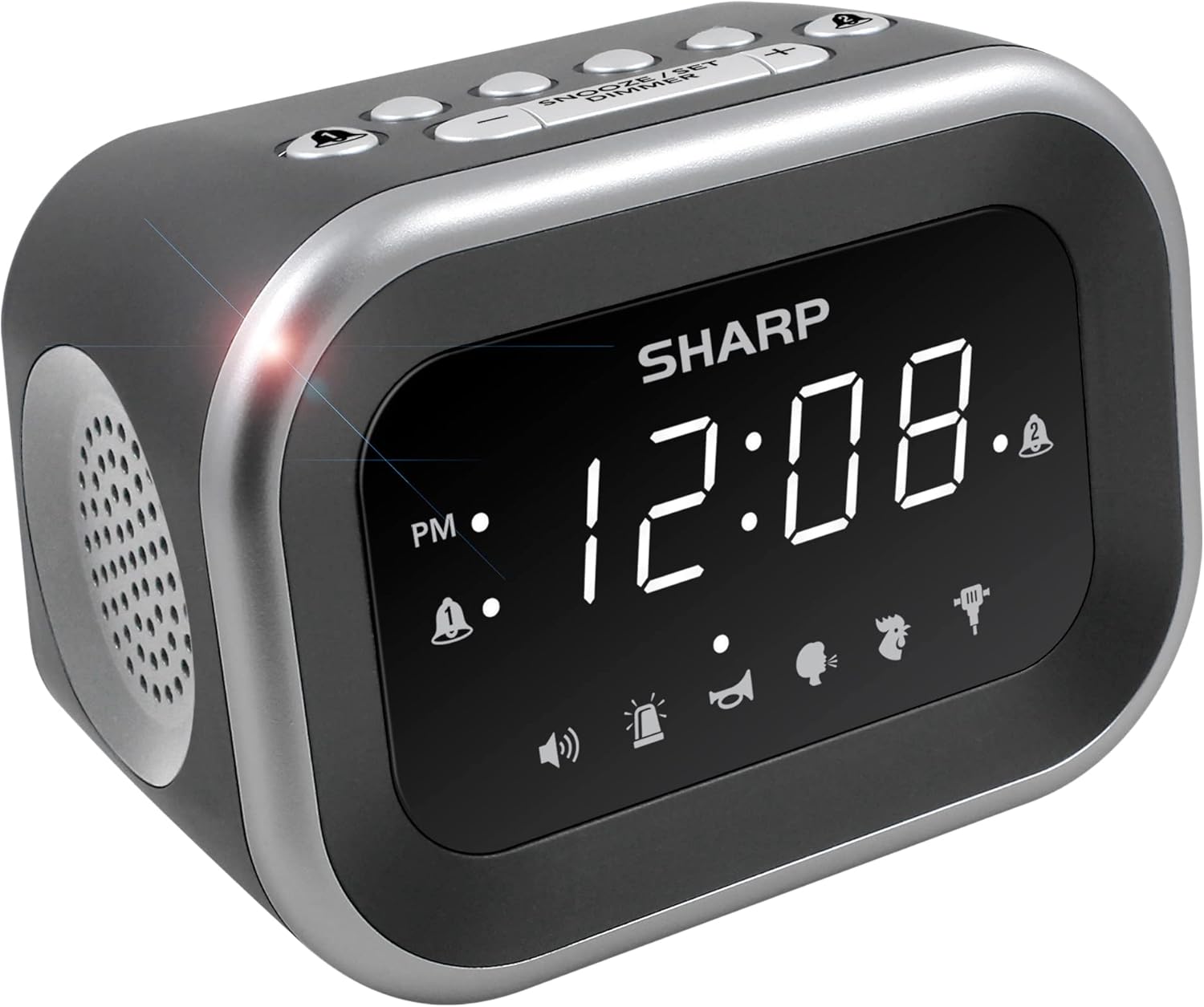
Gambar: Hareupeun view of the Sharp Big Bang Alarm Clock, showing the digital display and speaker grille.
Émbaran Kasalametan
- Entong ngalaan unit ka suhu anu ekstrim, sinar panonpoé langsung, atanapi kalembaban anu luhur.
- Keep the unit away from water or other liquids.
- Anggo ngan ukur adaptor kakuatan anu ditangtukeun.
- Entong nyobian ngabongkar atanapi ngarobih unit.
- Jauhkeun tina jangkauan barudak.
Eusi pakét
- Sharp Big Bang Alarm Clock
- Adaptor Daya AC
- Manual pangguna (dokumén ieu)
Produk Leuwihview
Familiarize yourself with the various components and controls of your alarm clock.
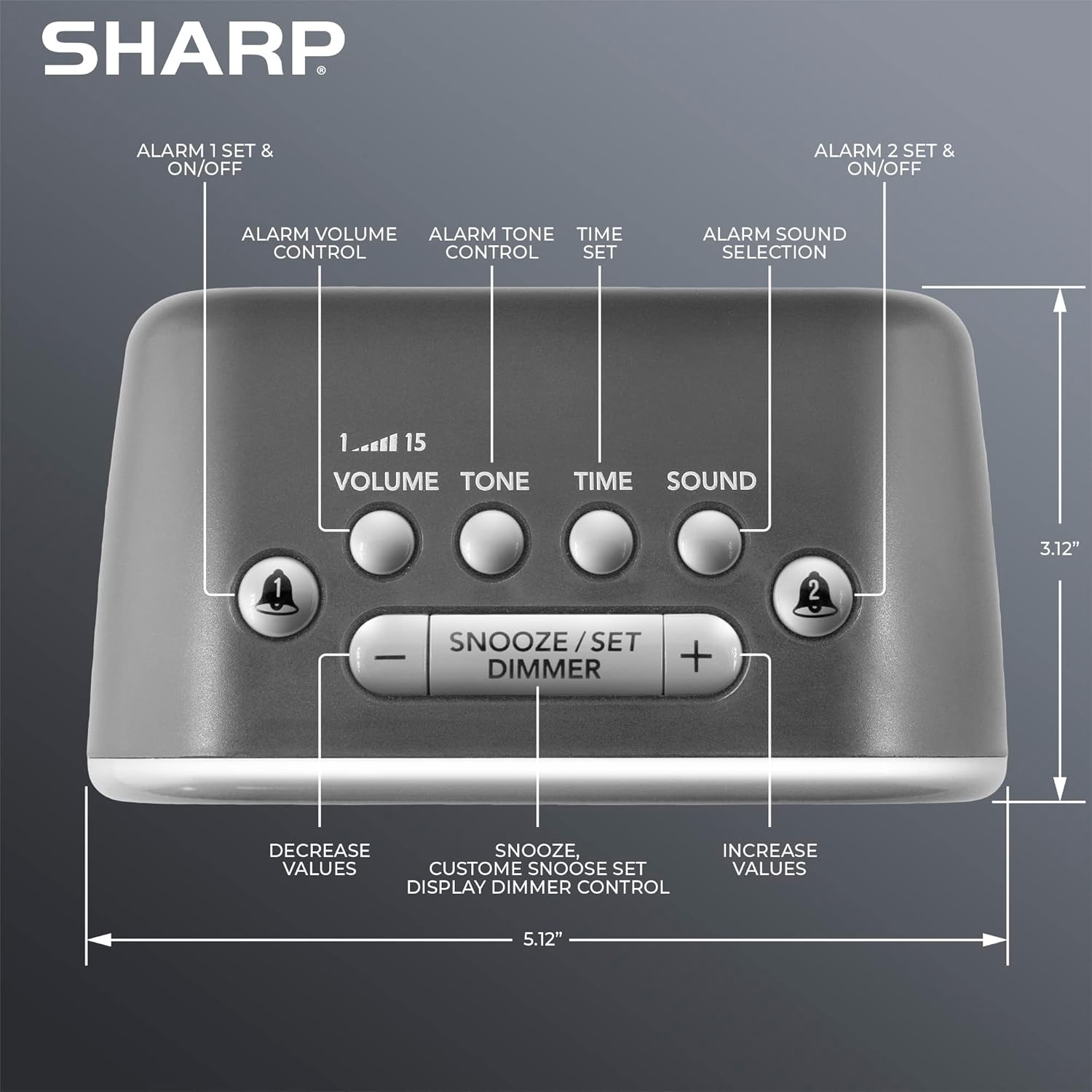
Gambar: Top view of the alarm clock, highlighting buttons for Alarm 1, Alarm 2, Volume, Tone, Time, Sound, Snooze/Set/Dimmer, and +/- controls.
- tampilan: Large white LED display for time and settings.
- Alarm 1 & 2 Buttons: Activate/deactivate and set individual alarms.
- Tombol Volume: Adjusts alarm volume (levels 1-15).
- Tombol Nada: Adjusts alarm tone.
- Tombol waktos: Dianggo pikeun nangtukeun waktu ayeuna.
- Tombol Sora: Selects one of the six alarm sounds.
- Snooze/Set/Dimmer Button: Activates snooze, confirms settings, and adjusts display brightness.
- +/- Tombol: Adjust values for time, volume, tone, and snooze duration.
Disetél
1. Sambungan Daya
- Plug the AC power adapter into the DC IN jack on the back of the alarm clock.
- Plug the other end of the adapter into a standard 110V/120V household wall outlet.
- The display will light up, indicating power is connected.
2. Pamasangan Cadangan Batré
The alarm clock requires 2 x AAA batteries (not included) for battery backup. This feature stores your time and alarm settings during a power interruption. The display will not be lit during battery backup mode.
- Buka panutup kompartemen batré dina handapeun unit.
- Insert 2 new AAA batteries, observing the correct polarity (+ and -).
- Tutup panutup kompartemen batré aman.

Image: The alarm clock positioned on a nightstand, ready for use.
Parentah Operasi
1. Nyetél Waktos Ayeuna
- Pencét jeung tahan tombol WAKTU tombol nepi ka angka jam flash.
- Ngagunakeun éta + or - tombol pikeun nyaluyukeun jam. Perhatikeun indikator PM.
- Pencét éta WAKTU button again to confirm the hour, and the minute digits will flash.
- Ngagunakeun éta + or - tombol pikeun nyaluyukeun menit.
- Pencét éta WAKTU button once more to save the time setting.
2. Nyetel Alarm (Alarm 1 sareng Alarm 2)
This clock features two independent alarms.
- Pencét jeung tahan tombol ALARMA 1 or ALARMA 2 tombol nepi ka jam alarm hurung hurup.
- Ngagunakeun éta + or - buttons to adjust the alarm hour. Observe the PM indicator.
- Pencét anu saluyu alarem button again to confirm the hour, and the minute digits will flash.
- Ngagunakeun éta + or - tombol pikeun nyaluyukeun menit alarm.
- Pencét éta alarem button once more to save the alarm time. The alarm indicator (bell icon) for the set alarm will appear on the display.
- To activate or deactivate an alarm, simply press the ALARMA 1 or ALARMA 2 button briefly. The bell icon indicates if the alarm is active.
3. Selecting Alarm Sounds
The clock offers 6 distinct alarm sounds: Rooster, Bugle, Nagging Mom, Jackhammer, Siren, and Beep.

Image: Visual representation of the six available alarm sounds.
- With an alarm set, press the SORA button. The current sound icon will flash.
- Ngagunakeun éta + or - buttons to cycle through the available sounds.
- Pencét éta SORA tombol deui pikeun mastikeun pilihan Anjeun.
4. Adjusting Alarm Volume and Tone
You can customize the volume (up to 115dB) and tone of your chosen alarm sound.

Image: Decibel reference scale illustrating the loudness of the alarm clock compared to common sounds.
- Pencét éta VOLUME button. The current volume level (1-15) will flash.
- Ngagunakeun éta + or - tombol pikeun nyaluyukeun polumeu.
- Pencét éta VOLUME tombol deui pikeun mastikeun.
- Pencét éta NADA button. The current tone setting will flash.
- Ngagunakeun éta + or - buttons to adjust the tone.
- Pencét éta NADA tombol deui pikeun mastikeun.
5. Fungsi Snooze
Lamun alarm disada, pencét badag SNOOZE/SET/DIMMER button on top of the clock to temporarily silence the alarm. The default snooze time is 9 minutes.
Customizing Snooze Duration:
- While the alarm is sounding, press and hold the SNOOZE/SET/DIMMER button until the snooze time flashes.
- Ngagunakeun éta + or - buttons to set your desired snooze duration (1-59 minutes).
- Pencét éta SNOOZE/SET/DIMMER button again to save the custom snooze time.
6. Témbongkeun Dimmer Control
The display has 3 brightness levels (Off, Low, High).
- Pencét sakeudeung SNOOZE/SET/DIMMER button (when the alarm is not sounding) to cycle through the brightness levels: High > Low > Off.

Gambar: Leuwihview of key features including display, volume, sounds, and controls.
Pangropéa
beberesih
- Cabut colokan jam alarm tina stop kontak sateuacan beberesih.
- Ngusap permukaan luar ku kaén anu lembut sareng garing.
- Ulah make cleaners abrasive, lilin, atawa pangleyur.
Ngagantian batré
- Upami jam leungiteun waktos atanapi setélan alarm salami kakuatan outage, the AAA backup batteries may need replacement.
- Follow the battery installation steps in the Setup section to replace the batteries.
Pamérésan masalah
| Masalah | Mungkin Cukang lantaranana | Solusi |
|---|---|---|
| Alarm does not sound or is too quiet. | Alarm is not activated; Volume is too low; Incorrect sound selected. | Ensure the alarm bell icon is displayed. Adjust the volume using the VOLUME button. Verify the selected alarm sound. |
| Display is off during a power outage. | Battery backup only retains settings, not display power. | This is normal operation. The display will relight when power is restored. Ensure backup batteries are fresh to retain settings. |
| Setélan waktos atanapi alarm leungit. | Power interruption and/or dead backup batteries. | Replace the 2 x AAA backup batteries. Reset the time and alarm settings. |
| Tombol-tombol henteu ngaréspon. | glitch software samentara. | Unplug the unit from the power outlet for a few minutes, then plug it back in. |
spésifikasi
- merek: Seukeut
- model: B0BDPQNVMR
- Sumber Daya: Corded Electric (110V/120V compatible)
- Cadangan batré: 2 x batré AAA (teu kaasup)
- Volume alarem: Nepi ka 115dB
- Sora Alarm: 6 (Rooster, Bugle, Nagging Mom, Jackhammer, Siren, Beep)
- tampilan: White LED with 3-level dimmer (High, Low, Off)
- Ukuran (Kira-kira.): 5.12" (Width) x 3.12" (Height) x 3.55" (Depth)
- beurat: 12.5 ons
- Bahan: Acrylonitrile Butadiene Styrene (ABS)
- UPC: 049353008608
Garansi sareng Rojongan
For warranty information and customer support, please refer to the documentation provided at the time of purchase or contact Sharp customer service directly. You can also visit the official Sharp store for more information: