Bubuka
This manual provides detailed instructions for the installation, operation, and maintenance of your Blaupunkt MEMPHIS440BT 6.2" In-Dash Touch Screen DVD Receiver. Please read this manual thoroughly before using the product to ensure proper functionality and to prevent damage.
Produk Leuwihview
The Blaupunkt MEMPHIS440BT is a versatile in-dash multimedia receiver featuring a 6.2-inch touch screen display. It supports DVD/CD playback, Bluetooth connectivity for hands-free calling and audio streaming, USB and SD card media playback, and AM/FM radio. The unit is designed to be the central entertainment system in your vehicle.

Gambar: Hareupeun view of the Blaupunkt MEMPHIS440BT in-dash receiver with its remote control. The receiver features a 6.2-inch touch screen displaying various function icons like Radio, Disc, USB, SD, and Bluetooth. The remote control has numerous buttons for navigation and media control.
Émbaran Kasalametan
- Always operate the vehicle safely. Do not operate the unit's functions that distract you from safe driving.
- Ensure proper wiring connections to prevent short circuits and electrical hazards.
- Taroskeun ka profésional pikeun pamasangan upami anjeun henteu yakin kana léngkah-léngkah naon waé.
- Ulah ngalaan unit ka Uap atawa suhu ekstrim.
Setup sareng Instalasi
Eusi pakét
- Blaupunkt MEMPHIS440BT DVD Receiver
- Kadali jauh
- Diiringkeun kabel
- Pamasangan Hardware
- Manual pangguna (dokumén ieu)
Diagram Wiring
Refer to the detailed wiring diagram provided in the separate installation guide for specific connections. Ensure all connections are secure and correctly matched to your vehicle's electrical system.
Gambar: Sisi view of the Blaupunkt MEMPHIS440BT receiver, illustrating the various ports and connections on the rear and side panels, including the USB and Mini SD slots on the front left side.
Pamasangan Unit
- Cabut stereo mobil anu aya tina dasbor.
- Connect the wiring harness to the vehicle's wiring and the MEMPHIS440BT.
- Slide the MEMPHIS440BT into the dashboard opening until it clicks into place.
- Secure the unit using the provided mounting screws.
Parentah Operasi
Daya Hurung/Pareuman
Pencét éta POWER button (usually a knob on the left side) to turn the unit on or off. Hold for 2 seconds to power off.
Panganteur Layar Toél
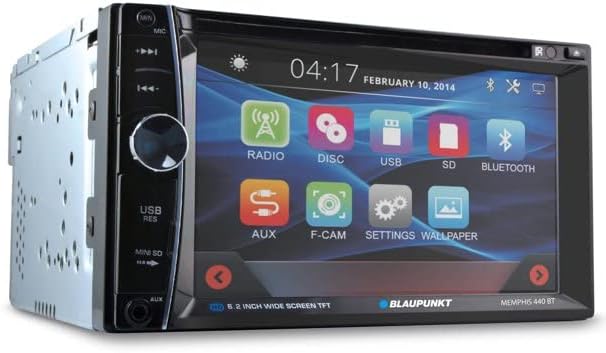
The 6.2-inch touch screen allows for intuitive control of all functions. Tap icons to select modes (Radio, Disc, USB, SD, Bluetooth, AUX, F-CAM, Settings, Wallpaper).

Gambar: hareup miring view of the Blaupunkt MEMPHIS440BT receiver, highlighting the touch screen interface with its main menu icons and the physical control knob on the left side.
Papasangan Bluetooth
- Dina ménu utama, ketok dina Bluetooth ikon.
- Aktipkeun Bluetooth dina alat sélulér anjeun sareng milarian alat anu sayogi.
- Select "MEMPHIS440BT" from the list.
- Enter the default PIN "0000" if prompted.
- Sakali dipasangkeun, anjeun tiasa nelepon/nampi telepon sareng ngalirkeun audio.
Media Playback (DVD/CD/USB/SD)
- DVD/CD: Insert a disc into the slot. The unit will automatically switch to Disc mode.
- USB: Insert a USB drive into the USB port. Tap the USB icon to access files.
- SD: Insert a miniSD card into the SD card slot. Tap the SD icon to access files.

Gambar: Deukeut view of the USB port and Mini SD card slot located on the front left side of the Blaupunkt MEMPHIS440BT receiver, beneath a protective flap.
Operasi Radio
- Ketok dina Radio icon to enter radio mode.
- Use the touch screen controls to scan for stations, tune manually, or select preset stations.
- To save a station, tune to the desired frequency, then press and hold a preset button on the screen.
Pangropéa
- beberesih: Use a soft, dry cloth to clean the touch screen and unit exterior. Do not use abrasive cleaners or solvents.
- Perawatan Cakram: Keupeul cakram ku sisi-sisina. Jaga supaya tetep bersih sareng bébas tina goresan.
- Pembaruan firmware: Check the official Blaupunkt websitus sacara périodik pikeun apdet firmware anu sayogi.
Pamérésan masalah
| Masalah | Mungkin Cukang lantaranana | Solusi |
|---|---|---|
| Taya kakuatan | Kabelna salah; Sekringna bocor | Pariksa sambungan listrik sareng ground; Ganti sekering upami diperyogikeun. |
| Taya sora | Volume low teuing; Jempé diaktipkeun; Masalah kabel speaker | Ningkatkeun volume; Nonaktipkeun bisu; Pariksa sambungan speaker. |
| Bluetooth teu nyambung | Device not in pairing mode; Incorrect PIN | Ensure device is discoverable; Re-enter PIN "0000". |
| Kasalahan disk | Kotor atanapi scratched disc; format disc salah | Clean disc; Try a different disc; Ensure disc is compatible. |
spésifikasi
- Ukuran layar: 6.2 inci
- Jenis tampilan: Layar Toél LCD
- Jenis Média: DVD, CD, USB, SD
- Konektipitas: Bluetooth
- Jumlah modél: MEMPHIS440BT
- Beurat barang: 4.25 pon
- Ukuran Paket: 9.69 x 9.17 x 6.85 inci
- Pabrikan: BLAUPUNKT
Garansi sareng Rojongan
For warranty information and technical support, please refer to the warranty card included with your product or visit the official Blaupunkt websitus. Simpen resi pameseran anjeun salaku bukti pameseran pikeun klaim garansi.
Blaupunkt Resmi Websitus: www.blaupunkt.com


