Bubuka
This manual provides essential information for the safe and effective use of your Canon PowerShot SX70 HS Digital Camera. Please read it thoroughly before using the camera and keep it for future reference.
The Canon PowerShot SX70 HS is a versatile bridge camera designed for users seeking extensive zoom capabilities and advanced imaging features. It integrates a 20.3-megapixel CMOS sensor with a DIGIC 8 image processor, enabling high-resolution still photography and UHD 4K video recording. Its standout feature is the 65x optical zoom lens, covering a focal length range equivalent to 21-1365mm, supported by optical image stabilization for clear handheld shots. The camera also features a 2.36m-dot OLED electronic viewfinder and offers built-in Wi-Fi and Bluetooth for seamless connectivity.
Disetél
1. Masang Batré
The camera uses a Canon LP-E12 Lithium-Ion Battery Pack. Ensure the battery is fully charged before first use.
- Buka panutup kompartemen batré dina handapeun kaméra.
- Insert the LP-E12 battery pack with the contacts facing the correct direction, as indicated inside the compartment.
- Tutupkeun panutup kompartemen batré pageuh-pageuh nepi ka ngaklik.
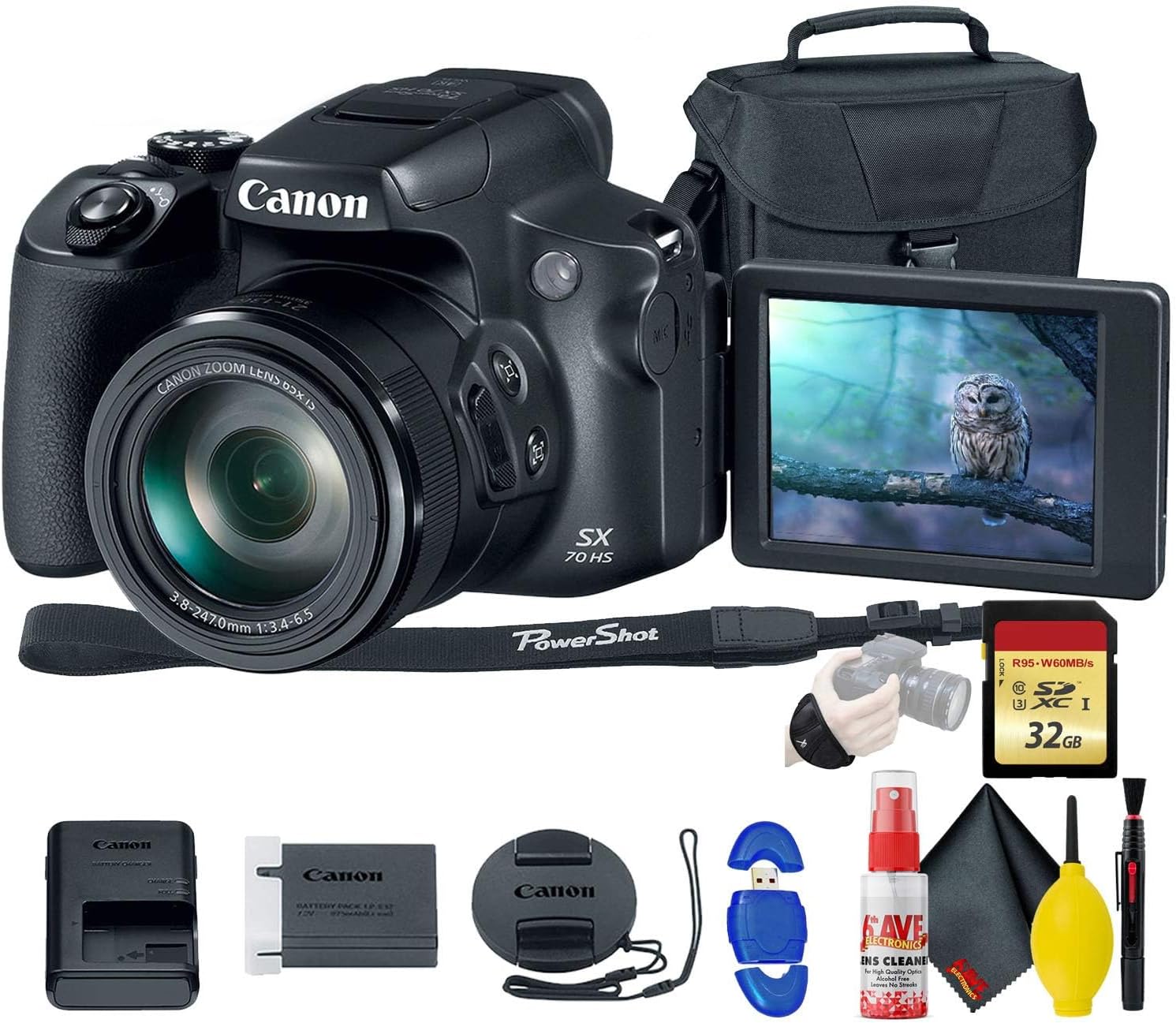
Image: Canon PowerShot SX70 HS Digital Camera shown with included accessories. This image illustrates the camera and its bundled items, including the battery charger and memory card.
2. Ngecas Batré
Use the provided Canon LC-E12 Battery Charger to charge the LP-E12 battery.
- Selapkeun batré kana carjer.
- Plug the charger into a power outlet. The charging indicator light will show the charging status.
- Sakali ngecas parantos réngsé, cabut batréna tina carjer.
3. Nyelapkeun Kartu Mémori
The camera supports SD, SDHC, and SDXC memory cards. A Secure Digital High Speed 32GB Memory Card is typically included.
- Buka panutup slot kartu memori, biasana aya di deukeut kompartemen batré.
- Selapkeun kartu memori kalayan labélna ngadep ka hareup kaméra dugi ka ngaklik kana tempatna.
- Tutup panutup slot kartu memori sacara aman.
4. Ngalampirkeun Tali beuheung
Attach the NS-DC11 Neck Strap to the camera's strap lugs for secure carrying.
- Thread the strap through the lug on one side of the camera.
- Secure the strap as shown in the camera's quick start guide.
- Ngulang pikeun sisi séjén.
Ngoperasikeun kaméra
1. Powering on / Pareum
Pencét éta POWER tombol ayana dina luhureun kaméra pikeun ngahurungkeun atawa mareuman.
2. Kontrol Dasar Leuwih tiview

Gambar: Hareupeun view of the Canon PowerShot SX70 HS camera, showing the lens and grip.
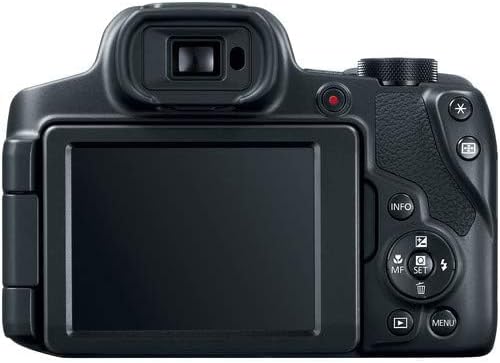
Gambar: Tukangeun view of the Canon PowerShot SX70 HS camera, displaying the LCD screen and control buttons.
- Tombol jepret: Pencét satengahna pikeun pokus, pinuh pikeun nyandak gambar.
- Lever zum: Surrounds the shutter button. Move left/right to zoom in/out.
- Mode Dial: Selects shooting modes (e.g., P, Av, Tv, M, Auto, Scene modes).
- Tombol MENU: Ngaksés setélan kaméra.
- Tombol Puteran: Views captured images and videos.
- Directional Pad / SET Button: Navigates ménu jeung confirms selections.
- Éléktronik ViewPanimu (EVF): Use for eye-level shooting.
- Vari-angle LCD Screen: Can be rotated for flexible viewdina sudut.
3. Nyokot Poto
- Turn the mode dial to your desired shooting mode (e.g., P for Program Auto, Av for Aperture Priority).
- Frame your shot using the EVF or LCD screen.
- Press the shutter button halfway down to focus. The focus frame will appear.
- Pencét tombol jepret sapinuhna ka handap pikeun moto gambar.
4. Ngarékam Pidéo
The PowerShot SX70 HS supports UHD 4K video recording.
- Turn the mode dial to the movie mode icon.
- Pencét dedicated Rékam Pilem button (red dot) to start recording.
- Pencét éta Rékam Pilem tombol deui pikeun ngeureunkeun ngarékam.
5. Using Wi-Fi and Bluetooth
The camera features built-in Wi-Fi and Bluetooth for connecting to smartphones or other devices.
- Transfer Gambar: Connect to a smartphone via the Canon Camera Connect app to transfer photos and videos.
- Némbak Jarak Jauh: Use the app to control the camera remotely.
- Refer to the camera's full user manual for detailed instructions on pairing and connection.
Pangropéa
1. Ngabersihan Kaméra
- Lensa: Use a blower brush to remove dust, then gently wipe with a lens pen cleaner or a microfiber cloth. Avoid touching the lens surface with your fingers.
- Awak kaméra: Lap ku lawon anu lemes sareng garing. Pikeun kokotor anu bandel, radaampen lawon jeung cai.
- Layar LCD: Use a soft, dry microfiber cloth.
Image: The Canon PowerShot SX70 HS camera shown with a cleaning kit, including a blower brush and microfiber cloth.
2. Kaperawatan batré
- Always use the specified Canon LP-E12 battery and LC-E12 charger.
- Simpen batré di tempat anu tiis sareng garing upami henteu dianggo.
- Hindarkeun sering-sering ngecas batré pikeun manjangkeun umurna.
3. Memory Card Care
- Format new memory cards in the camera before first use.
- Do not remove the memory card while the camera is writing data (indicator light is on).
- Keep memory cards away from strong magnetic fields and static electricity.
Pamérésan masalah
Kaméra Henteu Hurung
- Pastikeun batre tos dicas pinuh sareng diselapkeun leres.
- Pariksa lamun kontak batréna beresih.
Gambar Kabur
- Check focus settings; ensure autofocus is engaged.
- Verify shutter speed is appropriate for the lighting conditions to prevent motion blur.
- Bersihkeun lensa upami aya noda.
- Use a tripod for very long zoom shots or in low light.
Kasalahan Kartu Mémori
- Pastikeun kartu memori diselapkeun leres.
- Coba pormat kartu (catetan: ieu bakal mupus sadaya data).
- Test with a different, known-good memory card.
Masalah Sambungan Wi-Fi/Bluetooth
- Ensure Wi-Fi/Bluetooth is enabled on both the camera and the connecting device.
- Balikan deui kadua alat.
- Check the Canon Camera Connect app for specific troubleshooting steps.
spésifikasi
| Ngaran modél | PowerShot SX70 HS (3071C001) |
| Tipe sénsor | 20.3 MP CMOS |
| Prosesor Gambar | DIGIC 8 |
| Lensa | Zoom Optik 65x (sarua jeung 21-1365mm) |
| Stabilisasi Gambar | Optik |
| Ngarékam pidéo | UHD 4K (2160p) |
| Viewpanyungsi | 2.36m-dot OLED Electronic Viewpanyungsi |
| tampilan | Vari-angle LCD |
| Konektipitas | Wi-Fi, Bluetooth |
| Dirojong File Formulir | JPEG, RAW |
| Jenis Batré | LP-E12 Lithium-Ion |
| Slot Kartu Mémori | SD / SDHC / SDXC |
| Beurat | Approximately 3.21 Pounds (with battery and card) |
Garansi sareng Rojongan
Émbaran jaminan
This Canon PowerShot SX70 HS Digital Camera comes with a 90 poé jaminan kawatesMangga simpen bukti pameseran anjeun kanggo klaim garansi. Garansi ieu ngawengku cacad manufaktur dina kaayaan panggunaan normal.
Rojongan Palanggan
For further assistance, technical support, or detailed product information, please visit the official Canon support website or contact Canon customer service in your region. You can typically find support resources, FAQs, and driver downloads on their websitus.
Kanon Resmi Websitus: www.usa.canon.com/support


