1. Bubuka
This manual provides essential information for setting up, operating, and maintaining your Acer Nitro V 16 Slim Gaming Laptop (Model: ANV16S-41-R2B9). Designed for high-performance gaming and demanding tasks, this laptop features an AMD Ryzen 7 processor, NVIDIA GeForce RTX 5060 graphics, a 16-inch WUXGA 180Hz display, and runs on Windows 11 Home. Please read this manual thoroughly to ensure optimal use and longevity of your device.
2. Produk Langkungview
The Acer Nitro V 16 Slim is engineered for a powerful computing experience in a sleek form factor. Below are visual representations of the laptop's design and key components.
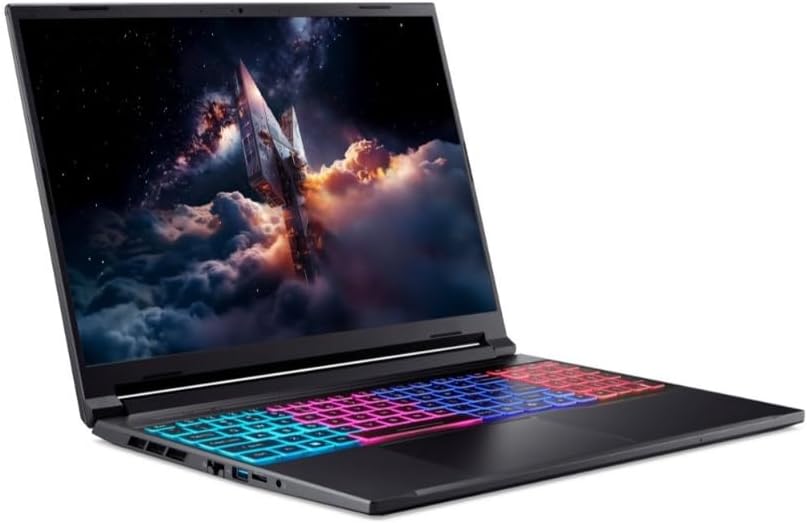
Gambar 2.1: Angled view of the Acer Nitro V 16 Slim gaming laptop, showcasing its sleek design, keyboard, and vibrant display.

Gambar 2.2: Lain angled view of the Acer Nitro V 16 Slim laptop, highlighting its compact form factor and screen.

Gambar 2.3: Top-handap view of the Acer Nitro V 16 Slim laptop's keyboard, featuring multi-zone RGB backlighting and a full numeric keypad.
3. Setélan
- Ngabongkar bungkusan: Carefully remove the laptop and all accessories from the packaging. Ensure all components are present.
- Power-Up mimiti: Connect the AC adapter to the laptop's power port and then to a power outlet. Open the laptop lid and press the power button to turn it on.
- Setup Sistem Operasi: Turutan parentah dina layar pikeun ngalengkepan setelan Windows 11 Home, kalebet pilihan basa, sambungan jaringan, sareng nyieun akun pangguna.
- Apdet parangkat lunak: After initial setup, connect to the internet and check for system and driver updates to ensure optimal performance and security.
4. Ngoperasikeun Laptop Anjeun
tampilan
The 16-inch WUXGA (1920x1200) IPS display features a 180Hz refresh rate, providing smooth visuals for gaming and multimedia. Adjust brightness and display settings through Windows display options.
Kibor sareng Touchpad
The laptop features a full-size keyboard with an RGB backlight. Customize lighting effects through the pre-installed Acer software. The precision touchpad supports multi-touch gestures for intuitive navigation.
Modeu kinerja
Utilize Acer's dedicated software (e.g., NitroSense) to switch between performance modes (e.g., Quiet, Balanced, Performance, Turbo) to optimize CPU/GPU power, fan speed, and overall system behavior based on your current task.
5. Konektipitas
The Acer Nitro V 16 Slim offers a range of ports and wireless connectivity options:
- Port USB: Sababaraha port USB pikeun nyambungkeun periferal.
- HDMI: Pikeun nyambungkeun ka tampilan éksternal.
- Ethernet (RJ-45): Pikeun sambungan jaringan kabel.
- Jack audio: Combined headphone/microphone jack.
- Wi-Fi 6E: High-speed wireless internet connectivity.
- Bluetooth 5.3: Pikeun nyambungkeun asesoris nirkabel.
6. Performance and Cooling
This laptop is equipped with powerful hardware to handle demanding applications and games:
- Prosesor: AMD Ryzen 7 processor 260 for efficient multitasking and processing power.
- Grafik: NVIDIA GeForce RTX 5060 8GB GDDR7 (85W) for high-fidelity gaming and content creation.
- Mémori: 16GB DDR5 5600MHz RAM ensures smooth operation even with multiple applications open.
- Panyimpenan: 512GB PCIe NVMe SSD provides fast boot times and rapid data access.
- Sistim cooling: An advanced cooling system with multiple heat pipes and anti-dust fans is designed to keep the system cool during intense gaming sessions, maintaining optimal performance.
7. Manajemén batré
The laptop's battery provides sufficient power for portable use. For optimal battery life and performance, consider the following:
- Ngecas: Always use the original AC adapter for charging.
- Modeu kakuatan: Adjust Windows power settings to optimize battery life for different usage scenarios.
- Gaming/Intensive Tasks: For best performance during gaming or other demanding tasks, it is recommended to keep the laptop plugged into a power outlet.
8. Pangropéa
Regular maintenance helps ensure the longevity and performance of your laptop:
- beberesih: Use a soft, lint-free cloth to clean the screen and exterior. Avoid harsh chemicals. Regularly clean the keyboard and vents to prevent dust buildup.
- Apdet parangkat lunak: Keep your operating system, drivers, and applications updated to the latest versions.
- Data Cadangan: Regularly back up important data to an external drive or cloud storage.
- Hindarkeun Kaayaan Ekstrim: Do not expose the laptop to extreme temperatures, direct sunlight, or excessive moisture.
9. Cara ngungkulan
If you encounter issues with your laptop, try the following basic troubleshooting steps:
- Henteu aya kakuatan: Pastikeun adaptor AC disambungkeun kalayan pageuh sareng stop kontakna tiasa dianggo. Cobi stop kontak anu sanés.
- Masalah tampilan: Check external monitor connections if applicable. Adjust brightness settings. Restart the laptop.
- Performance Lambat: Close unnecessary applications. Check for background processes. Ensure sufficient free storage space. Update drivers.
- Overheating: Ensure vents are clear and not obstructed. Use the laptop on a hard, flat surface. Adjust performance modes to a cooler setting.
- Masalah parangkat lunak: Restart the application or the laptop. Check for software updates. Reinstall problematic software.
For more complex issues, refer to the official Acer support websitus atanapi ngahubungan layanan palanggan.
10. Spésifikasi
| Fitur | Rincian |
|---|---|
| merek | Acer |
| Ngaran modél | ANV16S-41-R2B9 |
| Ukuran layar | 16 inci |
| Resolusi tampilan | 1920 x 1200 piksel (WUXGA) |
| Refresh Laju | 180Hz |
| Prosésor Brand | AMD |
| Jenis prosésor | AMD Ryzen 7 5800X (Processor 260) |
| Laju prosésor | 3.8 GHz |
| Jumlah prosésor | 8 |
| Ukuran Mémori RAM | 16 GB DDR5 5600MHz |
| Mémori Maksimum Dirojong | 32 GB |
| Ukuran Hard Drive | 512 GB PCIe NVMe SSD |
| GPU | NVIDIA GeForce RTX 5060 8GB GDDR7 (85W) |
| Sistem operasi | Windows 11 Imah |
| Tipe Wireless | Wi-Fi 6E, Bluetooth 5.3 |
| Diwangun-di Webkaméra | HD |
| Laptop Dimensions | 357.7 (W) x 264 (D) x 13.9/19.95 (H) mm |
| Item Beurat | 2.4 kg |
11. Garansi jeung Rojongan
Your Acer Nitro V 16 Slim laptop comes with a 2 Years Carry-in local Singapore Warranty. For warranty claims, technical support, or service inquiries, please contact Acer Official Store support channels. Keep your proof of purchase for warranty validation.
For additional support and resources, visit the official Acer support websitus.


