
Andoer e417fe28-cba1-49bd-8acb-ddcd73b41592
Andoer 4K Digital Video Camera User Manual
Model: e417fe28-cba1-49bd-8acb-ddcd73b41592
1. Bubuka
This user manual provides detailed instructions for operating your Andoer 4K Digital Video Camera. Please read this manual thoroughly before using the camera to ensure proper operation and to maximize its performance. Keep this manual for future reference.
1.1 Eusi pakét
Saatos muka bungkusan, mangga pariksa yén sadaya barang anu didaptarkeun di handap aya sareng dina kaayaan anu saé:
- 1 x Andoer 4K Digital Video Camera
- 2 x NP-40 Li-ion Battery (one pre-installed)
- 1 x Kabel USB
- 1 x Kabel Video
- 1 x Kadali Jauh
- 1 x Kantong Kaméra
- 1 x Buku Panduan (Basa Inggris)

Image: The Andoer 4K Digital Video Camera, remote control, and two NP-40 Li-ion batteries, illustrating the main components included in the package.
2. Fitur Produk
The Andoer 4K Digital Video Camera is equipped with a range of features designed to enhance your video recording and photography experience:
- 4K Ultra HD Video Recording: Capture stunning videos at 4K/30fps and 2.7K/30fps resolutions.
- 56MP Still Image Capture: Produce high-resolution photos up to 56 megapixels (interpolation).
- 3.0 Inch IPS Touchscreen: A rotatable 270° touchscreen for intuitive control and versatile viewdina sudut.
- 18X Digital Zoom: Bring distant subjects closer without compromising image quality.
- IR Peuting Visi: Record clear and natural footage in low-light or dark environments.
- Konektipitas WiFi: Easily connect to your smartphone or tablet via the DV-CAM APP for remote control, live view, jeung file mindahkeun.
- Face Detection & Anti-Shake: Enhance focus and stability for clearer shots.
- Pangrojong Mikropon Éksternal: Hot shoe mount for connecting an external microphone for improved audio quality.
- Dudukan Tripod Standar: 1/4 inch thread for mounting on a tripod or other accessories.

Image: An infographic highlighting the camera's main features including 4K 56MP resolution, 18X Digital Zoom, Face Detection, Night Vision, Dual Outputs, Digital Anti-shake, IPS Touchscreen, WiFi Connection, and Built-in Microphone.
3. Ngamimitian
3.1 Pamasangan Batré sareng Ngecas
The camera uses NP-40 Li-ion batteries. One battery is typically pre-installed. Ensure batteries are fully charged before first use.
- Buka panutup kompartemen batré anu aya di handapeun kaméra.
- Pasangkeun batré NP-40, pastikeun polaritasna leres.
- Tutup panutup kompartemen batré aman.
- To charge, connect the camera to a power source using the provided USB cable. The charging indicator light will illuminate.
- Ngecas parantos réngsé nalika lampu indikator pareum.
3.2 Pamasangan Kartu SD
The camera supports SD/SDHC cards up to 128GB (Class 6 or above recommended, not included).
- Locate the SD card slot, usually on the side or bottom of the camera.
- Insert the SD card with the metal contacts facing the correct direction (refer to the diagram near the slot). Push until it clicks into place.
- Pikeun nyabut, dorong kartu deui lebet deui dugi ka kaluar.
4. Operasi dasar
4.1 Daya Hurung/Pareuman
- Daya Hurung: Open the LCD screen or press the Power button.
- Pareum listrik: Close the LCD screen or press and hold the Power button.
4.2 Ngarékam Pidéo
- Hurungkeun kaméra.
- Ensure the camera is in video recording mode (indicated by an icon on the screen). If not, use the Mode button to switch.
- Press the Record button (usually a red circle) to start recording.
- Pencét deui tombol Rékam pikeun ngeureunkeun rékaman.
4.3 Nyokot Poto
- Hurungkeun kaméra.
- Pastikeun kaméra dina modeu poto.
- Pigura shot anjeun ngagunakeun layar LCD.
- Press the Photo button (often a camera icon or shutter button) to take a picture.
4.4 Fungsi zum
The camera features 18X digital zoom.
- Use the T (Telephoto) button to zoom in.
- Use the W (Wide) button to zoom out.

Image: A visual demonstration of the 18X digital zoom capability, showing how the camera can magnify distant subjects.
4.5 Playback
- In standby mode, press the Playback button (often an arrow icon) to enter playback mode.
- Use the navigation buttons to browse through your recorded videos and photos.
- Press the OK button to play a video or view poto dina layar pinuh.
- Pencét tombol Putar deui pikeun kaluar ti modeu puter.
5. Fungsi Maju
5.1 Sambungan WiFi
The camera supports WiFi connectivity for remote control and file transfer via the DV-CAM APP.
- Download and install the "DV-CAM" APP on your smartphone or tablet from your device's app store.
- On the camera, navigate to the WiFi settings and enable WiFi. The camera's WiFi network name (SSID) and password will be displayed.
- On your smartphone/tablet, go to WiFi settings and connect to the camera's WiFi network using the provided password.
- Open the DV-CAM APP. You can now view hirup footage, control recording, take photos, and download files directly to your mobile device.

Image: A visual representation of the camera's WiFi function, showing a smartphone connected to the camera to view hirup footage or transfer files.
5.2 IR Visi Peuting
The IR Night Vision feature allows you to record in low-light conditions.
- To activate IR Night Vision, locate the IR button or setting in the camera menu.
- When activated, the camera will use infrared light to illuminate the scene, capturing clear black and white footage in darkness.

Image: A side-by-side comparison demonstrating the effectiveness of IR Night Vision, showing a scene in normal light versus the same scene captured in darkness using infrared.
5.3 3.0 Inch IPS Touchscreen
The 3.0-inch IPS touchscreen offers intuitive control and can be rotated 270 degrees for various shooting angles, including self-recording.
- Tap the screen to access menu options or focus.
- Swipe to navigate through playback or menu pages.
- Rotate the screen to face forward for vlogging or self-portraits.
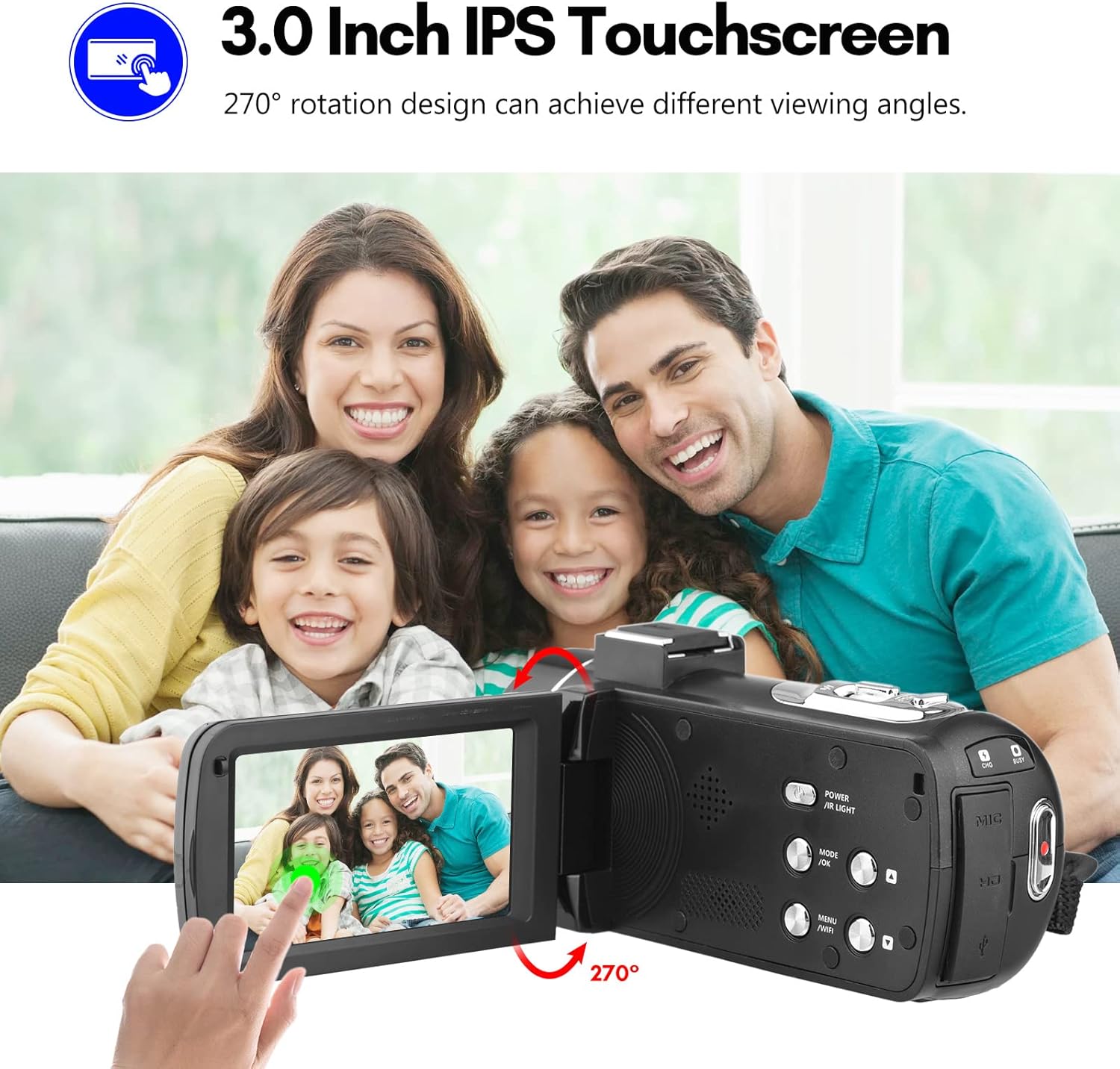
Image: The Andoer camera with its 3.0-inch IPS touchscreen rotated, demonstrating its 270-degree rotation capability for flexible viewing and self-recording.
5.4 Setélan Menu
Access the camera's menu to adjust various settings such as video resolution, photo resolution, white balance, exposure, self-timer, and auto power off.
- Pencét tombol MENU pikeun asup ka ménu setélan.
- Use the navigation buttons or touchscreen to select options.
- Pencét OKÉ pikeun mastikeun pilihan.
- Pencét deui MENU pikeun kaluar.
6. Konektipitas
The camera offers multiple connectivity options for viewing and transferring your media.
6.1 Connecting to a TV (HD Multimedia Interface)
- Pastikeun kaméra dipareuman.
- Connect one end of the HD multimedia interface cable (not explicitly listed in package contents, but mentioned in description) to the camera's HD port and the other end to an HD input on your TV.
- Turn on the TV and select the correct HD input source.
- Turn on the camera. The camera's display will be mirrored on the TV screen, allowing you to view poto sareng video.
6.2 Nyambungkeun ka Komputer (USB)
- Pastikeun kaméra dipareuman.
- Sambungkeun kaméra ka komputer Anjeun nganggo kabel USB nu disadiakeun.
- Turn on the camera. It will typically enter "Mass Storage" or "PC Camera" mode. Select "Mass Storage" to access files.
- The camera will appear as a removable disk drive on your computer, allowing you to transfer files.

Image: An illustration detailing how to connect the Andoer camera to a television via HD multimedia interface and to a computer via USB for viewing and transferring media.
7. Pangropéa
7.1 Ngabersihan Kaméra
- Anggo kaén anu garing sareng lemes pikeun ngabersihan awak kaméra.
- For the lens, use a specialized lens cleaning cloth and lens cleaning solution. Avoid touching the lens with your fingers.
- Ulah make deterjen kuat atawa pangleyur, sabab bisa ngaruksak finish kaméra urang.
7.2 Panyimpenan
- Lamun teu dipaké pikeun période nambahan, cabut batré tina kaméra.
- Simpen kaméra di tempat anu tiis, garing, jauh tina sinar panonpoé langsung sareng suhu anu ekstrim.
- Use the provided camera bag to protect it from dust and scratches.
8. Cara ngungkulan
| Masalah | Mungkin Cukang lantaranana | Solusi |
|---|---|---|
| Kaméra teu hurung. | Batré pareum atawa salah dipasang. | Cas batréna atanapi pasang deui kalayan leres. |
| Teu tiasa ngarékam pidéo / nyandak poto. | SD card is full, locked, or not inserted. | Hapus files, unlock the SD card, or insert an SD card. |
| Kualitas gambar/video goréng. | Lénsa kotor; cahaya teu cekap; setélan salah. | Clean the lens; use IR Night Vision in low light; adjust resolution/exposure settings. |
| Masalah sambungan WiFi. | Incorrect password; APP not installed; distance too far. | Verify password; install DV-CAM APP; move closer to camera. |
9. Spésifikasi
| Fitur | Rincian |
|---|---|
| Sénsor Gambar | CMOS |
| ISO | Otomatis, 100, 200, 400, 800, 1600 |
| Panyimpenan | SD/SDHC Card, max. 128GB (Class 6 or above) |
| Lensa | Fixed, f/2.6, f=7.0mm |
| Jarak Fokus | 0.5m ka takterhingga |
| layar | 3.0 Inch IPS Touchscreen (270° rotation) |
| Photo Format & Resolution | JPG, 56M/ 48M/ 30M/ 24M/ 20M/ 16M/ 12M/ 8M/ 5M |
| Video Format & Resolution | MP4, 4K/30fps, 2.7K/30fps, 1080P/60fps, 1080P/30fps, 720P/60fps, 720P/30fps |
| Zum Digital | 18X |
| Lampu IR | <1.0M |
| Kasaimbangan Bodas | Auto/ Daylight/ Cloudy/ Tungsten/ Fluorescent |
| Kakeunaan | ± 3.0EV |
| Timer Timer | OFF/2s/ 5s/ 10s |
| Daya Otomatis OFF | OFF/ 1min/3min/ 5min/ 10min |
| Mikropon | Built-in, supports external microphone |
| Sasayogian tanaga | 1 x NP-40 Li-ion Battery |
| Batré Kadali Jauh | 2 x Batré AAA (Teu Kaasup) |
| Ukuran kaméra | 12.6 x 5.8 x 5.9cm / 5 x 2.3 x 2.3di |
| Beurat kaméra | 318g / 11.2oz |
10. Garansi jeung Rojongan
For warranty information and technical support, please refer to the official Andoer websitus atanapi ngahubungan layanan palanggan maranéhna. Simpen resi pameseran anjeun salaku bukti pameseran.
You can visit the official Andoer store on Amazon for more information: Andoer Store
11. Émbaran Kasalametan
Punten perhatikeun pancegahan kaamanan di handap ieu pikeun nyegah tatu atanapi karusakan produk:
- Do not expose the camera to extreme temperatures, direct sunlight, or high humidity.
- Jauhkeun kaméra tina cai sareng cairan sanésna.
- Ulah nyobian ngabongkar atanapi ngarobih kaméra. Perbaikan ngan ukur kedah dilakukeun ku petugas servis anu diidinan.
- Keep plastic bags and packaging materials away from babies and children to avoid suffocation hazards.

Image: A multi-language warning label emphasizing the importance of keeping plastic bags away from children to prevent suffocation.
Ask a question about this manual
Ask about setup, troubleshooting, compatibility, parts, safety, or missing instructions. Manuals+ will review the question and use this page’s manual context to help answer it.