1. Bubuka
The LAUNCH X431 CAN FD Adapter Code Reader Cable is designed to facilitate communication between compatible LAUNCH X431 diagnostic tablets and vehicles utilizing the CAN FD (Flexible Data-Rate) communication protocol. This adapter enables advanced diagnostic functions such as reading fault codes, data streams, and other special functions on newer vehicle models.

Image 1: LAUNCH X431 CAN FD Adapter Cable
2. Setup jeung Connection
Follow these steps to properly connect the CAN FD Adapter to your LAUNCH X431 VCI unit and vehicle:
- Step 1: Connect Main Cable to VCI Unit
Connect the main cable's female adapter to the vehicle Data Link Connector (DLC) on the VCI unit. Ensure a secure connection by tightening the captive (thumb) screws. - Step 2: Connect CAN FD Adapter to Main Cable
Connect the CAN FD Adapter's 16-PIN female connector to the main cable's male adapter. - Step 3: Connect CAN FD Adapter to Vehicle's DLC
Connect the attached CAN FD adapter to the vehicle's DLC, which is generally located under the vehicle dashboard.
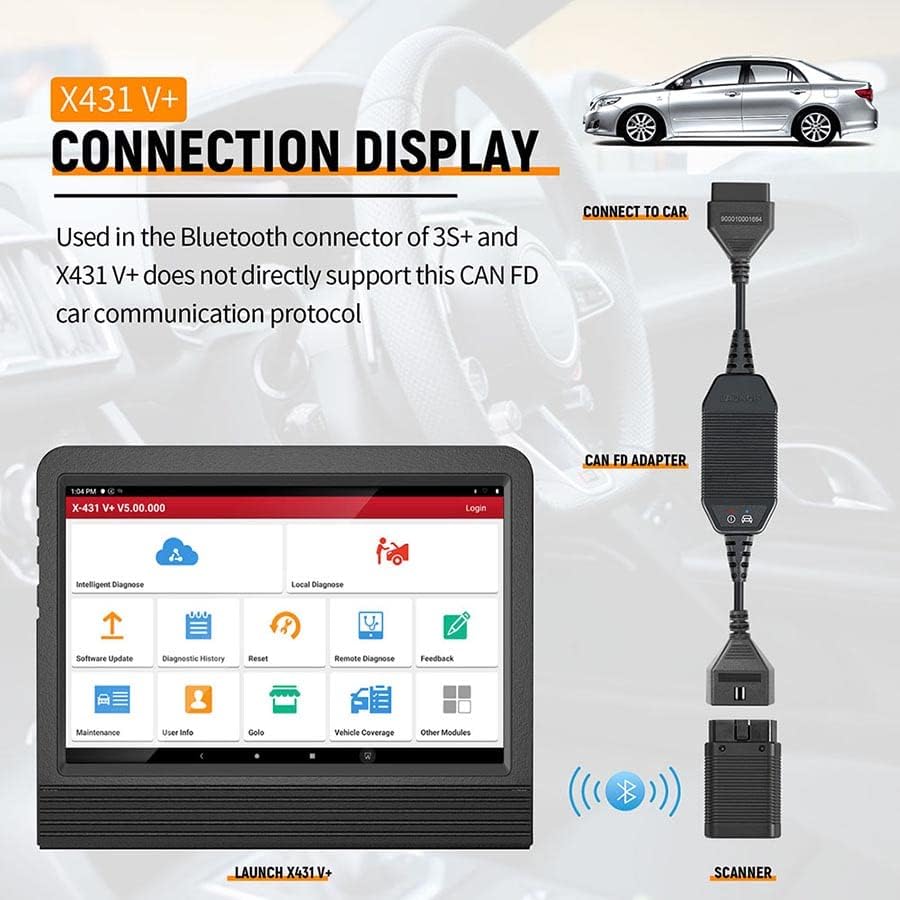
Image 2: Connection diagram showing the CAN FD adapter between the VCI unit and the vehicle's DLC.

Gambar 3: Detil view of the 16-pin connectors on the CAN FD adapter.
Video: Using the LAUNCH X431 PRO3S+ELITE Scanner (Relevant for Adapter Use)
Video 1: This video demonstrates the user interface and diagnostic process of a compatible LAUNCH X431 scanner (PRO3S+ELITE). While not specifically showing the CAN FD adapter connection, it illustrates the scanner's functions that the adapter enables for CAN FD vehicles, such as intelligent diagnosis and system scanning.
3. Operating the CAN FD Adapter
Once the CAN FD adapter is correctly connected, your LAUNCH X431 diagnostic tablet will be able to communicate with CAN FD compatible vehicles. The adapter facilitates the high-speed data transfer required for modern vehicle diagnostics.
Advantages of CAN FD Communication Protocol:
- High Load Support: The CAN FD protocol is designed to support high data loads, reducing the need for frequent data splitting.
- Increased Transfer Rate: CAN FD utilizes a variable data rate, with the highest rate reaching up to 10 MB/s, significantly faster than the traditional CAN protocol's 1 MB/s. This allows for quicker and more efficient diagnostic operations.
4. Kasaluyuan
The LAUNCH X431 CAN FD Adapter is compatible with a range of LAUNCH X431 diagnostic scanners and various vehicle brands:
Compatible LAUNCH X431 Scanners:
- X431 Throttle
- X431 Pad II AE
- X431 Torque
- Turbo X431
- X431 V
- X431 V+
- X431 Pro3
- X431 Pro3S+
- X431 Pad II
- X431 PADIII
- X431 DIAGUN V
- X431 PRO MINI
- X431 PROS MINI
Compatible Vehicle Brands (CAN FD):
The adapter works with CAN FD compatible new vehicles from brands such as:
- GM
- Ford
- AUDI
- BMW
- BMW MINI
- JAGUAR
- LAND ROVER
Catetan:
- The CAN FD adapter is specifically for newer vehicles that utilize the CAN FD protocol.
- It is essential for diagnosing most new vehicles that use the CAN FD protocol.

Image 4: Visual representation of compatible LAUNCH X431 scanners and vehicle brands.
5. Troubleshooting Scenarios
The CAN FD adapter is necessary in specific situations where standard diagnostic tools may not suffice:
- Bluetooth Connector Limitations: The Bluetooth connectors of some LAUNCH X431 models (e.g., X431 3S+ and X431 PADIII) do not directly support the CAN FD car communication protocol. In such cases, this dedicated CAN FD adapter is required to enable communication.
- Newer Vehicle Diagnostics: For certain newer vehicle models (e.g., 2020 Kovoz, Angkola, Chuangku), standard X431 tools may not be able to perform measurements or clear maintenance lights. The CAN FD adapter becomes essential for these vehicles.

Image 5: Illustration of a diagnostic tablet indicating the need for an adapter for certain vehicle models.
6. Spésifikasi
| Fitur | Rincian |
|---|---|
| Nomer Modél Item | 301190750 |
| Tipe Panyambung | 16-pin |
| Jumlah Palabuhan | 1 |
| Warna | Hideung |
| Daya tahan | Stable, durable, and portable design. |
7. Pangropéa
To ensure the longevity and optimal performance of your LAUNCH X431 CAN FD Adapter, please observe the following maintenance guidelines:
- Panyimpenan: Store the adapter in a clean, dry environment away from extreme temperatures and direct sunlight.
- beberesih: Use a soft, dry cloth to clean the adapter and its connectors. Avoid using harsh chemicals or abrasive materials.
- Penanganan: Handle the adapter with care. Avoid dropping it or subjecting it to excessive force, which could damage internal components or connectors.
- Sambungan: Always ensure connectors are properly aligned before pushing them together to prevent bending pins.
8. Garansi jeung Rojongan
The LAUNCH X431 CAN FD Adapter includes:
- Eusi pakét: 1 x LAUNCH X431 CAN FD Connector Car Code Reader and 1 x User Manual.
- Kabijakan pamulangan: Backed by a 30-day no-reason-asked return policy for refund or replacement.
- Garansi: garansi 1 taun.
- Bantosan Téknis: 24-hour technical support is available. For any issues, please contact us via the provided channels.


