Welcome to Your JCLOUD P300 Smart Scent Air Machine
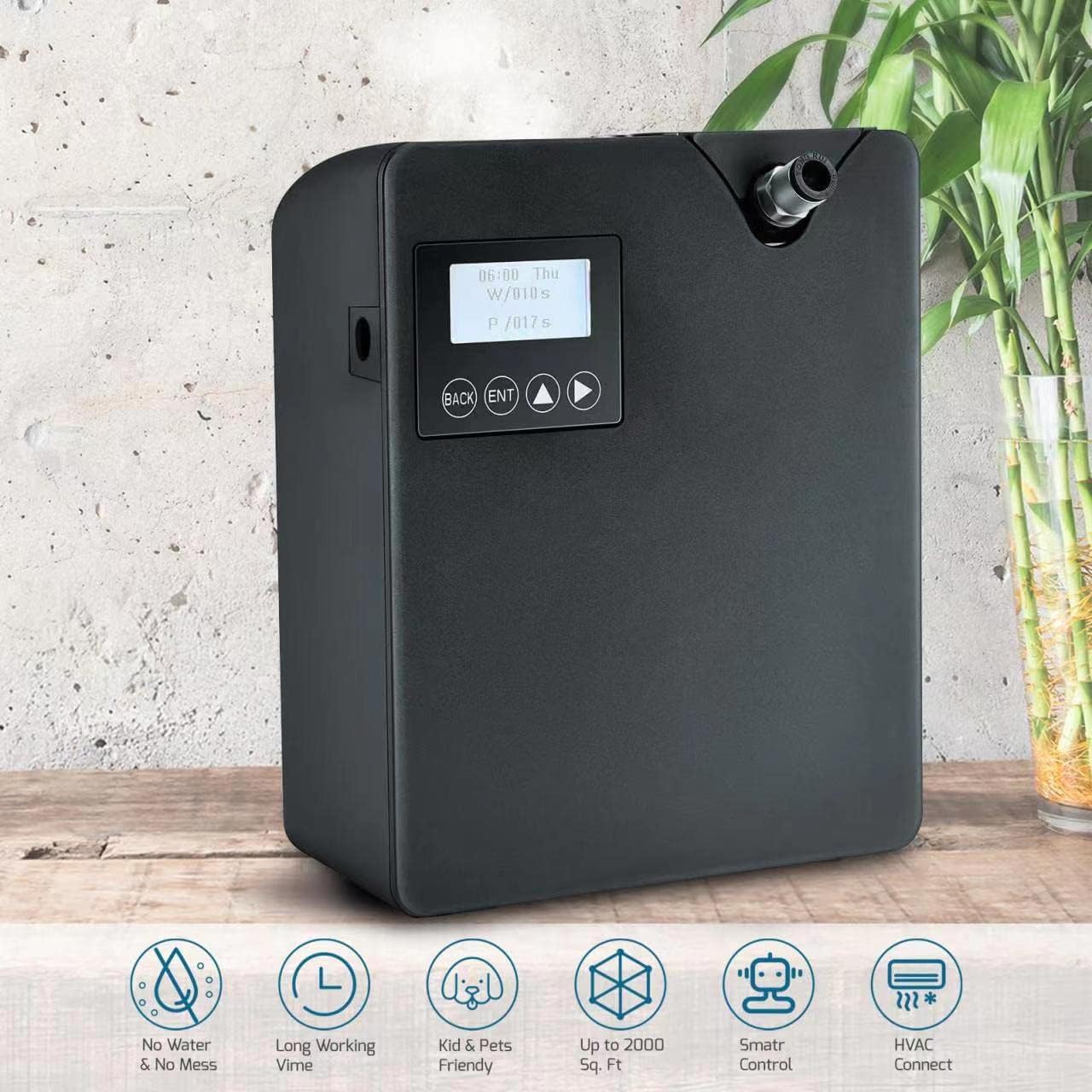
The JCLOUD P300 Smart Scent Air Machine utilizes advanced Cold-Air Diffusion Technology to disperse high-quality fragrance oil micro-droplets throughout your space without heat or water. Designed for efficiency, it consumes less than 0.5ml/h at its highest setting, making it an economical choice for improving air quality and creating a pleasant ambiance. This waterless diffuser is suitable for large rooms, offices, spas, and homes, covering up to 2000 square feet.
Émbaran Kasalametan penting
- Use with caution around children and pets. Avoid direct skin contact with undiluted essential oils.
- Pastikeun alat disimpen dina permukaan datar anu stabil.
- Ulah ngahalangan jalan kaluar atawa jalan asupna hawa nalika dioperasikeun.
- Only use pure essential oils or fragrance oils specifically designed for cold-air diffusers. Do not dilute with water or other substances.
- Jauhkeun alat ieu tina sinar panonpoé langsung, sumber panas, sareng seuneu anu muka.
- Cabut colokan alat sateuacan dibersihkeun atanapi upami teu dianggo salami lami.
Eusi pakét
Mangga cék kotak pikeun item di handap ieu:
- JCLOUD P300 Smart Scent Air Machine Unit
- Adaptor kakuatan
- 300ml Essential Oil Bottle (empty)
- Keys for secure access
- HVAC Connection Hose (for optional HVAC integration)
- Manual pamaké

Disetél
1. Ngeusian Botol Minyak Atsiri
- Unlock the device using the provided key.
- Kaluarkeun botol minyak atsiri anu kosong tina alat éta.
- Carefully unscrew the cap from the essential oil bottle.
- Fill the bottle with your preferred waterless essential oil (up to 300ml capacity). Do not overfill.
- Securely screw the cap back onto the essential oil bottle.
2. Installing the Oil Bottle
- Insert the filled essential oil bottle back into its compartment within the device.
- Ensure the bottle is seated correctly and the top mechanism is securely in place.
- Lock the device using the key to secure the bottle compartment.
3. Sambungan Daya
Connect the power adapter to the device's power port and then plug it into a standard electrical outlet.
Parentah Operasi
Kontrol Manual
If you choose not to use the app, the machine will operate on a default cycle: work for 10 seconds, then pause for 110 seconds, and repeat. Use the physical buttons (BACK, ENT, Up/Down arrows) on the device to adjust basic settings like time and scent grade directly.
- Hurungkeun/Pareuman: Hold down the ENT button.
- Pabrik Reset: Press the 1st and 4th buttons (BACK and Right Arrow) simultaneously, then select 'yes' to reset to factory mode. The APP default password is 1234.
- Setel waktos: Tap the Up Arrow and Right Arrow buttons simultaneously.
- Toggle Fan: Hold down the BACK button.
App Control (Aroma-Link)
For advanced control and customization, download the 'Scent Marketing' app (or 'Aroma-Link' as mentioned in some reviews) from Google Play (Android) or the APP Store (iOS).
- Download & Install: Milarian pikeun 'Scent Marketing' in your device's app store and install it.
- Sambungkeun Alat: Open the app, ensure Bluetooth is enabled on your phone, and follow the on-screen prompts to add your JCLOUD P300 device. The default password for the app is 1234.
- Set Working Schedule: Within the app, you can define specific working times (Power On/Off), days of the week, and scent concentration levels (Work Time in seconds, Suspend Time in seconds).
- Adjust Concentration: Customize the scent intensity by setting the 'Work' and 'Suspend' times. For example, 5 seconds work and 180 seconds pause for a lighter scent.
- Kontrol kipas: The app allows you to toggle the booster fan, which helps disperse fragrance more forcefully.
HVAC Connection (Optional)
The JCLOUD P300 can be integrated with your HVAC system to distribute scent throughout your entire home or commercial space more effectively.
- Locate HVAC Duct: Identify an appropriate location on your HVAC system's outflow ductwork.
- liang bor: Carefully drill a small hole (e.g., 5/16 inch) into the duct.
- Sambungkeun selang: Insert one end of the provided HVAC connection hose into the diffuser's designated port and the other end into the drilled hole in the HVAC duct. Ensure a secure seal (e.g., using plumber's putty).
- Penempatan optimal: For best results, connect the hose to the outflow side of your furnace to prevent the filter from catching the fine mist.

Pangropéa
Refilling Essential Oil
When the essential oil level is low, the device may indicate this on its display or via the app. Follow the steps in the 'Filling the Essential Oil Bottle' section to refill and reinsert the bottle.
beberesih
Periodically clean the exterior of the device with a soft, dry cloth. Do not use harsh chemicals or abrasive materials. Ensure no liquid enters the internal components.
Pitunjuk Ngungkulan
| Masalah | Mungkin Cukang lantaranana | Solusi |
|---|---|---|
| Taya seungit dipancarkeun | Oil bottle empty or incorrectly installed; nozzle clogged; device not powered on. | Check oil level and refill; ensure bottle is correctly seated; verify power connection; clean nozzle if necessary. |
| Device beeps 5 times | Lost Wi-Fi connection or server issue. | Check Wi-Fi connection; if using Bluetooth only, ignore beeps or ensure stable connection. Device will beep once upon reconnection. |
| Condensation in HVAC tube | Tube running downward from device. | Adjust tube placement so it runs upward from the device, allowing condensation to drain back into the bottle. |
| Scent too strong/weak | Incorrect concentration settings. | Adjust 'Work' and 'Suspend' times in the app to achieve desired intensity. |
| Alat teu ngabales | Device frozen or app connectivity issue. | Try factory reset (press 1st and 4th buttons simultaneously); restart app and device. |
Spésifikasi produk
| Fitur | Rincian |
|---|---|
| merek | JCLOUD |
| Ngaran modél | P300 |
| Warna | Hideung |
| Kapasitas | 300 mililiter |
| Wewengkon Cakupan | Nepi ka 2000 suku pasagi |
| Sumber Daya | Kabel Listrik |
| Wattage | 12 watt |
| Fitur husus | Waterless, Cold-Air Diffusion, Smart Bluetooth Control, HVAC Compatible, Kids & Pets Friendly |
| Bahan | palastik |
| Otomatis shutoff | Sumuhun |
| Item Beurat | 2.88 pon |
| Ukuran Paket | 12.28 x 10.2 x 4.96 inci |
Garansi sarta Rojongan Palanggan
Your satisfaction is our top priority. We are committed to providing exceptional customer service. If you encounter any issues or have questions regarding installation, operation, or maintenance of your JCLOUD P300 Smart Scent Air Machine, please contact us.
- Kontak: Refer to the service card included in your package or contact us via Amazon mail.
- Garansi: Information regarding product warranty and return policy is available through your purchase platform.


