
1. Bubuka
Hatur nuhun pikeun meuliasing the Panasonic 27 Litres Convection Microwave Oven, model NN-CT64MBFDG. This appliance is designed to provide versatile cooking options, combining microwave, grill, and convection functions. Please read this manual thoroughly before operating your new oven to ensure safe and efficient use. Keep this manual for future reference.
Key features of your oven include:
- Spacious 27 Litre Capacity: Ideal for families, accommodating larger dishes.
- Téknologi konvéksi: For baking, roasting, and grilling with even heat distribution.
- Sababaraha Modeu Masak: Microwave, Grill, Convection, and Combination cooking.
- Menu Masak Otomatis: Pre-programmed settings for various dishes.
- Fitur husus: Crispy Tawa, Defrost, Magic Grill, Reheat, Rotisserie.
2. Parentah Kasalametan penting
Nalika nganggo alat listrik, pancegahan kaamanan dasar kedah diturutan, kalebet ieu:
- Baca sadaya parentah sateuacan nganggo alat.
- Do not operate the oven if the cord or plug is damaged, if it is not working properly, or if it has been damaged or dropped.
- Ulah panas cair atawa kadaharan séjénna dina wadah disegel sabab bisa ngabeledug.
- Ngan ngawenangkeun barudak ngagunakeun oven tanpa pangawasan lamun parentah nyukupan geus dibikeun ku kituna anak geus bisa ngagunakeun oven dina cara aman tur understands bahaya tina pamakéan teu bener.
- Paké ngan utensils nu cocog pikeun pamakéan dina oven microwave.
- Nalika memanaskeun tuangeun dina wadah plastik atanapi kertas, perhatikeun oven kusabab kamungkinan hurung.
- Upami aya haseup, pareum atanapi cabut colokan alat sareng jaga panto ditutup pikeun mareuman seuneu.
- Ulah overcook dahareun.
- Entong nganggo bahan kimia korosif atanapi uap dina alat ieu.
- Alat ieu dirancang pikeun pemanasan dahareun. Éta henteu dirancang pikeun panggunaan industri atanapi laboratorium.
- Entong nyimpen atanapi nganggo alat ieu di luar.
- Ulah neuleumkeun ari atawa nyolok kana cai.
- Tetep ari jauh ti surfaces dipanaskeun.
- Ulah ngantep ari ngagantung leuwih ujung méja atawa counter.
- Alatna kedah dibersihkeun sacara teratur sareng tuangeun tuangeun.
- Gagalna ngajaga oven dina kaayaan bersih tiasa ngakibatkeun deterioration permukaan anu tiasa ngabahayakeun kahirupan alat sareng tiasa nyababkeun kaayaan bahaya.
3. Setup jeung Instalasi
3.1 Ngabongkar bungkusan
Carefully remove the microwave oven and all packing materials from the carton. Check the oven for any damage, such as dents or a misaligned door. If any damage is found, do not operate the oven and contact your dealer immediately.
Komponén anu kalebet:
- 1 x Unit Oven Microwave
- 1 x Manual Pamaké
- Turntable and Ring
- Raka Panggang
3.2 Nempatkeun
Place the oven on a flat, stable surface that can support its weight and the heaviest food likely to be cooked in it. Ensure adequate ventilation by leaving a minimum of 20 cm (8 inches) of space above the oven, 10 cm (4 inches) at the rear, and 5 cm (2 inches) on each side. Do not block any ventilation openings.
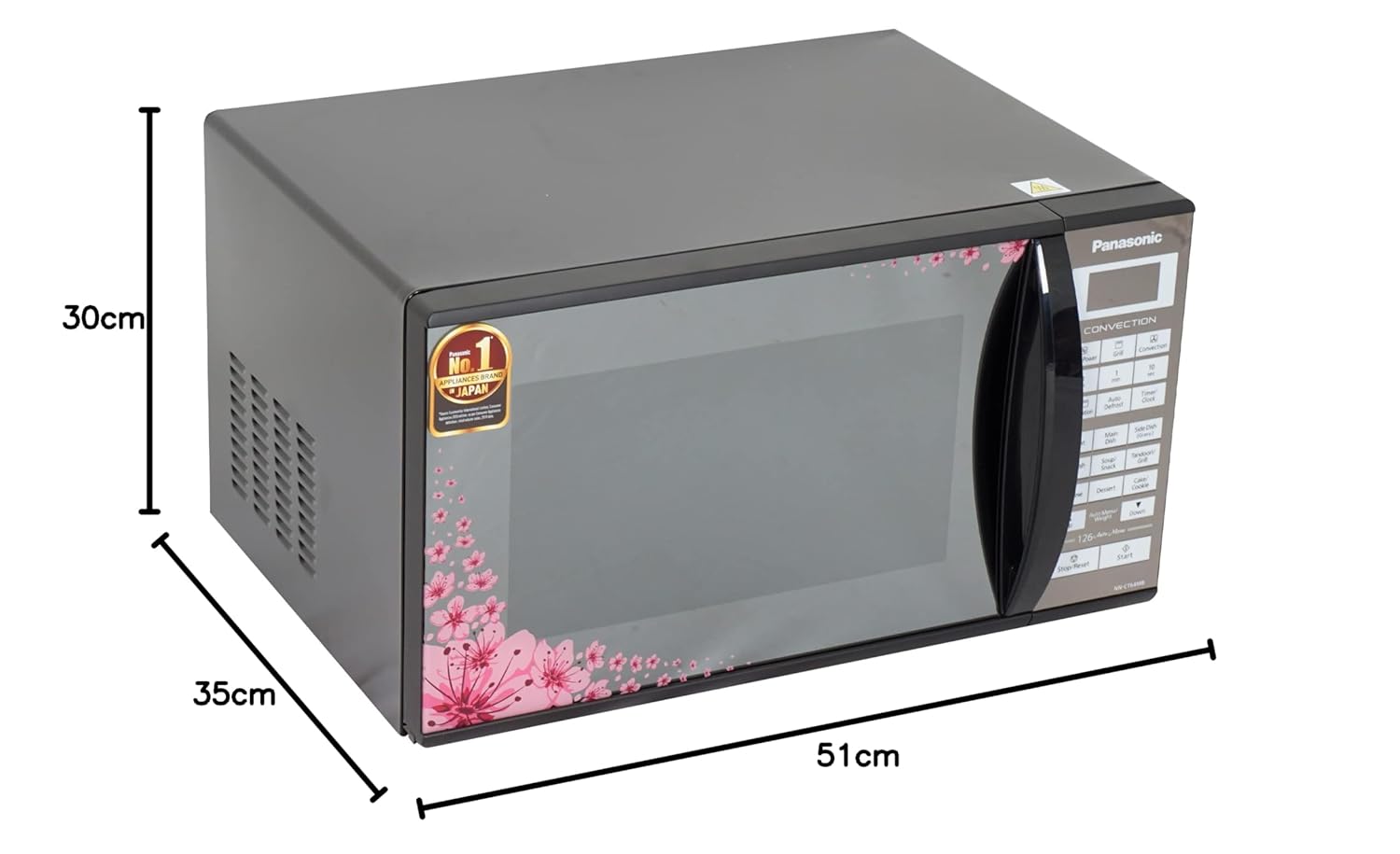
Image: Panasonic Microwave Oven showing dimensions (51cm width, 35cm depth, 30cm height). This illustrates the compact design and helps in planning placement.
3.3 Sambungan Listrik
Ensure the power outlet is properly grounded. Plug the oven into a dedicated 3-prong grounded outlet. Do not use extension cords or adapters. The oven operates on a standard household electrical supply.

Gambar: Tukangeun view of the Panasonic Microwave Oven, highlighting the power cord connection and rear ventilation grilles. This view is important for understanding proper installation and airflow requirements.
4. Parentah Operasi
4.1 Control Panel Leuwihview
The control panel features a digital display, function buttons, time/weight adjustment buttons, and Start/Stop controls. Familiarize yourself with the layout before operation.
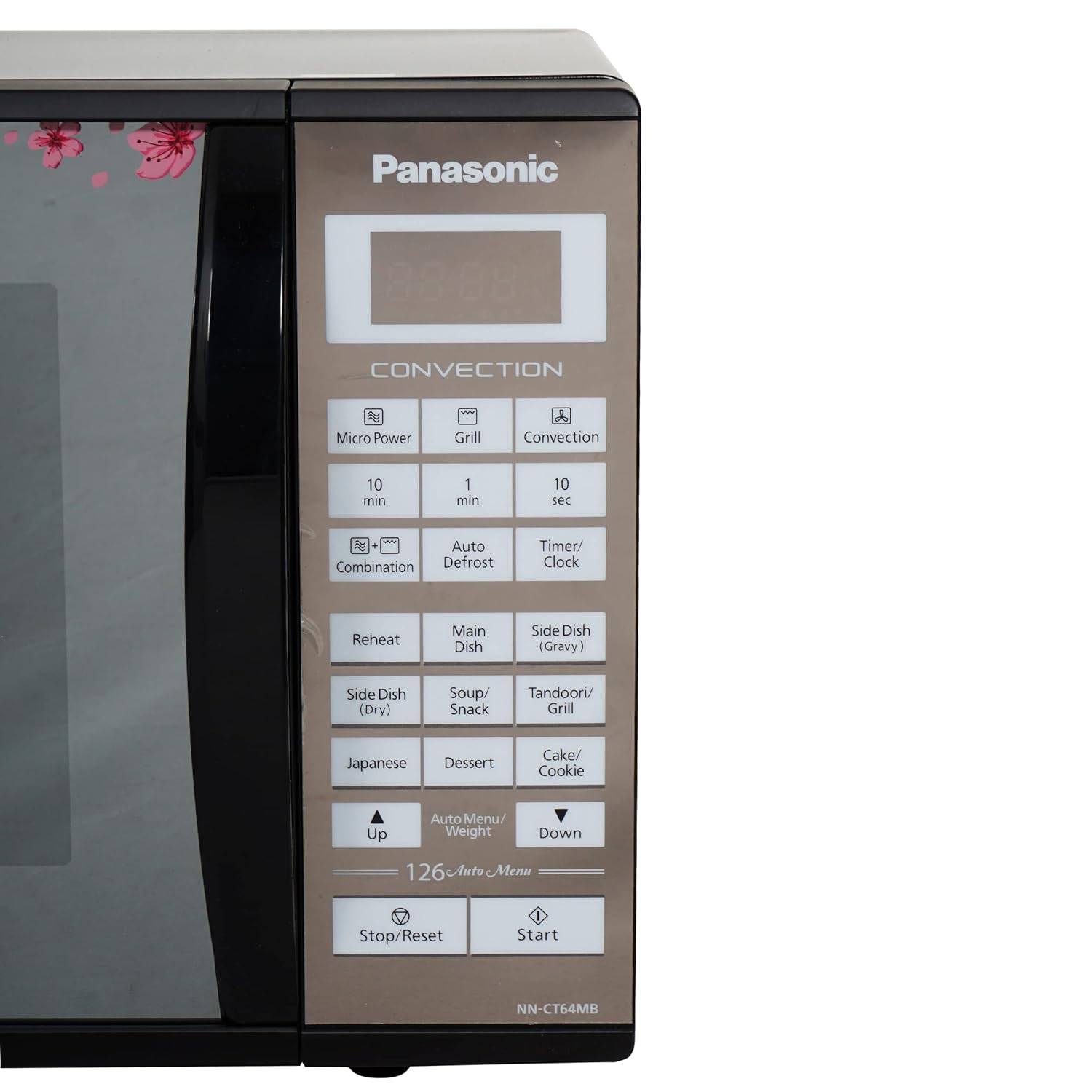
Image: Close-up of the Panasonic Microwave Oven's control panel, showing buttons for Micro Power, Grill, Convection, Combination, Auto Defrost, Timer/Clock, Reheat, and various Auto Menu options. This visual aid helps users locate specific functions.
4.2 Dasar microwave masak
- Teundeun dahareun dina wadah microwave-aman di jero oven.
- Tutup panto oven aman.
- Press the 'Micro Power' button.
- Use the '10 min', '1 min', '10 sec' buttons or 'Up/Down' arrows to set the desired cooking time.
- Pencét 'Mimitian'.
4.3 Convection masak
Modeu konveksi ngagunakeun kipas pikeun ngiderkeun hawa panas, idéal pikeun manggang sareng ngasang.
- Place food on the grill rack (if applicable) in the oven.
- Pencét tombol 'Konvéksi'.
- Set the desired temperature using the 'Up/Down' arrows.
- Setel waktos masak.
- Press 'Start'. The oven will preheat to the set temperature. Once preheated, a beep will sound. Place food inside and press 'Start' again.
4.4 Masak grill
Use the grill function for browning and crisping.
- Teundeun dahareun dina rak grill.
- Pencét tombol 'Grill'.
- Setel waktos masak anu dipikahoyong.
- Pencét 'Mimitian'.
4.5 Otomatis Defrost
This feature automatically defrosts food based on weight.
- Teundeun kadaharan beku dina oven.
- Pencét tombol 'Pencairan Otomatis'.
- Use the 'Up/Down' arrows to select the food type and enter the weight.
- Pencét 'Mimitian'.
4.6 Ménu Otomatis
The oven includes various pre-programmed auto menus for convenience. Refer to the control panel for specific menu options like 'Side Dish (Dry)', 'Soup/Snack', 'Japanese', 'Dessert', 'Cake/Cookie', 'Tandoori/Grill', 'Reheat', 'Main Dish', 'Side Dish (Gravy)'.
- Press the 'Auto Menu/Weight' button repeatedly or use 'Up/Down' arrows to select the desired menu.
- Adjust the weight or quantity if prompted.
- Pencét 'Mimitian'.
5. Perawatan sareng Pangropéa
5.1 Ngabersihan Oven Interior
Regularly clean the oven interior to prevent food residue buildup. Wipe the interior with a damp cloth and mild detergent after each use. For stubborn stains, place a bowl of water with lemon juice inside and microwave for a few minutes to loosen the residue, then wipe clean.
5.2 Ngabersihan Oven Exterior
Ngusap permukaan luar kalayan lemes, damp cloth. Avoid abrasive cleaners or harsh chemicals that may damage the floral mirror finish. Ensure the control panel is kept dry.
5.3 Asesoris beberesih
The glass turntable and turntable ring can be washed in warm, soapy water or in a dishwasher. The grill rack should be cleaned with warm, soapy water and a non-abrasive sponge.
6. Cara ngungkulan
If you encounter problems with your oven, refer to the following table for common issues and solutions. If the problem persists, contact customer service.
| Masalah | Mungkin Cukang lantaranana | Solusi |
|---|---|---|
| Oven henteu ngamimitian | Kabel listrik henteu dipasang; Panto teu ditutup leres; Fuse ditiup atawa circuit breaker tripped. | Pastikeun colokan aman dina stop kontak; Tutup panto pageuh; Pariksa sekering rumah tangga / circuit breaker. |
| Dahareun teu masak merata | Food not stirred or turned; Incorrect power level or cooking time; Food placed too close to oven walls. | Stir or turn food during cooking; Adjust power level/time; Ensure proper spacing. |
| Cahaya henteu jalan | Bohlam perlu diganti. | Kontak tanaga layanan mumpuni pikeun ngagantian bohlam. |
| Uap kaleuleuwihan dina oven | Eusi Uap anu luhur dina dahareun. | Ieu normal pikeun pangan kalayan Uap luhur. Ngusap interior saatos dianggo. |
7. Spésifikasi
| Fitur | Spésifikasi |
|---|---|
| merek | Panasonic |
| Ngaran modél | NN-CT64MBFDG |
| Kapasitas | 27 Liter |
| Warna | Floral Mirror Finish |
| Métode pemanasan | Padumukan |
| Tipe Pamasangan | Countertop |
| Wattage | 900 KW |
| Fitur husus | Crispy Tawa, Defrost, Magic Grill, Reheat, Rotisserie |
| Fungsi Timer | sadia |
| Orientasi panto | Kénca |
| Ukuran barang (D x W x H) | 51D x 30W x 35H Sentimeter |
| Jenis Bahan | Alloy Steel |
8. Garansi jeung Rojongan
This Panasonic microwave oven comes with a standard manufacturer's warranty. Please refer to the warranty card included with your purchase for specific terms, conditions, and duration. Keep your purchase receipt as proof of purchase for warranty claims.
For technical assistance, service, or to inquire about replacement parts, please contact Panasonic customer support. Contact details can typically be found on the Panasonic official websitus atanapi dina dokuméntasi jaminan.