Bubuka
This manual provides detailed instructions for the setup, operation, and maintenance of your ALLIMITY XMRM-19 Voice Remote Control. This remote is designed as a replacement and is compatible with various Xiaomi MI P1 4K OLED LCD TV models, including L32M6-6AEU, L43M6-6AEU, L50M6-6AEU, L55M6-6AEU, L-43M7-7AEU, and L32M7. Please read this manual carefully to ensure proper use and to maximize your remote control's functionality.
Disetél
1. Pamasangan batré
The ALLIMITY XMRM-19 remote control requires two (2) AAA batteries (not included). Follow these steps to install them:
- Teangan tempat panutup kompartemen batré dina tonggong kadali jauh.
- Geser panutup ka handap atawa pencét kancing (upami aya) pikeun muka kompartemen.
- Selapkeun dua batré AAA, mastikeun terminal positif (+) jeung négatip (-) align bener jeung markings jero kompartemen nu.
- Ganti panutup kompartemen batré ku cara ngageser deui kana tempatna nepi ka klik aman.

Salawasna anggo batré anyar sareng gentos duanana batré dina waktos anu sami. Ulah nyampur batré lami sareng énggal atanapi jinis batré anu béda.
2. Papasingan parentah
The XMRM-19 is a voice remote and requires pairing with your Xiaomi MI TV before use. Follow these steps to pair your remote:
- Ensure your Xiaomi MI TV is powered on.
- Point the remote control towards your TV.
- Pencét sareng tahan sakaligus Tombol imah (often represented by a house icon or 'm' for Mi) and the Tombol deui (represented by an arrow pointing left) for approximately 5-10 seconds.
- Release the buttons when you hear a beep or see a pairing confirmation message on your TV screen.
- Remote ayeuna kedahna parantos dipasangkeun sareng siap dianggo.

If pairing fails, ensure the batteries are correctly installed and try the process again. Make sure there are no obstructions between the remote and the TV during pairing.
Parentah Operasi
Once paired, your ALLIMITY XMRM-19 remote control provides full functionality for your compatible Xiaomi MI TV. Below is an overview of key buttons and their functions:
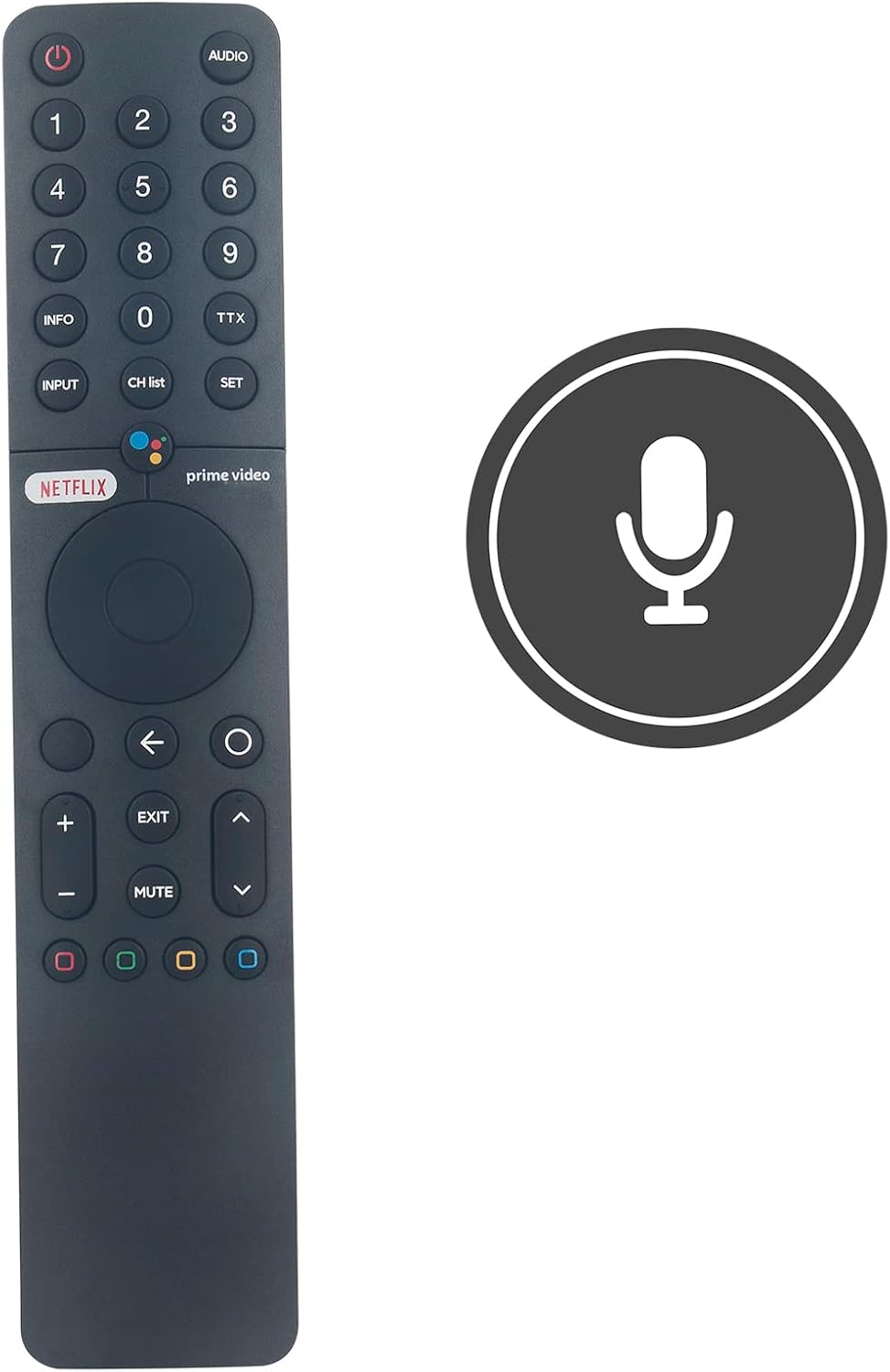
- Tombol Daya (⏻): Hurungkeun atawa mareuman TV.
- Voice Assistant Button (●●●●): Activates the voice control feature for commands and searches.
- Tombol Nomer (0-9): Direct channel selection or input for numerical data.
- INPUT: Siklus ngaliwatan sumber input sadia (HDMI, AV, jsb).
- CH DAFTAR: Mintonkeun daptar saluran.
- SETELAN: Ngaksés menu setelan TV.
- Tombol Netflix: Aksés langsung ka aplikasi Netflix.
- Tombol Video Perdana: Direct access to the Amazon Prime Video application.
- Navigation Pad (Circular): Dipaké pikeun nganapigasi ménu jeung milih item.
- Tombol Balik (←): Mulih ka layar atawa menu saméméhna.
- Home Button (m): Mulih ka layar utama TV.
- Volume Kaluhur/Turun (+/-): Nyaluyukeun polumeu TV.
- Tombol Jempé: Ngajempékeun atanapi nganonaktipkeun audio TV.
- Saluran luhur/handap (⌃/⌄): Robah saluran.
- Tombol Warna (Beureum, Héjo, Konéng, Biru): Functionality varies depending on the application or TV menu.
Fungsi Kontrol Sora
To use the voice control feature, press the Voice Assistant button (multi-colored dots) and speak clearly into the microphone located on the remote. You can use voice commands to search for content, open apps, control playback, and more.

Pangropéa
Ngagantian batré
If the remote control becomes unresponsive or its range decreases, the batteries may need to be replaced. Refer to the "Battery Installation" section for instructions on how to replace the AAA batteries. Dispose of used batteries responsibly according to local regulations.
beberesih
Pikeun ngabersihkeun kadali jauh, usap pabeungeutannana kalayan lembut sareng kaen garing. Keur kokotor bandel, rada dampen the cloth with water or a mild, non-abrasive cleaner. Avoid using harsh chemicals, solvents, or abrasive materials, as these can damage the remote's finish or internal components. Ensure no liquid enters the remote control.
Pamérésan masalah
If you encounter issues with your ALLIMITY XMRM-19 remote control, try the following troubleshooting steps:
- Jauh Teu Ngabales:
- Pariksa naha batréna parantos dipasang kalayan leres sareng gaduh muatan anu cekap. Ganti upami diperyogikeun.
- Pastikeun teu aya halangan antara remot kontrol sareng panarima infrabeureum TV.
- Re-pair the remote control with your TV by following the "Pairing Instructions" in the Setup section.
- Kontrol Sora Teu Gawé:
- Ensure the remote is properly paired with your TV. Voice functionality relies on a Bluetooth connection.
- Nyarios sacara jelas sareng langsung kana mikropon.
- Pariksa setélan TV anjeun pikeun mastikeun kontrol sora diaktipkeun.
- Tombol-tombolna Henteu Fungsina Leres:
- Clean the remote control to remove any dirt or debris that might be interfering with button presses.
- Upami ngan ukur tombol-tombol khusus anu henteu tiasa dianggo, éta tiasa nunjukkeun masalah perangkat keras.
If these steps do not resolve the issue, please refer to the "Warranty and Support" section for further assistance.
spésifikasi
| Nomer modél | XMRM-19 (BJKJ-XMRM-19-Voice-JKJB) |
| Alat nu cocog | Xiaomi MI P1 4K OLED LCD TVs (L32M6-6AEU, L43M6-6AEU, L50M6-6AEU, L55M6-6AEU, L-43M7-7AEU, L32M7) |
| Sumber Daya | 2 x Batré AAA (teu kalebet) |
| Dimensi produk | 4.72 x 1.57 x 0.24 inci (12 x 4 x 0.6 cm) |
| Item Beurat | 2 ons (kira-kira 56.7 gram) |
| Fitur husus | Voice Control, No Programming Required (after initial pairing) |
Garansi sareng Rojongan
For any questions, concerns, or issues not covered in this manual, please contact ALLIMITY customer support. Details regarding warranty coverage and support channels are typically provided with your purchase documentation or can be found on the manufacturer's official websitus. Punten tahan bukti pameseran anjeun pikeun klaim garansi.


