Bubuka
This user manual provides detailed instructions for the safe and efficient operation, maintenance, and troubleshooting of your Cecotec Power Matic-ccino 6000 Bianca S super-automatic coffee machine. Please read this manual thoroughly before first use and keep it for future reference.
Parentah Kasalametan penting
- Salawasna pastikeun mesin disambungkeun ka stop kontak kakuatan grounded.
- Entong neuleumkeun alat, kabel listrik, atanapi nyolok kana cai atanapi cairan sanésna.
- Jauhkeun alat tina jangkauan barudak.
- Cabut colokan mesin sateuacan dibersihkeun atanapi upami teu dianggo salami lami.
- Ulah ngajalankeun mesin lamun ari kakuatan atawa colokan ruksak.
- Paké ngan tiis, cai tawar dina tank cai.
- Never put anything other than coffee beans in the bean hopper.
- Ati-ati kana permukaan anu panas sareng uap salami operasi.
Produk Leuwihview
The Cecotec Power Matic-ccino 6000 Bianca S is a super-automatic coffee machine designed for preparing espresso and American coffee from freshly ground beans. It features a 19-bar pressure pump, Thermoblock heating system for rapid heating, and an intuitive LCD screen for easy operation.

Gambar 1: Hareupeun view of the Cecotec Power Matic-ccino 6000 Bianca S, showing two espresso shots being dispensed into cups.

Gambar 2: Detil view of the machine's LCD control panel and function buttons, indicating various coffee options and settings.
Disetél
1. Unboxing jeung panempatan
- Taliti miceun sadaya bahan bungkusan.
- Place the machine on a stable, flat, and dry surface, away from heat sources and water splashes.
- Pastikeun ventilasi anu cekap di sakitar mesin.
2. Ngeusian Tangki Cai
- Cabut bak cai tina tukang mesin.
- Eusian tangki ku cai ketok anu seger sareng tiis dugi ka indikator tingkat MAX.
- Ngaganti tank cai aman.
3. Ngeusian Hopper Biji Kopi

Figure 3: Coffee beans being added to the machine's integrated hopper, which feeds the conical grinder.
- Buka tutup hopper biji kopi anu aya dina luhureun mesin.
- Pour fresh coffee beans into the hopper. The hermetic reservoir has a capacity of 250g.
- Close the lid to maintain the aroma and freshness of the beans.
4. Power Connection and Initial Rinse
- Colokkeun kabel listrik kana stop kontak listrik anu cocog.
- Hurungkeun mesin nganggo tombol daya.
- The machine will perform an automatic rinse cycle. Place a container under the coffee spout to collect the water.
- Wait for the machine to complete the rinse cycle and indicate it is ready for use.
Parentah Operasi
1. Control Panel Leuwihview
The intuitive LCD screen and buttons allow for easy selection and customization of your beverages. Refer to Figure 2 for a visual guide to the control panel.
2. Making Espresso and American Coffee

Figure 4: A single espresso shot being dispensed, showcasing the adjustable coffee spout height.
- Place one or two cups under the coffee spout. The spout height is adjustable from 10.5 cm to 15 cm.
- Select your desired coffee type (e.g., Espresso, Americano) from the LCD menu.
- Press the corresponding button to start brewing. The machine will automatically grind the beans and dispense the coffee.
3. Customizing Your Coffee
The machine allows you to customize and memorize the quantity, intensity, and temperature of your coffee.

Figure 5: Visual representation of the machine's customizable settings for coffee preparation.
- Navigate through the menu using the arrow buttons on the control panel.
- Adjust settings such as grind level (using the conical grinder adjustment knob), coffee volume, and temperature according to your preference.
- Simpen setelan nu Anjeun pikaresep pikeun pamakéan hareup.
4. Ngagunakeun Kopi Pra-Ground
The machine includes an independent inlet for pre-ground coffee, ideal for decaffeinated options.
- Buka kompartemen kopi anu tos digiling.
- Add one scoop of pre-ground coffee. Do not overfill.
- Select the pre-ground coffee option on the control panel before brewing.
5. Milk Frothing and Hot Water Dispensing

Figure 6: The adjustable steam wand being used to froth milk for lattes and cappuccinos.
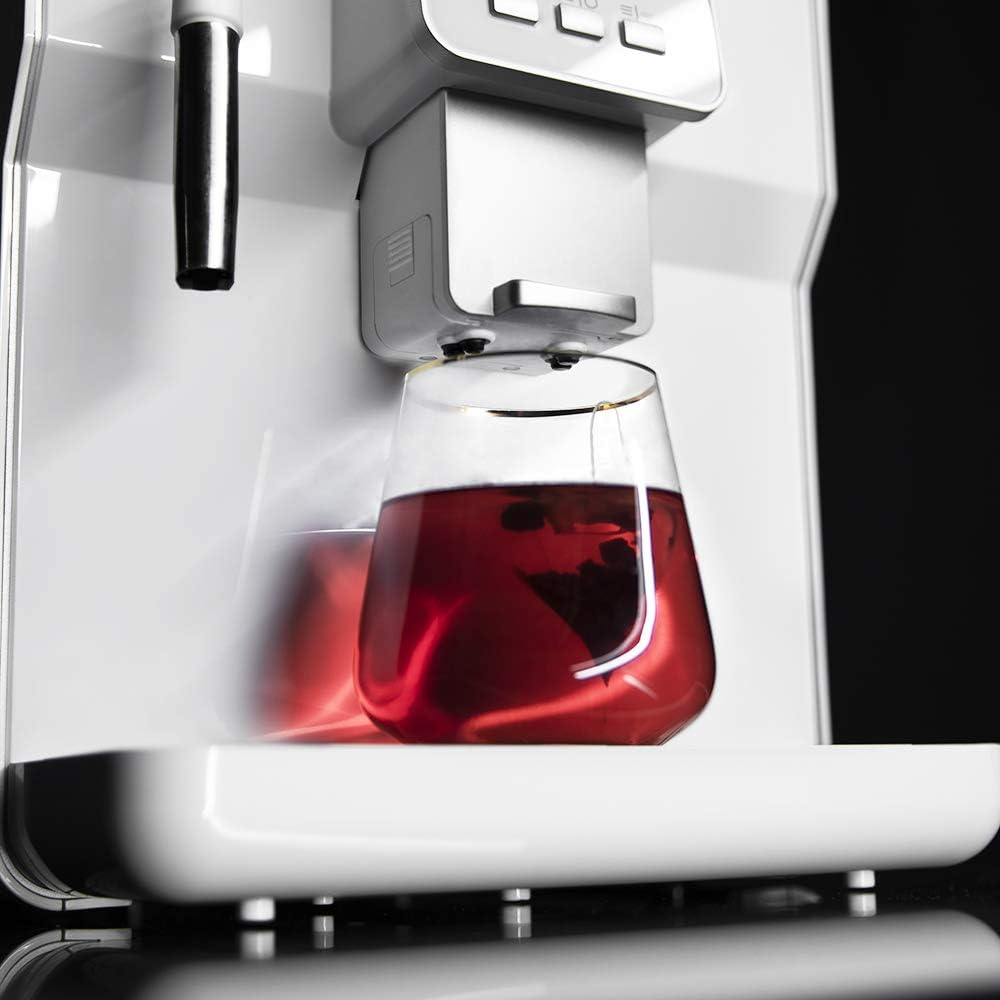
Figure 7: Hot water being dispensed from the machine, suitable for infusions or tea.
- To froth milk, place a pitcher with cold milk under the adjustable steam wand.
- Activate the steam function from the control panel. Move the pitcher to create desired foam.
- To dispense hot water, place a cup under the steam wand and select the hot water function.
- Always clean the steam wand immediately after use to prevent milk residue buildup.
Pangropéa
Regular cleaning and maintenance ensure the longevity and optimal performance of your coffee machine. The machine features an AlwaysClean system for easy maintenance.
1. beberesih poean
- Baki netes: Empty and clean the removable drip tray daily. The floating indicator will show when it's full.
- Wadah Kopi: Empty and clean the coffee grounds container when prompted by the machine or daily, whichever comes first.
- Tangki cai: Bilas tangki cai sacara rutin.
- Seblak Kopi: Ngusap spout kopi kalayan iklanamp lawon.
2. Turun
Descaling penting pisan pikeun ngaleungitkeun akumulasi mineral sareng ngajaga efisiensi mesin. Frékuénsi gumantung kana karasa cai sareng pamakean.
- Use a descaling solution recommended for coffee machines.
- Follow the instructions provided with the descaling solution and the machine's display prompts for the descaling process.
- Rinse the machine thoroughly after descaling.
3. Ngabersihan Unit Brewing
The brewing unit should be cleaned periodically.
- Pareuman teras cabut mesin.
- Remove the brewing unit according to the instructions in the full manual (not provided here, but implied by "easily removable").
- Rinse the brewing unit under lukewarm running water. Do not use detergents.
- Ngidinan nepi ka hawa garing lengkep saméméh reinserting.
Pamérésan masalah
Bagian ieu ngabahas masalah umum anu anjeun tingali. Pikeun masalah nu leuwih kompleks, kontak rojongan customer.
| Masalah | Mungkin Cukang lantaranana | Solusi |
|---|---|---|
| No coffee dispensed / Machine not brewing | Water tank empty; Coffee beans hopper empty; Brewing unit clogged. | Fill water tank; Fill coffee beans; Clean brewing unit. |
| Kopi lemah teuing | Grind setting too coarse; Not enough coffee used; Brewing unit dirty. | Adjust grind to finer setting; Increase coffee intensity setting; Clean brewing unit. |
| Milk frother not producing foam | Steam wand clogged; Milk not cold enough; Incorrect milk type. | Clean steam wand thoroughly; Use cold milk (dairy or suitable plant-based); Ensure proper technique. |
| Mesin bocor cai | Water tank not properly seated; Drip tray full; Internal component issue. | Pasang deui tangki cai; Kosongkeun wadah tetesan; Hubungi dukungan palanggan upami masalahna masih aya. |
| Pesen kasalahan dina LCD | Specific error code indicates problem. | Refer to the machine's display for specific instructions or consult the full manual for error code definitions. |
spésifikasi
| Fitur | Rincian |
|---|---|
| merek | Cecotec |
| Nomer modél | 01639 |
| Warna | Bianca Series |
| Ukuran (L x W x H) | 47.5 x 33.5 x 42 cm |
| Beurat | 10 kg |
| Kapasitas Tangki Cai | 1.7 liter |
| Kakuatan | 1350 Watt |
| Pompa tekanan | 19 Bar (Teknologi ForceAroma) |
| Kopi Bean Hopper Kamampuh | 250g |
| Fitur husus | Integrated Coffee Grinder, Milk Frother, Automatic Stop Function, Energy Saving System, AlwaysClean System |
| Adjustable Coffee Spout Height | 10.5 cm nepi ka 15 cm |
| Kasadiaan suku cadang | 10 Taun |
Garansi sareng Rojongan
Kanggo inpormasi garansi, dukungan téknis, atanapi pamenta jasa, mangga tingal kartu garansi anu kalebet dina produk anjeun atanapi kunjungan ka Cecotec resmi. websitus. Simpen bukti pameseran anjeun pikeun klaim garansi.
Cecotec is committed to providing technology at an honest cost. Spare parts are available for up to 10 years.


