1. Bubuka
This manual provides detailed instructions for the MoreJoy Smartwatch, Model MJ221. This device is designed to monitor various health metrics and provide smart notifications, compatible with both iPhone and Android smartphones. Please read this manual thoroughly before using the product to ensure proper operation and maintenance.

Figure 1: MoreJoy Smartwatch, showcasing tampilan pasagi panjangna sareng tali hideungna.
2. Fitur konci
The MoreJoy Smartwatch offers a range of functionalities to enhance your daily life and health monitoring:
- Large 1.7-inch Touch Screen: Features a 1.7-inch (4.3 cm) rectangular touch screen with a resolution of 240 x 280 pixels, providing a wide display area for clear viewing of information, calls, and notifications.
- Pangimeutan Kaséhatan: Integrates a comprehensive health tracking system including heart rate, blood pressure, and blood oxygen (SpO2) monitoring. It also tracks sleep patterns, distinguishing between deep and light sleep phases. Note: The data collected by this device is for reference only and cannot be used for medical diagnosis or treatment.
- Bewara pinter: Displays incoming calls, text messages, and app notifications directly on your wrist, accompanied by vibration alerts.
- Tahan cai IP68: Designed with an IP68 waterproof rating, making it suitable for activities such as swimming, rinsing, bathing, and enduring sweat without damage.
- Multiple Sport Modes: Supports 20 different sport modes to track various physical activities.
- Hirup batré anu panjang: Offers up to 7 days of typical use and approximately 20 days of standby time on a full charge.
- Kasaluyuan lega: Compatible with smartphones running iOS 9.0/Android 4.4 and above.
- Alat tambahan: Includes practical functions such as a timer, stopwatch, wake-up gesture, phone finder, sedentary reminder, and music control.
- Beungeut arloji anu tiasa disaluyukeun: Allows users to personalize the watch face to match their style.
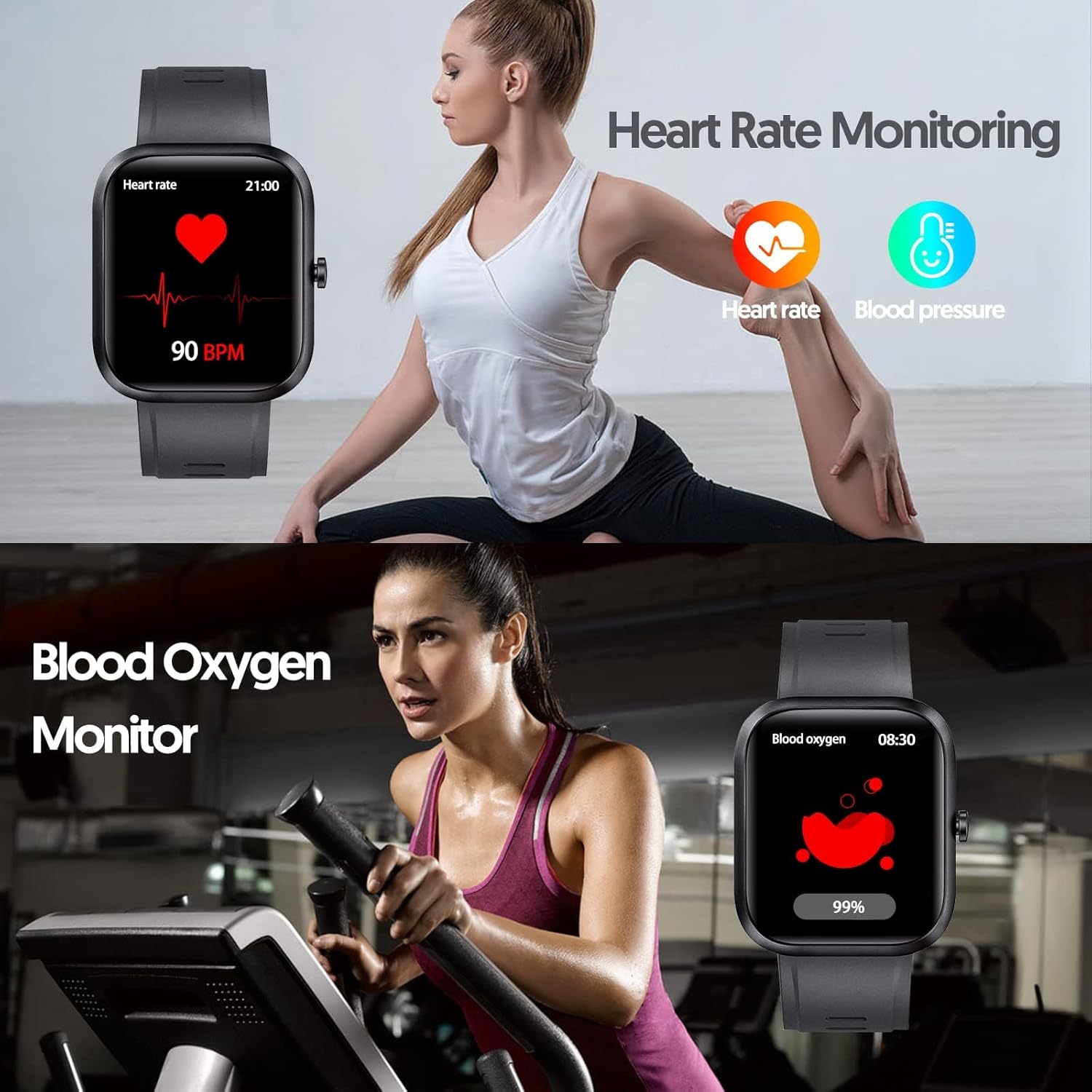
Figure 2: Illustration of the smartwatch's heart rate and blood oxygen monitoring capabilities.

Figure 3: Depiction of the automatic sleep quality monitoring feature, showing deep, light, and awake hours.

Figure 4: Visual representation of the smartwatch's IP68 water resistance, suitable for swimming, rinsing, bathing, and sweat.
3. Setup Guide
3.1 Ngecas Awal
Before first use, fully charge your MoreJoy Smartwatch. Connect the charging cable to the charging port on the back of the watch and plug the USB end into a standard USB power adapter (not included) or a computer's USB port. The watch display will indicate charging status.
3.2 Pamasangan Aplikasi
To unlock the full functionality of your smartwatch, you need to install the companion application on your smartphone. The specific app name is typically provided in the product packaging or a small quick start guide. If you cannot locate it, search for "MoreJoy Smartwatch" or scan a QR code if provided on the watch screen or packaging. Ensure your smartphone meets the compatibility requirements (iOS 9.0/Android 4.4 or above).
3.3 Masangkeun sareng Smartphone Anjeun
- Pastikeun Bluetooth diaktipkeun dina smartphone Anjeun.
- Open the installed companion app on your smartphone.
- Turutan parentah dina-aplikasi pikeun nambahkeun alat anyar. Aplikasi bakal milarian jam tangan pinter anu sayogi.
- Select "MoreJoy MJ221" or the corresponding device name from the list.
- Confirm the pairing request on both your smartphone and the smartwatch, if prompted.
- Sakali dipasangkeun, jam tangan bakal nyingkronkeun waktos sareng data sareng telepon anjeun.
4. Parentah Operasi
4.1 Napigasi Dasar
- Layar cabak: Swipe left/right, up/down to navigate through menus and functions. Tap to select an option.
- Tombol samping: Typically used to return to the home screen or wake up the device.
- Wake-up Gesture: Raise your wrist to automatically illuminate the screen. This feature can usually be enabled/disabled in the app settings.
4.2 Pangimeutan Kaséhatan
Access health monitoring features by swiping through the watch interface or selecting them from the main menu. Ensure the watch is worn snugly on your wrist for accurate readings.
- Laju Jantung: Tap the heart rate icon to initiate a measurement.
- Tekanan Darah: Tap the blood pressure icon to start a measurement.
- Oksigén getih (SpO2): Tap the SpO2 icon to measure your blood oxygen level.
- Nyukcruk saré: The watch automatically monitors your sleep when worn during the night. View detailed sleep data (deep sleep, light sleep, awake time) in the companion app.
4.3 Modeu Olahraga
The smartwatch supports 20 different sport modes. To start a workout:
- Buka bagian "Olahraga" atanapi "Latihan" dina jam tangan anjeun.
- Pilih kagiatan anu anjeun pikahoyong (contona, lumpat, bersepeda, ngojay).
- Tap to start the activity. The watch will begin tracking relevant metrics like duration, steps, distance, and calories burned.
- Tap again or press the side button to pause or end the workout.

Gambar 5: Leuwihview of the 20 available sport modes for activity tracking.
4.4 Bewara jeung Fitur séjén
- Bewara Pesen: Ensure notification permissions are granted to the app on your smartphone. Messages will appear on the watch screen.
- Kontrol Musik: Kadalikeun putereun musik dina telepon pinter anjeun langsung tina jam tangan (maén, pause, ngaliwatan lagu).
- Panginget Sedentary: Setel panginget dina aplikasi pikeun ngajurung anjeun mindahkeun saatos sababaraha waktos teu aktip.
- Custom Watch Face: Change your watch face via the companion app. Many options are available to suit your preference.

Figure 6: The smartwatch displaying smart notifications for texts and messages.

Gambar 7: Kelamples of customizable watch faces to fit individual style preferences.
5. Perawatan sareng Pangropéa
5.1 Ngabersihan Smartwatch Anjeun
Regularly clean your smartwatch to ensure hygiene and proper function. Use a soft, lint-free cloth to wipe the screen and body. For stubborn dirt, slightly dampen lawon jeung cai. Hindarkeun ngagunakeun bahan kimia kasar, pembersih abrasive, atanapi pangleyur.
5.2 Tahan cai
The MoreJoy Smartwatch has an IP68 water resistance rating. This means it is protected against immersion in water up to 1.5 meters for up to 30 minutes. It is suitable for swimming in a pool, showering, and can withstand sweat and splashes. However, it is not recommended for diving, hot water activities (like saunas or hot tubs), or high-pressure water jets.
5.3 Perawatan Batré
- Hindarkeun sering-sering ngeusi batre.
- Do not expose the watch to extreme temperatures (hot or cold), as this can affect battery life and performance.
- Use only the provided charging cable or a compatible replacement.
6. Cara ngungkulan
| Masalah | Mungkin Cukang lantaranana | Solusi |
|---|---|---|
| Arloji teu hurung. | Batré béak. | Ngecas arloji sahenteuna sahenteuna 30 menit. |
| Teu tiasa dipasangkeun sareng smartphone. | Bluetooth is off; app not running; watch not discoverable; incorrect app. | Ensure Bluetooth is on. Restart the app and watch. Check if the correct companion app is installed. Refer to section 3.2 for app installation. |
| Teu aya bewara anu ditampi. | App permissions not granted; app not running in background; phone's Do Not Disturb mode. | Check app notification permissions in your phone's settings. Ensure the app is running. Disable Do Not Disturb mode on your phone. |
| Data kaséhatan anu teu akurat. | Watch not worn snugly; sensor dirty; not a medical device. | Ensure the watch is worn correctly and snugly on your wrist. Clean the sensor on the back of the watch. Remember, data is for reference only. |
| hirup batré pondok. | Frequent use of power-intensive features; excessive notifications; old battery. | Reduce screen brightness, limit background app refresh, or disable unnecessary notifications. Ensure full charge cycles. |
7. Spésifikasi
| Fitur | Rincian |
|---|---|
| merek | MoreJoy |
| Nomer modél | MJ221 |
| Sistem operasi | Android (cocog sareng iOS) |
| Ukuran layar | 1.69 Inci (4.3 cm) |
| Konektipitas | USB, Bluetooth |
| Fitur husus | Heart Rate Monitor, Sleep Monitor, Notification, Blood Pressure Monitor, Blood Oxygen (SpO2) |
| Alat nu cocog | Smartphone (iOS 9.0+/Android 4.4+) |
| Jenis Batré | 1 litium-polimér (kaasup) |
| Kahirupan batré | Up to 7 days (usage), 20 days (standby) |
| Tahan cai | IP68 |
| Sasaran Audiens | Men, Women (Adult) |
| Wangun | Oval (Rectangular display) |

Figure 8: Dimensions of the MoreJoy Smartwatch (46mm x 41mm) and suitable wrist length (90-116mm).
8. Garansi jeung Rojongan
Information regarding product warranty and availability of spare parts is not provided in the product details. For specific warranty terms, technical support, or inquiries about spare parts, please refer to the official MoreJoy website or contact their customer service directly. Contact details are typically found on the product packaging or the manufacturer's official websitus.
Software updates are not guaranteed beyond the point of sale, as per available information.


