1. Produk Langkungview
This product consists of replacement filter elements designed specifically for the Baseus Lotis Y1 2.5L Smart Cat Water Fountain (ASIN: B0B692ZZKY). The filters are crucial for maintaining water quality and ensuring your pet has access to clean, fresh drinking water.
Each package contains 8 filter elements. Note that two filter elements are required for each replacement cycle, providing four complete filter sets.

Illustration of the dual filter system inside the Baseus Lotis Y1 Smart Pet Water Dispenser, highlighting the two filter elements.
2. Sistim filtrasi
The Baseus Lotis Y1 water fountain utilizes an advanced 4-stage filtration system to purify water for your pet. Each layer serves a specific function:
- Micro-pore PP mesh: Designed to remove hairs and larger debris, preventing blockages.
- High-density cotton filter: Filters out sediment, dirt, and fine impurities.
- Granular activated carbon: Absorbs remaining chlorine and odors, improving water taste.
- Ion exchange resin: Softens water by removing magnesium and calcium ions, which helps prevent urinary stones in pets.
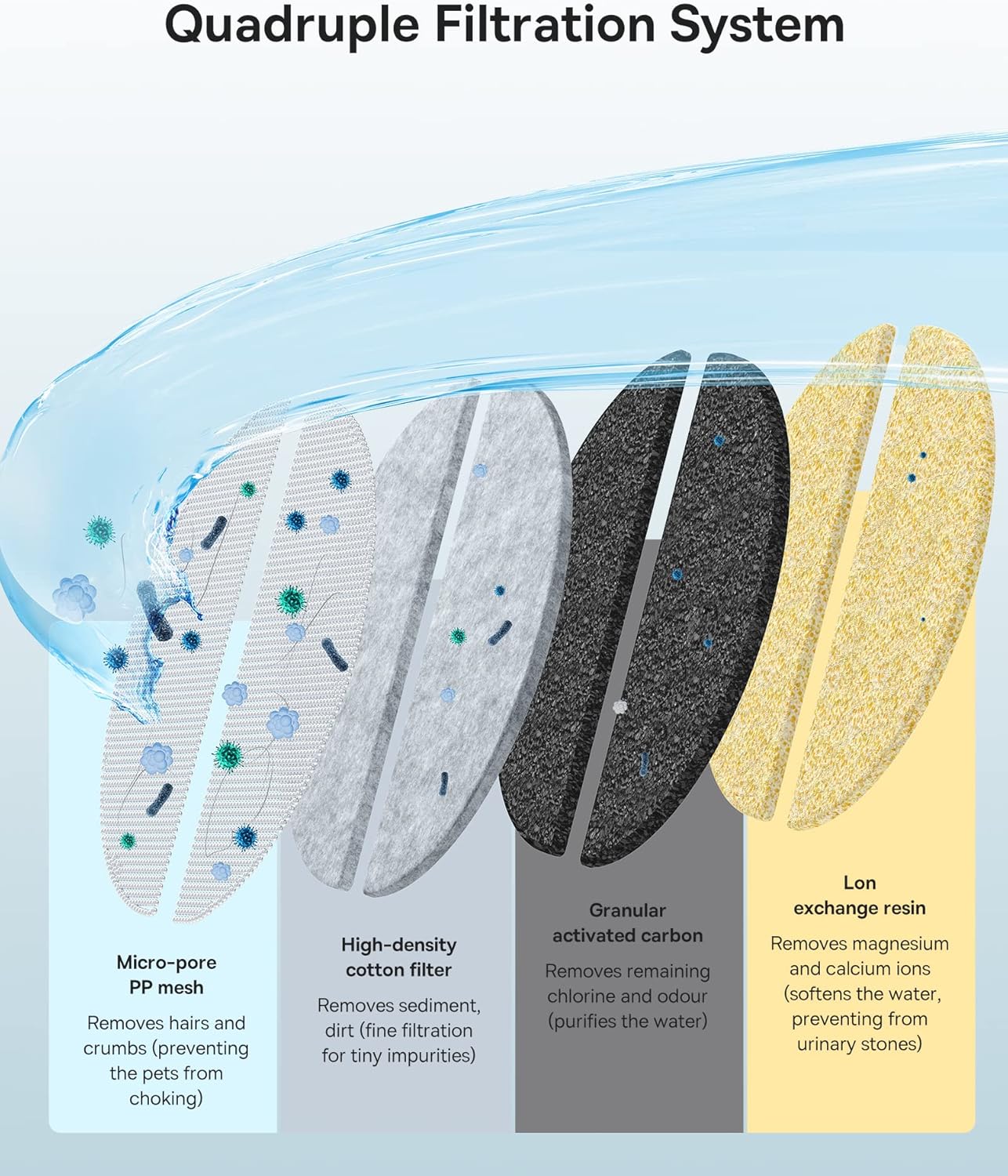
Diagram illustrating the four-stage filtration process: Micro-pore PP mesh, High-density cotton filter, Granular activated carbon, and Ion exchange resin, detailing their respective functions in purifying water.
3. Filter Installation and Replacement
Follow these steps to replace the filter elements in your Baseus Lotis Y1 Smart Cat Water Fountain:
- Prepare the new filters: Completely soak the new filter elements in water twice before installation. Gently wash them to remove any loose particles.
- Access the filter compartment: Remove the water storage tray from the fountain. Locate and open the filter compartment.
- Remove old filters: Carefully take out the used filter elements. Dispose of them properly.
- Install new filters: Place the new filter elements into the compartment. Ensure they are seated correctly and press the filter cover to secure them. Remember that two filter elements form one set and should be replaced together.
- Reset the fountain: After installing the new filters, press and hold the power button on the fountain for 5 seconds. The orange indicator light will turn off, confirming a successful reset of the filter reminder.

Four-step visual guide for replacing the Baseus Lotis Y1 water fountain filters, including soaking, removing the old filter, installing the new filter, and resetting the power button.
4. Pangropéa
Frékuénsi ngagantian Filter
For your pet's health and optimal fountain performance, it is recommended to replace the filter elements every 2 to 4 weeks. If you have multiple pets or if your local water quality is poor, consider replacing the filters every 2 to 3 weeks.

Screenshot of the Baseus app displaying a filter replacement reminder, indicating days remaining until the next filter change and a reset option.
Ngabersihan Air Mancur
To protect your pet's health and extend the lifespan of the water dispenser, completely change the water and clean the reservoir, tray, foam filter, and pump at least once a week. This practice helps prevent the buildup of stains and ensures hygienic operation.
5. Cara ngungkulan
Water Dispenser Noise
If the water dispenser begins to make unusual noise, check the following:
- Verify that the water level has not dropped below the minimum required level.
- Inspect the water pump for any signs of calcification or debris buildup. Clean the pump if necessary.
6. Spésifikasi
| Spésifikasi | Rincian |
|---|---|
| merek | Baseus |
| Nomer Modél Item | ACLY010002 |
| Komponén Kaasup | 8 saringan |
| Ukuran produk (L x W x H) | 45 x 29 x 21 cm; 90 grams (packaging dimensions) |
| Spésiés sasaran | Ucing |
| Warna | Bodas |
| Batré Diperlukeun? | No |
7. Catetan Penting
- produk ieu dimaksudkeun pikeun pamakéan indoor wungkul.
- Always replace both filter elements as they constitute a single set for effective filtration.


