1. Bubuka
This manual provides detailed instructions for the installation, operation, and maintenance of your Blaupunkt Key Largo 980-9 inch Android Car Multimedia System. Please read this manual thoroughly before using the product to ensure proper operation and to prevent damage.
2. Émbaran Kasalametan
- Pamasangan: Ensure professional installation to avoid damage to the vehicle's electrical system.
- Sasayogian tanaga: Connect only to a 12V DC car battery with negative grounding.
- Operasi: Do not operate the system in a way that distracts you from driving. Always prioritize road safety.
- Suhu: Hindarkeun ngalaan unit ka suhu anu ekstrim atanapi sinar panonpoé langsung kanggo waktos anu berkepanjangan.
- Uap: Keep the unit away from water and high humidity.
3. Eusi Paket
Pastikeun yén sadaya item aya dina bungkusan:
- Blaupunkt Key Largo 980-9 inch Multimedia System
- 7 Units Connector cables
- 8 Units Screws
- 1 Unit Warranty card
- Manual pangguna (dokumén ieu)
4. Produk Langkungview
The Blaupunkt Key Largo 980-9 inch is an Android-based car multimedia system designed to enhance your in-car entertainment and connectivity. It features a 9-inch display, Android 10.0 OS, 2GB RAM, 32GB ROM, and various connectivity options.

Gambar 4.1: Hareupeun view of the Blaupunkt Key Largo 980-9 inch car multimedia system, showing the 9-inch display with various application icons.
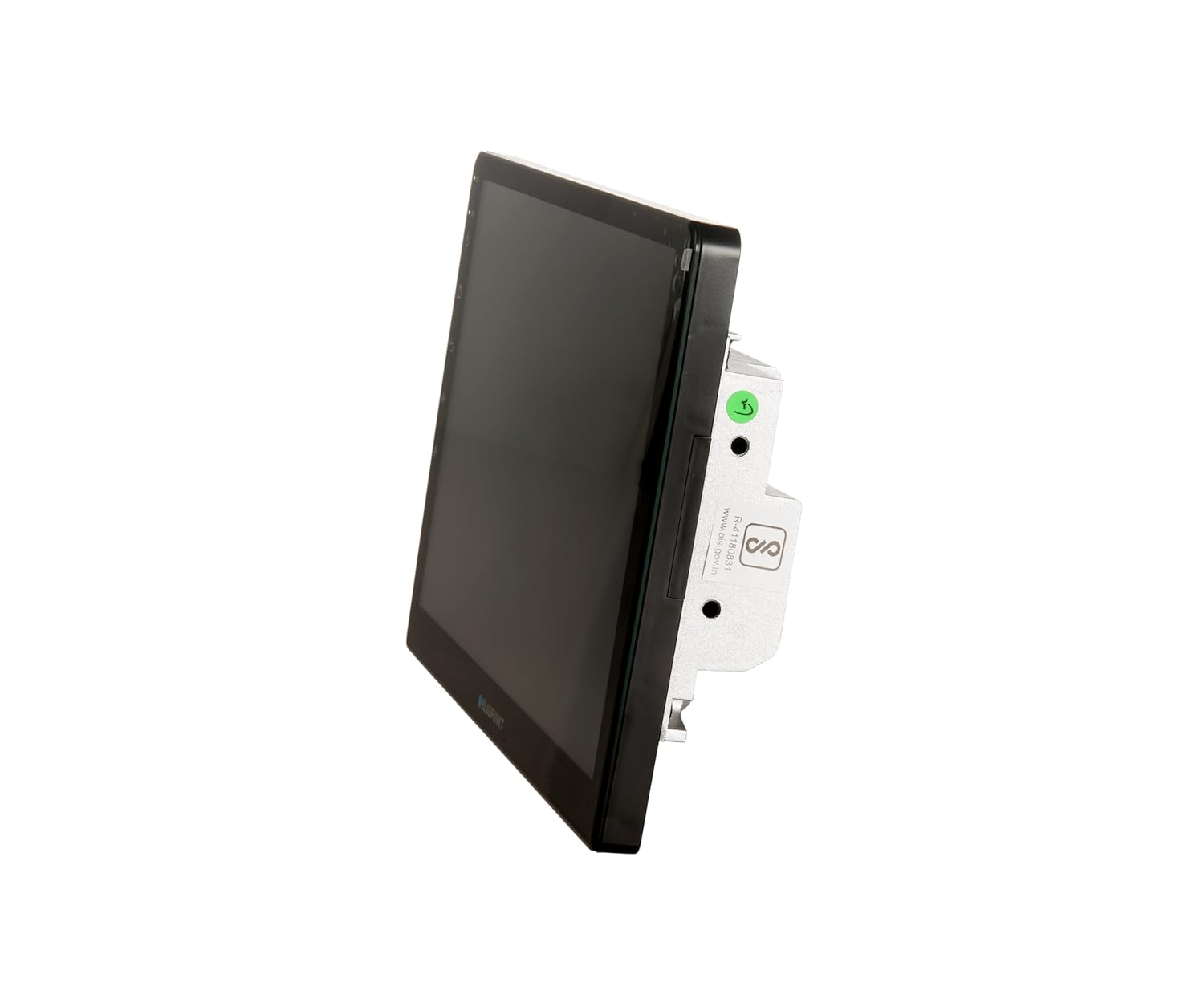
Gambar 4.2: Samping view of the multimedia system, highlighting its slim profile sareng titik-titik pemasangan.
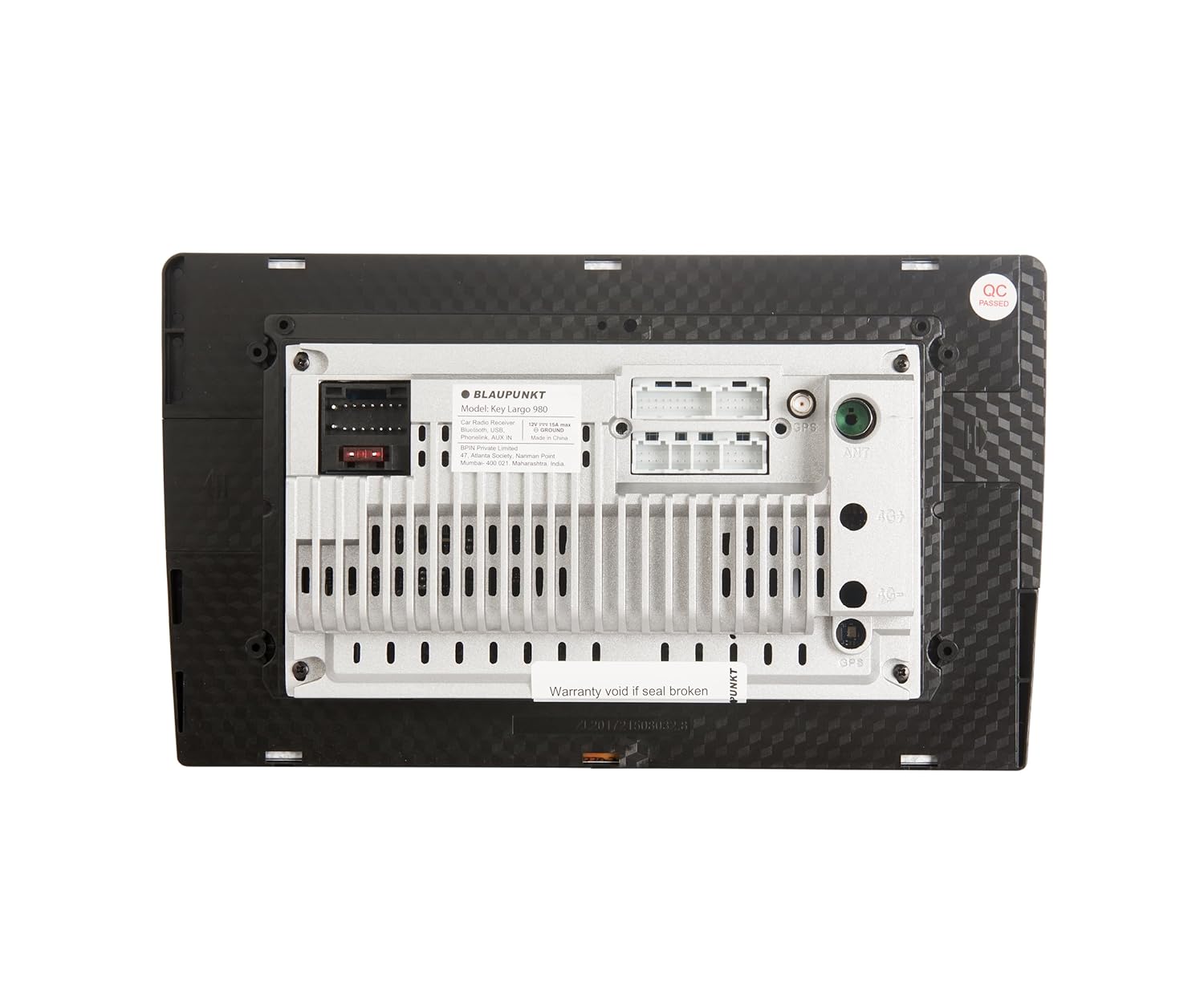
Gambar 4.3: Tukangeun view of the multimedia system, displaying various input/output ports for power, audio, video, and accessories. Note the "Warranty void if seal broken" sticker.
4.1 Fitur konci
- 9-inch Android Car Multimedia System
- Android 10.0 OS
- 2GB RAM + 32GB ROM
- 1.5GHz Quad Core processor
- PhoneLINK (Screen Mirroring)
- Bluetooth v5.0
- Dual Rear USB ports
- AUX-IN
- AHD Reverse Camera input support
- Video out for rear screen entertainment monitors
- FM (RDS) / AM Tuner
- 10-band Equalizer (EQ)
- Learning Steering Wheel Control capable
- Diwangun-Di Wi-Fi
5. Setup jeung Instalasi
Professional installation is highly recommended for this car multimedia system. Incorrect installation can lead to damage to the unit or your vehicle's electrical system.
5.1 Diagram Wiring
Tingal diagram wiring disadiakeun kalawan Unit Anjeun pikeun sambungan husus. sambungan konci ngawengku:
- kakuatan: 12V ACC, 12V Battery, Ground.
- Panyatur: Connect to your vehicle's speaker system.
- USB: Sambungkeun alat USB éksternal.
- AUX-IN: Pikeun sumber audio éksternal.
- Kaméra AHD: Input for a compatible AHD reverse camera.
- Kontrol setir: Connect to vehicle's steering wheel control wires for learning function.
- Pidéo Out: For connecting external monitors.
Note: Ensure all connections are secure and properly insulated to prevent short circuits.
5.2 Mimiti Power-On
- After installation, turn on your vehicle's ignition.
- The system should power on automatically and display the Blaupunkt logo.
- Follow any on-screen prompts for initial setup, such as language selection and time zone.
6. Parentah Operasi
The Key Largo 980-9 inch operates on an Android platform, similar to a tablet. You can navigate using touch gestures on the screen.

Gambar 6.1: Main menu screen showing various application icons like Navigation, Radio, Music, Phone, Settings, Video, File Explorer, BT Music, EQ, and AUX.
6.1 Napigasi Dasar
- Tombol imah: Mulih kana ménu utami.
- Tombol Balik: Mulih ka layar saméméhna.
- Kontrol Volume: Atur kaluaran audio.
- Ikon Setélan: Access system settings for display, sound, network, etc.
6.2 Radio (FM/AM)
- Ketok ikon "Radio" dina layar utama.
- Select FM or AM band.
- Use the seek/scan buttons to find stations or manually tune.
- Simpen stasiun anu dipikaresep kana prasetél.
6.3 Konektipitas Bluetooth
Sambungkeun telepon sélulér Anjeun liwat Bluetooth pikeun nelepon handsfree sareng streaming audio.
- Tap the "Phone" or "BT Music" icon.
- Aktipkeun Bluetooth dina telepon sélulér Anjeun tur neangan alat nu sadia.
- Select "Key Largo 980" (or similar) from the list on your phone.
- Pastikeun kode papasangan dina kadua alat eta.
- Sakali dipasangkeun, anjeun tiasa nelepon / nampi telepon sareng ngalirkeun musik.

Gambar 6.2: Screen displaying the phone dialer interface, accessible after Bluetooth pairing for hands-free communication.
6.4 PhoneLINK (Screen Mirroring)
PhoneLINK allows you to mirror your smartphone's screen onto the multimedia system's display.
- Ensure your phone is connected via USB or Wi-Fi (depending on PhoneLINK app requirements).
- Open the PhoneLINK application on the multimedia system.
- Follow the on-screen instructions to connect your smartphone. This may involve installing a specific app on your phone.
6.5 Playback USB
Connect a USB drive to one of the rear USB ports to play audio or video files.
- Insert the USB drive into a USB port.
- Pencét "File Explorer" or "Music" / "Video" icon.
- Navigate to the USB drive and select the desired file maén.

Gambar 6.3: Screen displaying the music playback interface, showing track information and playback controls.
6.6 Input AUX
Connect external audio devices using the AUX-IN port.
- Connect your audio device to the AUX-IN port using a 3.5mm audio cable.
- Tap the "AUX" icon on the main screen.
- Control playback from your connected audio device.
6.7 AHD Reverse Camera Support
When a compatible AHD reverse camera is connected and the vehicle is put into reverse gear, the system will automatically display the camera feed.
6.8 Setélan Audio (Ekualiser)
Customize your audio experience using the built-in 10-band equalizer.
- Tap the "EQ" icon on the main screen.
- Adjust frequency bands to your preference.
- Select from preset equalizer modes or create custom settings.
6.9 Control kabayang steering
The system supports learning steering wheel controls. This allows you to map functions like volume, track change, and mode selection to your vehicle's steering wheel buttons.
- Go to "Settings" and locate the "Steering Wheel Control" option.
- Follow the on-screen instructions to program each button.
6.10 Konektipitas Wi-Fi
Connect to a Wi-Fi network (e.g., mobile hotspot) to access online features, download apps, and use navigation with real-time traffic updates.
- Go to "Settings" and select "Network & Internet" or "Wi-Fi".
- Hurungkeun Wi-Fi teras pilih jaringan anu dipikahoyong.
- Lebetkeun kecap akses upami dipenta.
7. Pangropéa
- Ngabersihan layar: Anggo lawon anu lemes sareng henteu ngaganggu pikeun ngusap layar sacara lembut. Entong nganggo pembersih atanapi pelarut anu abrasif.
- Apdet parangkat lunak: Periodically check for software updates in the system settings to ensure optimal performance and access to new features.
- Perawatan Umum: Ulah neundeun barang beurat dina unit atanapi ngalaan kana gaya anu kaleuleuwihi.
8. Cara ngungkulan
| Masalah | Mungkin Cukang lantaranana | Solusi |
|---|---|---|
| Taya kakuatan | kabel salah; sekering ditiup; Masalah batré kendaraan. | Check power connections; Replace fuse; Check vehicle battery. Consult a professional if needed. |
| Taya sora | Volume low teuing; Jempé diaktipkeun; Masalah kabel speaker. | Ningkatkeun volume; Nonaktipkeun bisu; Pariksa sambungan speaker. |
| Bluetooth teu nyambung | Bluetooth off on phone/unit; Device not in pairing mode; Interference. | Ensure Bluetooth is on; Put device in pairing mode; Try pairing again; Move closer to the unit. |
| Layar rampa teu ngaréspon | System freeze; Software glitch. | Perform a soft reset (refer to device manual for reset button location, often a small pinhole); If issue persists, consult support. |
| panarimaan radio goréng | Antena teu nyambung; Daérah sinyal lemah. | Pariksa sambungan anteneu; Coba tuning ka stasiun anu langkung kuat. |
9. Spésifikasi
| merek | Blaupunkt |
| Modél | Key Largo 980 9 inches |
| Sistem operasi | Android 10.0 |
| Prosesor | 1.5GHz Quad Core |
| Ram | 2GB |
| Panyimpenan internal (ROM) | 32GB |
| Ukuran tampilan | 9 inci (22.73cm) |
| Téhnologi Tuner | AM, FM (RDS) |
| Vérsi Bluetooth | v5.0 |
| Konektipitas | Wi-Fi, USB (Dual Rear), AUX-IN, 3.5mm Jack |
| Fitur husus | Built-In Wi-Fi, FM Tuner, PhoneLINK, AHD Camera Support, 10-band EQ, Learning Steering Wheel Control |
| Mode Kaluaran Audio | Stereo |
| Speaker Sakuliling Konfigurasi Channel Sora | 3.1 |
| Audio Wattage | 200 Watts (4 x 50 Watt Max. power) |
| Dimensi produk | 30 x 45 x 15 cm |
| Item Beurat | 780 g |
10. Garansi jeung Rojongan
This product comes with a 2-year warranty. Please refer to the included warranty card for detailed terms and conditions. Keep your purchase receipt as proof of purchase.
For technical support or service inquiries, please contact Blaupunkt customer care:
- No. Layanan Pelanggan: 18002096820
- Surélék: info@blaupunktcar.in
- Alamat Importir: BPIN Pvt. Ltd. - 47, Atlanta Society, Jamnalal Bajaj Marg, Nariman Point, Mumbai - 400021, Maharashtra, India.
Note: Warranty may be void if the product seal is broken or if unauthorized repairs are attempted.


