
1. Bubuka
Thank you for choosing the Rockstar PAD20 PRO ADVANCED Electronic Drum Pad. This manual provides essential information for the safe and effective use of your new instrument. Please read it thoroughly before operation and retain it for future reference. The PAD20 PRO ADVANCED is designed to offer advanced percussion performance with versatile drum kits, enhanced connectivity, and durable construction.
2. Émbaran Kasalametan
- Sasayogian tanaga: Anggo ngan ukur adaptor kakuatan anu ditangtukeun. Pastikeun voltage cocog sarat alat.
- Cai sareng Uap: Do not expose the unit to rain, moisture, or excessive humidity. Avoid placing liquid containers near the device.
- Ventilasi: Pastikeun ventilasi nyukupan di sabudeureun unit. Ulah meungpeuk bukaan ventilasi.
- Sumber Panas: Jauhkeun unit tina sumber panas sapertos radiator, registers panas, kompor, atanapi aparat sanésna anu ngahasilkeun panas.
- beberesih: Cabut dayana sateuacan dibersihkeun. Anggo lawon anu lemes sareng garing. Entong nganggo pembersih cair atanapi pembersih aerosol.
- Palayanan: Entong nyobian ngalayanan produk ieu nyalira. Rujuk sadayana ngalayanan ka tanaga jasa anu mumpuni.
3. Eusi Paket
Pastikeun yén sadaya item aya dina bungkusan:
- Rockstar PAD20 PRO ADVANCED Electronic Drum Pad
- Adaptor kakuatan
- Manual pangguna (dokumén ieu)
4. Produk Langkungview
4.1 Panel Hareup sareng Kontrol
The front panel features eight velocity-sensitive pads, a large LCD screen, and various control buttons and knobs for navigation and sound manipulation.
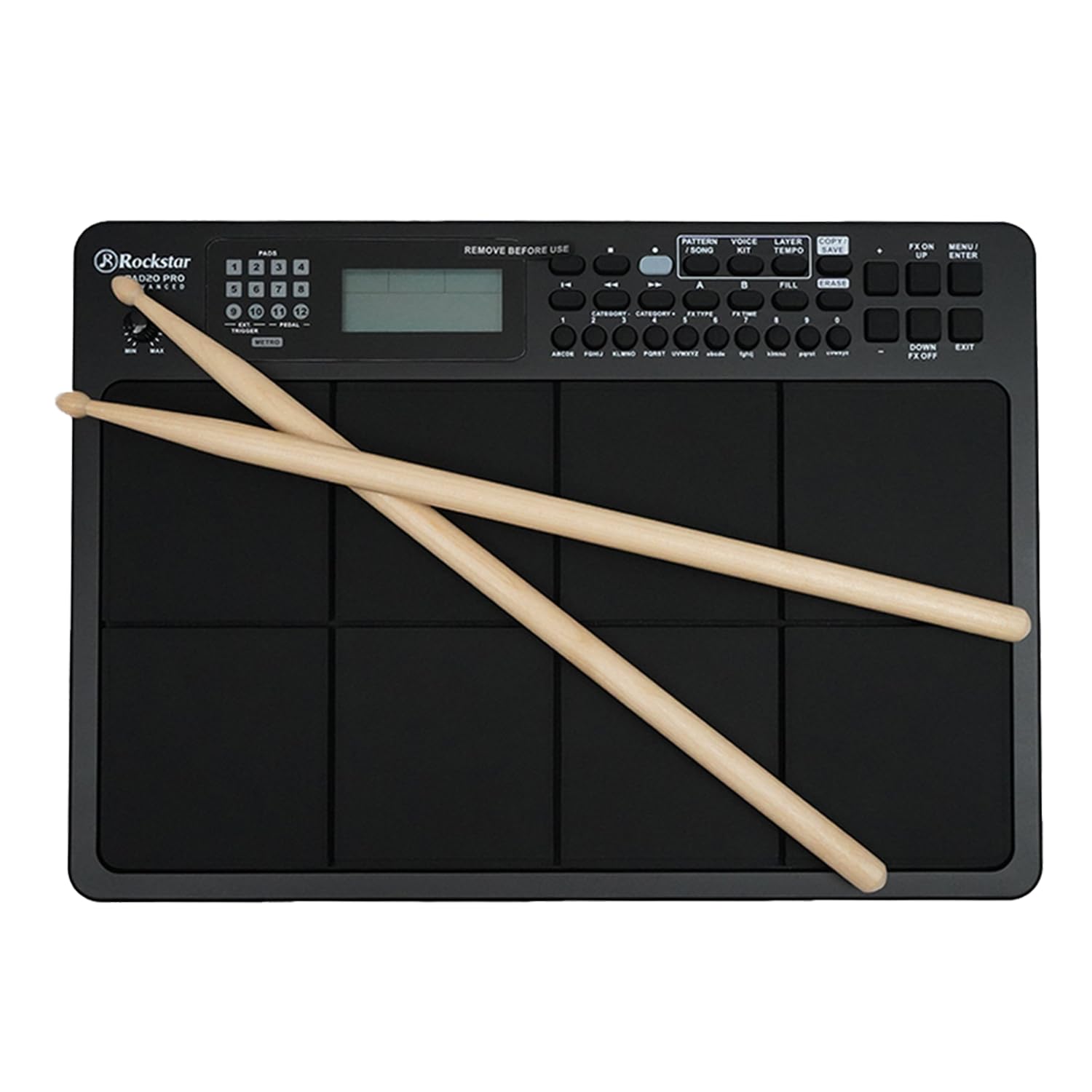
Gambar 1: Hareupeun view of the Rockstar PAD20 PRO ADVANCED with drumsticks, showing the pads, display, and control buttons.
- Pads (1-8): Velocity-sensitive pads for triggering sounds.
- Layar LCD: Large backlight display for navigating menus, selecting kits, and viewdina parameter.
- Tombol Napigasi: Buttons for moving through menus and adjusting settings.
- Jilid Kenop: Saluyukeun volume kaluaran sakabéh.
- Tombol Fungsi: Dedicated buttons for Pattern, Voice, Layer, Kit, Song, Tempo, Copy, Save, FX On/Off, Menu, Up/Down, Enter, Exit.
4.2 Sambungan Panel Rear
The rear panel provides various input and output ports for connecting to external devices.

Gambar 2: Rear panel connections diagram, illustrating ports for USB, MIDI In/Out, audio outputs, and power input.
- USB 2.0 MIDI Port: For connecting to a computer for MIDI data transfer.
- MIDI IN/OUT Ports: For connecting to other MIDI devices.
- Audio Outputs (L/MONO, R): Pikeun nyambungkeun ka hiji amplifier, mixer, atanapi panganteur audio.
- Kaluaran headphone: For private monitoring.
- Input bantu: Pikeun nyambungkeun pamaén audio éksternal.
- External Trigger/Pedal Inputs: For connecting additional pads or footswitches.
- Input kakuatan: Pikeun nyambungkeun adaptor daya DC.
5. Setélan
- panempatan: Place the PAD20 PRO ADVANCED on a stable, flat surface.
- Sambungan Daya: Connect the provided power adapter to the DC IN port on the rear panel, then plug the adapter into a power outlet.
- Sambungan Audio:
- Pikeun éksternal amplification, connect the L/MONO and R audio outputs to your amplifier or mixer using appropriate cables.
- For private practice, connect headphones to the Headphone Output.
- MIDI/USB Connection (Optional): To use the PAD20 PRO ADVANCED as a MIDI controller or to connect to a computer, use a USB cable to connect the USB 2.0 MIDI port to your computer.
- Daya Hurung: Press the power button to turn on the unit. The LCD display will illuminate.
6. Parentah Operasi
6.1 Operasi Dasar
Upon powering on, the unit will typically load the last used drum kit. Strike the pads with drumsticks or your hands to produce sounds.
6.2 Napigasi Pintonan

Gambar 3: Close-up of the LCD screen, showing kit selection and voice information. The display is bright and clear.
Use the navigation buttons (Up/Down, Left/Right, Enter, Exit) to move through menus and adjust parameters shown on the large backlight LCD display.
6.3 Pilihan Kit Drum
The PAD20 PRO ADVANCED features 100 professionally curated drum kits. To select a kit:
- Pencét éta KIT kancing.
- Use the navigation buttons to scroll through the available kits.
- Pencét Asupkeun pikeun mastikeun pilihan Anjeun.
6.4 Fungsi Ngarékam
The unit supports real-time record and step record edit functions. Refer to the on-screen menu for detailed instructions on how to initiate, stop, and edit recordings.
6.5 Connectivity and MIDI
The USB 2.0 MIDI port allows seamless integration with your computer. You can use the PAD20 PRO ADVANCED as a MIDI controller for software instruments or to send MIDI data to a Digital Audio Workstation (DAW).
7. Pangropéa
- beberesih: Wipe the unit with a soft, dry cloth. For stubborn dirt, a slightly damp cloth can be used, followed by a dry cloth. Avoid abrasive cleaners.
- Panyimpenan: Upami henteu dianggo kanggo waktos anu lami, simpen unit di tempat anu tiis sareng garing, jauh tina sinar panonpoé langsung sareng suhu anu ekstrim.
- Perawatan Pad: Avoid striking the pads with excessive force or sharp objects, as this can damage the sensors.
8. Cara ngungkulan
| Masalah | Mungkin Cukang lantaranana | Solusi |
|---|---|---|
| No sound from pads | Volume too low; incorrect audio connection; headphones not connected properly. | Increase master volume. Check audio cables and connections. Ensure headphones are fully inserted. |
| Unit teu hurung | adaptor kakuatan teu disambungkeun; stop kontak listrik lepat. | Pastikeun adaptor daya disambungkeun pageuh kana unit sareng stop kontak anu tiasa dianggo. Cobi stop kontak anu sanés. |
| Pads are unresponsive or trigger inconsistently | Sensitivity settings; physical damage to pads. | Check pad sensitivity settings in the menu. If problem persists, contact support. |
| MIDI connection issues | Incorrect USB cable; driver issues; software settings. | Ensure a proper USB 2.0 cable is used. Check computer's device manager for driver status. Verify MIDI input settings in your software. |
9. Spésifikasi
| Fitur | Katerangan |
|---|---|
| Modél | PAD20 PRO |
| Pads | 8 Velocity-sensitive pads |
| Drum Kit | 100 (Pre-programmed) |
| tampilan | Large Backlight LCD |
| Konektipitas | USB 2.0 MIDI, MIDI IN/OUT, Audio Outputs (L/MONO, R), Headphone Output, Aux Input, External Trigger/Pedal Inputs |
| Fungsi Rekaman | Real-time Record, Step Record Edit |
| Bahan Awak | palastik |
| Tipe rengse | Hideung finish |
| Dimensi produk | 30.5 x 30.5 x 50.8 cm (L x W x H) |
| Item Beurat | 2 kg |
| Negara asal | Cina |
10. Garansi jeung Rojongan
The Rockstar PAD20 PRO ADVANCED comes with a 2 Years Hassle Free Warranty from the date of purchase. This warranty covers manufacturing defects under normal use. For warranty claims or technical support, please contact Rockstar customer service.
Inpormasi Kontak Pabrikan:
Nomer Telepon: +91 8885241706
Email: care@justshop24x7.com