
Produk Leuwihview
Experience everything that TV has to offer with this 42-inch LED smart TV from RCA. The built-in Roku app lets you control the TV directly through your smartphone for great control and ease of use. You can also cast photos, videos, music and more directly from your compatible mobile device right onto the television, letting you share the best of entertainment with everyone in the room.
Fitur konci
- Platform pinter: Roku TV
- Resolusi: 1080p lengkep HD
- Laju Refresh: 60Hz
- Rasio Aspék: 16:9
- Waktu ngaréspon: 8 ms
- Konektipitas: 2x HDMI, VGA, RF, YPbPr, AV Audio/Video, Coaxial, PC Audio
Naon Kaasup
- RCA 42" Smart LED TV
- Stand TV (2 buah)
Guide Setup
1. Ngagantelkeun Stand
Carefully place the TV screen-down on a soft, clean surface to prevent scratches. Align the stand pieces with the screw holes on the bottom of the TV. Secure the stands using the provided screws. Ensure the stand is firmly attached before placing the TV upright.
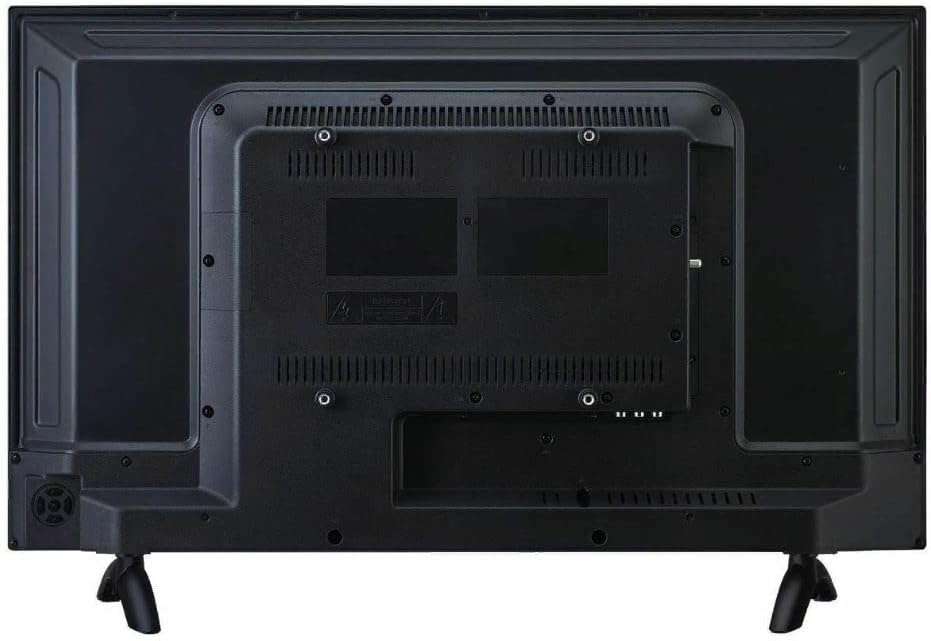
Gambar 1: Tukangeun view of the TV, illustrating the stand attachment points and various input ports.
2. Nyambungkeun périferal
Connect your external devices such as cable boxes, Blu-ray players, or gaming consoles to the appropriate input ports on the back of the TV. The TV features 2 HDMI ports, VGA, RF, YPbPr, AV Audio/Video, Coaxial, and PC Audio inputs.
3. Ngahurungkeun sareng Setup Awal
Plug the power cord into the TV and then into a wall outlet. Press the power button on the TV or the remote control. Follow the on-screen instructions to complete the initial setup, including network connection for Smart TV features and channel scanning.
Parentah Operasi
Navigasi Antarbeungeut TV Roku
The RCA Smart LED TV uses the Roku TV platform for easy access to streaming services and inputs. Use the remote control's directional pad to navigate through the home screen menu. Select options by pressing the OK button.

Gambar 2: The Roku TV home screen, showing navigation options and streaming channel icons.
Using Streaming Channels
From the home screen, select your desired streaming channel (e.g., Netflix, Hulu). Ensure your TV is connected to the internet. You may need to log in to your accounts for each service.
Casting Eusi
The built-in Roku app allows casting of photos, videos, and music from compatible mobile devices directly to the TV. Ensure your mobile device and TV are on the same Wi-Fi network. Use the casting feature within your mobile app to select the RCA Roku TV as the playback device.
Pangropéa sareng Perawatan
Ngabersihan Layar
Pikeun ngabersihkeun layar TV, usap lalaunan nganggo lawon anu lemes, garing, sareng henteu ngaganggu. Pikeun tanda anu bandel, usap lalaunanampBilas lawon ku cai atanapi larutan pembersih layar anu khusus dirancang pikeun éléktronik. Hindarkeun nganggo bahan kimia anu keras, pembersih anu abrasif, atanapi nyemprot langsung kana layar.
Perawatan Umum
- Jauhkeun TV tina sinar panonpoé langsung sareng sumber panas.
- Pastikeun ventilasi anu pas di sabudeureun TV pikeun nyegah overheating.
- Ulah ngahalangan bukaan ventilasi dina tonggong TV.
- Cabut colokan TV tina colokan listrik nalika badai kilat atanapi nalika teu dianggo kanggo sababaraha waktos.
Pamérésan masalah
Taya Daya
- Pariksa naha kabel listrik dicolokkeun sacara aman kana TV sareng stop kontak témbok.
- Pastikeun yén stop kontak témbok berpungsi ku cara nyolokkeun alat anu sanés.
- Coba pencét tombol daya dina TV sorangan, teu ngan jauh.
Taya Gambar / Kualitas Gambar Miskin
- Pastikeun sumber input anu bener dipilih (contona, HDMI 1, AV).
- Pariksa sadaya sambungan kabel antara TV jeung alat éksternal.
- Saluyukeun setélan gambar (kacaangan, kontras, warna) dina menu TV.
- If using an antenna, check antenna connection and try rescanning channels.
Taya Sora / Kualitas Sora Miskin
- Increase the volume on both the TV and any connected external audio devices.
- Pariksa sambungan kabel audio.
- Pastikeun TV teu dipareuman.
- Upami nganggo spiker éksternal, pastikeun éta dihurungkeun sareng disambungkeun kalayan leres.
Remote Control Teu Gawé
- Ganti batré dina kadali jauh.
- Pastikeun teu aya halangan antara jauh sareng sénsor IR TV.
- Acungkeun remote langsung ka TV.
Spésifikasi teknis
| Fitur | Spésifikasi |
|---|---|
| Nomer modél | RTR4262-CA |
| Ukuran layar | 42 Inci (107 cm diagonal) |
| Téknologi tampilan | LED |
| Resolusi | 1080p lengkep HD |
| Refresh Laju | 60 Hz |
| Rasio Aspék | 16:9 |
| Waktu Tanggapan | 8 ms |
| Platform pinter | Roku TV |
| Konektipitas | 2x HDMI, VGA, RF, YPbPr, AV Audio/Video, Coaxial, PC Audio |
| Diménsi Produk (W x D x H) | 37.64 x 7.2 x 23.23 inci |
| Item Beurat | 13.7 pon |
| Tipe Speaker | Diwangun-Di |
| Tanggal Sadia munggaran | 11 Méi 2022 |
Garansi sareng Rojongan
For warranty information and technical support, please refer to the documentation included with your purchase or visit the official RCA support websitus. Simpen bukti pameseran anjeun pikeun klaim garansi.
Dukungan Online: Nganjang ka Toko RCA di Amazon