Bubuka
This manual provides essential information for the safe and efficient operation of your Crosley Montero Portable Rechargeable Bluetooth Speaker. Please read this manual thoroughly before using the device and retain it for future reference.
Émbaran Kasalametan
- Do not expose the speaker to water or excessive moisture. This product is not waterproof.
- Ulah neundeun speaker caket sumber panas sapertos radiator, pancatat panas, kompor, atanapi alat-alat sanésna (kalebet ampLiifiers) anu ngahasilkeun panas.
- Paké ngan kantétan / asesoris dieusian ku produsén.
- Cabut colokan alat ieu nalika badai kilat atanapi nalika henteu dianggo kanggo waktos anu lami.
- Rujuk sadayana ngalayanan ka tanaga jasa anu mumpuni. Pelayanan diperyogikeun nalika aparat parantos rusak sagala cara.
Naon dina Box
- Crosley Montero Portable Rechargeable Bluetooth Speaker
- Kabel Mikro-USB
- 3.5mm Aux Dina Cable
Produk Leuwihview
The Crosley Montero speaker features a classic design with modern connectivity options. It includes controls for mode selection, track navigation, and volume adjustment on the top panel. The rear panel houses the input/output ports.
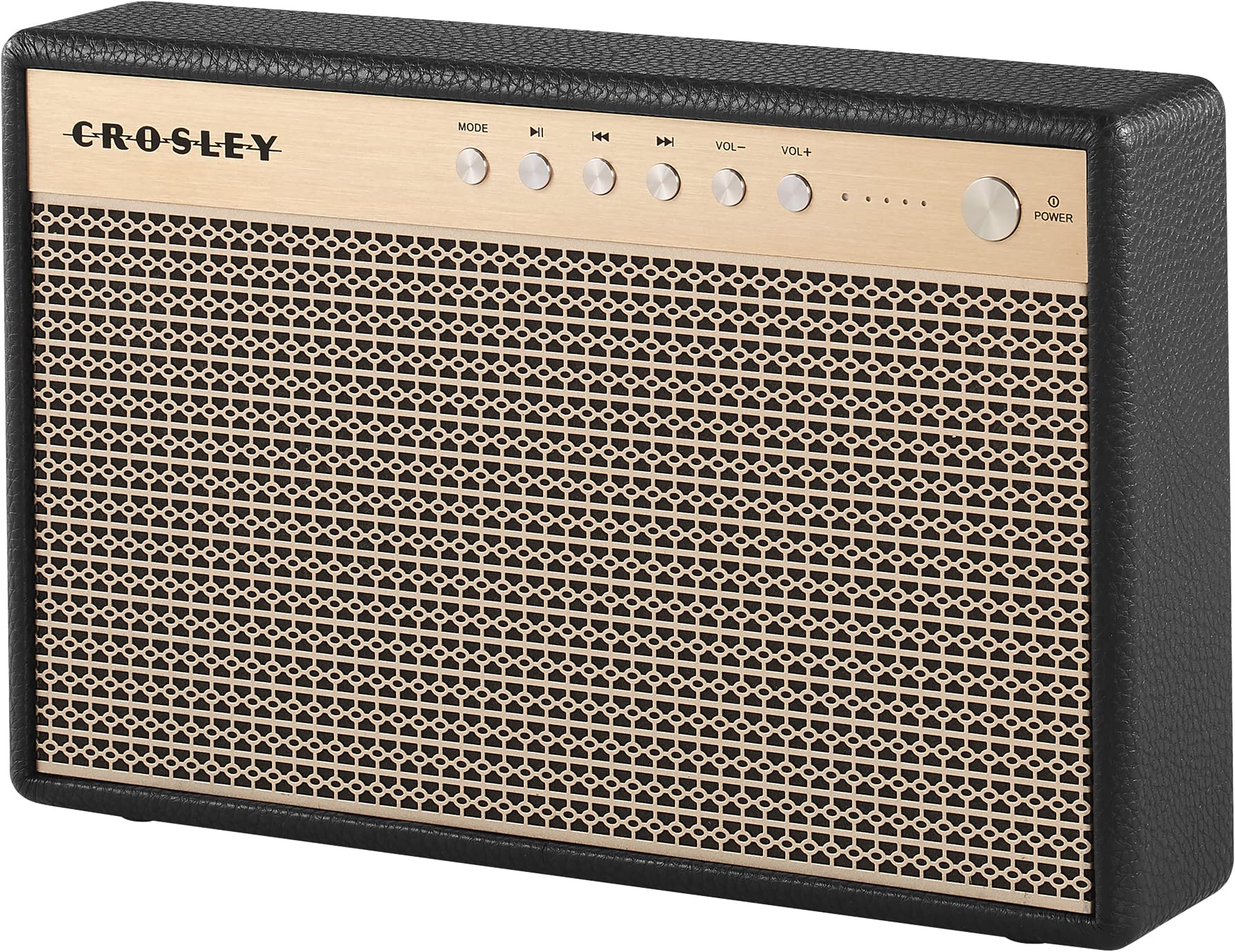
Gambar 1: Hareupeun view of the Crosley Montero speaker, showing the speaker grille and control panel.

Gambar 2: Tukangeun view of the Crosley Montero speaker, highlighting the AUX input, USB OTG (input port), Phone Charging (output: 5V 1A), and DC 5V power input ports.
Disetél
Ngecas Speaker
Before initial use, fully charge the speaker using the provided Micro-USB cable. Connect the Micro-USB cable to the DC 5V port on the rear of the speaker and the other end to a compatible USB power adapter (not included). The charging indicator lights will illuminate during charging and turn off when fully charged.
Ngahurungkeun/Pareuman
- To power on: Press and hold the Power button on the control panel.
- To power off: Press and hold the Power button. The speaker must be disconnected from external power before shutting off.
Parentah Operasi
Papasangan Bluetooth
- Power on the speaker. The Bluetooth indicator light will flash, indicating it is in pairing mode.
- Dina alat Bluetooth-diaktipkeun anjeun (smartphone, tablet, jsb), aktipkeun Bluetooth tur neangan alat nu sadia.
- Select "Crosley Montero" from the list of devices.
- Once paired, the Bluetooth indicator light on the speaker will remain solid. You can now stream audio from your device.
Input bantu
To connect a device via the auxiliary input:
- Connect one end of the 3.5mm Aux In cable to the AUX port on the rear of the speaker.
- Sambungkeun tungtung kabel anu sanésna kana jack headphone atanapi output audio alat éksternal anjeun.
- Press the "MODE" button on the speaker's control panel until the AUX mode is selected.
- Adjust the volume on both the speaker and your external device.
USB Telepon Ngecas
The speaker features a USB port for charging external devices. Connect your phone's USB charging cable to the "Phone Charging (Output: 5V 1A)" port on the rear of the speaker. This feature allows you to charge your phone while the speaker is in use or on standby.
Kadali dasar
- MODÉ: Pencét pikeun pindah antara modeu input Bluetooth sareng AUX.
- Puter / Reureuh: Press to play or pause audio during Bluetooth playback.
- Lagu Sateuacanna: Press to go to the beginning of the current track or the previous track during Bluetooth playback.
- Lagu salajengna: Press to skip to the next track during Bluetooth playback.
- VOL-: Pencét pikeun ngirangan polumeu.
- VOL+: Pencét pikeun ningkatkeun polumeu.
Klip 1: An official video demonstrating the features and operation of the Crosley Montero Portable Rechargeable Bluetooth Speaker.
Klip 2: A concise official video showcasing the Crosley Montero Portable Rechargeable Bluetooth Speaker.
Pangropéa
- Clean the speaker with a soft, dry cloth. Do not use liquid cleaners or aerosol sprays.
- Keep the speaker away from dust and direct sunlight.
- Simpen spéker dina tempat anu tiis sareng garing upami henteu dianggo kanggo waktos anu lami.
Pamérésan masalah
| Masalah | Solusi |
|---|---|
| Speaker teu hurung. | Ensure the speaker is charged. Connect it to a power source using the Micro-USB cable. |
| Teu aya sora ti panyatur. | Check volume levels on both the speaker and the connected device. Ensure the correct mode (Bluetooth/AUX) is selected. |
| Alat Bluetooth teu tiasa dipasangkeun. | Ensure the speaker is in pairing mode (flashing Bluetooth indicator). Turn off and on Bluetooth on your device. Move the device closer to the speaker. |
| Telepon teu ngecas via USB. | Verify the USB cable is securely connected to the "Phone Charging" port and your phone. Ensure the speaker has sufficient battery charge. |
spésifikasi

Gambar 3: Overall dimensions of the Crosley Montero speaker: 10.25" W x 6.5" H x 2.25" D.
- Ngaran modél: Montero
- Tipe Speaker: Speaker Speaker
- Téknologi konektipitas: Bluetooth, USB
- Téknologi Komunikasi Nirkabel: Bluetooth
- Daya Kaluaran Maksimum Speaker: 30 Watt
- Tanggapan Frékuénsi: 18 KHz
- Sumber Daya: Batré Powered (1 batré Litium Ion kaasup)
- Ukuran produk: 10.25 "D x 6.5" W x 2.25" H
- Beurat barang: 2.8 Pounds (approximately 2.76 pounds)
- Bahan: palastik
- Komponén Kaasup: Speaker, Micro-USB Cable, 3.5mm Aux In Cable
Garansi sareng Rojongan
This Crosley product comes with a limited warranty. For specific warranty details, please refer to the warranty card included with your purchase or visit the official Crosley website. For technical support or customer service, please contact Crosley's USA-based customer support.