Bubuka
This manual provides detailed instructions for the safe and efficient operation of your Max Power MPD816 PA Speaker. Please read this manual thoroughly before using the product and retain it for future reference.
The Max Power MPD816 is a portable PA speaker system designed for both indoor and outdoor use, featuring Bluetooth connectivity, LED lights, a rechargeable battery, and inputs for a microphone and auxiliary devices.
Eusi pakét
Pastikeun yén sadaya item aya dina bungkusan:
- Max Power MPD816 PA Speaker
- Mikropon kabel
- Kadali jauh
- Kabel Ngecas Tipe-C
- Manual pangguna (dokumén ieu)

Figure 1: Max Power MPD816 PA Speaker with included wired microphone, remote control, and charging cable.
Disetél
1. Ngecas Speaker
Before initial use, fully charge the speaker's built-in lithium-ion battery. The speaker comes with a Type-C charging cable for fast charging.
- Connect the Type-C charging cable to the charging port on the speaker.
- Connect the other end of the charging cable to a compatible AC power adapter (not included) or a USB power source.
- The charging indicator light will illuminate. Once fully charged, the indicator light may change color or turn off, depending on the model.
- A muatan pinuh nyadiakeun kira 6 jam waktu playback.
Note: Use only the provided charging cable or a certified Type-C cable to prevent damage to the device.
2. Powering on / Pareum
Locate the power switch on the control panel of the speaker.
- To power on: Press and hold the power button until the display illuminates.
- Pikeun mareuman: Pencét terus tahan tombol daya nepi ka layar pareum.
3. Nyambungkeun Mikropon
The wired microphone can be connected for karaoke or public address functions.
- Locate the microphone input jack on the speaker's control panel.
- Insert the microphone cable into the microphone input jack.
- Adjust the microphone volume using the dedicated knob on the control panel or the remote control.

Figure 2: Speaker control panel with various inputs and controls.
Parentah Operasi
1. Konektipitas Bluetooth
Connect your smartphone, tablet, or other Bluetooth-enabled device wirelessly to the speaker.
- Power on the speaker. The speaker will automatically enter Bluetooth pairing mode, indicated by a flashing Bluetooth icon on the display or an audible prompt.
- Dina alat anjeun, aktipkeun Bluetooth sareng milarian alat anu sayogi.
- Select "Max Power MPD816" (or similar name) from the list of devices.
- Once paired, the speaker will emit a confirmation sound, and the Bluetooth icon will stop flashing.
- Anjeun ayeuna bisa muterkeun audio tina alat Anjeun ngaliwatan speaker.
Note: The effective Bluetooth range is typically 5-10 meters. Obstacles may reduce this range.
2. Modeu Radio FM
Dengékeun stasiun radio karesep anjeun nganggo tuner FM internal.
- Press the "Mode" button on the speaker or remote control until "FM" is displayed.
- Press the "Play/Pause" button to automatically scan and save available FM stations.
- Use the "Previous" and "Next" buttons to navigate between saved stations.
3. Putereun Kartu USB/TF
Puterkeun audio files directly from a USB flash drive or TF (MicroSD) card.
- Selapkeun flash drive USB kana port USB atanapi kartu TF kana slot kartu TF.
- Spéker bakal otomatis ngalih ka modeu kartu USB atanapi TF sareng ngawitan maén audio files. Upami henteu, pencét tombol "Mode" pikeun milih input anu leres.
- Anggo tombol "Maénkeun/Pause", "Saméméhna", sareng "Salajengna" pikeun ngontrol putereun.
4. Modeu Input AUX
Connect external audio devices using an auxiliary cable.
- Sambungkeun hiji tungtung kabel audio 3.5mm (teu kaasup) kana port input AUX dina spiker.
- Sambungkeun tungtung anu sanésna kana jack headphone atanapi output audio alat éksternal anjeun (contona, pamuter MP3, laptop).
- Press the "Mode" button on the speaker or remote control until "AUX" is displayed.
- Kontrol playback sareng volume tina alat éksternal anjeun.
5. Kontrol Lampu LED
The speaker features multi-color LED lights that can be turned on or off.
- Locate the dedicated LED light button on the control panel or remote control.
- Press the button to cycle through light modes or to turn the lights on/off.
6. Ngagunakeun Remote Control
The included remote control provides convenient access to various functions from a distance.
- kakuatan: Hurungkeun / pareum speaker.
- Mode: Switch between Bluetooth, FM, USB/TF, and AUX modes.
- Volume +/-: Saluyukeun volume master.
- Puter / Reureuh: Puter atanapi ngareureuhkeun playback audio.
- Saméméhna/Salajengna: Skip tracks or navigate FM stations.
- EQ: Select equalizer presets (if available).
- Jempé: Ngajempékeun kaluaran audio.
- Pad Nomer: Direct track selection in USB/TF mode.
Pangropéa
- beberesih: Anggo kaén anu garing sareng lemes pikeun ngabersihan bagian luar spéker. Ulah make cleaners abrasive, lilin, atawa pangleyur.
- Panyimpenan: Lamun teu dipaké pikeun période nambahan, nyimpen speaker dina tiis, tempat garing jauh ti sinar panonpoé langsung jeung hawa ekstrim.
- Perawatan batré: Pikeun manjangkeun umur batré, ulah sering ngosongkeun batréna. Cas deui speaker sacara rutin, sanaos teu dianggo, pikeun ngajaga kaséhatan batréna.
- Paparan cai: This speaker is not waterproof. Avoid exposing it to rain, splashes, or high humidity.
Pamérésan masalah
| Masalah | Mungkin Cukang lantaranana | Solusi |
|---|---|---|
| Speaker teu hurung. | Batré discharged. | Connect the speaker to a power source using the Type-C charging cable and allow it to charge. |
| Teu aya sora ti panyatur. | Volume is too low or muted. Incorrect input mode selected. Device not properly connected. | Increase the volume on the speaker and your connected device. Ensure the speaker is not muted. Press the "Mode" button to select the correct input (Bluetooth, AUX, USB/TF). Re-establish Bluetooth connection or re-insert AUX/USB/TF. |
| Alat Bluetooth teu tiasa dipasangkeun. | Speaker is not in pairing mode. Device is out of range. Another device is already connected. | Ensure the speaker is in Bluetooth mode and flashing. Move your device closer to the speaker. Disconnect any previously paired devices from the speaker or your device. |
| Mikropon teu jalan. | Microphone not properly connected. Microphone volume is too low. | Ensure the microphone cable is fully inserted into the microphone input. Adjust the microphone volume knob on the speaker. |
| Kadali jauh teu jalan. | Battery in remote is dead. Obstruction between remote and speaker. | Replace the battery in the remote control. Ensure there is a clear line of sight between the remote and the speaker's IR receiver. |
spésifikasi
| Nomer modél | MPD816 |
| merek | Daya Max |
| Sumber Daya | AC (for charging) |
| Jenis Batré | 1 Litium Ion (kaasup) |
| Kahirupan batré | Kurang leuwih 6 jam |
| Téhnologi konektipitas | Bluetooth, USB |
| Input audio | AUX (3.5mm), Microphone, USB, TF Card |
| Bahan | palastik |
| Ukuran (H x W x D) | 26.11 x 12.2 x 11.2 inches (approximate package dimensions, actual product dimensions are similar) |
| Item Beurat | 9.08 pon |
| UPC | 761062716826 |
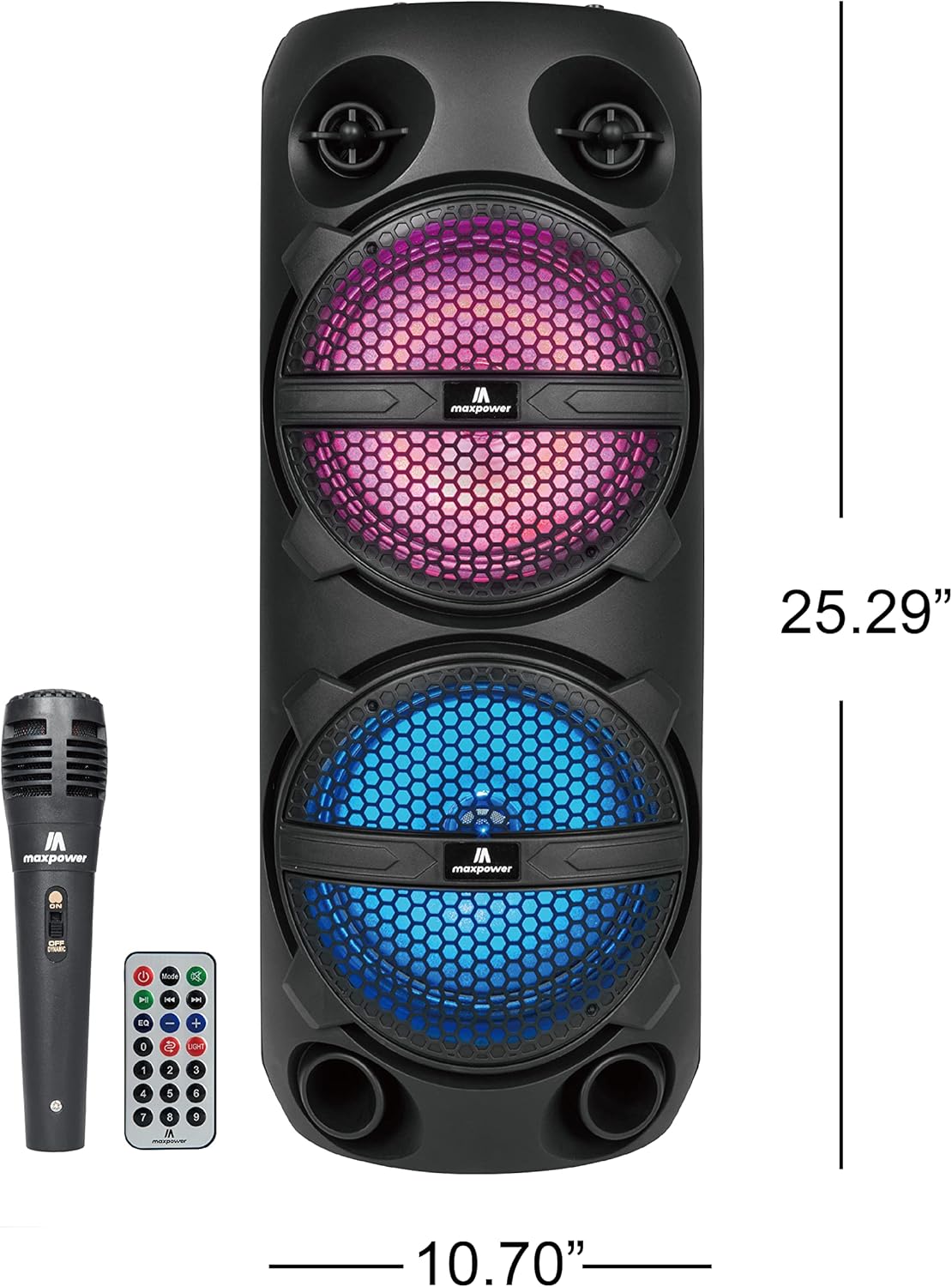
Figure 3: Max Power MPD816 PA Speaker with approximate dimensions.
Émbaran Kasalametan
Pitunjuk Kasalametan Penting:
- Baca parentah ieu taliti.
- Tetep parentah ieu pikeun rujukan hareup.
- Heed sagala warnings.
- Turutan sagala parentah.
- Entong nganggo alat ieu caket cai.
- Ngabersihan ngan ku kaén garing.
- Ulah meungpeuk sagala bukaan ventilasi. Pasang saluyu sareng parentah produsén.
- Entong dipasang di deukeut sumber panas sapertos radiator, register panas, kompor, atanapi aparat sanésna (kalebet ampLiifiers) anu ngahasilkeun panas.
- Nangtayungan kabel listrik tina leumpang atawa diciwit, utamana dina colokan, wadah merenah, jeung titik dimana aranjeunna kaluar tina aparat.
- Ngan anggo kantétan/aksésori anu ditunjuk ku produsén.
- Cabut colokan alat ieu nalika badai kilat atanapi nalika henteu dianggo kanggo waktos anu lami.
- Rujuk sadayana jasa ka tanaga jasa anu mumpuni. Diperlukeun ngalayanan nalika aparatur ruksak ku cara naon waé, sapertos kabel catu daya atanapi colokan rusak, cairan tumpah atanapi barang murag kana aparatur, aparatur parantos kakeunaan hujan atanapi lembab, henteu beroperasi normal. , atawa geus turun.


