Bubuka
Thank you for choosing the PELONIS 16" Height Adjustable Silent Oscillating Pedestal Fan. This manual provides important information regarding the safe operation, assembly, maintenance, and troubleshooting of your fan. Please read it thoroughly before use and retain it for future reference.
Parentah Kasalametan penting
Nalika nganggo alat-alat listrik, pancegahan dasar kedah diturutan pikeun ngirangan résiko kahuruan, kejutan listrik, sareng tatu pikeun jalma, kalebet ieu:
- Baca sadaya pitunjuk sateuacan nganggo kipas ieu.
- Anggo kipas ieu ngan sakumaha anu dijelaskeun dina manual ieu. Pamakéan sanés anu henteu disarankeun tiasa nyababkeun kahuruan, kejut listrik, atanapi cidera ka jalma.
- Pikeun ngajaga tina sengatan listrik, ulah neundeun kipas dina jandela, ngalelepkeun unit, colokan atanapi kabel kana cai atanapi nyemprot ku cairan.
- Pengawasan anu ketat diperyogikeun nalika alat naon waé dianggo ku atanapi caket barudak.
- Cabut colokan tina stop kontak nalika henteu dianggo, nalika mindahkeun kipas tina hiji lokasi ka lokasi anu sanés, sareng sateuacan beberesih.
- Entong nganggo kipas anu nganggo kabel atanapi colokan anu rusak, atanapi saatos kipas gagal atanapi parantos turun atanapi rusak dina cara naon waé.
- Ulah ngajalankeun ari handapeun karpét. Ulah nutupan ari ku karpet lémparan, runners, atawa coverings sarupa. Ulah jalur tali handapeun parabot atawa parabot. Atur tali jauh ti wewengkon lalulintas sarta dimana eta moal tripped leuwih.
- Ulah nyelapkeun atanapi ngantepkeun barang asing asup kana liang ventilasi atanapi knalpot sabab ieu tiasa nyababkeun sengatan listrik atanapi kahuruan, atanapi ngaruksak kipas.
- Ulah ngahalangan asupan hawa atanapi knalpot ku cara naon waé. Ulah dianggo dina permukaan anu lemes, sapertos ranjang, dimana liangna tiasa tersumbat.
- kipas ieu dimaksudkeun pikeun pamakéan rumah tangga wungkul.
Produk Leuwihview
The PELONIS PSPF18AR40B fan is designed for efficient air circulation with multiple features for user convenience.
Fitur konci:
- 12-speed fan configuration for precise airflow control.
- Remote control included for convenient operation from a distance.
- Adjustable height settings: 28", 40", and 52" to suit various needs.
- Clear LED display on the fan for easy monitoring of settings.
- 12-Hour Programmable Timer for automatic shut-off.
- Oscillation function for wide area coverage or static adjustment for direct airflow.
- Power off memory function retains last settings upon restart.
- Easy to carry handle for portability.
komponén:

Hareupeun view of the assembled PELONIS 16-inch Pedestal Fan, showcasing its sleek black design and stable round base.

Angled view of the PELONIS Pedestal Fan, highlighting its height-adjustable pole and the fan head's position.
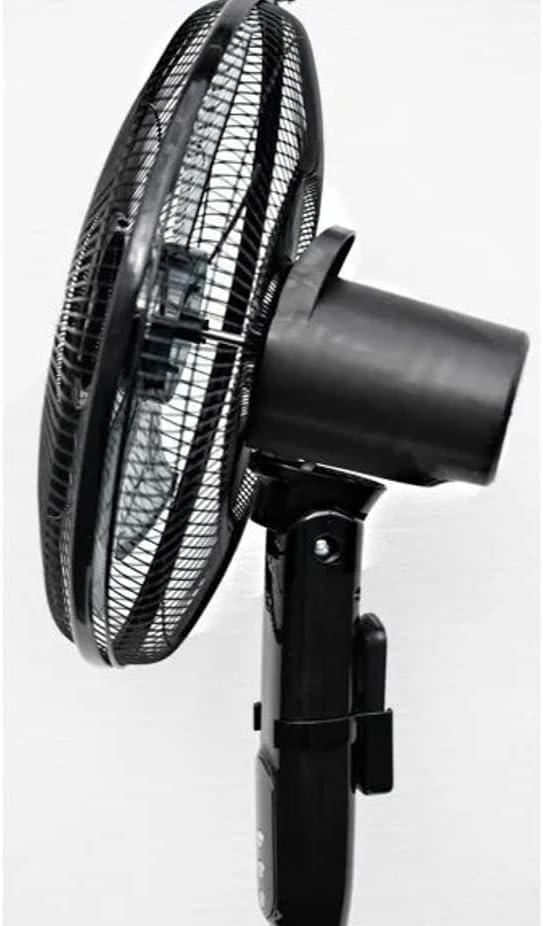
Samping view of the fan head, demonstrating the adjustable tilt mechanism for directing airflow up or down.

Pahareup-hareup view of the fan's protective grill and internal blades, designed for silent and efficient air movement.

Diwincik view of the control panel on the fan's stand, showing the power, oscillation, and mode buttons.
Setup sareng Majelis
Please follow these steps to assemble your PELONIS Pedestal Fan:
- Carefully unpack all components from the box and ensure all parts are present: fan head, front and rear grills, fan blade, motor shaft nut, grill retaining nut, stand pole, base, and remote control.
- Attach the stand pole to the base. Secure it firmly using the provided screws or locking mechanism.
- Mount the motor housing onto the top of the stand pole. Ensure it clicks securely into place.
- Remove the grill retaining nut and motor shaft nut from the motor shaft.
- Place the rear grill onto the motor housing, aligning the locating pins. Secure it with the grill retaining nut.
- Slide the fan blade onto the motor shaft, ensuring the notch on the blade aligns with the pin on the shaft. Secure it with the motor shaft nut, tightening it counter-clockwise.
- Attach the front grill to the rear grill, ensuring the clips snap together firmly around the edge. Secure with any provided screws or clips.
- Adjust the height of the fan by loosening the height adjustment collar on the stand pole, extending or retracting the pole, and then tightening the collar firmly.
- Teundeun kipas dina permukaan anu rata.
- Colokkeun kabel listrik kana stop kontak listrik standar.
Parentah Operasi
Panel Kontrol sareng Kadali Jauh:
The fan can be operated using the control buttons on the fan's stand or the included remote control. The LED display will show current settings.
- Tombol Daya (ⓘ): Pencét pikeun ngahurungkeun kipas ON atawa OFF.
- Tombol Laju (✴): Press repeatedly to cycle through the 12 available fan speeds. The current speed will be indicated on the LED display.
- Tombol Osilasi (⌣): Press to activate or deactivate the oscillation function, which allows the fan head to sweep from side to side.
- Timer Button (on Remote): Press to set the auto-off timer in 1-hour increments, up to 12 hours. The fan will automatically turn off after the set time.
- Mode Button (on Remote): Cycles through different fan modes (e.g., Normal, Natural, Sleep, if available). Refer to the LED display for the active mode.
Adjusting Fan Height and Tilt:
- Penyesuaian Jangkungna: Loosen the height adjustment collar on the main pole, extend or retract the inner pole to the desired height (28", 40", or 52"), and then firmly tighten the collar.
- Penyesuaian Dengdekkeun: Gently push the fan head up or down to adjust the vertical angle of airflow. The fan head will hold its position once set.
Pangropéa jeung beberesih
Pembersihan rutin bakal ngabantosan ngajaga kinerja kipas anjeun sareng manjangkeun umurna.
- Sok cabut kipas tina stop kontak sateuacan beberesih.
- Ngagunakeun lemes, damp lawon pikeun ngusap surfaces exterior kipas. Ulah make cleaners abrasive atawa pangleyur.
- To clean the fan blades and inside the grills, you may need to disassemble the front grill. Refer to the assembly instructions in reverse. Use a soft cloth or a vacuum cleaner with a brush attachment to remove dust and debris.
- Ensure all parts are completely dry before reassembling and plugging the fan back in.
- Simpen kipas di tempat anu tiis sareng garing nalika henteu dianggo, langkung saé dina bungkus aslina.
Pamérésan masalah
Upami anjeun ngalaman masalah sareng kipas anjeun, mangga tingali masalah sareng solusi umum ieu:
| Masalah | Mungkin Cukang lantaranana | Solusi |
|---|---|---|
| Kipas angin teu hurung. | Not plugged in; power outlet not working; fan not assembled correctly. | Ensure the power cord is securely plugged into a working outlet. Check circuit breaker. Verify all assembly steps are correct. |
| Kipas angin ribut. | Loose parts; fan not on a level surface; dust accumulation. | Check for any loose screws or components. Place fan on a stable, level surface. Clean fan blades and grills. |
| Osilasi teu jalan. | Oscillation function not activated; obstruction. | Press the oscillation button. Ensure there are no obstructions preventing the fan head from turning. |
| Kadali jauh teu jalan. | Batré paéh atanapi teu leres diselapkeun; jauh kaluar tina rentang. | Replace batteries (ensure correct polarity). Point remote directly at the fan's receiver. Ensure you are within effective range. |
spésifikasi
| merek | PELONIS |
| Nomer modél | PSPF18AR40B / VES760 |
| Warna | Hideung |
| Dimensi produk | 38.1 x 12.7 x 88.9 cm (15 x 5 x 35 inci) |
| Item Beurat | 3.5 kg (7.7 lbs) |
| Jumlah Speeds | 12 |
| Fitur husus | Oscillating, Digital Display, Remote Control, 12-Hour Timer, Power Off Memory |
| Sumber Daya | Kabel Listrik |
Garansi sareng Rojongan
This PELONIS Pedestal Fan is an Amazon Renewed product and comes with a 90-day Amazon Renewed warranty. This warranty covers any defects in material or workmanship under normal use during the warranty period.
For warranty claims or technical support, please contact Amazon Renewed customer service directly through your Amazon purchase history. They will assist you with troubleshooting or arranging a replacement/refund as per the warranty terms.


