1. Bubuka
This manual provides essential information for the installation, operation, and maintenance of your ASRock AMD Radeon RX 6400 Challenger ITX Graphics Card. Please read this guide thoroughly before proceeding with installation to ensure proper setup and optimal performance.
2. Émbaran Kasalametan
- Always disconnect the computer from the power outlet before installing or removing any hardware components.
- Handle the graphics card by its edges to avoid touching sensitive components and to prevent electrostatic discharge (ESD). Consider using an anti-static wrist strap.
- Ensure your computer case has adequate ventilation to prevent overheating.
- Jauhkeun kartu grafis tina kalembaban, lebu, sareng suhu anu ekstrim.
- Do not attempt to repair the card yourself. Refer to qualified service personnel.
3. Eusi Paket
Pastikeun yén sadaya item aya dina pakét anjeun:
- ASRock AMD Radeon RX 6400 Challenger ITX Graphics Card
- Guide Instalasi Gancang
- Driver CD or link to driver download (check ASRock's official website for the latest drivers)
4. Produk Langkungview
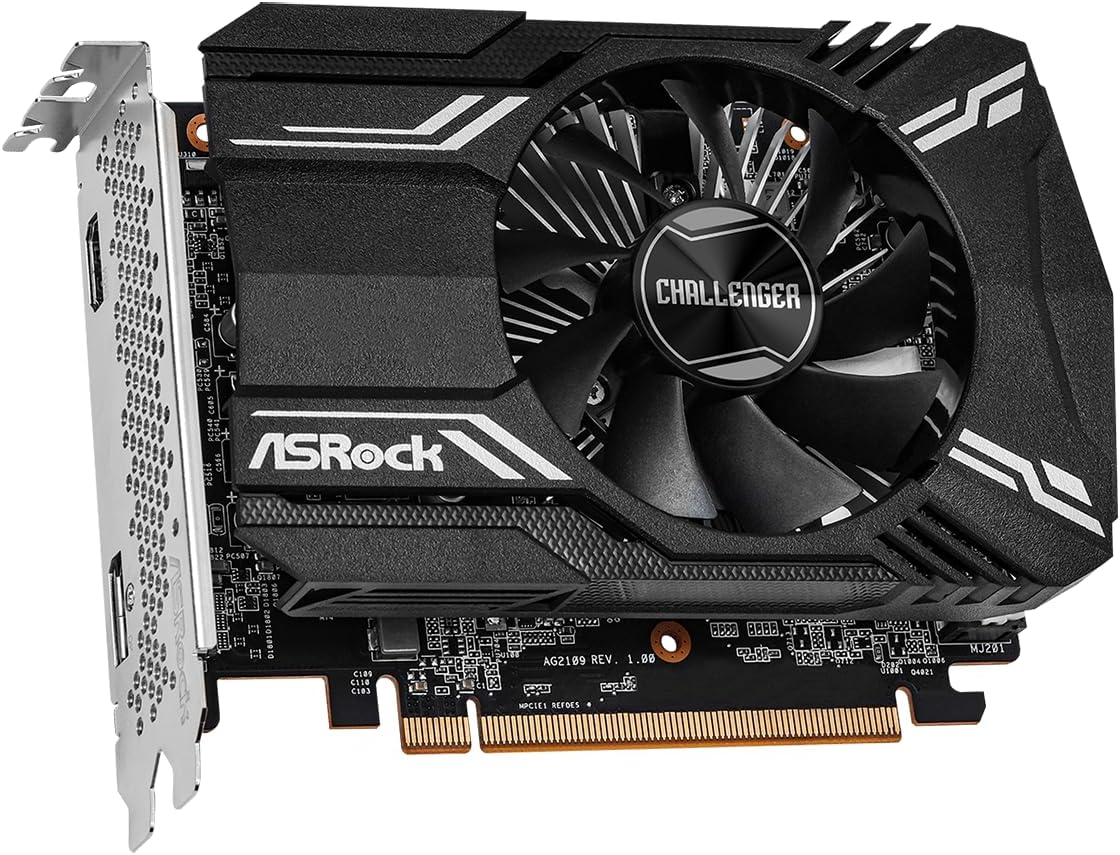
The ASRock AMD Radeon RX 6400 Challenger ITX is a compact graphics card designed for efficient performance. It features a single fan for optimized cooling, ensuring your system remains cool during operation. Built on the 6nm AMD Radeon RX 6400 GPU with RDNA 2 Architecture, it includes 4GB of GDDR6 memory and supports PCI Express 4.0 and DirectX 12 Ultimate.



5. Setup jeung Instalasi
Turutan léngkah ieu pikeun masang kartu grafik anjeun:
- Nyiapkeun Sistim anjeun: Power off your computer and unplug the power cord from the wall outlet. Open your computer case.
- Manggihan slot PCIe: Find an available PCI Express 4.0 x16 slot on your motherboard. Remove any expansion slot covers that may be blocking the slot.
- Selapkeun Kartu Grafik: Carefully align the graphics card with the PCIe slot. Press down firmly and evenly until the card is fully seated in the slot. A click may be heard when it is properly seated.
- Ngamankeun Kartu: Secure the graphics card to the computer case using the screw from the expansion slot cover or the case's retention mechanism.
- Sambungkeun kabel tampilan: Close your computer case and reconnect the power cord. Connect your monitor(s) to the graphics card's HDMI or DisplayPort outputs.
- Hurungkeun sareng Pasang Supir: Power on your computer. Once the operating system loads, install the latest graphics drivers from the ASRock or AMD official websitus.
6. Parentah Operasi
- Pamasangan supir: After physical installation, download and install the latest AMD Radeon drivers from the official ASRock or AMD website. This ensures optimal performance and access to all features.
- Sambungan tampilan: Use the HDMI or DisplayPort outputs on the graphics card to connect to your monitor. Ensure your monitor is set to the correct input source.
- Résolusi sareng Laju Refresh: Adjust your display resolution and refresh rate settings within your operating system's display settings or through the AMD Radeon Software. The card supports resolutions up to 7680x4320 pixels.
- Konfigurasi Parangkat Lunak: Utilize the AMD Radeon Software for fine-tuning graphics settings, monitoring performance, and updating drivers.
7. Pangropéa
- Tetep Pembalap diropéa: Regularly check for and install the latest graphics drivers from ASRock or AMD to benefit from performance improvements and bug fixes.
- Pastikeun aliran hawa anu leres: Keep your computer case clean and ensure that the graphics card's fan and heatsink are not obstructed. Good airflow is crucial for efficient cooling.
- beberesih lebu: Bersihkeun sacara berkala lebu tina kipas sareng heatsink kartu grafis nganggo udara anu dikomprés. Pastikeun komputer dipareuman sareng dicabut tina colokan sateuacan dibersihkeun.
8. Cara ngungkulan
- Henteu aya kaluaran tampilan:
- Pastikeun kartu grafik geus pinuh seated dina slot PCIe.
- Verify that the monitor cable is securely connected to both the graphics card and the monitor.
- Check if your monitor is set to the correct input source (HDMI/DisplayPort).
- Uji nganggo kabel tampilan atanapi monitor anu béda upami mungkin.
- Masalah Instalasi Supir:
- Uninstall any previous graphics drivers using a utility like Display Driver Uninstaller (DDU) in Safe Mode.
- Download the latest drivers directly from the ASRock or AMD website and perform a clean installation.
- Overheating or Fan Noise:
- Pastikeun aliran hawa nyukupan dina wadah komputer anjeun.
- Clean any dust accumulation on the fan and heatsink.
- Monitor temperatures using AMD Radeon Software or third-party tools.
- Ketidakstabilan atanapi Kacilakaan Sistem:
- Pastikeun unit catu daya (PSU) anjeun nyumponan wat minimumtage syarat pikeun sistem Anjeun, kaasup kartu grafik.
- Check for conflicting software or outdated motherboard BIOS.
9. Spésifikasi
| Fitur | Spésifikasi |
|---|---|
| merek | ASRock |
| Runtuyan | RX6400 CLI 4G |
| Nomer modél | RX6400 CLI 4G |
| Grafik Coprocessor | AMD Radeon RX 6400 |
| Chipset Brand | AMD |
| Ukuran RAM Kartu Grafika | 4 GB GDDR6 |
| Resolusi layar Max | 7680x4320 Piksel |
| Panganteur Kaluaran Video | DisplayPort, HDMI |
| Vérsi PCI Express | 4.0 |
| Item Beurat | 9.7 ons |
| Dimensi produk | 9.89 x 8.55 x 2.52 inci |
| Solusi cooling | Single Fan Design (0dB Silent Cooling) |
10. Garansi jeung Rojongan
For detailed warranty information, please refer to the official ASRock website or the warranty card included with your product. ASRock provides technical support for its products. If you encounter any issues that cannot be resolved using this manual, please visit the ASRock support page or contact their customer service for assistance.
ASRock Official Websitus: www.asrock.com


