Bubuka
The Akuvox X916S is an advanced SIP Door Phone designed for high-end buildings, offering secure and convenient access control. It features a large 13-inch IPS LCD color touch display, a 2MP Starlight camera, and a durable 316-grade stainless steel front panel. This manual provides comprehensive instructions for the installation, operation, and maintenance of your X916S device.
Fitur konci
- 13-inch IPS LCD Color Touch Display: Provides an intuitive interface for user interaction.
- 2MP Main Starlight Camera: Features built-in HDR mode for clear imaging in various lighting conditions, with a 115° (H) x 63° (V) display angle and Full HD 1080p video resolution at 30fps.
- Multiple Access Control Methods: Supports facial recognition, NFC, 13.56MHz and 125kHz access cards, Bluetooth, QR code, and numeric PIN.
- Konstruksi awét: 316-grade stainless steel front panel with IP65 and IK06 protection ratings.
- Audio canggih: Dual-microphone for noise reduction and dual loudspeakers with IP66 protection.
- SIP Support: Enables reliable two-way voice and one-way video communication.
- Sistem Operasi Android 9.0: Provides a flexible and powerful platform.
Eusi pakét
Mangga pariksa heula sadaya komponén parantos aya sateuacan neraskeun pamasangan:
- Akuvox X916S SIP Door Phone Unit
- Pamasangan Bracket sareng Screws
- Panyambung Wiring
- Pituduh Mimitian Gancang (upami aya)
- Dokuméntasi sareng Inpormasi Garansi
Setup sareng Instalasi
The X916S is designed for wall mounting. Ensure the installation location provides stable Wi-Fi connectivity and access to either Power over Ethernet (PoE) or a 12V DC power source.
Masang Alat
The device should be securely mounted to a wall. The dimensions are 340mm (H) x 384mm (W) x 45mm (D). When flush mounted, the depth from the wall is 3mm. Use the provided mounting bracket and hardware to ensure a stable installation.
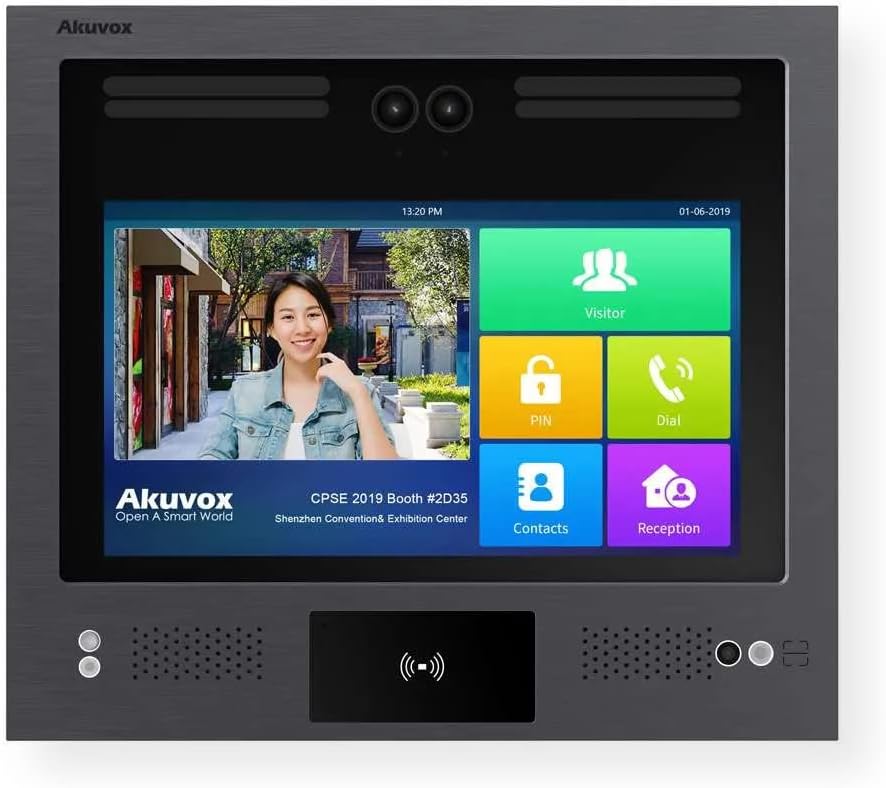
Gambar 1: Hareupeun view of the Akuvox X916S SIP Door Phone, highlighting the large touch display and integrated camera.
Daya sareng Sambungan Jaringan
Connect the device to your network via Wi-Fi. For power, use either a PoE-enabled network switch or injector, or a 12V DC power adapter. Ensure the power source meets the device's requirements (2 watts).

Gambar 2: Sisi view illustrating the mounting depth and connection ports (not explicitly visible but implied by context).

Figure 3: Close-up of the lower section, detailing the NFC/card reader and speaker/microphone placement.
Operasi
The Akuvox X916S operates on Android 9.0, providing a user-friendly interface via its 13.3-inch capacitive touchscreen.
Métode Kontrol Aksés
- Pangenal raray: The device supports facial recognition with high accuracy (>99%) and fast comparison speed (<0.6s per person). Ensure proper lighting for optimal performance.
- NFC and Access Cards: Utilize 13.56MHz and 125kHz access cards or NFC-enabled devices for entry.
- Bluetooth: Configure Bluetooth access through the device settings for convenient entry via smartphone.
- Kode QR: Generate and use QR codes for temporary or one-time access.
- Numeric Keypad (PIN): Enter a numeric PIN code directly on the touchscreen keypad for access.
Komunikasi
The X916S supports SIP for two-way voice and one-way video communication. Use the integrated dual microphones and loudspeakers for clear audio. The 2MP Starlight camera provides Full HD 1080p video at 30fps, with a wide viewing angle of 115° (H) x 63° (V).
Kontrol sora
The device supports voice control for certain functions. Refer to the on-screen interface for available voice commands.
Pangropéa
To ensure the longevity and optimal performance of your Akuvox X916S, follow these maintenance guidelines:
- beberesih: Gently wipe the stainless steel front panel and touch display with a soft, damp lawon. Hindarkeun pembersih abrasive atanapi pangleyur.
- Kaayaan Lingkungan: The device has an IP65 rating for dust and water resistance and an IK06 rating for impact protection. It is designed for outdoor use and can operate in temperatures up to 55°C. However, avoid direct exposure to extreme weather conditions if possible.
- Apdet parangkat lunak: Pariksa sareng pasang apdet firmware sacara rutin pikeun mastikeun alat ieu ngagaduhan fitur sareng paningkatan kaamanan pangénggalna.
Pamérésan masalah
This section addresses common issues you might encounter with your X916S. For more complex problems, please refer to the support section.
- Alat Teu Dihurungkeun:
Ensure the power source (PoE or 12V DC) is correctly connected and supplying adequate power. Check network cables for PoE connections.
- Teu Aya Pidéo/Kualitas Pidéo Goréng:
Verify network connectivity. Ensure the camera lens is clean and free from obstructions. Check lighting conditions; the Starlight camera with HDR performs best in low light but extreme darkness or backlight can affect quality.
- Access Control Not Working:
For facial recognition, ensure the user is positioned correctly and lighting is adequate. For cards/NFC, ensure the card is correctly presented and registered. Verify user permissions in the system settings.
- Taya Audio/Kualitas Audio Kurang:
Check microphone and loudspeaker areas for obstructions. Ensure volume settings are appropriate. Verify network stability for SIP communication.
spésifikasi
| Fitur | Rincian |
|---|---|
| Nomer modél | X916S |
| tampilan | 13.3 inch IPS LCD Color Touch Display |
| Sistem operasi | Android 9.0 |
| Kaméra Utama | 2MP Starlight Camera with HDR |
| Resolusi Video | HD lengkep 1080p |
| Laju pigura | Max 1080p @ 30fps |
| Camera Display Angle | 115° (H) x 63° (V) |
| Mikropon | 2x Built-in, IP67 protection |
| Spéker sora | 2x, IP66 protection |
| Bahan Panel hareup | 316 Kelas Stainless Steel |
| Ratings panyalindungan | IP65 / IK06 |
| Métode Aksés | Facial Recognition, NFC, 13.56MHz/125kHz Cards, Bluetooth, QR Code, Numeric PIN |
| Protokol konektipitas | Wi-Fi, SIP |
| Sasayogian tanaga | PoE atanapi 12V DC |
| Wattage | 2 watt |
| Ukuran (H x W x D) | 340mm x 384mm x 45mm |
| Depth from Wall (flush mounted) | 3 mm |
| Item Beurat | 2.5 pon |
| Suhu Operasi | Nepi ka 55 ° C |
Garansi sareng Rojongan
For warranty information and technical support, please refer to the documentation provided with your product or visit the official Akuvox website. Ensure you have your product model number (X916S) and purchase details ready when contacting support.
For further assistance, you may contact the manufacturer, Akuvox, directly.


