
Cuifati CUIFATIywqr0emxu88079
HRD-700 Portable Shortwave Radio User Manual
Model: CUIFATIywqr0emxu88079 | Brand: Cuifati
1. Bubuka
The HRD-700 Portable Shortwave Radio is a versatile and compact device designed for comprehensive radio reception and music playback. It supports multiple frequency bands including FM, MW, SW, WB (NOAA Weather Band), and features Bluetooth 5.0 connectivity and memory card playback. Its portable design makes it ideal for various indoor and outdoor activities.

Gambar 1.1: Hareupeun view of the HRD-700 Portable Shortwave Radio with its telescopic antenna extended.
Fitur konci:
- Full Band Reception: Capable of receiving FM, MW, SW, and WB (NOAA Weather Band) frequencies.
- Konektipitas Bluetooth 5.0: Seamlessly connect to Bluetooth-enabled devices for audio streaming.
- Rojongan Kartu Mémori: Puterkeun audio files directly from a memory card (TF card).
- Automatic Search & Store: Features coding pulley switch tuning with automatic station search and storage.
- Batré awét: Dilengkepan batré 1000mAh kanggo panggunaan anu lami.
- Timer Saré: Customizable sleep timer function (10-70 minutes).
- Audio anu kuat: Features a 3W diaphragm horn for clear and loud sound output.
- Desain portabel: Compact and lightweight, designed for easy carrying.
2. Komponén produk
Before using your HRD-700 radio, please ensure all components are present in the packaging.
Naon anu aya dina Kotak:
- HRD-700 Portable Shortwave Radio Unit
- USB Type-C Charging Cable (Power Cord)
- Mawa Kantong
- Manual pangguna (dokumén ieu)
3. Kontrol jeung Fungsi
Familiarize yourself with the various parts and controls of your HRD-700 radio for optimal operation.

Image 3.1: Detailed diagram of the HRD-700 radio highlighting key components and their functions.
| komponén | Fungsi |
|---|---|
| Tie Rod Antenna | Extend for improved FM, SW, and WB reception. |
| Rotating Tuning Button | Used for manual tuning of radio frequencies. |
| tampilan | Shows frequency, mode, battery status, and other information. |
| FM Road Pulley | Another control for tuning, possibly for fine-tuning FM. |
| Speaker éksternal | Audio output for listening to radio or music. |
| Port Ngecas Tipe C | Connect the USB Type-C cable for charging the internal battery. |
| Lanyard Liang | Attachment point for a lanyard or wrist strap for portability. |
| TF Card Jack | Insert a TF (microSD) card for playing stored audio files. |
| Panutup batré | Access point for the internal battery. |
| Pindah Pamilihan Mode | Switch between Radio (Channel Reception), BT (Bluetooth Reception), and M.Play (TF Card Mode). |
4. Setélan
4.1 Ngecas Batré
The HRD-700 radio comes with a built-in 1000mAh rechargeable lithium battery. Before first use, it is recommended to fully charge the battery.
- Locate the Type C Charging Port on the radio.
- Connect one end of the provided USB Type-C charging cable to the radio's charging port.
- Sambungkeun tungtung kabel USB anu sanés ka adaptor kakuatan USB standar (teu kalebet) atanapi port USB komputer.
- The display will indicate charging status. Once fully charged, the indicator will change or turn off.

Image 4.1: The HRD-700 radio with an illustration of its high-capacity 1000mAh lithium battery, emphasizing improved battery life.
4.2 Nyelapkeun Kartu Memori (Opsional)
If you wish to play audio files from a memory card, follow these steps:
- Locate the TF Card Jack on the side or back of the radio.
- Gently insert a compatible TF (microSD) card into the slot until it clicks into place. Ensure the card is inserted in the correct orientation.
- To remove, gently push the card inwards until it springs out.
5. Parentah Operasi
5.1 Ngahurungkeun/Mareuman sareng Kontrol Volume
- To power on the radio, locate the power button/switch and press/slide it to the ON position.
- To power off, press/slide the power button/switch to the OFF position.
- Adjust the volume using the dedicated volume control knob or buttons. The radio features a 3W speaker capable of over 120 decibels.
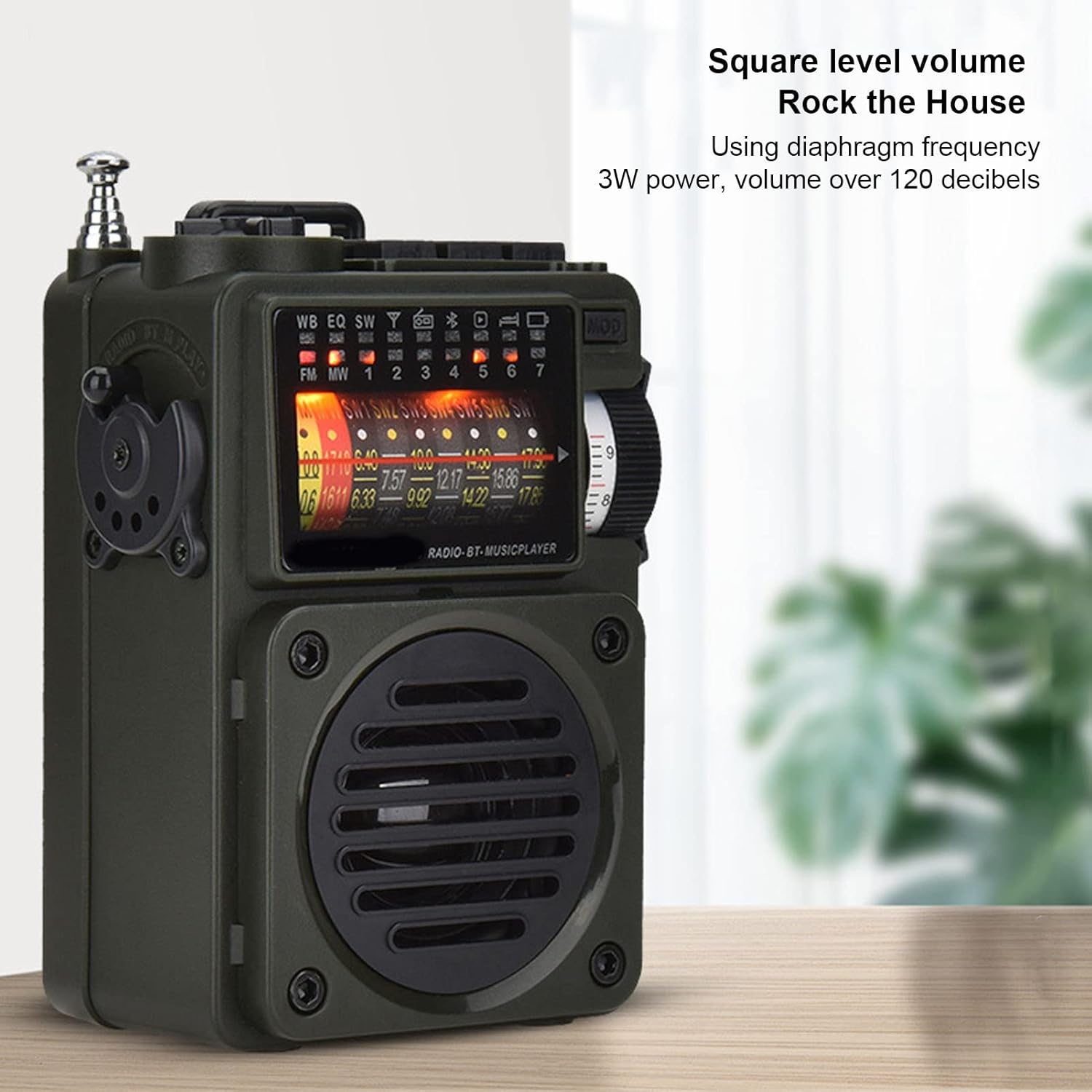
Image 5.1: The HRD-700 radio demonstrating its powerful sound output, suitable for filling a room.
5.2 Radio Reception (FM/MW/SW/WB)
The HRD-700 supports a wide range of radio bands.
- Pilih Mode: Use the Mode Selection Switch to select "Radio" mode.
- Manjangkeun Antenna: For optimal reception on FM, SW, and WB bands, fully extend the Tie Rod Antenna.
- Ngepaskeun:
- Tuning Manual: Use the Rotating Tuning Button or FM Road Pulley to manually scan for stations.
- Milarian Otomatis: Press the designated button (refer to display icons for "Auto Search") to automatically scan and store available stations.
- Station Recall: After automatic search, use the tuning controls to cycle through stored stations.

Image 5.2: The HRD-700 radio's display showing various frequency bands (FM, MW, SW, WB) and tuning indicators.
5.3 Putereun Musik Bluetooth
Connect your smartphone or other Bluetooth devices to the HRD-700 for wireless audio streaming.
- Pilih Mode: Use the Mode Selection Switch to select "BT" (Bluetooth) mode. The radio will enter pairing mode, indicated by a flashing Bluetooth icon on the display.
- Aktipkeun Bluetooth: On your device (e.g., smartphone), enable Bluetooth and search for available devices.
- pasangan: Select "HRD-700" from the list of found devices. Once connected, the Bluetooth icon on the radio's display will become solid.
- Puter Musik: Start playing music on your connected device. Audio will now play through the HRD-700 radio.

Image 5.3: The HRD-700 radio demonstrating its wireless Bluetooth connectivity with a smartphone, offering a stable connection up to 10 meters.
5.4 Memory Card (TF Card) Playback
Play your favorite audio files directly from a TF card.
- Lebetkeun Kartu: Ensure a TF card with audio files is properly inserted into the TF Card Jack (refer to Section 4.2).
- Pilih Mode: Use the Mode Selection Switch to select "M.Play" (Memory Play) mode.
- Playback: The radio will automatically begin playing audio files from the TF card. Use the radio's controls (e.g., next/previous track buttons, if available) to navigate your music.
5.5 Fungsi Timer Saré
The sleep timer allows you to set a duration after which the radio will automatically turn off.
- Access the sleep timer setting through the radio's menu or a dedicated button (refer to display icons or specific buttons).
- Adjust the sleep timer duration between 10 and 70 minutes.
- Confirm your selection. The radio will power off automatically after the set time.
6. Pangropéa
6.1 beberesih
- Lap bagian luar radio ku lawon anu lemes sareng garing.
- Ulah make cleaners abrasive, lilin, atawa pangleyur sabab bisa ngaruksak finish.
- Ulah meunang Uap kana sagala bukaan.
6.2 Panyimpenan
- Upami henteu dianggo salami lami, simpen radio di tempat anu tiis sareng garing, jauh tina sinar panonpoé langsung sareng suhu anu ekstrim.
- It is advisable to partially charge the battery before long-term storage and recharge it every few months to maintain battery health.
- Use the provided carrying pouch to protect the radio from dust and scratches.
7. Cara ngungkulan
If you encounter issues with your HRD-700 radio, please refer to the following common problems and solutions.
| Masalah | Mungkin Cukang lantaranana | Solusi |
|---|---|---|
| Radio teu hurung. | Batré béak. | Charge the radio using the provided USB Type-C cable. |
| panarimaan radio goréng. | Antena teu dipanjangkeun; daérah sinyal lemah; gangguan. | Fully extend the telescopic antenna. Move to an area with better signal. Avoid sources of electronic interference. |
| Bluetooth teu nyambung. | Radio not in BT mode; device Bluetooth off; too far from radio. | Ensure radio is in "BT" mode. Turn on Bluetooth on your device. Keep devices within 10 meters (32.8 feet). Try re-pairing. |
| No sound from memory card. | Card not inserted correctly; radio not in M.Play mode; unsupported file formatna. | Re-insert the TF card. Switch to "M.Play" mode. Ensure audio files aya dina format cocog. |
| Tampilan kosong atanapi kedip-kedip. | Low battery; internal issue. | Charge the radio. If the problem persists, contact customer support. |
8. Spésifikasi
| Fitur | Rincian |
|---|---|
| merek | Cuifati |
| Nomer modél | CUIFATIywqr0emxu88079 |
| Téhnologi konektipitas | Bluetooth |
| Vérsi Bluetooth | 5.0 (up to 10m/32.8ft stable connection range) |
| Téhnologi Tuner | FM, AM |
| Pita Radio Dirojong | SW, FM, AM, WB (NOAA Weather Band) |
| Sumber Daya | Battery Powered (1000mAh internal battery) |
| Kaluaran Speaker | 3W (over 120 decibels) |
| Téknologi tampilan | LCD |
| Fitur husus | Portable, Memory Card Playback, Sleep Timer |
| Item Beurat | 7.7 ons |
| Ukuran Paket | 5.47 x 5 x 2.05 inci |
| Negara asal | Cina |
9. Garansi jeung Rojongan
Cuifati products are manufactured to high-quality standards. For any questions, technical support, or warranty inquiries, please contact the seller or manufacturer directly through your purchase platform.
Punten tahan bukti pameseran anjeun pikeun klaim garansi.
Kanggo inpo nu leuwih lengkep, anjeun tiasa nganjang ka Cuifati Store on Amazon.
Ask a question about this manual
Ask about setup, troubleshooting, compatibility, parts, safety, or missing instructions. Manuals+ will review the question and use this page’s manual context to help answer it.