1. Bubuka
The Nokia Comfort Earbuds TWS-411-WH are designed to provide a balanced audio experience with a focus on comfort and durability. These wireless Bluetooth earbuds feature 10mm drivers for clear sound and are built to withstand daily use with IPX5 water and sweat resistance. This manual provides instructions for setting up, operating, maintaining, and troubleshooting your earbuds.
1.1. Naon dina Box
- Nokia kanyamanan Earbuds
- 3 pairs of ear tips (Small, Medium & Large)
- Kasus ngecas
- Kabel USB Type-C
- Pituduh ngamimitian gancang

Image 1.1: The Nokia Comfort Earbuds, charging case, three pairs of ear tips, USB-C cable, and quick start guide.
2. Setélan
2.1. Ngecas Earbuds jeung Case
Before first use, fully charge the earbuds and the charging case. Place the earbuds into the charging case. Connect the USB Type-C cable to the charging port on the case and to a power source. The indicator light on the case will show the charging status. A full charge provides up to 9.5 hours of listening time for the earbuds, with the charging case offering an additional 19.5 hours, totaling up to 29 hours of playback.

Image 2.1: The Nokia Comfort Earbuds inside their charging case, illustrating the charging contacts and compact design.
2.2. Nyapasangkeun sareng Alat
- Pastikeun yén earbuds dieusi.
- Buka wadah ngecas. Earbuds bakal otomatis asup kana mode papasangan.
- On your device (phone, laptop, tablet), enable Bluetooth.
- Milarian pikeun available Bluetooth devices and select "Nokia Comfort Earbuds" from the list.
- Sakali disambungkeun, sora konfirmasi bakal diputer, sarta earbuds siap dipaké.
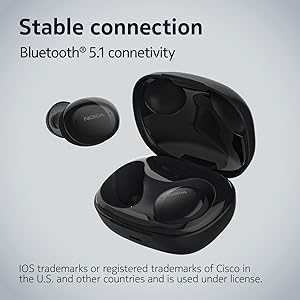
Image 2.2: The earbuds and charging case, highlighting the stable Bluetooth 5.1 connectivity.
3. Ngoperasikeun Earbuds
3.1. Ngagem Earbuds
Select the ear tips that provide the most comfortable and secure fit. Gently insert the earbuds into your ears and twist slightly to ensure a snug seal. The natural ergonomic form and unique comfort ring are designed for a secure fit.
3.2. Toél Kontrol
The Nokia Comfort Earbuds feature touch controls for easy management of audio and calls. Refer to the quick start guide for specific tap gestures for functions such as play/pause, skip tracks, answer/end calls, and activate voice assistant.
3.3. Manajemén nelepon
The earbuds support easy automatic switching between using one or both earbuds for phone calls, providing flexibility during conversations.

Image 3.1: A user wearing the Nokia Comfort Earbuds, demonstrating comfortable usage during daily activities.
4. Pangropéa
4.1. beberesih
Regularly clean your earbuds and charging case to ensure optimal performance and hygiene. Use a soft, dry, lint-free cloth to wipe the surfaces. For ear tips, remove them from the earbuds and clean with a mild soap solution, then rinse and dry thoroughly before reattaching.
4.2. Cai jeung Kesang Résistansi
The Nokia Comfort Earbuds are rated IPX5 for water and sweat resistance. This means they are protected against low-pressure water jets from any direction. They are suitable for workouts and light rain but should not be submerged in water. Ensure the earbuds are dry before placing them back in the charging case to prevent damage.

Image 4.1: The Nokia Comfort Earbuds demonstrating their IPX5 water and sweat resistance.
5. Cara ngungkulan
5.1. Isu umum jeung Solusi
- Earbuds teu dipasangkeun: Pastikeun duanana earbud aya dina wadah ngecas, teras buka tutupna pikeun ngaktipkeun modeu pairing. Pariksa setélan Bluetooth alat anjeun teras cobian nyambungkeun deui.
- Henteu aya sora atanapi volume rendah: Pariksa tingkat volume dina alat sareng earbud anjeun. Pastikeun earbud dipasang kalayan leres dina ceuli anjeun.
- Sambungan intermiten: Move closer to your connected device. Avoid obstacles that may interfere with the Bluetooth signal.
- Earbuds teu ngecas: Ensure the charging cable is securely connected to both the case and the power source. Verify that the charging contacts on the earbuds and inside the case are clean and free of debris.
6. Spésifikasi
| Fitur | Rincian |
|---|---|
| Ngaran modél | Earbuds Wireless Leres |
| Nomer modél | TWS-411 WH |
| Téhnologi konektipitas | Nirkabel (Bluetooth 5.1) |
| Tipe Supir Audio | Supir dinamis |
| Ukuran supir | 10 mm |
| Kahirupan Batré (Earbuds) | Nepi ka 9.5 jam |
| Total Playtime (kalawan Case) | Nepi ka 29 jam |
| Tahan cai | IPX5 (Waterproof, Sweatproof) |
| Métode kontrol | Toél |
| Mikropon | Sumuhun |
| Faktor Bentuk | Di-ceuli |
| Bahan | palastik |
| Item Beurat | 48.17 gram |
| Dimensi produk | 10 x 10 x 4.9 cm |
| Model Taun | 2022 |

Image 6.1: Detailed dimensions of the Nokia Comfort Earbuds and their charging case.
7. Garansi jeung Rojongan
7.1. Émbaran jaminan
This product comes with a standard brand warranty. For detailed information regarding the warranty period, coverage, and terms, please refer to the warranty card included in the product packaging or visit the official Nokia support websitus.
7.2. Rojongan Palanggan
For further assistance, technical support, or service inquiries, please contact Nokia customer support through their official channels. Contact details can typically be found on the Nokia websitus atanapi dina dokuméntasi produk.
8. Produk Langkungview Video
Video 8.1: Pajabat parantos réngséview of the Nokia Comfort Earbuds, showcasing their design, features, and key benefits such as ergonomic fit, sound balance, and water resistance.


