1. Bubuka
This manual provides comprehensive instructions for the installation, operation, and maintenance of your alpina Smart Home Wi-Fi Outdoor Camera. Please read this manual thoroughly before using the product to ensure proper function and safety. Keep this manual for future reference.
2. Émbaran Kasalametan
Perhatikeun tindakan pencegahan kaamanan ieu pikeun nyegah karusakan kana produk atanapi cilaka ka diri anjeun:
- Ensure the power adapter is connected to a suitable power source (100-240V / 50-60Hz).
- Do not expose the camera to extreme temperatures or humidity beyond its IP54 rating.
- Entong nyobian ngabongkar atanapi ngarobih kaméra. Ieu bakal ngabatalkeun jaminan.
- Simpen kaméra sareng komponénna tebih tina jangkauan barudak.
- Paké ngan adaptor kakuatan disadiakeun.
- Ensure the mounting surface is strong enough to support the camera.
3. Eusi Paket
Pastikeun yén sadaya item aya dina bungkusan:
- 1x alpina Smart Home Wi-Fi Outdoor Camera
- 1x Mounting Kit (fixation and screws)
- 1 x adaptor kakuatan
- 1x Manual Pamaké (dokumén ieu)

Image: The alpina Smart Home Wi-Fi Outdoor Camera and its packaging. The box highlights features like Full HD, IP54 rating, and app control.
4. Fitur Produk
The alpina Smart Home Wi-Fi Outdoor Camera is designed for external surveillance, offering a range of functionalities for monitoring your property.
- Resolusi Full HD 1080p: Nyadiakeun foo video jelas tur lengkeptage.
- Fungsi Pan sareng Tilt: Allows for remote adjustment of the camera's viewing angle (85° tilt, 355° pan).
- Visi Peuting: Infrared night vision up to 10 meters for monitoring in low-light or dark conditions.
- Deteksi Gerakan sareng Sora: Alerts you via push notifications on your smartphone when activity is detected.
- Audio Dua Arah: Enables communication through the camera with a built-in microphone and speaker.
- IP54 Tahan Cuaca: Certified dustproof and protected against water splashes from any direction, suitable for outdoor use.
- alpina Smart Home App Control: Ngatur jeung view hirup footage, control camera movement, and receive alerts from your smartphone.
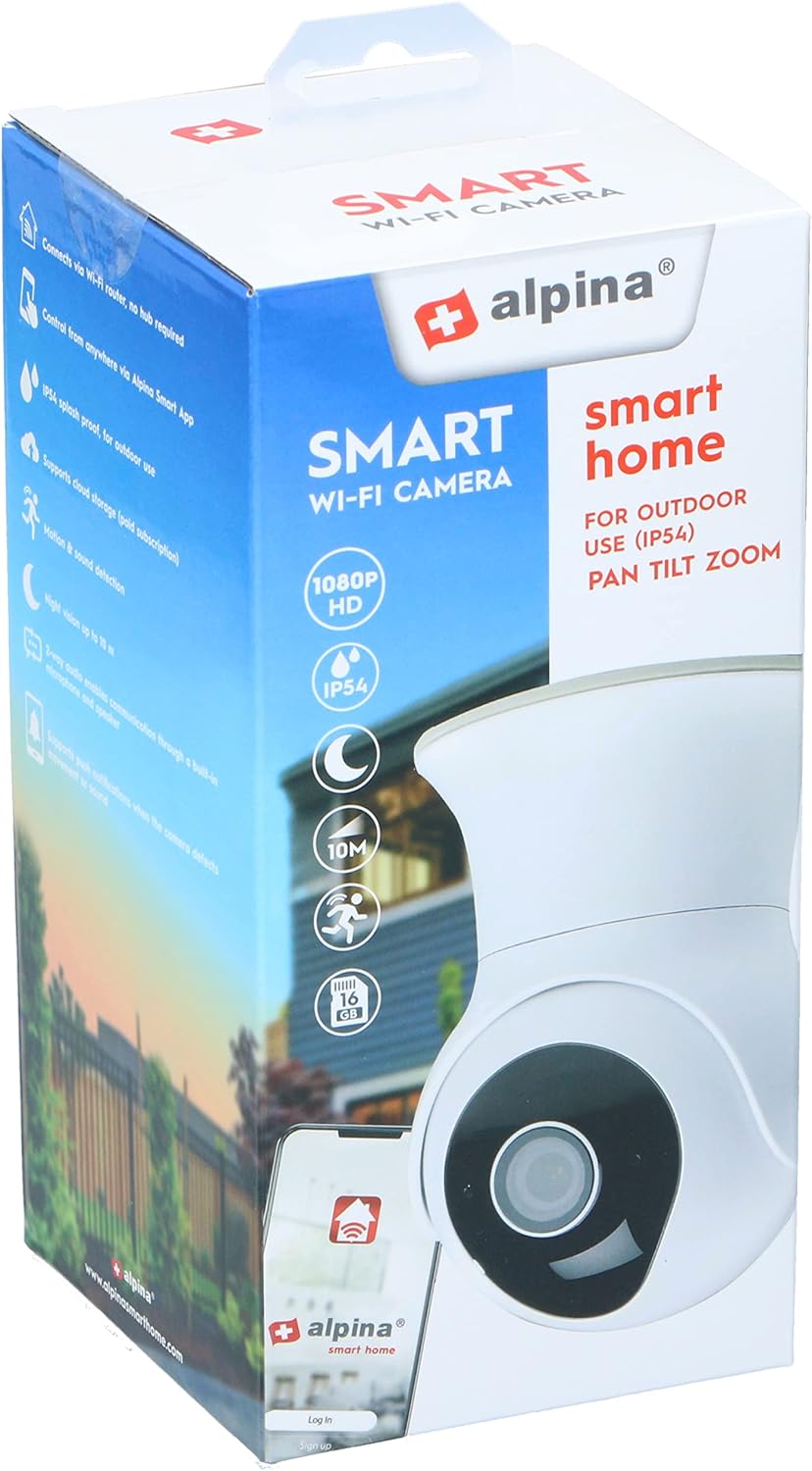
Image: The camera's pan and tilt capabilities are illustrated, showing a 85-degree vertical tilt and a 355-degree horizontal pan rotation.

Image: A smartphone screen shows a live feed from the camera, highlighting key features such as push notifications, motion and sound detection, and two-way audio communication.
5. Parentah Setup
5.1. Pamasangan Aplikasi
- Unduh alpina Smart Home app from the Google Play Store (for Android devices) or the Apple App Store (for iOS devices).
- Ngadaptarkeun akun anyar atanapi log in upami anjeun parantos gaduh.
5.2. Pamasangan Kaméra
- Choose a strategic outdoor location for mounting the camera, ensuring it is within Wi-Fi range.
- Use the provided mounting kit (screws and fixation) to securely attach the camera to a wall or ceiling.
- Connect the camera to the power adapter and plug it into a power outlet. The camera will power on and enter pairing mode (indicated by a flashing LED).
5.3. Ngapasangkeun Kaméra sareng Aplikasi
- Open the alpina Smart Home app on your smartphone.
- Ketok ikon "+" pikeun nambahkeun alat anyar.
- Select "Security Camera" or the appropriate camera type from the list.
- Follow the on-screen instructions to connect the camera to your Wi-Fi network. This typically involves scanning a QR code generated by the app with the camera lens or entering your Wi-Fi credentials.
- Once connected, the camera's LED indicator will turn solid, and you will see the camera feed in the app.
- Ngaran kaméra anjeun pikeun gampang idéntifikasi.
6. Parentah Operasi
6.1. Hirup View
From the app's main screen, tap on your camera's name to access the live video feed. You can view real-time footage of your monitored area.
6.2. Pan jeung Dengdekkeun Control
Dina jero siaran langsung view interface, use the directional controls (usually arrows or a joystick icon) to remotely adjust the camera's horizontal (pan) and vertical (tilt) angles to cover different areas.
6.3. Audio Dua Arah
To use the two-way audio feature, tap the microphone icon in the app. Hold the button to speak, and release to listen. Ensure your smartphone's microphone is enabled for the app.
6.4. Gerak sareng Deteksi Sora
Configure motion and sound detection settings in the app's camera settings. You can adjust sensitivity levels and set up notification schedules. When motion or sound is detected, the camera will send a push notification to your smartphone.
6.5. Recording and Snapshots
The app allows you to manually record video clips or take snapshots from the live view. These recordings and images are typically stored within the app or on a connected cloud service (if subscribed).
7. Pangropéa
7.1. beberesih
To clean the camera lens and body, use a soft, dry cloth. Do not use harsh chemicals, solvents, or abrasive cleaners, as these can damage the camera's surface or lens coating.
7.2. Pertimbangan Lingkungan
While the camera is IP54 rated for dust and water resistance, avoid direct exposure to high-pressure water jets or prolonged submersion. Ensure the power adapter connection is protected from moisture.
8. Cara ngungkulan
Upami anjeun mendakan masalah sareng kaméra anjeun, tingal solusi umum ieu:
- Kaméra teu nyambung ka Wi-Fi:
- Pastikeun kaméra aya dina jangkauan router Wi-Fi anjeun.
- Pastikeun kecap akses Wi-Fi anjeun leres.
- Balikan deui router anjeun sareng kaméra.
- Ensure your Wi-Fi network is 2.4GHz, as the camera may not support 5GHz networks.
- No live video feed:
- Pariksa sambungan internét anjeun.
- Ensure the camera is powered on and connected to Wi-Fi.
- Balikan deui aplikasi.
- Motion/Sound detection not working:
- Verify detection settings are enabled and sensitivity is adjusted correctly in the app.
- Pariksa idin bewara aplikasi dina telepon pinter anjeun.
- Masalah audio dua arah:
- Ensure your smartphone's microphone and speaker are functioning and app permissions are granted.
- Check the camera's microphone and speaker for obstructions.
9. Spésifikasi
| Nomer modél | 8711252264653 |
| Jenis kaméra | Pan, Tilt, Zoom (PTZ) Dome |
| Resolusi Video | HD lengkep 1080p |
| Komprési Video | H.264 |
| Laju pigura | 25fps |
| Ukuran Lénsa | 4 mm |
| Input kakuatan | 100-240V / 50-60Hz, 1A |
| Pan Sudut | 355° |
| Sudut Dengdekkeun | 85° |
| Peunteun IP | IP54 (Tahan lebu, Tahan cipratan cai) |
| Wengi Sawangan Sawangan | Nepi ka 10 méter |
| Téhnologi nirkabel | Wi-Fi (2.4 GHz) |
| Ukuran (L x W x H) | 7.6 x 7.6 x 10.7 cm |
| Beurat | 460 gram |
| Bahan | logam |
| Warna | Bodas |
10. Garansi jeung Rojongan
For warranty information and technical support, please refer to the official alpina Smart Home website or contact their customer service. Details regarding specific warranty periods and support channels are typically provided with your purchase documentation or on the manufacturer's websitus.
Spare parts availability information is not available in the provided product data.


