Bubuka
The Zoom V6-SP is a versatile vocal processor designed for both studio and live performance environments. It integrates professional vocal effects, a built-in looper, and a unique formant pedal to enhance vocal performances across various musical styles. This manual provides essential information for setting up, operating, and maintaining your V6-SP unit.

Image: The Zoom V6-SP Vocal Processor, showcasing desain kompak na perenah kontrol.
Precautions Kasalametan
To ensure safe operation and prevent damage to the unit or injury to yourself and others, please observe the following precautions:
- Sasayogian tanaga: Use only the specified AC adapter (Zoom AD-16 or equivalent 9V DC, 300mA center negative). Using an incorrect adapter can cause malfunction, electric shock, or fire.
- Uap: Do not expose the unit to rain or moisture. Do not use it near water or in damp kaayaan.
- Objék Asing: Ulah ngasupkeun barang logam atawa bahan nu gampang kaduruk kana liang unitna.
- panempatan: Place the unit on a stable, level surface. Avoid extreme temperatures, direct sunlight, and excessive dust.
- beberesih: Clean the unit with a soft, dry cloth. Do not use liquid cleaners or solvents.
Disetél
Ngabongkar jeung Eusi
The package for your Zoom V6-SP Vocal Processor typically includes:
- Zoom V6-SP Main Unit
- AC Adapter (may be sold separately in some regions)
- Manual Pitunjuk (dokumén ieu)
Nyambungkeun Unit a
Refer to the diagram below for proper connection of microphones, power, and output devices.
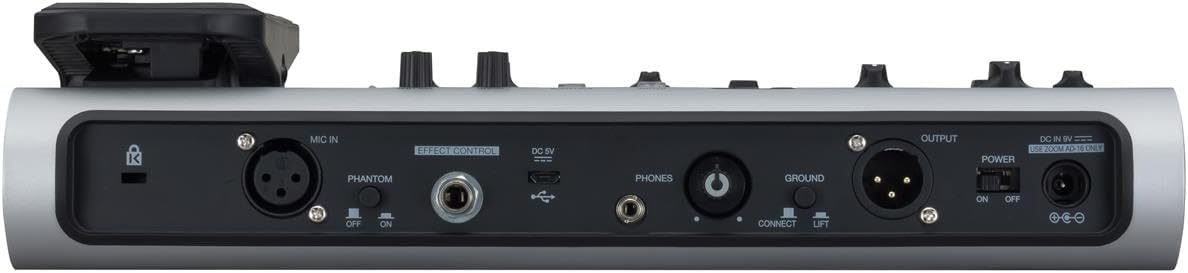
Image: Rear panel of the V6-SP, showing input/output jacks and power connection.
- Input Mikropon (MIC IN): Connect your microphone to the XLR input. If using a condenser microphone requiring phantom power, ensure the PANTOM saklar disetél ka ON.
- Kontrol Pangaruh: This 1/4-inch jack is for connecting an optional expression pedal or footswitch for additional control.
- DC 9V: Connect the supplied AC adapter here. Ensure the power switch is in the Pareum posisi saméméh nyambungkeun.
- USB: Use this port for firmware updates or connecting to a computer for audio interface functionality (refer to Zoom's website for driver information).
- Telepon: Connect headphones to this 1/4-inch stereo jack for monitoring your sound.
- Ground Connect/Lift: Use this switch to eliminate hum caused by ground loops. Set to ANGKAT if hum is present.
- Output (OUTPUT): Connect the XLR outputs to your mixer, audio interface, or PA system.
- Saklar kakuatan: Hurungkeun unit ON or Pareum using this switch.
After all connections are made, turn on the power switch. The display will illuminate, indicating the unit is ready for use.
Operating the V6-SP
The V6-SP features three main effect sections: Voice, Harmony, and Effect, along with a Formant pedal and Looper functionality. You can use up to three vocal processors simultaneously.

Gambar: Detil view of the V6-SP's control panel, including Voice, Harmony, and Effect sections.
Control Sections Overview
- Bagian Sora: Offers 12 distinct voice effects such as Vocoder, Pitch Correct, Talkbox, Robot, and Whistle. Use the Saluyukeun knob to fine-tune parameters for the selected effect.
- Harmony Section: Provides 3-voice harmonizer capabilities. Select the key using the central KUNCI dial. Adjust harmony levels with the MIX kenop.
- Effect Section: Includes over 10 studio-grade effects like Distortion, Chorus, Echo, Reverb (Room, Hall, Plate), and Telephone. The Saluyukeun knob controls effect parameters, while WAKTU jeung Eupan balik knobs are available for time-based effects.
- Formant Pedal: The large pedal on the right allows real-time adjustment of your vocal character, shifting formants up or down for unique vocal textures.
- Memory/Looper Footswitches: The bottom row of footswitches controls memory banks and looper functions.
- MEMORY/LOOPER + (Hold/Bypass): Activates/deactivates the looper or bypasses effects.
- MEMORY (Play/Stop): Controls looper playback or switches memory patches.
- MEMORY (Record): Initiates looper recording or saves memory patches.
Saving and Recalling Patches
The V6-SP has 100 memory locations for storing user-created patches. To save a patch, adjust your desired effects and then press the TOKO button. Use the footswitches to select a memory location and confirm. To recall a patch, simply use the memory footswitches to navigate through your saved presets.
Looper Functionality
The built-in looper allows for recording up to 3 minutes and 30 seconds of audio. Use the dedicated looper footswitches to record, play, and overdub vocal phrases. Refer to the detailed operational guide for specific looper commands and timings.

Image: A musician's foot operating the formant pedal on the V6-SP during a performance.
Pangropéa
Proper maintenance ensures the longevity and optimal performance of your V6-SP.
- beberesih: Regularly wipe the unit with a soft, dry cloth to remove dust and grime. Avoid abrasive cleaners or solvents that could damage the finish.
- Panyimpenan: Lamun teu dipaké pikeun période nambahan, nyimpen unit dina tiis, tempat garing jauh ti sinar panonpoé langsung jeung hawa ekstrim.
- Footswitches and Knobs: Ensure footswitches and rotary knobs operate smoothly. Avoid applying excessive force.
- Pembaruan firmware: Pariksa Zoom resmi website periodically for firmware updates. Keeping your unit's firmware current can improve performance and add new features.
Pamérésan masalah
If you encounter issues with your V6-SP, consult the following common troubleshooting steps:
- Henteu aya kakuatan:
- Ensure the AC adapter is correctly connected to the DC 9V input and a working power outlet.
- Verify the power switch is in the ON posisi.
- Taya Kaluaran Sora:
- Check all audio cable connections (microphone, output to mixer/PA).
- Ensure the microphone is working and phantom power is enabled if required.
- Pariksa éta VOLUME knob on the V6-SP is turned up.
- Check the input levels on your mixer or audio interface.
- If using headphones, ensure they are properly connected to the TELEPON jack and the headphone volume is adjusted.
- Hum atawa Noise:
- Coba nyetel GROUND CONNECT/LIFT pindah ka ANGKAT.
- Pastikeun sadaya kabel dina kaayaan anu saé sareng dilindungan kalayan leres.
- Avoid placing the unit near strong electromagnetic interference sources.
- Effects Not Engaging:
- Check if the individual effect sections (Voice, Harmony, Effect) are activated (indicated by illuminated LEDs).
- Ensure you are not in bypass mode (e.g., by holding the MEMORY/LOOPER + footswitch).
If problems persist, consult the official Zoom support resources or contact customer service.
spésifikasi
| Fitur | Rincian |
|---|---|
| Nomer modél | V6-SP |
| Ukuran (L x W x H) | 12.6 x 7 x 3 inci (320 x 178 x 76 mm) |
| Item Beurat | 4.72 pon (2.14 kg) |
| Bahan Awak | Logam sareng Plastik |
| Sumber Daya | Listrik Kabel (Adaptor AC) |
| Voltage | 9 volt DC |
| Ampumur | 300 Miliamps |
| Jenis Panyambung | XLR (MIC IN, OUTPUT), 1/4 inch (6.35mm) audio jack (Effect Control, Phones) |
| Panganteur Hardware | 1/4 inci Audio, USB |
| Format Sinyal | Analog |
| Waktu Rekaman Looper | Up to 3 minutes 30 seconds |
| Lokasi Mémori | 100 user-created patches |
Garansi sareng Rojongan
Émbaran jaminan
The Zoom V6-SP Vocal Processor comes with a standard manufacturer's warranty. Please refer to the warranty card included with your product or visit the official Zoom websitus kanggo syarat sareng katangtuan anu lengkep, kalebet durasi sareng jangkauan garansi.
Rojongan Palanggan
For technical assistance, product inquiries, or service requests, please contact Zoom customer support. You can find contact information and additional resources, such as FAQs and driver downloads, on the official Zoom websitus: