1. Bubuka
This manual provides detailed instructions for the installation, configuration, and operation of your MokerLink 24G + 4x10G SFP Managed Gigabit Switch. This device is designed to offer high-performance networking solutions with advanced Layer 2 and Layer 3 management capabilities, suitable for various network environments including enterprise, data centers, and broadband access.
2. Eusi Paket
- MokerLink 24G + 4x10G SFP Managed Gigabit Switch
- Kabel listrik
- Kit Rackmount
- Manual pangguna (dokumén ieu)
3. Setélan
3.1 Instalasi fisik
The MokerLink switch is designed for 1U rackmount installation. Ensure adequate ventilation around the device. Connect the power cord to the switch and a suitable power outlet. Connect your network devices (servers, workstations, other switches) to the Gigabit Ethernet ports (1-24) and 10G SFP+ uplink ports (25-28) using appropriate Ethernet cables or SFP+ transceivers and fiber optic cables.
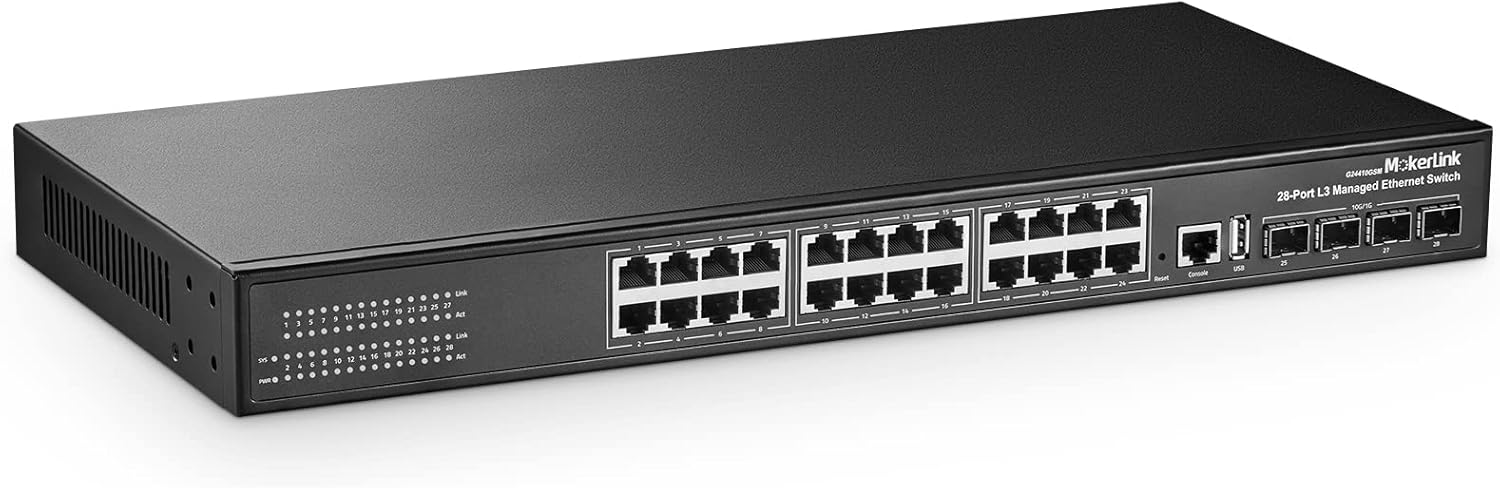
Gambar 3.1: Hareupeun view of the MokerLink 28-Port L3 Managed Ethernet Switch, showing 24 Gigabit Ethernet ports and 4 SFP+ uplink ports.

Figure 3.2: Detailed diagram illustrating the 24 Gigabit Ethernet ports, 4 SFP+ uplink ports, Console port, USB port, system indicators (SYS, PWR), and Link/Act LEDs for each port.

Figure 3.3: The MokerLink switch mounted in a standard 19-inch server rack, demonstrating its compact 1U form factor.
3.2 Konfigurasi Awal
The switch typically has a default IP address (e.g., 192.168.2.1). To access the management interface, connect a computer directly to one of the switch's Ethernet ports and configure your computer's IP address to be in the same subnet. Open a web browser and navigate to the switch's default IP address. Alternatively, use the console port for Command Line Interface (CLI) access.
Video 3.1: Hiji leuwihview of a MokerLink 26-port Gigabit PoE switch, demonstrating its physical appearance and port layout. While this video features a PoE model, the general setup and port types are similar to the managed switch.
4. Ngoperasikeun Switch
4.1 Layer 2 Features
- VLAN (Virtual Local Area Network): Supports 4K 802.1Q VLANs for network segmentation and traffic isolation.
- Méja MAC: Features a 16K MAC address table for efficient forwarding.
- Packet Filtering: L2-L4 packet filtering for enhanced security.
- Kaamanan Pelabuhan: Restrict access to specific ports based on MAC addresses.
- Palabuan Eunteung: Monitor network traffic by mirroring it to a designated port.
- Flow Rate Limiting: Control bandwidth usage on individual ports.
- QoS (Kualitas Palayanan): Prioritize critical network traffic.
- STP/RSTP/MSTP: Spanning Tree Protocols to prevent network loops.
- IGMP (Internet Group Management Protocol): Support for V1/V2/V3 multicast.
- Penindasan Badai: Prevent network performance degradation from broadcast, multicast, or unknown unicast storms.
- Ring Network Protection: Implement resilient network topologies.
- Link Aggregasi: Gabungkeun sababaraha tautan fisik kana hiji tautan logis pikeun ningkatkeun bandwidth sareng redundansi.

Figure 4.1: A visual representation of the various Layer 3 software functions supported by the switch, including SNMP, Port Mirroring, Port Isolation, Storm Suppression, Link Aggregation, VLAN, Spanning Tree, Multicast, Anti-attack, IP Route, and Network Diagnosis.
4.2 Layer 3 Features
- Routing statik: Configure static routes for inter-VLAN routing and network segmentation.
- DHCP Server/Relay/Snooping: Manage IP address assignment and security.
- IPv4/IPv6 Support: Compatibility with both current and next-generation IP protocols.
- ARP Configuration: Address Resolution Protocol management.
4.3 Interfaces Manajemén
The switch offers multiple management options:
- Webdumasar GUI: A user-friendly graphical interface accessible via a web browser for easy configuration and monitoring.
- CLI (Antarbeungeut Baris Paréntah): Accessible via console port, Telnet, or SSH for advanced configuration and scripting.
- SNMP (Protokol Manajemén Jaringan Basajan): For centralized network management and monitoring.
- RMON (Remote Monitoring): For network traffic analysis and performance monitoring.

Figure 4.2: Illustration of the switch's management utilities, showing both the intuitive web interface and the powerful command-line interface (CLI) for comprehensive network control.
5. Pangropéa
The MokerLink switch features a fanless design, contributing to silent operation and reduced maintenance requirements. Regular firmware updates are recommended to ensure optimal performance and security. Keep the device in a clean, dry environment with proper airflow to prevent overheating.

Figure 5.1: Depiction of the switch's fanless and noiseless design, highlighting its quiet operation and efficient heat dissipation through its metal casing.
6. Cara ngungkulan
6.1 Isu umum jeung Solusi
- Henteu aya kakuatan: Ensure the power cord is securely connected and the power outlet is functional. Check the PWR LED on the front panel.
- Henteu aya tautan / kagiatan: Verify that Ethernet cables are properly connected to both the switch and the connected device. Check the Link/Act LED for the corresponding port. Ensure the connected device is powered on and functioning correctly.
- Teu Bisa Aksés Web panganteur: Confirm your computer's IP address is in the same subnet as the switch's management IP. Try pinging the switch's IP address. Clear your browser's cache or try a different browser.
- Kinerja Jaringan Lambat: Check for network loops (ensure STP is enabled). Verify cable quality and length. Monitor port utilization for bottlenecks.
6.2 Indikator LED
Panel hareup LEDs nyadiakeun informasi status:
- SYS (System Indicator):
- Lighting: System Normal
- Flashing: System Starting
- PWR (Power Indicator):
- cahaya: Powered
- Teu Cahya: Henteu Kakuatan
- Link (Street Lamp):
- Lighting: Gigabit
- Un-Light: Not Gigabit
- Act (Data Lamp):
- Lighting: Connecting
- Flashing: Data Transmit
- Un-Light: Disconnect
7. Spésifikasi
| Fitur | Katerangan |
|---|---|
| merek | MokerLink |
| Nomer modél | 24G + 4x10G SFP(Managed) |
| Jumlah Palabuhan | 28 (24 x 1 Gigabit Ethernet, 4 x 10 Gigabit SFP+ Uplink) |
| Ngalihkeun Kamampuh | 336 Gbps |
| Packet Neraskeun Laju | 95.23 Mpps |
| Mémori | 512MB DDR |
| Kilat | 32 MB |
| Ukuran méja MAC | 16K |
| Jumbo Pigura | 9600 bait |
| Rojongan VLAN | 4K 802.1Q VLAN |
| Manajemén | Web, CLI (Console, Telnet, SSH), SNMP, RMON |
| Layer Features | L2 (QoS, STP/RSTP/MSTP, IGMP, Link Aggregation, Port Security, Port Mirroring, Flow Rate Limiting), L3 (Static Routing, DHCP Server/Relay/Snooping, IPv4/IPv6, ARP) |
| Desain | Rackmount, Fanless, Metal Housing |
| Diménsi | 19.76 x 11.81 x 3.7 inci |
| Item Beurat | 7.04 pon |
8. Garansi jeung Rojongan
For technical support, troubleshooting assistance, or warranty inquiries, please refer to the contact information provided with your product packaging or visit the official MokerLink websitus. Simpen resi pameseran anjeun pikeun validasi jaminan.


