
BEBEN 1
Buku Panduan Pangguna Earbud Nirkabel BEBEN
Modél: 1
Brand: BEBEN
Bubuka
Welcome to the user manual for your BEBEN Wireless Earbuds, Model 1. These earbuds are designed to provide a superior audio experience with features like 36 hours of playtime, smart touch controls, ergonomic design for sports, Hi-Fi sound, and active noise reduction for clear calls. This manual will guide you through the setup, operation, maintenance, and troubleshooting of your new earbuds.

Image: The BEBEN Wireless Earbuds, featuring the two earbuds with ear hooks and their compact charging case.
Naon Kaasup
- BEBEN Wireless Earbuds (Left and Right)
- Kasus Ngecas Nirkabel
- Kabel Ngecas USB Tipe-C
- Ujung Ceuli Silikon (ukuran S/M/L)
- Kantong Panyimpen Portabel
- Manual pamaké
spésifikasi
| Fitur | Rincian |
|---|---|
| Ngaran modél | 1 |
| Téhnologi konektipitas | Bluetooth 5.0 |
| Total Playtime | Nepi ka 36 Jam (kalayan wadah ngecas) |
| Waktu Puter Earbud (Ngeusian Tunggal) | Nepi ka 6 Jam |
| Ngecas Gancang | 5 minutes charge for 2 hours standby |
| Tipe Kontrol | Smart Toel Control |
| Tingkat Résistansi Cai | Tahan cai |
| Kontrol bising | Aktif Noise Cancellation (pikeun nelepon) |
| Wangun Earpiece | Pancing ceuli |
| Alat nu cocog | Multiple Bluetooth-enabled devices (smartphones, tablets, laptops, smart speakers) |
Disetél
1. Ngecas Awal
Saméméh dipaké munggaran, eusian pinuh ku earbuds jeung wadah ngecas.
- Tempatkeun duanana earbuds kana kotak ngeusian.
- Sambungkeun kabel ngecas USB Tipe-C kana wadah ngecas sareng kana sumber daya.
- The LED indicators on the case will show charging status. A full charge for the case takes approximately 6 hours.
- The earbuds themselves charge quickly, with 5 minutes of charging providing 2 hours of standby time.

Image: Earbuds inside the charging case, illustrating the Type-C charging port and battery life indicators.
2. Ngapasangkeun sareng Alat Anjeun (Ngapasangkeun Otomatis Hiji Léngkah)
Headphone ieu dilengkepan ku fitur one-step auto pairing pikeun genah.
- Ensure Bluetooth is enabled on your smartphone, tablet, or other compatible device.
- Buka wadah ngecas teras cabut dua earbud. Éta bakal otomatis hurung teras lebet kana modeu pairing.
- Dina alat anjeun, milarian alat Bluetooth teras pilih "C3" tina daptar.
- Once connected, you will hear a confirmation prompt, and the earbuds are ready for use.

Image: A smartphone screen showing "C3" as a discoverable Bluetooth device, with the earbuds next to it, demonstrating the one-step auto pairing process.
Note: The earbuds support single or binaural mode, allowing you to use one earbud independently or both together.
Parentah Operasi
Toél Kontrol
The earbuds feature smart touch controls for easy management of music and calls. Please keep your hands dry when touching the controls for optimal sensitivity.
- Hurungkeun/Pareuman:
- Automatically power on when taken out of the charging case.
- Automatically power off when placed back into the charging case.
- Puter / Reureuh: Ketok tunggal dina boh earbud.
- Lagu salajengna: Ketok dua kali dina earbud katuhu.
- Lagu saméméhna: Ketok dua kali dina earbud kénca.
- Volume Up: Pencét lila earbud katuhu.
- Volume Turun: Pencét lila earbud kénca.
- Ngajawab / mungkas Telepon: Ketok tunggal dina boh earbud.
- Nolak Telepon: Pencét jeung tahan boh earbud salila 2 detik.
- Aktipkeun Asisten Sora (Siri / Asisten Google): Ketok tilu kali dina boh earbud.
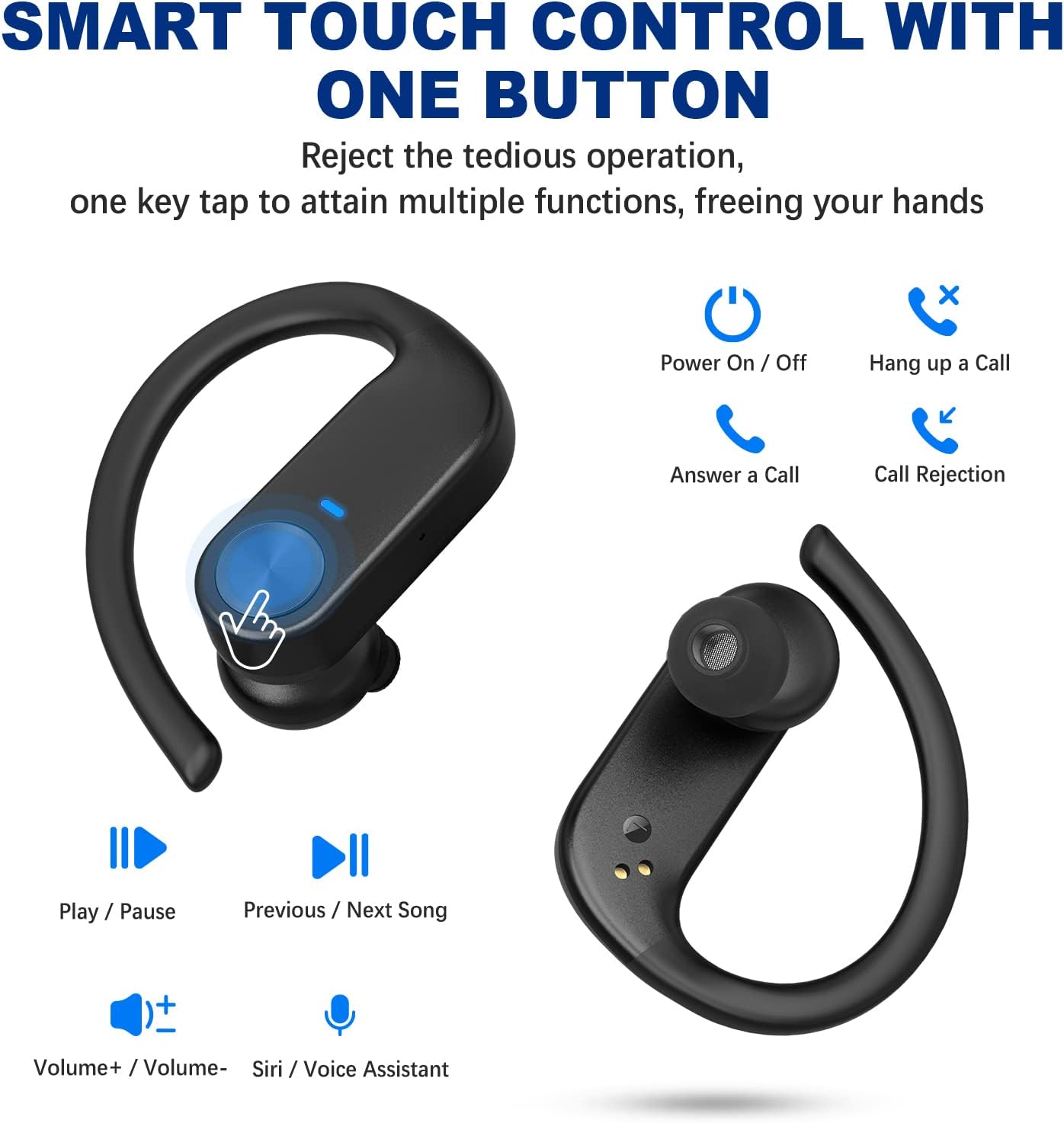
Image: Visual guide to the smart touch controls on the earbuds, showing functions like play/pause, volume, call management, and voice assistant activation.
Ngagem Earbuds
For optimal comfort and sound quality, choose the correct ear tips and adjust the ear hooks.
- Select the silicone ear tips (S/M/L) that best fit your ear canal.
- Lebetkeun earbud kana saluran ceuli anjeun.
- Place the ear hook over your ear and adjust it for a secure and comfortable fit. The ergonomic design ensures stability during activities like sports and workouts.

Image: Instructions on how to properly wear the earbuds, highlighting the soft ear tips and secure ear hooks for a comfortable and stable fit.
Pangropéa sareng Perawatan
- Regularly clean the earbuds, especially the ear tips and charging contacts, with a soft, dry cloth.
- Ulah make bahan kimia kasar atawa bahan abrasive pikeun beberesih.
- Simpen earbuds dina wadah ngecas nalika henteu dianggo pikeun ngajagi aranjeunna sareng pastikeun tetep dicas.
- Keep the earbuds away from extreme temperatures, humidity, and dust.
- While waterproof, avoid prolonged submersion in water. Dry thoroughly if exposed to moisture.
Pamérésan masalah
| Masalah | Solusi |
|---|---|
| Earbuds teu dipasangkeun / nyambungkeun. |
|
| Ngan hiji earbud jalan. |
|
| Volume lemah atawa kualitas sora goréng. |
|
| Earbuds teu ngecas. |
|
Garansi sareng Rojongan
BEBEN products come with a standard manufacturer's warranty. For detailed warranty information, technical support, or customer service inquiries, please refer to the contact information provided on the product packaging or visit the official BEBEN websitus.
Anjeun oge bisa nganjang ka BEBEN Store on Amazon pikeun émbaran leuwih produk jeung sumber rojongan.
Ask a question about this manual
Ask about setup, troubleshooting, compatibility, parts, safety, or missing instructions. Manuals+ will review the question and use this page’s manual context to help answer it.