1. Bubuka
Thank you for choosing the Acer Go True Bluetooth Wireless Earbuds. This manual provides essential information for setting up, operating, maintaining, and troubleshooting your new earbuds. Please read it carefully to ensure optimal performance and longevity of your device.
2. Eusi Paket
Pastikeun sadaya item aya dina pakét anjeun:
- Acer Go True Bluetooth Wireless Earbuds (Left and Right)
- Ngecas Case
- Kabel Ngecas USB
- Manual pamaké
3. Produk Langkungview
The Acer Go True Wireless Earbuds are designed for a seamless audio experience, offering wireless connectivity for calls and music. They feature an in-ear design for comfortable fit and are housed in a compact charging case.
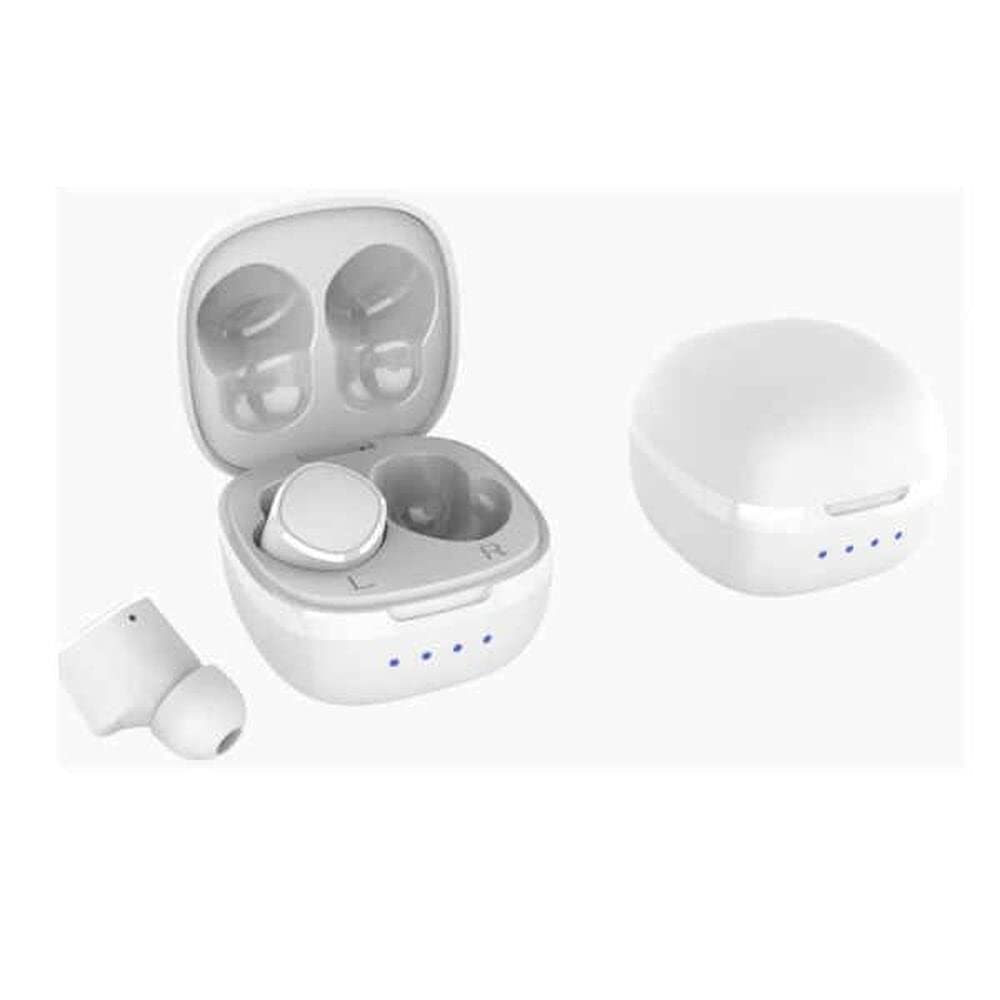
Figure 3.1: Acer Go True Wireless Earbuds in their open charging case, showing both earbuds and the charging contacts.

Figure 3.2: A slightly different perspective of the Acer Go True Wireless Earbuds within their open charging case, highlighting the compact design.
4. Setélan
4.1 Ngecas Earbuds sareng Case
Before first use, fully charge the earbuds and the charging case. The case provides additional charges for the earbuds on the go.
- Teundeun earbuds kana wadah ngecas, pastikeun aranjeunna ditempatkeun leres.
- Sambungkeun kabel ngecas USB ka port ngecas dina case jeung ka sumber daya USB nu cocog.
- Lampu indikator dina kasus bakal nunjukkeun status ngecas. Saatos dicas pinuh, lampu bakal nunjukkeun parantosan atanapi pareum.
The earbuds feature fast charging capabilities. The total playback time with the charging case is up to 14 hours.
4.2 Nyapasangkeun Bluetooth
Pikeun nyambungkeun earbud anjeun ka alat:
- Pastikeun yén earbuds tos dieusi sareng dina wadah ngecas.
- Open the charging case. The earbuds will automatically enter pairing mode, and an indicator light will flash.
- Dina alat anjeun (smartphone, tablet, laptop), aktipkeun Bluetooth sareng milarian alat anu sayogi.
- Select "Acer Go True" from the list of found devices.
- Once connected, the indicator light on the earbuds will stop flashing, and you will hear a confirmation tone.
Earbuds bakal otomatis nyambung deui ka alat dipasangkeun panungtungan sawaktos nyandak kaluar tina wadahna, upami Bluetooth diaktipkeun dina alat.
5. Parentah Operasi
The Acer Go True Earbuds are primarily controlled via an application on your connected device. Basic functions may also be available through touch controls on the earbuds.
5.1 Puterkeun Musik
- Puter / Reureuh: Ketok boh earbud sakali.
- Lagu salajengna: Ketok dua kali earbud katuhu.
- Lagu Sateuacanna: Ketok dua kali earbud kénca.
- Kontrol volume: Adjust via your connected device or through the dedicated control app.
5.2 Manajemén Telepon
- Ngajawab / mungkas Telepon: Ketok boh earbud sakali.
- Nolak Telepon: Pencét jeung tahan boh earbud salila 2 detik.
5.3 Asistén Sora
- Aktipkeun Asisten Sora: Triple-tap either earbud (functionality may vary by device).
6. Pangropéa
Perawatan anu leres mastikeun umur panjang earbud anjeun:
- beberesih: Anggo lawon anu lemes, garing, henteu lint pikeun ngabersihan earbuds sareng wadah ngecas. Ulah make cleaners abrasive atawa pangleyur.
- Tahan cai: The earbuds are waterproof. However, avoid prolonged submersion in water and ensure they are dry before placing them back in the charging case to prevent damage to the charging contacts.
- Panyimpenan: Nalika henteu dianggo, simpen earbuds dina wadah ngecasna pikeun ngajagi sareng tetep dicas. Nyimpen dina tiis, tempat garing jauh ti suhu ekstrim.
- Ngecas Kontak: Periodically clean the charging contacts on both the earbuds and the case with a dry cotton swab to ensure a reliable connection.
7. Cara ngungkulan
If you encounter issues with your Acer Go True Wireless Earbuds, try the following solutions:
- Earbuds teu dipasangkeun:
- Pastikeun earbud sareng wadah ngecas parantos dicas pinuh.
- Pareuman sareng aktipkeun Bluetooth alat anjeun.
- Forget "Acer Go True" from your device's Bluetooth list and attempt to pair again.
- Lebetkeun deui earbud kana wadahna, tutup, antosan sababaraha detik, teras buka pikeun lebet deui kana modeu pairing.
- Henteu aya sora atanapi volume rendah:
- Pariksa tingkat polumeu dina alat Anjeun disambungkeun.
- Pastikeun yén earbuds dipasang leres dina ceuli anjeun.
- Bersihkeun kokotor naon waé tina kisi-kisi earbud.
- Sambungkeun deui earbuds ka alat anjeun.
- Earbuds teu ngecas:
- Pastikeun kabel ngecas disambungkeun aman ka duanana wadahna jeung sumber kakuatan.
- Pastikeun sumber kakuatan aktip.
- Bersihkeun kontak anu ngecas boh dina earbuds sareng wadahna.
- Pastikeun yén earbuds disimpen leres dina wadah ngecas.
8. Spésifikasi
| Nomer modél | GP.HDS11.010 |
| Téhnologi konektipitas | Bluetooth, Nirkabel |
| Panempatan Ceuli | Dina-Ceuli |
| Warna | Bodas |
| Tingkat Résistansi Cai | Tahan cai |
| Tipe Kontrol | Kontrol Aplikasi |
| Bahan | alumunium |
| Dianjurkeun Mangpaat | Indoor, Multimedia |
| Fitur husus | Fast Charging, Wireless (charging) |
| Software Apdet Dijamin Dugi | 13 April 2030 |
9. Émbaran jaminan
The Acer Go True Bluetooth Wireless Earbuds (Model: GP.HDS11.010) come with a 2-taun jaminan produsén urang. Garansi ieu nyertakeun cacad dina bahan sareng pagawean dina panggunaan normal. Punten tahan bukti pameseran anjeun pikeun klaim garansi.
Spare parts availability in the EU is guaranteed for 2 years.
For detailed warranty terms and conditions, please refer to the official Acer websitus atanapi ngahubungan rojongan customer.
10. Rojongan
If you require further assistance or have questions not covered in this manual, please contact Acer customer support through their official websitus atanapi inpormasi kontak anu disayogikeun sareng bungkusan produk anjeun.
For the latest information, FAQs, and software updates, visit the official Acer support page.


