1. Bubuka jeung Leuwihview
The Grandstream UCM6308 is an enterprise-grade IP PBX appliance designed to provide a centralized solution for all business communication needs. Built on an advanced hardware platform and robust software, it offers a comprehensive suite of unified communication features, including voice, video, data, and mobility. This manual provides detailed instructions for the installation, configuration, operation, and maintenance of your UCM6308 system.
The UCM6308 is capable of accommodating the communication needs of up to 5,000 users, making it suitable for large organizations. It supports hybrid connectivity, allowing seamless integration with both legacy FXS/FXO lines and modern SIP trunks, providing flexibility for existing infrastructure and future growth.
2. Fitur Produk
- Massive User Capacity: Supports up to 5,000 users and 800 concurrent calls, empowering large organizations to collaborate and connect effortlessly.
- Hybrid Connectivity: Integrates seamlessly with 8 FXO ports for PSTN lines and 8 FXS ports for analog phones, alongside cutting-edge SIP trunks.
- Kaamanan Canggih: Features strong security protection using SRTP, TLS, and HTTPS encryption.
- Unified Communications: Supports voice, video, data, and mobility features for a comprehensive communication experience.
- Skalabilitas: Designed for future expansion and integration with various communication endpoints.
3. Eusi Paket
Upon unpacking your Grandstream UCM6308, please verify that all items listed below are present and in good condition:
- Alat IP PBX Grandstream UCM6308
- Universal Power adaptor
- Kabel Ethernet
- Rackmount Ears (2) with Screws
- Pitunjuk Instalasi Gancang (QIG)
- GPL License Statement
4. Setup Guide
4.1 Instalasi fisik
The UCM6308 can be installed on a desktop or mounted in a standard 19-inch rack.
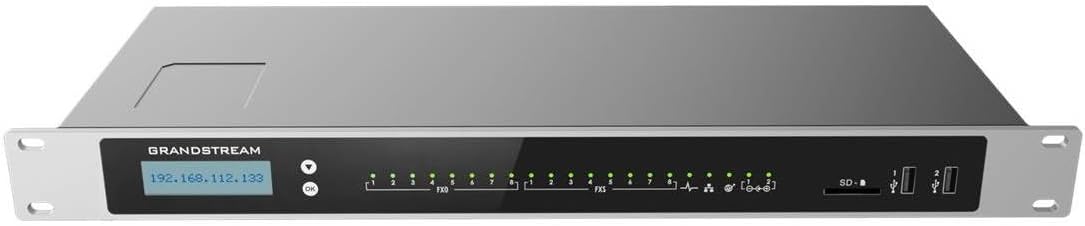
Gambar 1: Hareupeun view of the Grandstream UCM6308 IP PBX, showing the display and LED indicators.
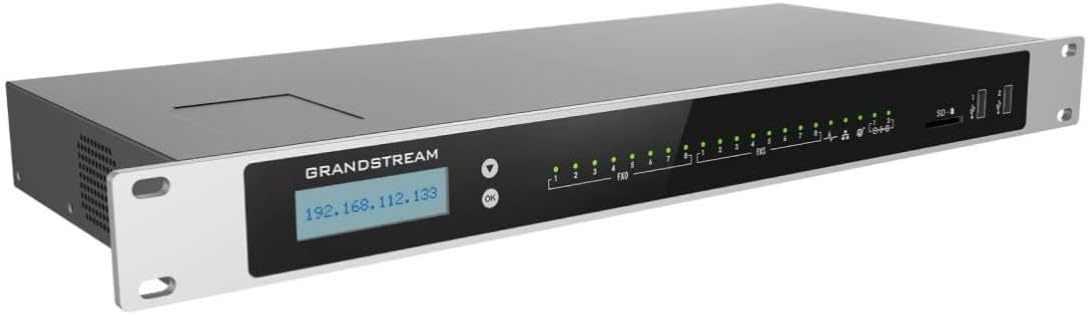
Gambar 2: Angled view of the Grandstream UCM6308 IP PBX, highlighting its rack-mountable design and front panel.

Figure 3: Close-up of the Grandstream UCM6308 front panel, detailing the LCD screen, navigation buttons, and port indicators.

Gambar 4: Tukangeun view of the Grandstream UCM6308 IP PBX, showing the power input, network ports, and FXO/FXS ports.
- panempatan: Choose a stable, well-ventilated location away from direct sunlight and heat sources. Ensure adequate space for cable connections.
- Sambungan Daya: Connect the provided power adapter to the DC12V port on the rear panel of the UCM6308 and then plug it into a power outlet.
- Sambungan jaringan:
- Connect one end of an Ethernet cable to the LAN port on the UCM6308 and the other end to your local network switch/router.
- If using the WAN port, connect it to your internet router or modem.
- FXO/FXS Connections: Connect your analog phone lines to the FXO ports and analog phones/fax machines to the FXS ports as required.
4.2 Konfigurasi Awal
UCM6308 tiasa dikonfigurasi ngalangkungan web panganteur pamaké (Web UI).
- Ngaksés Web UI:
- Ensure your computer is on the same local network as the UCM6308.
- The default IP address for the UCM6308 is displayed on its front LCD screen. Alternatively, you can use Grandstream's Discovery Tool.
- Buka a web browser (e.g., Chrome, Firefox) and enter the IP address of the UCM6308 in the address bar.
- Lebet: The default username is 'admin' and the default password can be found on the sticker at the bottom of the unit. It is highly recommended to change the default password immediately after the first login.
- Setup Wizard: Upon first login, the system will guide you through a setup wizard to configure basic network settings, time zone, and administrator password.
5. Parentah Operasi
Once the initial setup is complete, you can proceed with configuring the various communication features of the UCM6308.
5.1 Extension Management
Extensions are the internal numbers assigned to users or devices. You can create and manage SIP extensions, analog extensions (for FXS ports), and virtual extensions.
- Arahkeun ka Extension/Trunk > Extensions dina Web UI.
- Click 'Add' to create a new extension.
- Configure parameters such as extension number, password, caller ID, and voicemail settings.
5.2 Trunk Configuration
Trunks connect your UCM6308 to external networks, such as the Public Switched Telephone Network (PSTN) via FXO ports or VoIP service providers via SIP trunks.
- For FXO trunks, go to Extension/Trunk > Analog Trunks.
- For SIP trunks, go to Extension/Trunk > VoIP Trunks.
- Follow the on-screen instructions to add and configure your desired trunks.
5.3 Call Routing
Call routing rules determine how incoming and outgoing calls are handled by the UCM6308.
- Inbound Routes: Configure how incoming calls from trunks are directed to extensions, ring groups, or IVRs (Interactive Voice Response). Navigate to Call Features > Inbound Routes.
- Outbound Routes: Define rules for extensions to make outgoing calls through specific trunks. Navigate to Call Features > Outbound Routes.
6. Pangropéa
Regular maintenance ensures the optimal performance and longevity of your UCM6308 system.
- Pembaruan firmware: Periodically check for and apply firmware updates from the Grandstream website to ensure your system has the latest features, security patches, and bug fixes. Navigate to System Settings > Maintenance > Upgrade.
- Nyadangkeun sareng Mulangkeun: Regularly back up your system configuration to prevent data loss. Navigate to System Settings > Maintenance > Backup and Restore.
- Pangimeutan Sistim: Utilize the system status and call detail records (CDR) features to monitor system performance and call activity.
7. Cara ngungkulan
This section provides solutions to common issues you might encounter with your UCM6308.
- No Dial Tone on Analog Phone:
- Pastikeun telepon analog parantos nyambung ka port FXS kalayan leres.
- Check the FXS port status in the Web UI.
- Ensure the phone is functional by testing with another device.
- Teu Bisa Nelepon/Narima Telepon:
- Check network connectivity of the UCM6308.
- Verify trunk registration status (for SIP trunks) or FXO line status.
- Review inbound and outbound routing rules for correctness.
- Ensure extensions are registered and enabled.
- Web UI Inaccessible:
- Confirm the UCM6308 is powered on and network cables are connected.
- Verify your computer's IP address is in the same subnet as the UCM6308.
- Coba mupus cache browser anjeun atanapi nganggo browser anu sanés.
- Reset Sistim: Upami masalah tetep, reset pabrik tiasa diperyogikeun. Awas: This will erase all configurations. Refer to the official Grandstream documentation for the precise reset procedure.
8. Spésifikasi
| Fitur | Rincian |
|---|---|
| Produsén | Grandstream |
| merek | Grandstream |
| Nomer Modél Item | Grandstream UCM6308 |
| Item Beurat | 1.1 pon |
| Dimensi produk | 19.69 x 19.69 x 11.02 inci |
| Jumlah Item | 1 |
| Produsén Bagian Jumlah | Grandstream UCM6308 |
| ASIN | B09S1F4J7V |
| Tanggal Kahiji Sadia | 25 Maret 2021 |
9. Émbaran jaminan
The Grandstream UCM6308 IP PBX is covered by a manufacturer's limited warranty. Please refer to the warranty card included in your product packaging or visit the official Grandstream websitus kanggo syarat sareng katangtuan anu lengkep ngeunaan panutup garansi, durasi, sareng prosedur klaim.
10. Émbaran Rojongan
For technical assistance, product inquiries, or further support, please contact Grandstream Networks directly. You can find contact information, FAQs, and additional resources on the official Grandstream websitus (www.grandstream.com). Please have your product model and serial number ready when contacting support.


