1. Bubuka
Thank you for choosing the Omega OM0520WB 1600 dpi Wireless Optical Mouse. This manual provides detailed instructions for setting up, operating, maintaining, and troubleshooting your new device. Please read this manual carefully before use to ensure optimal performance and longevity of your mouse.
2. Eusi Paket
Mangga parios pakét kanggo barang-barang ieu:
- Omega OM0520WB Wireless Optical Mouse
- Manual pamaké
- 1 x AA Battery (may be pre-installed or included separately)
3. Produk Langkungview
Familiarize yourself with the components of your Omega OM0520WB mouse:
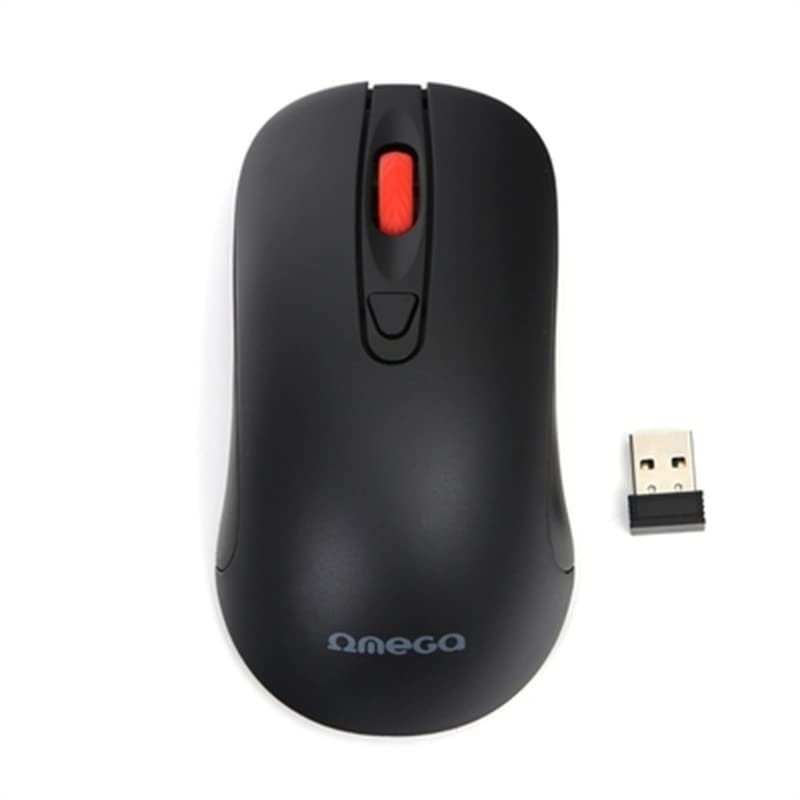
Image: The Omega OM0520WB Wireless Optical Mouse, shown in black. It features a sleek, ergonomic design with standard left and right click buttons, a scroll wheel, and a smooth finish.
- Tombol Klik Kénca: Fungsi klik primér standar.
- Tombol Klik katuhu: Fungsi klik sekundér standar.
- Gulung kabayang: Pikeun fungsi ngagulung vertikal sareng klik tengah.
- Sénsor optik: Located on the underside, for precise tracking.
- Kompartemen batré: Located on the underside, for inserting the AA battery.
- Saklar kakuatan: On/Off switch, usually on the underside of the mouse.
4. Parentah Setup
Follow these steps to set up your Omega OM0520WB mouse:
- Pasang Batré: Open the battery compartment cover on the underside of the mouse. Insert one AA battery, ensuring the polarity (+/-) matches the diagram inside the compartment. Close the cover securely.
- Hurungkeun Beurit: Teangan saklar kakuatan dina underside beurit tur geser ka posisi 'ON'.
- Nyambungkeun via Bluetooth:
- On your computer or laptop, navigate to the Bluetooth settings.
- Pastikeun Bluetooth diaktipkeun.
- Milarian pikeun new devices. The mouse should appear as 'Omega OM0520WB' or similar.
- Select the mouse to pair. Once paired, your mouse is ready for use.
5. Parentah Operasi
Your Omega OM0520WB mouse is designed for intuitive use:
- Napigasi Dasar: Pindahkeun beurit dina permukaan anu datar pikeun ngontrol kursor dina layar anjeun.
- Ngaklik: Use the left button for primary clicks (e.g., selecting items) and the right button for secondary clicks (e.g., opening context menus).
- Ngagulung: Gulung roda gulung ka luhur atanapi ka handap pikeun nganapigasi dokumén sareng web pages. Press the scroll wheel for a middle-click function, if supported by your application.
- Setélan DPI: The mouse operates at a fixed 1600 dpi, providing a balance of speed and precision for most tasks.
- Desain Ambidextrous: The symmetrical design allows comfortable use for both left-handed and right-handed users.
6. Pangropéa
Pikeun mastikeun umur panjang sareng kinerja optimal mouse anjeun, turutan pedoman perawatan ieu:
- beberesih: Anggo kaén anu lembut sareng garing pikeun ngusap permukaan beurit. Keur kokotor bandel, rada dampen lawon jeung cai. Hindarkeun ngagunakeun bahan kimia anu kasar atanapi pembersih abrasive.
- Sénsor optik: Keep the optical sensor on the underside clean and free from dust or debris.
- Ngagantian batré: When the mouse performance degrades or it stops responding, replace the AA battery. Always use a fresh, high-quality battery.
- Panyimpenan: When not in use for extended periods, turn off the mouse using the power switch to conserve battery life. Store it in a cool, dry place.
7. Cara ngungkulan
If you encounter issues with your Omega OM0520WB mouse, refer to the following solutions:
- Beurit Teu Ngabales:
- Pastikeun beurit dihurungkeun.
- Pariksa batréna. Ganti upami diperyogikeun.
- Verify that Bluetooth is enabled on your computer and the mouse is paired. Try re-pairing the mouse.
- Move the mouse closer to your computer to ensure a strong Bluetooth signal.
- Gerakan Kursor Erratic:
- Ngabersihan sensor optik dina underside beurit.
- Anggo beurit dina permukaan anu bersih, henteu mantul, sareng rata. Disarankeun nganggo alas beurit.
- Masalah sambungan:
- Balikan deui komputer anjeun sareng cobian sambungkeun deui.
- Remove the mouse from your computer's Bluetooth device list and then re-pair it.
- Ensure there are no other devices interfering with the Bluetooth signal.
8. Spésifikasi
| Ngaran modél | OM0520WB |
| Téhnologi konektipitas | Nirkabel (Bluetooth) |
| Téhnologi Deteksi Gerakan | Optik |
| DPI | 1600 dpi |
| Jumlah Kancing | 3 (Kénca, Katuhu, Gulung Roda) |
| Orientasi leungeun | Ambidextrous |
| Sumber Daya | 1 x AA Lithium-ion battery (required) |
| Alat nu cocog | Komputer Pribadi, Laptop |
| Beurat | Kira-kira 73 g |
| Warna | Hideung |
9. Garansi jeung Rojongan
Omega products are designed for reliability and performance. For information regarding warranty coverage, technical support, or service, please refer to the warranty card included with your product or visit the official Omega websitus. Simpen resi pameseran anjeun salaku bukti pameseran.


