Bubuka
This manual provides comprehensive instructions for the Angrox XRT140 Universal Remote Control, designed as a replacement for various VIZIO Smart TV models. It covers setup, operation, and troubleshooting to ensure optimal performance and ease of use.
Produk Leuwihview

Gambar: Hareup jeung tukang view of the Angrox XRT140 Universal Remote Control.
Fitur konci
- Aksés Sakali Toél: Dedicated buttons for popular streaming services including Vudu, Netflix, Prime Video, Xumo, Hulu, and Redbox, plus a WatchFree button.
- Tombol responsif: Engineered for quick response times (less than 0.5 seconds) and durability (over 11,000 clicks).
- rentang diperpanjang: Offers a transmitting distance of over 42 feet for flexible use.
- Konstruksi awét: Made from high-quality ABS material with a glossy finish for enhanced durability and soft, tactile buttons.
- Henteu Dibutuhkeun Pemrograman: Ready to use immediately after battery installation.
Kasaluyuan
The Angrox XRT140 remote control is designed for broad compatibility with VIZIO Smart TV models and can replace several VIZIO remote models.
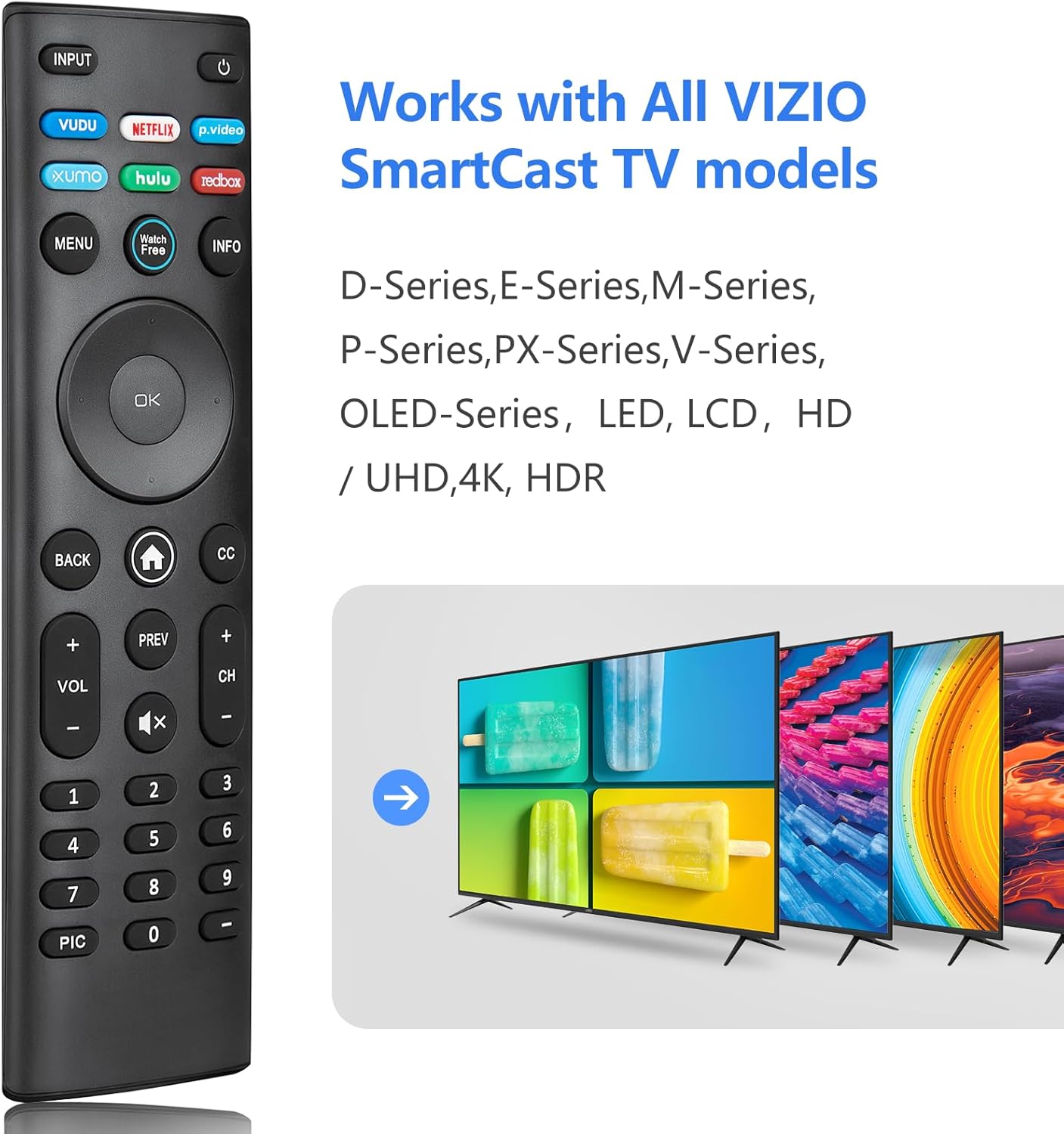
Image: The Angrox XRT140 remote control is compatible with various VIZIO SmartCast TV models, including D-Series, E-Series, M-Series, P-Series, PX-Series, V-Series, and OLED-Series.
- Compatible VIZIO TV Models: D-Series, E-Series, M-Series, P-Series, PX-Series, V-Series, OLED-Series, and other LED, LCD, HD, 4K UHD, HDR Smart TVs.
- Replaces VIZIO Remote Models: XRT136, XRT135, XRT510, XRT500, XRT100, XRT112, XRT122, XRT302, VR1, VR2, VR10, VR15.
Parentah Setup
Pamasangan batré
- Panggihan kompartemen batré dina tonggong kadali jauh.
- Geser panutup batré ka handap pikeun mukakeunana.
- Insert two (2) 1.5V AAA batteries, ensuring the positive (+) and negative (-) terminals align correctly with the markings inside the compartment.
- Geser panutup batré deui kana tempatna nepi ka ngaklik aman.
Catetan: Salawasna anggo batré anyar sareng gentos duanana batré dina waktos anu sami. Ulah nyampur batré lami sareng énggal atanapi jinis batré anu béda.
Pamakéan awal
The Angrox XRT140 remote control requires no programming. Once batteries are installed, it is ready for immediate use with compatible VIZIO Smart TVs.
- Ensure your VIZIO Smart TV is powered on.
- Point the remote control directly towards the TV's infrared (IR) sensor.
- Press any button (e.g., Power, Volume Up) to test functionality.
If the remote does not respond, verify battery installation and ensure there are no obstructions between the remote and the TV sensor.
Parentah Operasi
Fungsi Tombol
The following diagram and descriptions detail the functions of each button on the Angrox XRT140 remote control.

Image: Detailed diagram illustrating the function of each button on the Angrox XRT140 remote control.
| Tombol | Fungsi |
|---|---|
| INPUT | Changes the currently displayed input source. |
| Kakuatan (⏻) | Turns the television ON or OFF. |
| VUDU | Accesses VUDU channels/application. |
| NETFLIX | Accesses NETFLIX channels/application. |
| p.video (Prime Video) | Accesses Prime Video channels/application. |
| XUMO | Accesses XUMO channels/application. |
| HULU | Accesses HULU channels/application. |
| REDBOX | Accesses REDBOX channels/application. |
| MENU | Némbongkeun menu setélan. |
| WatchFree | Accesses WatchFree channels (availability may vary by region). |
| INFO | Displays the information window. |
| Navigation Buttons (Up/Down/Left/Right) | Navigates on-screen menus. |
| OKÉ / Play / Reureuh | Selects the highlighted menu option and plays or pauses content. |
| BALIK | Goes to the previous on-screen menu. |
| Home Button (⌂) | Launches SmartCast Home or returns to the SmartCast Home Screen. |
| CC (Katerangan Tertutup) | Enables or disables closed captions. Long press to open the Accessibility menu. |
| VOL +/- (Volume Up/Down) | Increases or decreases the loudness of the audio. |
| PREV | Returns to the channel last viewed. |
| CH +/- (Channel Up/Down) | Ngarobah saluran. |
| Bisu (🔇) | Turns the audio ON or OFF. |
| Nomer Pad (0-9) | Manually enters a channel number. |
| PIC | Cycles through different picture setting modes. Long press to enable/disable talk back feature. |
| Seblak (-) | Used with the number pad to manually enter a digital sub-channel (e.g., 18-4 or 18-5). |
Pamérésan masalah
If you encounter issues with your Angrox XRT140 remote control, please refer to the following common troubleshooting steps:
- Jauh Teu Ngabales:
- Ensure batteries are correctly installed with proper polarity (+/-).
- Replace old batteries with two new 1.5V AAA batteries.
- Confirm there are no obstructions between the remote's IR emitter and the TV's IR receiver.
- Arahkeun remot langsung ka sénsor IR TV.
- Rentang kawates:
- Ensure batteries are fresh. Low battery power can reduce signal strength.
- Remove any objects that might be blocking the signal path between the remote and the TV.
- The remote operates via infrared (IR) and requires a direct line of sight to the TV.

Image: The remote control offers an extended transmitting distance of over 42 feet, but requires a clear line of sight.
- Tombol Spésifik Teu Gawé:
- Clean the remote control buttons and surface with a soft, dry cloth to remove any dirt or residue that might be interfering with button presses.
- Upami ngan ukur tombol-tombol tertentu anu teu ngaréspon, remotna tiasa ruksak. Pertimbangkeun pikeun ngagentos remotna.
spésifikasi
| Fitur | Rincian |
|---|---|
| Nomer modél | XRT140 |
| merek | Angrox |
| Dimensi produk | 6.3 x 1.57 x 0.39 inci (16.0 x 4.0 x 1.0 cm) |
| Item Beurat | 1.76 ons (50 gram) |
| Batré Diperlukeun | 2 x batré AAA (1.5V) |
| Fitur husus | Ergonomic design, No Programming Required, Universal compatibility with specified VIZIO TVs |
| Produsén | ENJOYLink Direct |

Image: Physical dimensions of the Angrox XRT140 remote control.
Pangropéa
- beberesih: Anggo lawon anu lemes sareng garing pikeun ngabersihkeun remot kontrol. Entong nganggo pembersih cair atanapi bahan anu kasar.
- Perawatan batré: Remove batteries if the remote will not be used for an extended period to prevent leakage. Dispose of used batteries responsibly according to local regulations.
- Panyimpenan: Nyimpen remote di tempat anu tiis sareng garing jauh tina sinar panonpoé langsung sareng suhu anu ekstrim.
Garansi sareng Rojongan
Specific warranty details for the Angrox XRT140 remote control may vary. Please refer to the product packaging or contact the retailer where the product was purchased for detailed warranty information.
For technical support or further assistance, please contact Angrox customer service through their official channels or the retailer's support services.
