1. Bubuka
This manual provides comprehensive instructions for the installation, operation, and maintenance of your COUGAR Archon 2 RGB Mid Tower Case. Please read this manual carefully before beginning installation to ensure proper setup and to maximize the performance and longevity of your product.

Gambar 1.1: Angled view of the COUGAR Archon 2 RGB Mid Tower Case, showcasing the tempered glass side panel and front RGB fans.
2. Fitur Produk
The COUGAR Archon 2 RGB Mid Tower Case is designed for PC enthusiasts seeking a balance of aesthetics, airflow, and functionality. Key features include:
- Elegant Design with Tempered Glass: A sleek black finish combined with a tempered glass side panel allows for a clear view komponén internal sareng pencahayaan RGB.
- Aliran Udara Dioptimalkeun: Supports multiple fan configurations and includes three pre-installed 120mm ARGB fans at the front for efficient cooling.
- Kasaluyuan éksténsif: Accommodates Mini ITX, Micro ATX, and ATX motherboards.
- AmpPilihan Panyimpenan: Provides bays for both 3.5" HDDs and 2.5" SSDs.
- I/O Hareup anu merenah: Features USB 3.0 and USB 2.0 ports for easy peripheral connectivity.
- Kontrol Lampu RGB: Integrated ARGB fans offer customizable lighting effects.

Gambar 2.1: Hareupeun view of the COUGAR Archon 2 RGB case, highlighting the three pre-installed ARGB fans.
3. Setup Guide
Follow these steps to properly install your components into the COUGAR Archon 2 RGB case.
3.1. Daptar pariksa Pra-Pasang
- Ensure you have all necessary components: motherboard, CPU, RAM, GPU, power supply, storage drives, and appropriate tools (screwdriver, zip ties).
- Work on a clean, static-free surface. Consider using an anti-static wrist strap.
3.2. Muka Kasus
- Carefully remove the tempered glass side panel by unscrewing the thumbscrews located at the rear of the case. Set the panel aside on a soft, flat surface to prevent scratches.
- Remove the opposite metal side panel by unscrewing its thumbscrews and sliding it backward.
3.3. Pamasangan motherboard
- Pasangkeun tameng I/O (upami teu acan dipasangkeun kana motherboard anjeun) kana liang tukang casing.
- Sejajarkeun motherboard anjeun sareng tempat anu aya di jero wadahna. Pastikeun sadaya tempat anu aya cocog sareng liang sekrup dina motherboard anjeun.
- Ngamankeun motherboard ngagunakeun screws disadiakeun. Ulah overtighten.
3.4. Pamasangan Power Supply Unit (PSU).
- Teangan tempat dipasang PSU di handapeun pungkur kasus.
- Slide your PSU into the designated bay from the rear of the case, ensuring the fan faces downwards for optimal cooling (if the case has a bottom vent).
- Amankeun PSU nganggo sekrup ti tukangeun casing.
3.5. Panyimpenan Girang Instalasi
The Archon 2 RGB supports both 3.5" HDDs and 2.5" SSDs.
- For 3.5" HDDs: Locate the drive cage usually beneath the PSU shroud. Slide the HDD into the drive bay and secure it with screws.
- For 2.5" SSDs: Mount SSDs to the designated mounting points on the back of the motherboard tray or within the drive cage, securing them with screws.
3.6. Pamasangan Kartu ékspansi (GPU).
- Leupaskeun slot PCIe perlu nyertakeun ti pungkur kasus.
- Insert your graphics card or other expansion cards into the appropriate PCIe slot on the motherboard.
- Secure the card with screws to the case.
3.7. Cable Management and Front Panel Connections
Route all power and data cables neatly behind the motherboard tray. Connect the front panel I/O cables (USB, audio, power switch, reset switch, LED indicators) to their respective headers on the motherboard according to your motherboard manual.

Figure 3.1: Dimensions of the COUGAR Archon 2 RGB case, useful for planning component fit and space.
4. Parentah Operasi
4.1. Ngahurungkeun
Once all components are installed and cables are connected, replace both side panels. Connect your monitor, keyboard, mouse, and power cable to the PSU. Press the power button on the top panel of the case to start your system.
4.2. RGB Lighting Control
The pre-installed ARGB fans are typically controlled via a dedicated button on the case's front I/O panel or through your motherboard's RGB software (if connected to an ARGB header). Refer to your motherboard manual for software-based control options.
5. Pangropéa
Pangropéa rutin ngabantosan mastikeun kinerja optimal sareng umur panjang komponén PC anjeun.
- beberesih lebu: Sacara périodik ngabersihan saringan lebu (upami aya) sareng komponén internal nganggo hawa anu dikomprés. Pastikeun sistem dipareuman sareng dicabut colokan sateuacan beberesih.
- Manajemén Kabel: Ensure cables are neatly routed to avoid obstructing airflow.
- Pamariksaan kipas: Check fans for dust buildup or obstructions that could impede their operation.
6. Cara ngungkulan
Upami anjeun mendakan masalah, tingal léngkah-léngkah ngungkulan umum ieu:
- Sistem Henteu Diaktipkeun:
- Check all power connections, including the PSU to the wall outlet, PSU to motherboard (24-pin and CPU 8-pin), and front panel power switch header.
- Pastikeun saklar PSU dina posisi 'ON'.
- Kipas Teu Muter / RGB Teu Jalan:
- Verify fan power cables are securely connected to the motherboard or fan controller.
- Check ARGB headers for proper connection to the motherboard or RGB controller.
- Ensure RGB software or case button is correctly configured.
- Henteu aya kaluaran tampilan:
- Confirm the monitor cable is connected to the graphics card (not the motherboard integrated graphics, unless no dedicated GPU is present).
- Pasang deui kartu grafik sareng modul RAM.
7. Spésifikasi
Detailed specifications for the COUGAR Archon 2 RGB Mid Tower Case:
| Fitur | Rincian |
|---|---|
| Ngaran modél | ARCHON 2 RGB |
| Jenis Kasus | Pertengahan Menara |
| Motherboard kasaluyuan | Mini ITX, mikro ATX, ATX |
| Ukuran (L x W x H) | 14.96 x 8.27 x 18.5 inci (380 x 210 x 470 mm) |
| Item Beurat | 11.37 pon (5.17 kg) |
| Bahan | Logam, Kaca Tempered |
| Warna | Hideung |
| Kipas anu tos dipasang | 3 x 120mm ARGB fans (Front) |
| Rojongan Kipas (Harepan) | 3 x 120mm atanapi 2 x 140mm |
| I / O palabuhan | 1 x USB 2.0, 2 x USB 3.0, Audio Asup/Kaluar |
| Power Supply ningkatna Tipe | Gunung handap |
| Métode Cooling | Hawa |
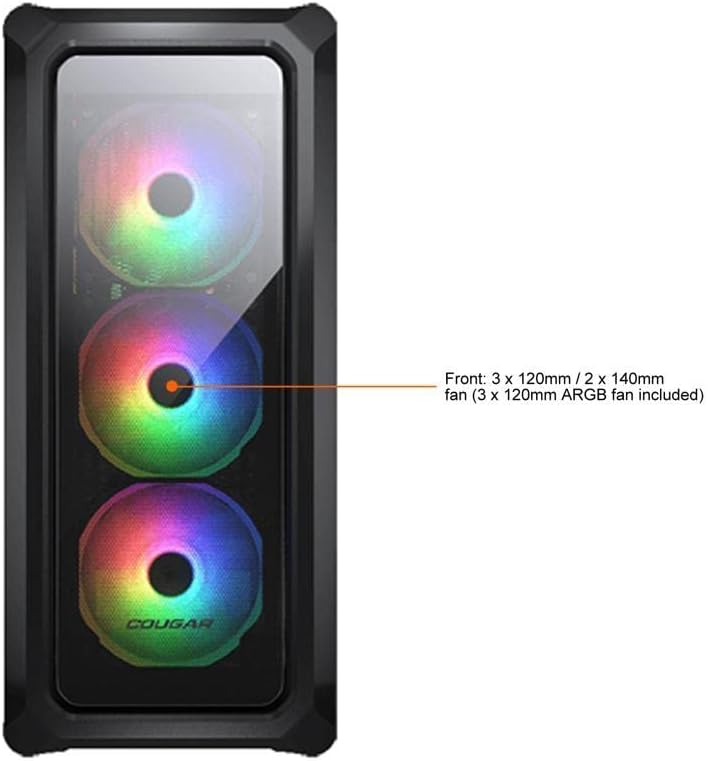
Figure 7.1: Front panel fan configuration and size options for the COUGAR Archon 2 RGB case.
8. Garansi jeung Rojongan
For warranty information and technical support, please refer to the official COUGAR websitus atanapi ngahubungan departemén layanan palanggan maranéhna. Simpen bukti pameseran anjeun pikeun klaim garansi.
COUGAR Official Websitus: cougargaming.com


