Bubuka
This manual provides comprehensive instructions for the use and care of your new Remote brand compatible remote control. This remote is specifically designed to function seamlessly with Nordmende ND40S3000J SMART televisions, offering full functionality without the need for complex programming.
Mangga baca manual ieu taliti pikeun mastikeun setelan ditangtoskeun jeung operasi kadali jauh Anjeun.
Disetél
1. Pamasangan batré
The remote control requires alkaline batteries (not included). Follow these steps to install them:
- Teangan tempat panutup kompartemen batré dina tonggong kadali jauh.
- Geser panutup ka handap atawa pencét kancing pikeun mukakeunana.
- Insert two new alkaline batteries, ensuring the positive (+) and negative (-) terminals match the diagrams inside the compartment.
- Ganti panutup kompartemen batré, geser deui kana tempatna nepi ka klik aman.
penting: Always use new alkaline batteries for optimal performance. Do not mix old and new batteries, or different types of batteries.
2. Initial Use (No Programming Required)
This compatible remote control is pre-programmed for the Nordmende ND40S3000J SMART TV model. No additional programming or setup steps are required. Once batteries are installed, the remote is ready for immediate use with your television.
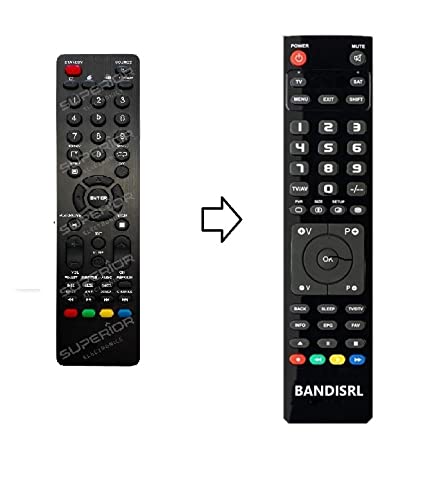
Gambar 1: The Remote compatible remote control. This image displays the layout of the buttons and the overall design of the remote, ready for use with your Nordmende TV.
Parentah Operasi
To operate your Nordmende ND40S3000J SMART TV with this remote control, point the remote directly at the television's infrared receiver. Ensure there are no obstructions between the remote and the TV.
- Tombol Daya: Pencét pikeun ngahurungkeun atanapi mareuman TV.
- Volume Kaluhur/Turun: Saluyukeun polumeu audio.
- Saluran luhur/handap: Ngaganti saluran TV sacara berurutan.
- Tombol Jumlah (0-9): Pilih saluran TV langsung.
- Tombol Navigasi (Konci Panah, OK): Napigasi ngaliwatan ménu tur pilih pilihan.
- Tombol TV Smart: Access specific Smart TV functions or applications (e.g., Home, Apps, Netflix, YouTube, etc., depending on the remote's layout and TV's features).
- Tombol Bisu: Ngajempékeun audio TV.
- Tombol Sumber/Input: Siklus ngaliwatan sumber input sadia (HDMI, AV, jsb).
Refer to your Nordmende TV's original user manual for specific details on its menu structure and Smart TV functionalities.
Pangropéa
Ngabersihan Remote Control
Pikeun ngabersihkeun remot kontrol anjeun, anggo lawon anu lemes sareng garing. Pikeun kokotor anu bandel, radaampen the cloth with water. Do not use abrasive cleaners, alcohol, or solvents, as these can damage the remote's surface and internal components.
Ngagantian batré
Replace batteries when the remote control's response becomes sluggish or stops working. Always replace both batteries simultaneously with new alkaline batteries. Dispose of used batteries according to local regulations.
Panyimpenan
Simpen remot kontrol di tempat anu tiis, garing, sareng jauh tina sinar panonpoé langsung sareng suhu anu ekstrim. Upami remot ieu moal dianggo kanggo waktos anu lami, langkung saé nyabut batréna pikeun nyegah bocor.
Pamérésan masalah
- Kadali jarak jauh teu tiasa dianggo:
- Pariksa naha batréna dipasang kalayan leres sareng polaritas anu leres (+/-).
- Replace the batteries with new alkaline batteries.
- Pastikeun teu aya halangan antara remot kontrol sareng panarima infrabeureum TV.
- Pastikeun anjeun nunjuk remot langsung ka TV.
- Verify that the TV is powered on.
- Some buttons are not responding:
- This remote is designed for the Nordmende ND40S3000J SMART TV. If you are using it with a different model, some advanced functions may not be compatible.
- Ensure the buttons are clean and free from debris.
- TV responds intermittently:
- Batré bisa jadi low; ngaganti aranjeunna.
- Ensure a clear line of sight to the TV's infrared sensor.
- Avoid strong light sources (like direct sunlight) that might interfere with the infrared signal.
If troubleshooting steps do not resolve the issue, please refer to the Support section.
spésifikasi
| merek: | Remote (Manufacturer: Bandisrl) |
| Alat anu cocog: | Nordmende ND40S3000J SMART Television |
| Téknologi konektipitas: | Infrabeureum (IR) |
| Fitur husus: | Taya programming diperlukeun |
| Jenis Batré: | Alkali |
| Batré Kaasup: | No |
| warna: | Hideung |
| Jumlah Kancing: | 25 |
| Jenis Controller: | Tombol Control |
Garansi sareng Rojongan
Émbaran jaminan
Specific warranty details for this compatible remote control are not provided in this manual. Please refer to the purchase documentation or contact the seller/manufacturer (Bandisrl) for information regarding warranty coverage and terms.
Rojongan Palanggan
For further assistance, technical support, or inquiries regarding compatibility with other TV models, please contact the manufacturer, Bandisrl. Contact information can typically be found on the product packaging or the seller's websitus.
If you own a different TV model than the Nordmende ND40S3000J SMART, it is recommended to contact Bandisrl to confirm compatibility before purchase or use.


