
1. Bubuka
The Behringer Octave Divider is a versatile effects pedal designed to generate sub-octave effects for guitar, bass, and synthesizers. This manual provides essential information for the proper setup, operation, and maintenance of your device, ensuring optimal performance and longevity.
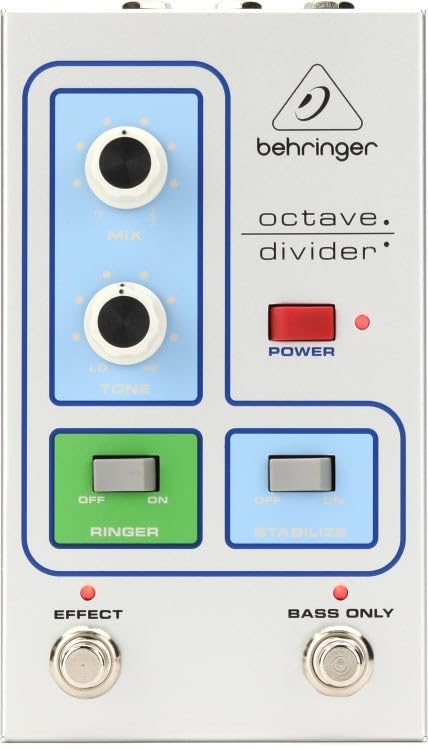
Hareupeun view of the Behringer Octave Divider Effects Pedal, showcasing its silver finish and control knobs.
2. Fitur
- Dedicated Octave Divider effects for guitar, bass, and synthesizers.
- Compact and durable silver chassis.
- Analog signal processing for authentic tone.
- Intuitive knob controls for precise sound shaping.
- Standard 1/4 inch (6.35mm) mono audio jack for input and output.
3. Kontrol jeung sambungan
Familiarize yourself with the controls and connections on your Octave Divider pedal:
3.1. Kadali
- TINGKAT Knob: Adjusts the overall output volume of the effect.
- OCTAVE Knob: Controls the blend or intensity of the sub-octave effect.
- Knop TONE: Shapes the tonal characteristics of the octave effect, from dark to bright.
- KUKUH: Engages atanapi bypasses pangaruh.
3.2. Panyambungan
- INPUT Jack: Connect your instrument (guitar, bass, synth) here using a 1/4 inch mono cable.
- Jack OUTPUT: Sambungkeun ieu ka anjeun amplifier or the next pedal in your signal chain using a 1/4 inch mono cable.
- 9V DC Power Input: Connect the included 9V DC power supply here. Ensure polarity is correct.
4. Setélan
Follow these steps to set up your Behringer Octave Divider pedal:
- Pastikeun Anjeun amplifier and other audio equipment are turned off.
- Sambungkeun alat Anjeun ka INPUT jack of the Octave Divider pedal using a standard 1/4 inch instrument cable.
- Nyambungkeun OUTPUT jack of the Octave Divider pedal to your amplifier's input or the next pedal in your effects chain using another 1/4 inch instrument cable.
- Sambungkeun catu daya 9V DC anu kalebet kana 9V DC Power Input on the pedal. Plug the power supply into a suitable AC outlet.
- Once all connections are secure, you may power on your amplifier jeung parabot lianna.
5. Nyuping
To operate your Behringer Octave Divider pedal:
- Ningkatkeun Pangaruh: Press the footswitch to toggle the effect on or off. An indicator light will illuminate when the effect is active.
- Adjusting Level: Ngagunakeun éta TINGKAT knob to set the desired output volume. Start with a lower setting and increase gradually to avoid sudden volume spikes.
- Controlling Octave: Puterkeun OKTAVE knob to adjust the intensity and blend of the sub-octave effect. Experiment with different settings to find your preferred sound.
- Shaping Tone: The NADA knob allows you to fine-tune the brightness or darkness of the octave effect.
- Ékspérimén: The Octave Divider responds differently to various instruments and playing styles. Experiment with single notes, chords, and different pickup selections to discover its full potential.
6. Pangropéa
Proper care will ensure the longevity of your Octave Divider pedal:
- beberesih: Anggo lawon anu lemes sareng garing pikeun ngabersihkeun bagian luar pedal. Hindarkeun pembersih atanapi pangleyur anu abrasif.
- kakuatan: Always use the specified 9V DC power supply. Disconnect the power supply when the pedal is not in use for extended periods.
- Lingkungan: Protect the pedal from extreme temperatures, humidity, and direct sunlight. Avoid dropping or subjecting the pedal to strong impacts.
- Panyimpenan: Store the pedal in a clean, dry place when not in use.
7. Cara ngungkulan
If you encounter issues with your Octave Divider pedal, refer to the following:
- Henteu aya sora:
- Pariksa sadaya sambungan kabel (instrumen, amppanguat, kakuatan).
- Pastikeun catu daya disambungkeun kalayan leres sareng tiasa dianggo.
- Pariksa yén alat anjeun sareng amplifier berpungsi leres.
- Press the footswitch to ensure the effect is engaged (indicator light on).
- Poor Sound Quality / Unwanted Noise:
- Ensure all cables are in good condition and fully inserted.
- Check for proper grounding in your power outlet.
- Saluyukeun TINGKAT jeung OKTAVE knobs to prevent signal clipping.
- Uji nganggo catu daya anu béda upami tiasa.
- Pangaruhna Henteu Ngahibur:
- Confirm the power supply is connected and providing power.
- Press the footswitch firmly.
8. Spésifikasi
| merek | Behringer |
| Ngaran modél | P0EAE |
| Gaya | Kompak |
| Warna | pérak |
| Item Beurat | 2.2 pon |
| Voltage | 9 Volt (DC) |
| Éfék Kaluaran Audio | Modulation, Distortion (Note: Primary function is Octave Division) |
| Kontrol Tipe | Kenop |
| Sumber Daya | Kabel Listrik |
| Format Sinyal | Analog |
| Item Dimensi | 9.9 x 6.25 x 3.5 inci |
| Tipe Panyambung | Soket audio mono 1/4 inci (6.35mm) |
| Komponén Kaasup | Sasayogian tanaga |
| UPC | 644216640706 |
9. Garansi jeung Rojongan
Kanggo inpormasi garansi anu lengkep sareng dukungan téknis, mangga tingal Behringer resmi websitus atanapi hubungi distributor Behringer lokal anjeun. Simpen resi pameseran anjeun salaku bukti pameseran pikeun klaim garansi naon waé.
Sumberdaya Online: Nganjang www.behringer.com for product registration, manuals, and support.