1. Bubuka
This manual provides comprehensive instructions for the installation, operation, and maintenance of your DIGITEN Waterproof Temperature Controller DTC310. This device is designed to precisely regulate temperature in various environments, ensuring optimal conditions for your applications. Please read this manual thoroughly before use to ensure safe and efficient operation.
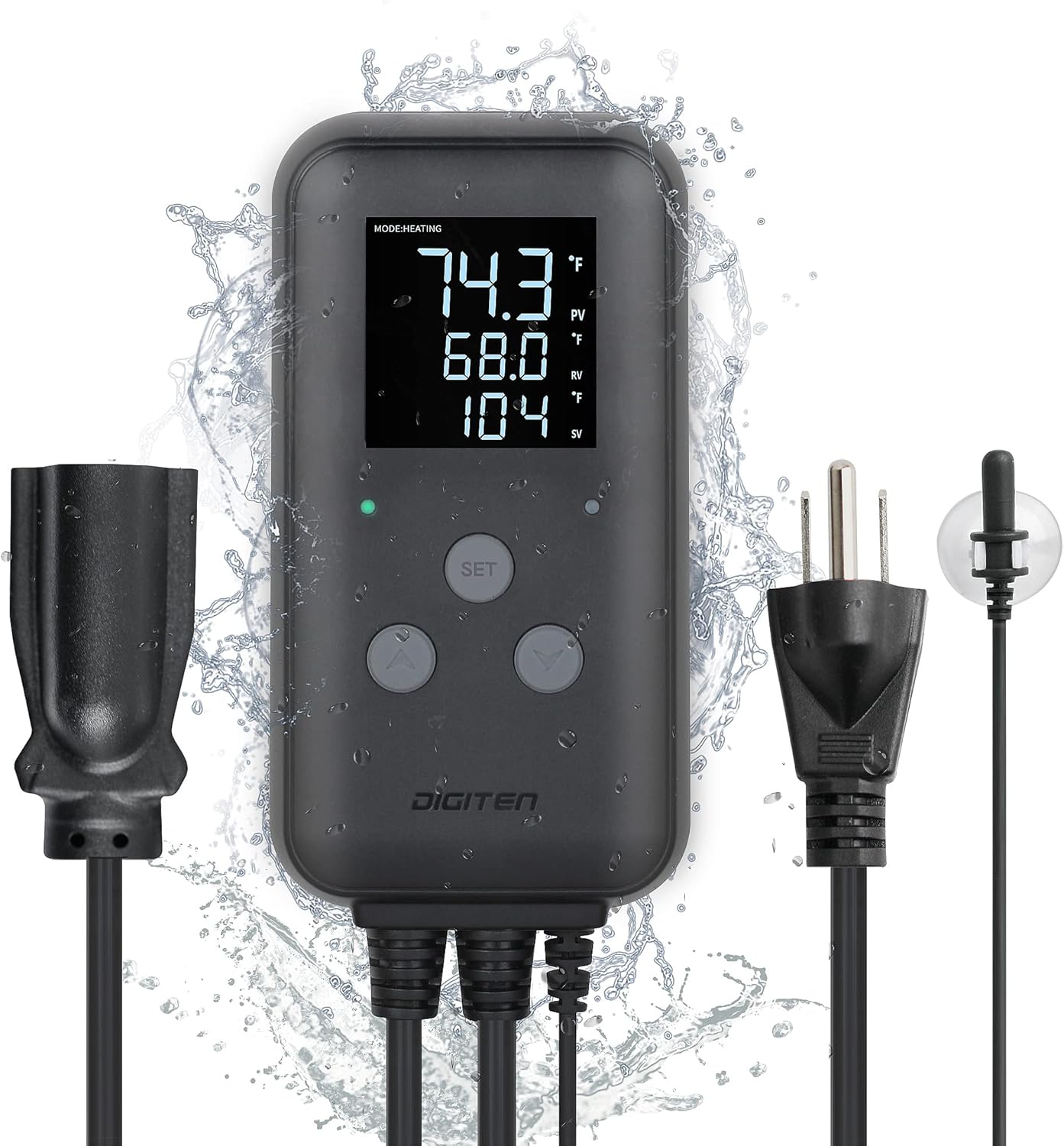
Image 1.1: DIGITEN DTC310 Waterproof Temperature Controller. This image shows the main unit with its display, control buttons, power cord, and sensor probe, all designed to withstand water exposure.
The DTC310 controller is suitable for a wide range of applications including:
- Greenhouses and mushroom houses
- Reptile breeding and pet feeding enclosures
- Akuarium sareng tangki lauk
- Wine cellars and cigar storage
- Ngadamel bir sareng fermentasi di bumi
- Seed germination and heating mats
- Baby rooms, attics, garages, and other general temperature control needs
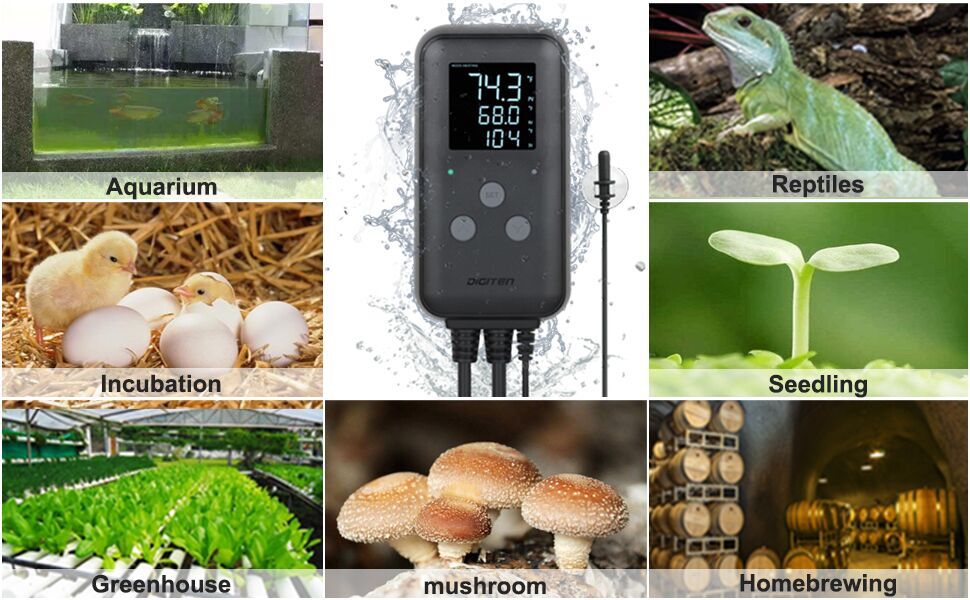
Image 1.2: Diverse applications of the DTC310. This image illustrates the controller being used in an aquarium, for incubation, seedling growth, greenhouse, mushroom cultivation, and homebrewing.
2. Produk Langkungview
2.1 Komponén
The DIGITEN DTC310 Waterproof Temperature Controller consists of the main control unit, a sensitive waterproof sensor probe, a standard US plug for power input, and a 3-pin socket for connecting your heating or cooling device.

Image 2.1: Labeled components of the DTC310. This image highlights the Current Temp (PV), Run Temp (RV), Stop Temp (SV) on the display, along with the Run Indicator, Stop Indicator, Setting Button, Up Button, Down Button, Sensitive Probe with Suction Cup, Standard US Plug, and 3-Pin Socket.
2.2 Fitur konci
- Kisaran Kontrol Suhu Lega: Regulates and maintains temperatures from -40°F to 248°F (-40°C to 120°C).
- Peunteun tahan cai IP65: The integrated waterproof shell allows for outdoor use, protecting against rain. For optimal waterproofing, hanging the unit is recommended.
- Témbongkeun LED cahayana: Provides clear temperature readings and settings, even in low-light conditions.
- Alarm Suhu Tinggi sareng Rendah: Alerts users if the temperature exceeds or falls below a set range, protecting connected devices or environments.
- Unit anu tiasa dialihkeun: Gampang ngaganti antara Fahrenheit (°F) sareng Celsius (°C).
- Kalibrasi Suhu: Allows for fine-tuning of temperature readings for accuracy.
- Protéksi Tunda compressor: Customizable delay settings protect refrigeration equipment from frequent on/off cycles.

Image 2.2: Key features of the DTC310. This image highlights the Heating/Cooling Mode, °C/°F Switchable function, Calibration capability, and High/Low Temperature Alarm.
3. Setélan
3.1 Instalasi fisik
The controller can be mounted on a wall or hung using hooks. Ensure the installation location is stable and allows for easy access to the display and buttons.

Image 3.1: Controller hanging installation. This image shows the DTC310 unit hanging from hooks, demonstrating a common installation method.
3.2 Sensor Probe Placement
The waterproof sensor probe is crucial for accurate temperature readings. Place the probe in the environment where temperature control is needed. For aquariums, use the included suction cup to secure the probe within the water. Ensure the probe is fully submerged or positioned to accurately reflect the target temperature.
Image 3.2: Sensor probe with suction cup. This image details the sensitive probe and its suction cup attachment for secure placement.
3.3 Sambungan Daya
Plug the controller's standard US plug into a suitable power outlet. Connect your heating or cooling device to the 3-pin socket located at the bottom of the controller. Ensure the device connected does not exceed the controller's maximum current rating of 10A.

Image 3.3: 3-pin power socket. This image shows a detailed view of the power output socket where the heating or cooling device is connected.
4. Parentah Operasi
The DTC310 features an intuitive interface with a SET button, an Up button, and a Down button for configuration.
4.1 Pidangkeunview
The LED display shows three main values:
- PV (Nilai Prosés): Current temperature detected by the probe.
- RV (Run Value): The temperature at which the connected device will activate (e.g., heater turns on, cooler turns off).
- SV (Stop Value): The temperature at which the connected device will deactivate (e.g., heater turns off, cooler turns on).
Indicators for 'Run' and 'Stop' will illuminate to show the status of the connected device.
4.2 Nyetél Parameter Suhu
Follow these steps to configure the temperature settings:
- Switching °F or °C: Pencét éta Up jeung Turun buttons simultaneously to toggle between Fahrenheit and Celsius.
- Enter Preset Mode: Pencét panjang sareng tahan SET button for 3 seconds to enter the temperature preset mode.
- Set Run Temperature (RV): Ngagunakeun éta Up or Turun buttons to adjust the desired Run Temperature.
- Set Stop Temperature (SV): Pencét pondok SET button to move to the Stop Temperature setting. Use the Up or Turun buttons to adjust the desired Stop Temperature.
- Simpen Setélan: Pencét panjang sareng tahan SET button for 3 seconds to save your settings and exit the preset mode.

Image 4.1: Temperature setting guide. This image visually demonstrates the four steps to set the temperature parameters on the DTC310 controller.
4.3 Advanced Settings (P0-P8 Parameters)
The DTC310 may include advanced parameters for fine-tuning operation, such as compressor delay, temperature calibration, and alarm thresholds. Refer to the detailed parameter list below for specific functions and adjustment methods. To access these settings, typically a longer press of the SET button or a combination of buttons is required.
| Parameter | Katerangan | Rentang | Default |
|---|---|---|---|
| P0 | modeu pemanasan / cooling | H (Heating) / C (Cooling) | H |
| P1 | Hysteresis Setting | 0.1-30°F (0.1-15°C) | 2°F (1°C) |
| P2 | Alarm Suhu Tinggi | -40-248°F (-40-120°C) | 248°F (120°C) |
| P3 | Alarm Suhu Rendah | -40-248°F (-40-120°C) | -40°F (-40°C) |
| P4 | Calibration Suhu | -10-10°F (-5-5°C) | 0°F (0°C) |
| P5 | Kompresor Reureuh | 0-10 menit | 0 menit |
| P6 | Pilihan Unit | F (Fahrenheit) / C (Celsius) | F |
| P7 | Konci Data | ON / OFF | Pareum |
| P8 | Reset pabrik | ENYA / NO | NO |
To access advanced parameters: Long press the SET tombol jeung Up button simultaneously for 3 seconds. Use Up/Turun to navigate parameters (P0-P8). Press SET to enter a parameter, adjust with Up/Turun, teras pencét SET again to confirm. Long press SET kaluar.
5. Pangropéa
Regular maintenance ensures the longevity and accuracy of your DIGITEN DTC310 Temperature Controller.
- beberesih: Wipe the controller unit with a soft, damp lawon. Ulah make cleaners abrasive atawa pangleyur. Pastikeun unit geus cabut colokan saméméh beberesih.
- Perawatan Probe: Keep the sensor probe clean and free from debris or mineral buildup, especially when used in water. Gently clean the probe with a soft brush if necessary.
- Pamariksaan kabel: Periodically check all cables for any signs of wear, cuts, or damage. Replace the unit if any damage is found to prevent electrical hazards.
- Panyimpenan: If storing the controller for an extended period, ensure it is clean, dry, and stored in a cool, dry place away from direct sunlight.
6. Cara ngungkulan
If you encounter issues with your DTC310 controller, refer to the following common problems and solutions:
| Masalah | Mungkin Cukang lantaranana | Solusi |
|---|---|---|
| Pintonan pareum | Taya catu daya | Check if the controller is properly plugged into a live power outlet. Verify the outlet is functional. |
| Connected device (heater/cooler) is not turning on/off | Incorrect temperature settings (RV/SV) Device not properly plugged into controller Controller in wrong mode (Heating/Cooling) Compressor delay active | Review and adjust RV/SV settings. Ensure the device is securely plugged into the controller's socket. Check P0 parameter for correct mode. Wait for compressor delay to expire (P5). |
| Bacaan suhu teu akurat | Sensor probe dirty or improperly placed Calibration diperlukeun | Clean the sensor probe and ensure it is correctly positioned. Perform temperature calibration using the P4 parameter. |
| Alarm constantly active | Temperature outside set alarm limits Alarm limits set too close to operating range | Check the current temperature and adjust the P2 (High Alarm) and P3 (Low Alarm) parameters to appropriate values. |
| Tombol teu ngaréspon | glitch software samentara Data lock enabled | Unplug the controller for 10 seconds and plug it back in. Check P7 parameter to ensure Data Lock is OFF. |
Lamun masalah persists sanggeus nyobian solusi ieu, mangga ngahubungan rojongan customer.
7. Spésifikasi
| Fitur | Spésifikasi |
|---|---|
| Nomer modél | DTC-310 |
| Rentang Kontrol Suhu | -40°F nepi ka 248°F (-40°C nepi ka 120°C) |
| Peunteun kakuatan | 10A |
| Peunteun waterproof | IP65 |
| Tipe tampilan | LED |
| Item Beurat | 14.9 ons |
| Ukuran Paket | 7.05 x 3.5 x 3.31 inci |
| UPC | 727567973164 |
8. Garansi jeung Rojongan
8.1 Émbaran jaminan
The DIGITEN DTC310 Waterproof Temperature Controller comes with a 12-garansi sasih from the date of purchase. This warranty covers manufacturing defects and malfunctions under normal use. Please retain your proof of purchase for warranty claims. The warranty does not cover damage caused by misuse, accidents, unauthorized modifications, or improper installation.
8.2 Rojongan Palanggan
For technical assistance, troubleshooting not covered in this manual, or warranty inquiries, please contact DIGITEN customer support. Refer to the product packaging or the official DIGITEN websitus pikeun inpo kontak panganyarna.


