1. Bubuka
This manual provides essential instructions for the safe and efficient operation of your Crosley CR6252A-YS Portfolio 3-Speed Bluetooth Turntable. Please read this manual thoroughly before using the product and retain it for future reference.
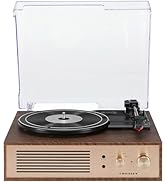
The Crosley Portfolio turntable is designed to play vinyl records at three speeds and features built-in speakers, Bluetooth connectivity for wireless audio streaming, and a moving magnetic cartridge for audio reproduction.

Figure 1.1: Crosley CR6252A-YS Portfolio Turntable (Open View)
2. Parentah Kasalametan
- Baca sadaya parentah sateuacan dianggo.
- Jauhkeun produk tina cai atanapi Uap.
- Ulah disimpen caket sumber panas sapertos radiator, pancatat panas, kompor, atanapi alat sanés anu ngahasilkeun panas.
- Ngabersihan ngan ku kaén garing.
- Ngan anggo kantétan/aksésori anu ditunjuk ku produsén.
- Cabut colokan alat ieu nalika badai kilat atanapi nalika henteu dianggo kanggo waktos anu lami.
- Rujuk sadayana jasa ka tanaga jasa anu mumpuni. Diperlukeun ngalayanan nalika aparatur ruksak ku cara naon waé, sapertos kabel catu daya atanapi colokan rusak, cairan tumpah atanapi barang murag kana aparatur, aparatur parantos kakeunaan hujan atanapi lembab, henteu beroperasi normal. , atawa geus turun.
3. Eusi Paket
Pastikeun yén sadaya item anu didaptarkeun di handap kalebet kana pakét anjeun:
- Crosley CR6252A-YS Portfolio Turntable
- Adaptor kakuatan
- Manual pangguna (dokumén ieu)
4. Fitur produk jeung komponén
The Crosley CR6252A-YS Portfolio Turntable includes the following key features and components:
- Meja Putar 3-Kagancangan: Supports 33 1/3, 45, and 78 RPM records.
- Diwangun-di panarima Bluetooth: Ngamungkinkeun streaming nirkabel tina alat anu cocog.
- Kontrol pitch adjustable: Fine-tune record speed.
- Moving Magnetic Cartridge: Pre-mounted for optimal sound.
- Input bantu: Sambungkeun sumber audio éksternal.
- USB Enabled: For PC connection.
- Speaker Diwangun-di: Kaluaran audio anu terintegrasi.

Figure 4.1: Turntable Mechanism and Controls
Gambar 4.2: Rincian Panel Kontrol

Gambar 4.3: Sambungan Panel Rear
5. Setélan
5.1 Panempatan Awal
Place the turntable on a flat, stable surface away from direct sunlight, heat sources, and excessive dust or vibrations.
5.2 Sambungan Daya
- Connect the power adapter to the DC 12V input jack on the rear of the turntable.
- Colokkeun adaptor kakuatan kana stop kontak témbok nu cocog.
5.3 Turntable Preparation
- Carefully remove any protective packaging materials from the turntable platter and tonearm.
- Pastikeun tonearm teu dikonci tina tempatna.
6. Parentah Operasi
6.1 Rékaman Anu Diputer
- Hurungkeun ON/OFF knob clockwise to power on the unit.
- Select the desired speed (33 1/3, 45, or 78 RPM) using the speed selector switch. Note: A 78 RPM stylus (not included) is required for 78 RPM records.
- Place a record on the turntable platter. If playing a 45 RPM single, place the 45 RPM adapter (if included) over the spindle.
- Lift the tonearm using the cueing lever and position it over the desired track on the record.
- Turunkeun tonearm lalaunan kana piringan hitam nganggo tuas isyarat. Piringan hitam bakal mimiti diputer.
- Saluyukeun polumeu nganggo VOLUME kenop.
- Ngagunakeun éta PITCH control knob to fine-tune the playback speed if necessary.
- To stop playing, lift the tonearm, return it to its rest, and turn the ON/OFF tombol jarum jam.
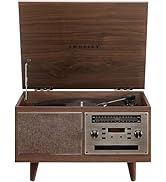
Figure 6.1: Stylus on Record
6.2 Operasi Bluetooth
- Hurungkeun ON/OFF knob clockwise to power on the unit.
- Slide the function switch to the Bluetooth position. The indicator light will flash, indicating pairing mode.
- Enable Bluetooth on your external device (e.g., smartphone, tablet) and search for "Crosley Portfolio".
- Select "Crosley Portfolio" from the list of available devices to pair. Once paired, the indicator light will stop flashing and remain solid.
- You can now stream audio wirelessly from your device to the turntable's built-in speakers.
- Saluyukeun polumeu nganggo VOLUME knob on the turntable and/or your external device.
6.3 Input Auxiliary (AUX IN)
- Hurungkeun ON/OFF knob clockwise to power on the unit.
- Sambungkeun alat audio éksternal (contona, pamuter MP3, pamuter CD) ka NGARÉMÉ DI port ngagunakeun kabel audio 3.5mm (teu kaasup).
- Turntable bakal otomatis pindah ka modeu AUX IN.
- Saluyukeun polumeu nganggo VOLUME knob on the turntable and/or your external device.
6.4 Konektipitas USB
The turntable features a PC-USB port for connecting to a computer. This allows for digital conversion of your vinyl records using appropriate software (not included). Refer to your chosen software's instructions for recording procedures.
7. Pangropéa
7.1 Ngabersihan Turntable
- Salawasna cabut colokan turntable ti stop kontak listrik saméméh beberesih.
- Anggo lawon anu lemes sareng garing pikeun ngusap permukaan luar. Entong nganggo pembersih atanapi pangleyur anu abrasif.
- Gently brush the stylus with a soft brush designed for stylus cleaning, moving from back to front.
7.2 Panggantian Stylus
The stylus (needle) is a consumable part and will wear out over time. A worn stylus can damage your records and degrade sound quality. Replace the stylus after approximately 200-300 hours of playback. Consult your retailer or Crosley support for compatible replacement styli.
8. Cara ngungkulan
| Masalah | Mungkin Cukang lantaranana | Solusi |
|---|---|---|
| Taya kakuatan | Adaptor daya teu nyambung atawa stop kontak faulty. | Pastikeun adaptor daya disambungkeun kalayan pageuh sareng stop kontakna tiasa dianggo. |
| Teu aya sora ti panyatur | Volume too low; function switch in wrong position; Bluetooth not paired. | Increase volume; ensure function switch is set to PHONO or Bluetooth is correctly paired. |
| Ngarekam skipping | Record is dirty or damaged; stylus is worn; turntable not level. | Clean record; replace stylus; ensure turntable is on a level surface. |
| Alat Bluetooth moal dipasangkeun | Turntable not in pairing mode; device too far; device already paired to another unit. | Ensure turntable is in Bluetooth pairing mode; move device closer; disconnect from other Bluetooth devices. |
9. Spésifikasi
- Ukuran produk: 12.4 x 15.28 x 6.5 inci
- Beurat barang: 13 pon
- Jumlah modél: CR6252A-YS
- merek: Crosley
- Komponén Kaasup: CR6252A-YS Portfolio Turntable
- Gaya: Vintage
- warna: Yellow Submarine
- Format Sinyal: Analog
- Sumber Daya: Kabel Listrik
- UPC: 710244246569
10. Garansi jeung Rojongan
For warranty information and technical support, please refer to the warranty card included with your product or visit the official Crosley websitus. Simpen resi pameseran anjeun salaku bukti pameseran pikeun klaim garansi.
Pabrikan: Crosley
Titimangsa munggaran sadia: 30 Nopémber 2021


