
1. Bubuka
Thank you for choosing the SJOYBRING Double Din Car Stereo. This manual provides comprehensive instructions for the installation, operation, and maintenance of your new car stereo system. Please read this manual thoroughly before using the product to ensure proper functionality and to maximize your user experience. Keep this manual for future reference.
2. Émbaran Kasalametan
- Kasalametan nyetir: Always prioritize driving safety. Do not operate the system in a way that distracts you from the road. Adjust settings only when the vehicle is stationary and safe to do so.
- Pamasangan: Incorrect installation can lead to malfunction or damage. If you are unsure about the installation process, seek professional assistance. Ensure all wiring is correctly connected and insulated to prevent short circuits.
- Sasayogian tanaga: Sambungkeun unit ngan ka catu daya 12V DC kalayan taneuh négatip.
- Suhu: Avoid exposing the unit to extreme temperatures, direct sunlight for prolonged periods, or excessive humidity.
- beberesih: Anggo kaén anu lemes sareng garing pikeun beberesih. Ulah make cleaners abrasive atawa pangleyur.
3. Eusi Paket
Punten parios yén sadaya barang anu didaptarkeun di handap kalebet kana pakét anjeun:
- SJOYBRING Double Din Car Stereo Unit
- Original Data Cable
- Kadali jauh
- Dash Cam and Cable (MicroSD card not included)
- Tukangeun View Kaméra sareng Kabel
- Pamasangan Bingkai
- Diiringkeun kabel
- Pamasangan kurung
- Screws
- Manual pangguna (dokumén ieu)

Figure 3.1: Included components and fitment guide.
4. Produk Langkungview
The SJOYBRING Double Din Car Stereo features a 7-inch full HD capacitive touchscreen and intuitive physical buttons for easy operation. It integrates multiple functions including Apple CarPlay, Android Auto, Bluetooth, Mirror Link, AM/FM radio, and supports both dash cam and backup camera inputs.

Gambar 4.1: Hareupeun view of the car stereo unit with integrated dash cam display.
4.1. Front Panel Controls and Ports
- Layar Toél Kapasitif HD 7 inci: Main interface for all functions.
- Jilid Kenop: Rotary control for audio volume.
- Tombol fisik: Dedicated buttons for common functions like Home, Reset, AUX, etc.
- Mikropon internal: For hands-free calling and voice commands.
- Port USB: For media playback, phone charging, and CarPlay/Android Auto connection.
- Slot Kartu TF: For media playback and dash cam recording storage.
4.2. Palabuhan Panel Rear
The rear panel includes various input/output ports for power, speakers, cameras, and external audio/video devices. Refer to the wiring diagram in Section 5.2 for detailed connections.
5. Setup jeung Instalasi
5.1. Cék Pra-Pamasangan
- Dashboard Opening Size: Before ordering and installation, measure your dashboard opening size. This unit supports common sizes: 173×98mm (6.81×3.85inch), 178×100mm (7×4inch), or 190×116mm (7.48×4.56inch). A suitable dash kit may be required for a perfect fit.
- Kasaluyuan kandaraan: Some vehicles may require additional accessories (e.g., wiring harness adapter, antenna adapter) for installation.
- Pegatkeun sambungan batré: Always disconnect the vehicle's negative battery terminal before starting any electrical work to prevent short circuits and damage.
5.2. Diagram Kabel
Follow the wiring diagram carefully for correct connections. Improper wiring can damage the unit or your vehicle's electrical system.

Figure 5.1: Detailed wiring diagram and product dimensions for installation.
- Sambungan Kakuatan:
- Konéng (B+): Sambungkeun ka daya 12V konstan.
- Beureum (ACC): Sambungkeun ka daya 12V anu diaktipkeun (kontak).
- Hideung (GND): Nyambung ka taneuh chassis wahana.
- Sambungan Speaker: Connect to vehicle speakers. Ensure correct polarity.
- White/White-Black: Front Left Speaker
- Gray/Gray-Black: Front Right Speaker
- Green/Green-Black: Rear Left Speaker
- Purple/Purple-Black: Rear Right Speaker
- Sambungan kaméra:
- Input Kaméra Tukang: Connect the video signal from the backup camera.
- Reverse Light Trigger (Brown wire): Connect to the vehicle's reverse light positive wire for automatic camera activation when shifting into reverse.
- Dash Cam Input: Connect the video signal from the dash cam.
- Kontrol Setir (SWC): Connect SWC wires (Key1, Key2) to your vehicle's steering wheel control wires. Refer to your vehicle's wiring diagram for specific connections.
- anteneu: Connect your vehicle's radio antenna.
- MIC éksternal: Connect the provided external microphone for improved call quality.
- Subwoofer/AmpKaluaran Lifier: RCA outputs for connecting an external subwoofer or amppangagung.
5.3. Pamasangan Unit
Secure the unit into the dashboard opening using the provided mounting brackets and screws. Ensure it is firmly in place to prevent vibrations and movement.
6. Parentah Operasi
6.1. Apple CarPlay jeung Android Auto
Connect your iPhone or Android smartphone via a USB cable to access CarPlay or Android Auto. This allows you to use phone functions like navigation, music, calls, and messages directly on the stereo's display.
- Sambungan: Plug your phone into the USB port of the stereo. The system will automatically detect and launch CarPlay or Android Auto.
- Kontrol sora: Utilize voice assistants (Siri for CarPlay, Google Assistant for Android Auto) for hands-free operation, enhancing driving safety.

Figure 6.1: Apple CarPlay and Android Auto interfaces displayed on the stereo.

Figure 6.2: Voice control integration with CarPlay and Android Auto.
6.2. Dash Cam and Backup Camera
The system supports both a front dash camera and a rear backup camera, providing enhanced visibility and recording capabilities.
- Dash Cam: Features a 150° ultra-wide-angle lens, HD 720P resolution, night vision, and loop recording. The camera can be rotated 360° for optimal viewing.
- Kamera Cadangan: The AHD rear view kaméra nawiskeun sudut ultra-lebar 170° viewing angle, is fully waterproof, and provides HD 1080P video quality. It automatically displays the rear view nalika kendaraan dibalikkeun.

Figure 6.3: Key features of the integrated dash cam and backup camera.

Gambar 6.4: Leuwihview of dash cam and rear view camera coverage.


Figure 6.5: Dash cam rotation and backup camera wiring illustration.
6.3. Bluetooth 5.2
Connect your smartphone wirelessly via Bluetooth 5.2 for hands-free calling and audio streaming.
- papasangan: Enable Bluetooth on your phone and search for the stereo (e.g., "SJOYBRING"). Select it to pair.
- Telepon Hand-Free: Make and receive calls directly through the stereo. The built-in and external microphones ensure clear sound.
- Streaming Audio: Play music from your phone wirelessly through the car speakers.

Figure 6.6: Bluetooth 5.2 connectivity and microphone features.

Figure 6.7: Bluetooth 5.2 usage in a vehicle.
6.4. Phone Mirror Link
Mirror Link allows you to display your smartphone's screen directly onto the car stereo's display, supporting both iOS and Android devices.
- Sambungan: Connect your phone via USB cable. Follow the on-screen prompts to activate Mirror Link.
- Fungsionalitas: View apps, videos, and navigation from your phone on the larger stereo screen.

Figure 6.8: Mirror Link displaying phone content on the stereo.

Figure 6.9: Mirror Link compatibility with Android and iOS phones.
6.5. HD Capacitive Touchscreen
The 1024 x 600 resolution HD capacitive touch screen provides smooth and accurate operation with support for 1920 x 1080P video playback.

Figure 6.10: Comparison of HD capacitive screen resolution.
6.6. Audio Settings (16-Band EQ)
Customize your audio experience with the built-in HIFI audio chip and 16-band equalizer settings. Adjust frequencies to match your preferences and vehicle acoustics.
- EQ prasetél: Choose from various preset modes like Pop, Classic, Rock, Jazz, or create custom settings.
- Fader / Kasaimbangan: Adjust audio distribution between front/rear and left/right speakers.
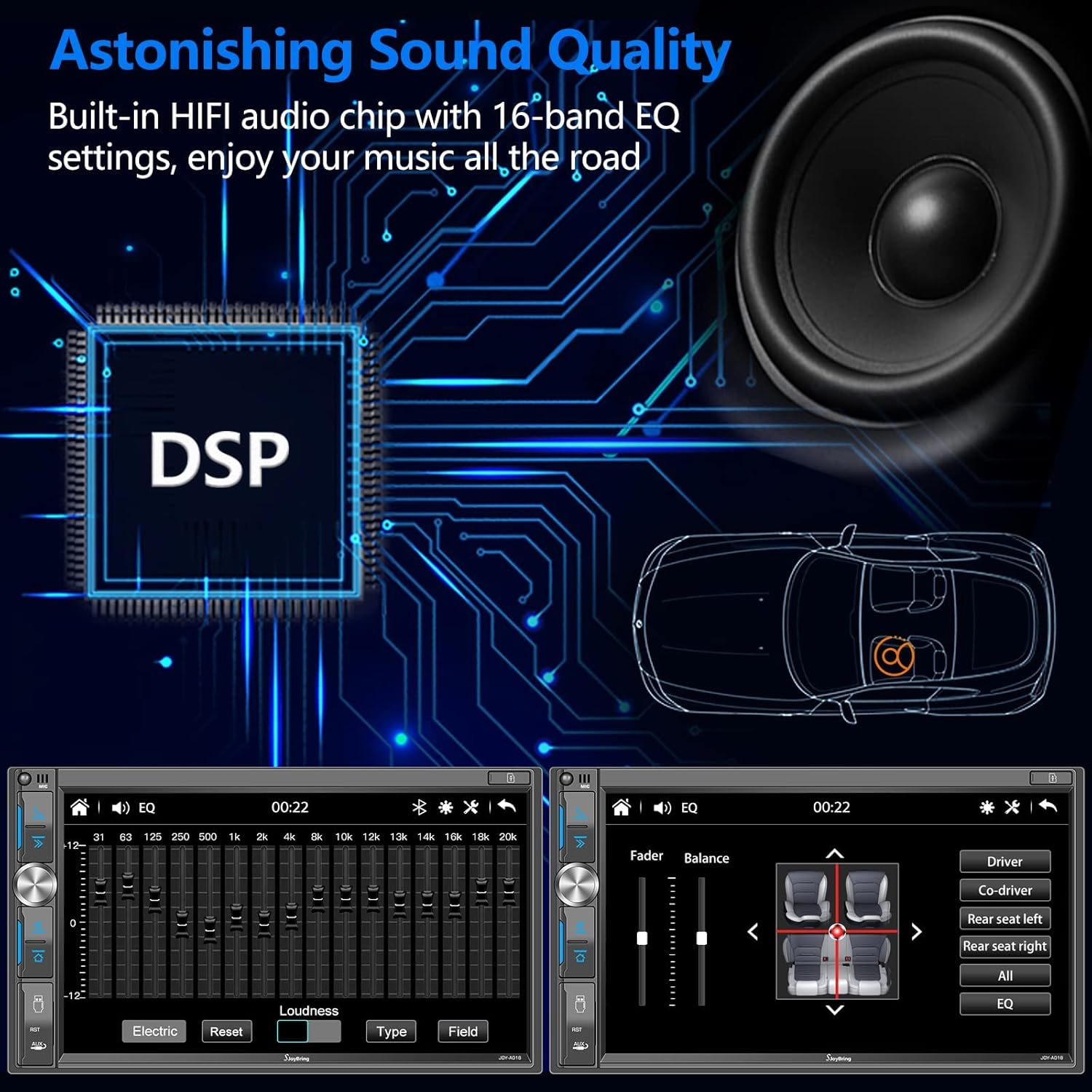
Figure 6.11: Digital Sound Processor (DSP) and Equalizer interface.

Figure 6.12: 16-Band Equalizer adjustment screen.
6.7. Radio AM/FM
Tune into your favorite AM and FM radio stations.
- Rentang Frékuénsi: AM (530-1710KHz), FM (87.5-107.9 MHz).
- Prasetél stasiun: Save your preferred stations for quick access.

Figure 6.13: FM/AM Radio tuning interface.
6.8. Kontrol Setir (SWC)
Program your vehicle's steering wheel controls to operate the stereo, allowing for convenient and safe control of functions like volume, track skipping, and mode switching.
- Disetél: Access the SWC settings in the stereo menu. Follow the instructions to map your steering wheel buttons to the desired functions.

Figure 6.14: Steering Wheel Control programming interface.
6.9. 7 Color LED Key Light
Customize the color of the physical key backlighting to match your vehicle's interior or your personal preference.

Figure 6.15: Available LED key light color options.
7. Pangropéa
- Ngabersihan layar: Use a soft, lint-free cloth to wipe the touchscreen. For stubborn smudges, slightly dampen lawon jeung cai atawa cleaner aman layar. Hindarkeun bahan kimia anu kasar.
- beberesih umum: Jaga unit ieu bébas tina lebu sareng kokotor. Anggo sikat lemes atanapi hawa anu dikomprés pikeun ngabersihkeun sakitar tombol sareng port.
- Apdet parangkat lunak: Periodically check the SJOYBRING official website for any available software updates. Updates can improve performance, add features, or fix bugs. Follow the instructions provided with the update file taliti.
8. Cara ngungkulan
If you encounter issues with your SJOYBRING car stereo, refer to the following common problems and solutions:
| Masalah | Mungkin Cukang lantaranana | Solusi |
|---|---|---|
| Unit teu hurung. | wiring salah; sekering ditiup; Taya catu daya. | Check power connections (B+, ACC, GND). Verify vehicle fuses and the unit's fuse. Ensure constant and switched 12V power are present. |
| Teu aya sora atanapi sora distorsi. | Incorrect speaker wiring; Volume too low; EQ settings. | Check all speaker wire connections for correct polarity and shorts. Increase volume. Adjust EQ and fader/balance settings. |
| Touchscreen unresponsive or dim. | System error; Overheating; Brightness setting. | Perform a system reset (locate the RST button, usually a small pinhole). Allow unit to cool down if overheating. Adjust screen brightness in settings. |
| CarPlay / Android Auto teu nyambung. | Faulty USB cable; Phone settings; App issues. | Try a different, high-quality USB cable. Ensure CarPlay/Android Auto is enabled on your phone. Restart both phone and stereo. |
| Kaméra cadangan teu némbongan. | Incorrect camera wiring; Faulty camera; Reverse trigger issue. | Check camera video input connection. Verify the brown reverse trigger wire is correctly connected to the reverse light. Test camera power supply. |
| Masalah papasangan Bluetooth. | Bluetooth not enabled; Incorrect pairing procedure. | Ensure Bluetooth is enabled on both devices. Delete previous pairings and try pairing again. Keep devices close during pairing. |
If the problem persists after trying these solutions, please contact SJOYBRING customer support for further assistance.
9. Spésifikasi
| Fitur | Spésifikasi |
|---|---|
| merek | SJOYBRING |
| Ngaran modél | A018 (JOY-A018) |
| tampilan | 7-inch HD Capacitive Touch Screen |
| Resolusi tampilan | 1024 x 600 piksel |
| Video Playback Resolution | Up to 1920 x 1080P |
| Konektipitas | Bluetooth 5.2, USB, AUX, TF-card |
| Fitur husus | Apple CarPlay, Android Auto, Mirror Link, Dash Cam Input, Backup Camera Input, 16-Band Equalizer, Steering Wheel Control, 7-Color LED Key Light |
| Dash Cam Angle | 150 ° sudut ultra-lega |
| Backup Camera Angle | 170 ° sudut ultra-lega |
| Sasayogian tanaga | 12V DC (Taneuh Négatip) |
| Item Beurat | 2.75 pon (kira-kira 1.25 kg) |
| Dimensi produk | 3.26 x 7 x 3.93 inci (82 x 178 x 100 mm) |
| Supported Dash Sizes | 173×98mm, 178×100mm, 190×116mm |
10. Garansi jeung Rojongan
SJOYBRING is committed to providing high-quality products and excellent customer service. For any questions, technical support, or warranty inquiries, please contact our customer service team.
- Palayanan palanggan: Refer to your purchase platform or the SJOYBRING official websitus pikeun inpo kontak.
- Sumberdaya Online: Additional support, FAQs, and software updates may be available on the SJOYBRING websitus.
- Manual Pamaké (PDF): A downloadable PDF version of the user manual is available for your convenience: Unduh Manual PDF.


