
1. Parentah Kasalametan
Always observe basic safety precautions to reduce the risk of fire, electric shock, and personal injury when operating this power tool. Read all instructions carefully before use.
Kasalametan Alat Kakuatan Umum
- Kasalametan Area Gawé: Tetep wewengkon gawé beresih jeung well-cahayana. Wewengkon nu pabalatak atawa poek ngondang kacilakaan. Ulah ngajalankeun parabot kakuatan dina atmosfir ngabeledug, kayaning ku ayana cair kaduruk, gas, atawa lebu.
- Kasalametan listrik: Colokan alat listrik kedah cocog sareng stop kontak. Pernah ngarobah colokan dina sagala cara. Hindarkeun kontak awak sareng permukaan bumi atanapi grounded.
- Kasalametan Pribadi: Always wear eye protection (safety goggles). Use hearing protection when operating for extended periods. Wear a dust mask if operation creates dust. Dress properly; do not wear loose clothing or jewelry. Keep hair, clothing, and gloves away from moving parts.
- Pamakéan sareng Perawatan Alat: Ulah maksakeun alat kakuatan. Anggo alat kakuatan anu leres pikeun aplikasi anjeun. Pegatkeun sambungan colokan ti sumber listrik samemeh nyieun sagala panyesuaian, ngaganti asesoris, atawa nyimpen parabot kakuatan.
Mitre Saw Kaamanan spésifik
- Always secure the workpiece firmly before cutting.
- Ensure the blade guard is functioning correctly and in place before operation.
- Pernah ngahontal kana aréa sabeulah nalika ragaji disambungkeun ka kakuatan.
- Ngidinan sabeulah pikeun ngahontal speed pinuh saméméh dimimitian cut a.
- Support long workpieces to prevent tipping and loss of control.
- Regularly check the blade for sharpness and damage. Replace dull or damaged blades immediately.
2. Produk Langkungview
The Powerplus POWX075700 is a 1500W miter saw designed for precise cutting of various materials, including fiberboard, hard, and soft wood. It features a 210mm blade and offers both straight and miter cutting capabilities.
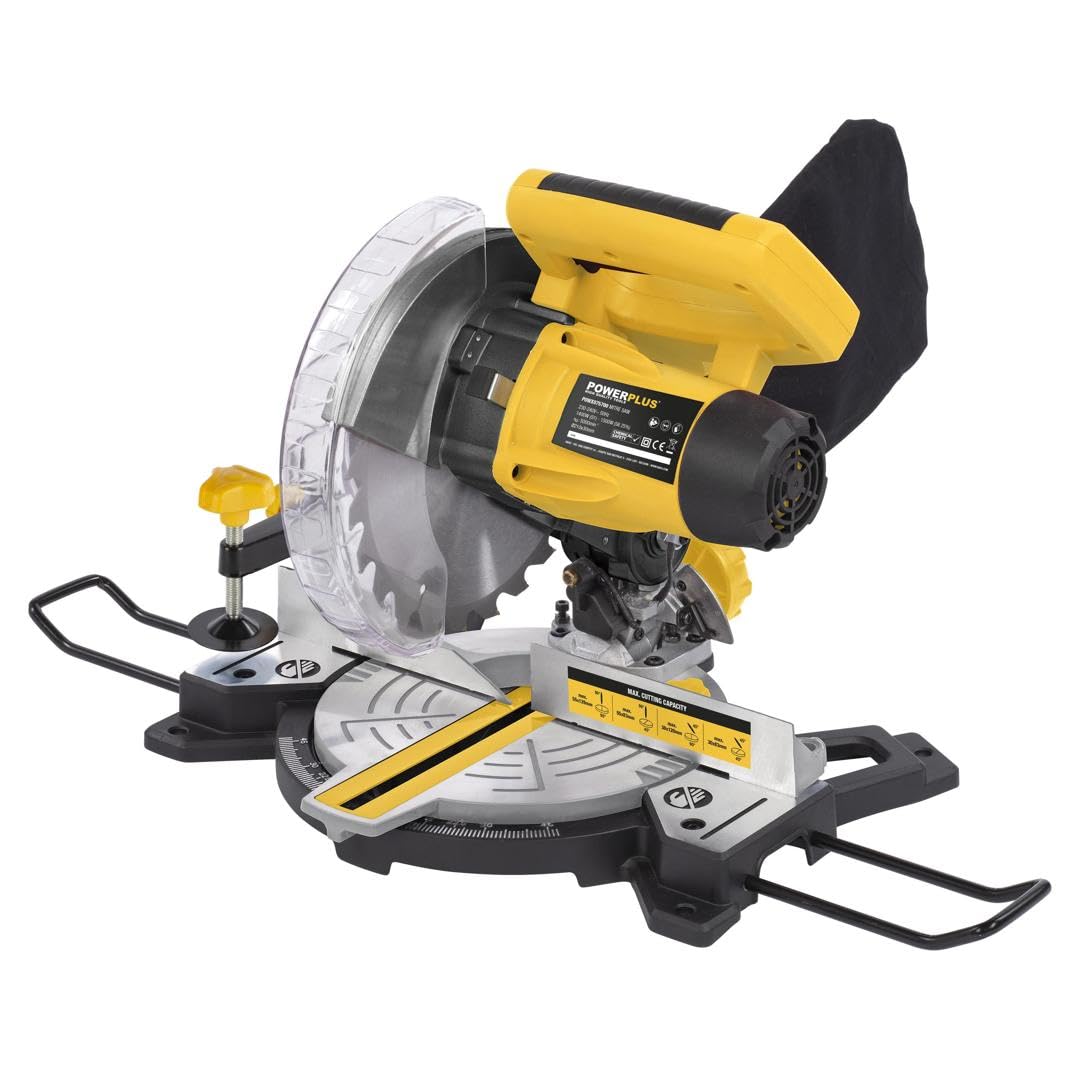
Gambar 2.1: Gemblengna view of the Powerplus POWX075700 miter saw, illustrating its maximum cutting performance for various angles and dimensions. Both straight and miter cuts are possible with this tool.

Gambar 2.2: The miter saw showing its approximate dimensions (408mm width, 405mm height) and highlighting additional support features like the parallel stop and workpiece fixation for enhanced stability during operation.
3. Setélan
3.1 Ngabongkar sareng Inspeksi
- Cabut gergaji miter sareng sadaya asesoris tina bungkusna kalayan ati-ati.
- Mariksa alat pikeun sagala karuksakan anu mungkin geus lumangsung salila pengiriman barang. Ulah beroperasi lamun ruksak.
- Ensure all components listed in the manual are present. The saw blade for fiberboard, hard, and soft wood is included.
3.2 Pamasangan/Panggantian Bilah
- Pegatkeun Daya: Always unplug the saw from the power source before installing or replacing the blade.
- Raise Blade Guard: Lift the lower blade guard to expose the blade arbor.
- Leupaskeun Mur Punjung: Paké rengkuh disadiakeun pikeun loosen nut arbor bari nahan tombol konci arbor.
- Hapus Old Blade: Carefully remove the outer flange and the old blade.
- Pasang Blade Anyar: Place the new 210mm blade onto the arbor, ensuring the teeth are pointing in the correct direction (usually indicated by an arrow on the blade and saw). Reinstall the outer flange and arbor nut.
- Kencangkeun Mur: Tighten the arbor nut securely while pressing the arbor lock button. Do not overtighten.

Gambar 3.1: The miter saw in operation, demonstrating the dust collection bag and indicating the included blade type (Ø210 - 24T) suitable for fiberboard, hard, and soft wood.
3.3 Masang Gergaji
For stable and safe operation, it is recommended to mount the miter saw to a workbench or a dedicated miter saw stand using appropriate bolts and nuts (not included). Ensure the mounting surface is level and sturdy.
3.4 Nyaluyukeun Sudut Miter sareng Bevel
- Sudut Miter: Loosen the miter lock knob, adjust the turntable to the desired angle (up to 45 degrees), and then tighten the knob.
- Sudut Bevel: Loosen the bevel lock lever, tilt the saw head to the desired bevel angle, and then secure the lever.
3.5 Laser Guide Adjustment
The saw is equipped with an integrated laser for precise cutting line indication. If the laser line does not align with the blade's cutting path, refer to the detailed instructions in the full manual for calibration. Typically, this involves adjusting screws near the laser module.

Gambar 3.2: Pahareup-hareup view of the miter saw highlighting the integrated laser, which enables precise work by indicating the cutting line on the workpiece.
4. Parentah Operasi
4.1 Sambungan Daya
Connect the saw's power cord to a suitable electrical outlet. Ensure the voltage matches the tool's requirements (230V, 50Hz).
4.2 Ngawitan sareng Ngeureunkeun Gergaji
- Pikeun ngamimitian: Press the ON/OFF switch. The blade will begin to rotate.
- Pikeun eureun: Release the ON/OFF switch. The blade will slow down and stop.

Gambar 4.1: An operator using the 1500W miter saw, demonstrating its fast and constant speed (Max. 5000 min⁻¹) for stable sawing across various materials.
4.3 Nyieun cut a
- Workpiece Aman: Place the workpiece firmly against the fence and secure it with the clamp.
- Align Cut: Use the laser guide to align the blade with your desired cut line.
- Gergaji Mimitian: Press the ON/OFF switch and allow the blade to reach full speed.
- Lower Blade: Slowly and steadily lower the saw head through the workpiece. Do not force the cut.
- Potong lengkep: Once the cut is complete, release the ON/OFF switch and allow the blade to stop before raising the saw head.
4.4 Koléksi lebu
The saw is equipped with a dust bag to collect sawdust. Empty the dust bag regularly to maintain efficient dust collection and prevent blockages. For improved dust extraction, connect a suitable workshop vacuum cleaner to the dust port.
5. Pangropéa
Regular maintenance ensures the longevity and safe operation of your miter saw. Always disconnect the saw from the power supply before performing any maintenance.
5.1 beberesih
- After each use, clean the saw of sawdust and debris using a brush or compressed air.
- Ngusap permukaan luar nganggo iklanamp lawon. Ulah make bahan kimia atawa pangleyur kasar.
- Ensure the blade guard mechanism is free of debris and moves smoothly.
5.2 Kamanusaan sarta Studi agul
- Inspect the saw blade regularly for dullness, cracks, or missing teeth. Replace damaged blades immediately.
- Keep blades clean and free of resin buildup, which can affect cutting performance.
5.3 Panyimpenan
Store the miter saw in a clean, dry, and secure location, out of reach of children. Protect it from moisture and extreme temperatures.
6. Cara ngungkulan
| Masalah | Mungkin Cukang lantaranana | Solusi |
|---|---|---|
| Saw teu ngamimitian | Taya catu daya; switch lepat; Masalah motor | Check power connection and circuit breaker; Contact service center if switch or motor is faulty. |
| Kualitas potongan goréng (kasar, serpihan) | Dull or incorrect blade; Workpiece not secured; Too fast feed rate | Replace blade or use appropriate blade for material; Secure workpiece firmly; Reduce feed rate. |
| Geter kaleuleuwihi | Mata pisau leupas; Mata pisau ruksak; Pemasangan teu stabil | Check and tighten blade arbor nut; Replace damaged blade; Ensure saw is securely mounted. |
| Laser guide not visible or misaligned | Dirty laser lens; Miscalibration | Clean laser lens; Refer to manual for laser calibration instructions. |
7. Spésifikasi
| Fitur | Rincian |
|---|---|
| Nomer modél | POWX075700 |
| Kakuatan | 1500 Watt |
| Panjang sabeulah | 210 milimeter |
| Jumlah Huntu (Bilah) | 48 |
| Max. Laju rotasi | 5000 rpm |
| Max. Cutting Angle | 45 darajat |
| Sumber Daya | Kabel Listrik |
| Fitur husus | Brushless Motor |
| Permukaan anu Disarankeun | Kai jeung Metal |
| Ukuran produk (L x W x H) | 5 x 5 x 5 cm; 1 Kilogram |
| Tingkat Sora | 113 desibel |
8. Jaminan & Dukungan
Warranty information for the Powerplus POWX075700 miter saw is typically provided with the product at the time of purchase. Please refer to the warranty card or documentation included in your product packaging for specific terms and conditions.
For technical support, spare parts, or service inquiries, please contact your retailer or the Powerplus customer service department. Contact details can usually be found on the Powerplus official websitus atanapi dina dokuméntasi produk Anjeun.
Pabrikan: Varo y Kreator