1. Bubuka
This manual provides detailed instructions for the installation, operation, and maintenance of your Hiseeu 10-Port 1000 Mbps PoE Switch. Please read this manual thoroughly before using the device to ensure proper functionality and safety.
Eusi pakét
- Hiseeu 10-Port PoE Switch
- Sasayogian tanaga
2. Fitur Produk
- High Power 120W & 802.3 af/at Compliant: Features 8 PoE+ ports and 2 Uplink Ethernet ports. Each PoE+ port delivers up to 30W, with a total power budget of 120W.
- Extended Range & Speed: Includes 2 Gigabit Uplink Ports (1000 Mbps) and 8 PoE+ ports. Default mode offers 100 Mbps up to 100m (328 ft). Extend mode increases distance to 250m (820 ft) for PoE+ ports 1-6.
- Colokkeun & Maénkeun Anu Teu Diurus: Requires no software installation or configuration. Simply connect the power cord and network cables.
- AI PD Detection (AI Watchdog): Automatically detects abnormal port connection issues, such as unresponsive PoE devices, and intelligently reboots the port to restore functionality.
- Konstruksi awét: Sturdy metal case designed for efficient heat dissipation, ensuring smooth and quiet operation.
- 4KV panyalindungan kilat: Integrated surge protection for enhanced device longevity and reliability.
3. Produk Langkungview
The Hiseeu 10-Port PoE Switch is designed for reliable network connectivity and power delivery to PoE-compatible devices.
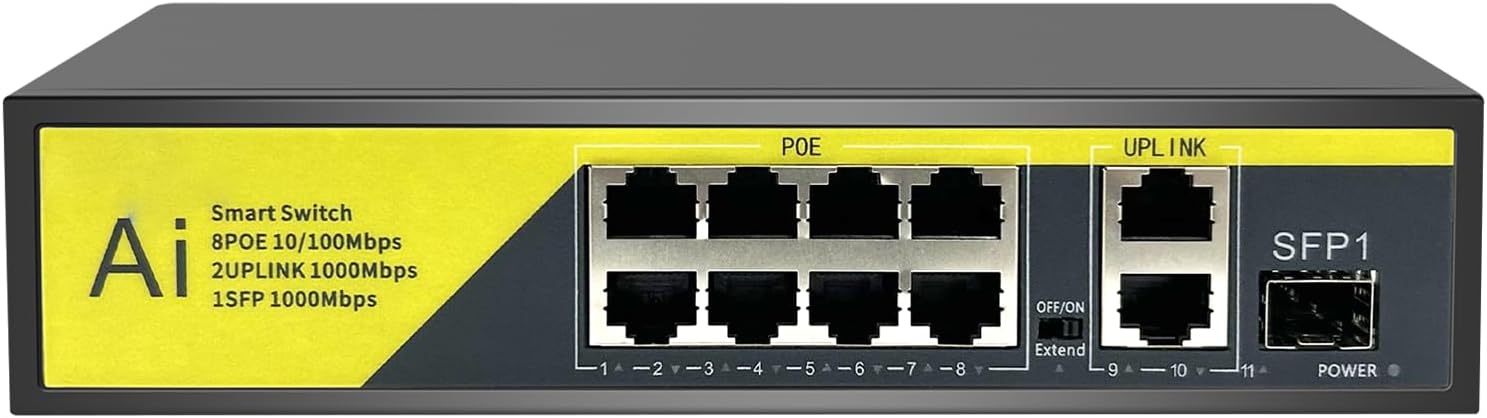
Gambar: Tukangeun view of the Hiseeu 10-Port PoE Switch, highlighting the 8 PoE ports, 2 Uplink ports, SFP slot, and the Extend switch.
Palabuhan Layout
- Palabuhan PoE (1-8): 10/100 Mbps ports supporting 802.3af/at Power over Ethernet. Connect your PoE-powered devices (e.g., IP cameras, IP phones, wireless access points).
- Uplink Ports (9-10): 1000 Mbps Ethernet ports for connecting to your router, NVR, or other network devices.
- SFP1 Port: 1000 Mbps SFP slot for fiber optic connections (transceiver not included).
- Extend Switch: Toggles between default mode (100m range) and extend mode (250m range for PoE ports 1-6).
- Palabuhan Daya: Nyambungkeun kana adaptor kakuatan anu kalebet.
4. Parentah Setup
The Hiseeu PoE Switch is designed for simple plug-and-play operation.
- Sambungkeun Kakuatan: Plug the included power adapter into the DC power port on the switch and then into a standard electrical outlet.
- Sambungkeun Uplink: Connect one of the Uplink Ethernet ports (9 or 10) to your router, NVR, or main network device using a standard Ethernet cable.
- Sambungkeun Alat PoE: Connect your PoE-powered devices (e.g., IP cameras, IP phones) to the PoE ports (1-8) using Ethernet cables. The switch will automatically detect and power these devices.
- Optional SFP Connection: If using a fiber optic connection, insert a compatible SFP module into the SFP1 slot and connect your fiber cable.
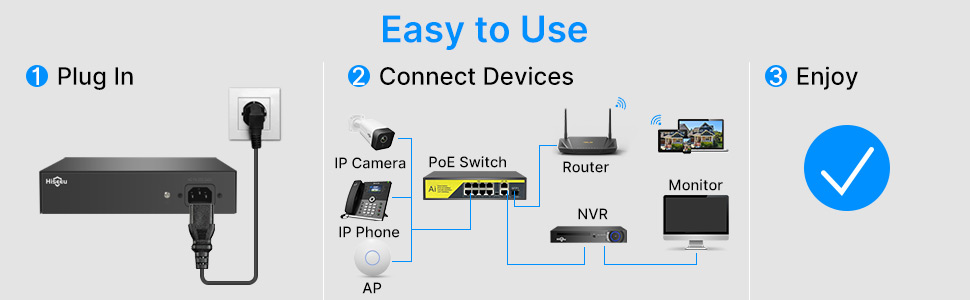
Image: Connection diagram illustrating the simple setup process for the Hiseeu PoE Switch with various network devices.
5. Parentah Operasi
Standard and Extend Modes
The Hiseeu PoE Switch features an 'Extend' switch to adjust the transmission distance:
- Default Mode (Extend OFF): Provides data transmission up to 100 meters (328 feet) at 100 Mbps.
- Extend Mode (Extend ON): Extends the data transmission distance for PoE ports 1-6 up to 250 meters (820 feet) at a reduced speed of 10 Mbps. This mode is ideal for long-distance deployments of IP cameras or other PoE devices where high bandwidth is not critical.

Image: Visual representation of the Extend mode functionality, showing increased range for PoE devices.
AI Watchdog Fungsi
The integrated AI Watchdog function continuously monitors the connection status of PoE-powered devices. If a device becomes unresponsive or experiences an abnormal connection, the switch will automatically detect the issue and reboot the specific PoE port to restore its operation. This feature enhances system reliability and reduces the need for manual intervention.

Image: Illustration of the AI Watchdog function, demonstrating automatic detection and repair of unresponsive PoE devices.
6. Pangropéa
To ensure optimal performance and longevity of your Hiseeu PoE Switch, follow these maintenance guidelines:
- Kaayaan Lingkungan: Operate the switch within its specified temperature range of -40°C to 70°C. Avoid exposing the device to extreme temperatures, high humidity, or direct sunlight.
- beberesih: Tetep saklar beresih jeung bébas tina lebu. Anggo kaén anu lemes sareng garing pikeun beberesih. Entong nganggo pembersih cair atanapi aerosol.
- Ventilasi: Ensure proper airflow around the device. The sturdy metal case is designed for efficient heat dissipation, but obstructions to ventilation slots should be avoided. The fanless design ensures silent operation.
- Manajemén Kabel: Organize network cables to prevent strain on ports and ensure proper connections.

Gambar: Leuwihview of the switch's robust design, highlighting features like temperature resistance and fanless operation.
7. Cara ngungkulan
If you encounter issues with your Hiseeu PoE Switch, consider the following common troubleshooting steps:
- Henteu aya kakuatan: Ensure the power adapter is securely connected to both the switch and a working electrical outlet. Check the power indicator light on the switch.
- Henteu aya sambungan jaringan: Verify that all Ethernet cables are properly connected to the correct ports on the switch and connected devices. Check the link/activity LEDs on the ports.
- PoE Device Not Receiving Power/Data:
- Pastikeun alat anu nyambung cocog sareng PoE (802.3af/at).
- Check the cable length. If using Extend mode, ensure the device is connected to ports 1-6 and the switch is set to 'Extend ON'.
- The AI Watchdog function should automatically attempt to restore unresponsive devices. If not, try disconnecting and reconnecting the device's Ethernet cable.
- Verify the total power budget (120W) is not exceeded by all connected PoE devices.
- Mindahkeun Data Lambat: Ensure all cables are Cat5e or higher. If in Extend mode, remember that speed is reduced to 10 Mbps for longer distances. Check for network congestion or issues with connected devices.
- Sambungan Intermittent: Pariksa sambungan kabel anu leupas. Pastikeun saklar disimpen dina lingkungan anu stabil, jauh tina gangguan éléktromagnétik anu kuat.
If problems persist after attempting these steps, please contact Hiseeu customer support for further assistance.
8. Spésifikasi
| Fitur | Spésifikasi |
|---|---|
| Nomer modél | 10-Palabuhan |
| Jumlah Palabuhan | 8 PoE+ Ports, 2 Uplink Ethernet Ports, 1 SFP Slot |
| Standar Poe | IEEE 802.3af / di |
| Anggaran Daya PoE | 120W Total, up to 30W per PoE+ port |
| Laju Mindahkeun Data | 10/100 Mbps (PoE Ports), 1000 Mbps (Uplink Ports, SFP Slot) |
| Jarak Pangiriman | 100m (Default Mode), 250m (Extend Mode for PoE Ports 1-6) |
| Tipe panganteur | PoE+, RJ45, SFP |
| Dimensi produk | 10.63 "L x 6.3" W x 2.2" H |
| Item Beurat | 1.96 pon |
| Suhu Operasi | -40°C nepi ka 70°C |
| Panangtayungan kilat | 4KV Surge Protection |
| Bahan Kasus | Metal Teguh |
9. Garansi jeung Rojongan
Hiseeu is committed to providing reliable products and excellent customer service.
- Garansi produk: Your Hiseeu PoE Switch is covered by a product warranty. Please refer to the warranty card included with your purchase or visit the official Hiseeu websitus pikeun istilah jeung kaayaan husus.
- Balik deui Gratis 30 Dinten: Hiseeu offers a 30-day free return policy for eligible purchases.
- Rojongan Téknis Hirupna: Hiseeu provides lifetime technical support for its products. If you require assistance with setup, operation, or troubleshooting, please contact our support team.

Image: Hiseeu's commitment to customer satisfaction, including technical support and warranty information.
Privasi sareng Kaamanan Data
Hiseeu products are designed with privacy in mind. User's personal data is encrypted for local use (e.g., on a TV monitor) or for network access via the official Hiseeu app or PC client software, ensuring data protection.


