Bubuka
Thank you for choosing the Mistral MSF1650R 16-inch Stand Fan. This manual provides important information regarding the assembly, operation, maintenance, and troubleshooting of your new fan. Please read it thoroughly before use and retain it for future reference.
Parentah Kasalametan penting
- Always ensure the fan is placed on a stable, level surface to prevent it from tipping over.
- Ulah ngoperasikeun kipas upami kabel atanapi colokanna rusak. Upami kabelna rusak, éta kedah digentos ku produsén, agén layananna, atanapi jalmi anu mumpuni pikeun nyingkahan bahaya.
- Unplug the fan from the power outlet before cleaning, assembling, or disassembling parts.
- Keep fingers, pencils, or any other objects out of the fan guard when it is operating.
- Ulah nganggo kipas di deukeut cai atanapi di lingkungan anu lembab teuing.
- Alat ieu henteu dimaksudkeun pikeun dianggo ku jalma (kalebet murangkalih) anu ngirangan kamampuan fisik, indrawi atanapi mental, atanapi kirang pangalaman sareng pangaweruh, kecuali aranjeunna dipasihan pangawasan atanapi petunjuk ngeunaan panggunaan alat ku jalma anu tanggung jawab kana kasalametanana.
- Barudak kedah diawaskeun pikeun mastikeun yén aranjeunna henteu maén sareng alatna.
Komponén produk
Familiarize yourself with the main parts of your Mistral MSF1650R stand fan.
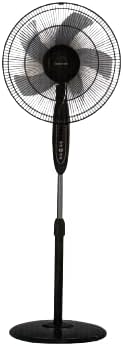
Gambar 1: Hareupeun view of the Mistral MSF1650R 16-inch Stand Fan, showing the fan head, control panel, adjustable stand, and round base.

Figure 2: The Mistral MSF1650R stand fan accompanied by its remote control, illustrating the convenience of remote operation.
- Pangawal payun
- Fan Blade (5 ABS blades)
- Pangawal tukang
- Perumahan Motor
- Panél kontrol
- Tiang Panyangga anu Bisa Disaluyukeun
- Dasar
- Kadali jauh
Parentah Majelis
Follow these steps to assemble your stand fan:
- Pasang Dasar: Place the stand pole onto the base and secure it using the provided screw and washer from underneath the base.
- Install the Rear Guard: Position the rear guard onto the motor housing, ensuring it aligns with the locating pins. Secure it with the guard nut.
- Mount the Fan Blade: Slide the fan blade onto the motor shaft, aligning the notch on the blade with the pin on the shaft. Secure it with the blade cap, turning it counter-clockwise.
- Pasangkeun Pelindung Hareup: Place the front guard onto the rear guard, aligning the clips. Secure the guards together using the guard ring and clip, ensuring it is tightly fastened around the perimeter.
- Saluyukeun Jangkungna: Loosen the height adjustment knob on the stand pole, extend or retract the pole to the desired height, and then tighten the knob securely.
Parentah Operasi
Your Mistral MSF1650R fan can be operated via the control panel on the fan body or the remote control.
Fungsi Panel Kontrol:
- Tombol ON/OFF: Pencét pikeun ngaktipkeun atanapi mareuman kipas.
- Tombol SPEED: Press repeatedly to cycle through fan speeds: Low, Medium, High.
- Tombol MODE: Press to select between Normal, Natural, and Sleep modes.
- Tombol TIMER: Press to set the operating timer (up to 7.5 hours). Each press adds 0.5 hours.
- Tombol OSC (Osilasi): Press to start or stop the fan head oscillating horizontally.
Fungsi Remote Control:
The remote control duplicates all functions available on the fan's control panel for convenient operation from a distance.
- Pastikeun batréna leres diselapkeun kana kadali jauh.
- Point the remote control towards the fan's receiver when operating.
- Buttons on the remote correspond to the functions described above (ON/OFF, SPEED, MODE, TIMER, OSC).
Pangropéa jeung beberesih
Pembersihan rutin bakal ngabantosan ngajaga kinerja kipas sareng manjangkeun umurna.
- Cabut colokan saméméh beberesih: Always disconnect the fan from the power supply before attempting any cleaning or maintenance.
- Bersihan Permukaan Luar: Lap permukaan luar kipas ku kaén nu lemes,amp lawon. Ulah make cleaners abrasive atawa pangleyur.
- Clean Fan Blades and Guards: To clean the fan blades and inside the guards, you may need to carefully remove the front guard. Use a soft cloth or a vacuum cleaner with a brush attachment to remove dust. Ensure all parts are dry before reassembling.
- Panyimpenan: If storing the fan for an extended period, cover it to protect it from dust and store it in a dry, cool place.
Pamérésan masalah
Tingali tabel di handap pikeun masalah umum sareng solusina.
| Masalah | Mungkin Cukang lantaranana | Solusi |
|---|---|---|
| Kipas angin teu hurung. | Taya catu daya. Kipas teu dipasang. Tombol daya teu dipencet. | Pariksa stop kontak listrik. Pastikeun colokan parantos dipasang sapinuhna. Pencét tombol ON/OFF. |
| Aliran hawa lemah. | Laju kipas disetel handap teuing. Dust accumulation on blades/guards. | Ningkatkeun laju kipas. Clean fan blades and guards as per maintenance instructions. |
| Kipas nyieun sora anu teu biasa. | Bagéan leupas. Halangan dina bilah kipas. | Ensure all assembly screws and nuts are tight. Cabut colokan sareng parios naha aya barang asing. |
| Kadali jauh teu jalan. | Batré paéh. Halangan antara remote jeung kipas. | Ganti batré. Ensure clear line of sight to the fan's receiver. |
spésifikasi
Technical details for the Mistral MSF1650R 16-inch Stand Fan.

Figure 3: Detailed specifications of the Mistral MSF1650R stand fan, including dimensions, power, and features.
| Modél | MSF1650R |
| Kipas Agul | 5 ABS Fan Blade |
| Voltage | 220-240V ~ 50Hz |
| Kakuatan | 55W |
| Volume hawa | 66.49 m³ / mnt |
| Aliran hawa Max | 3.45 m/s |
| Dimensi produk | 45 x 15 x 57 cm (P x L x T) |
| Jangkungna Maksimal | 1.3m (Adjustable) |
| Beurat bersih | 5.85 kg |
| Fitur husus | Adjustable Height, Remote Controlled, 7.5 Hours Timer, 3 Speed Selection, Normal/Natural/Sleep Modes |
Garansi sareng Rojongan
For warranty information or technical support, please refer to the warranty card included with your purchase or contact Mistral customer service. Keep your proof of purchase for warranty claims.
For further assistance, please visit the official Mistral websitus atanapi ngahubungan puseur layanan otorisasi maranéhanana.


